This category contains some of my older pages which still contains some relevant information.
This is the multi-page printable view of this section. Click here to print.
Archive
This category contains some of my older pages which still contains some relevant information.
- Entra ID Custom CSS styling
- Welcome to justinverstijnen.nl v2
- CompTIA Security+ Course notes
- Azure Key Vault
- The MITRE ATTACK Framework
- The Zero Trust-model
- Solved: August 2024 updates breaks GPO Item level targeting - user in group
- Introduction to the Microsoft Cloud Security Benchmark (MCSB)
- Introduction to the Azure Well-Architected Framework
- Cloud Adoption Framework Introduction (CAF)
- AI-900 My learning journey
- MS-100 + MS-101 Course notes
- MD-100 + MD-101 Course notes
- 70-742 Course notes
- 70-741 Course notes
- 70-740 Course notes
Entra ID Custom CSS styling
On this page I will show the advanced and custom CSS controls available for Entra ID prompts to style this to your likings or organization branding.
Info
This feature of Entra ID has been deprecated which I find very unfortunate, but security first. Source: https://learn.microsoft.com/en-us/entra/fundamentals/reference-company-branding-css-template
Everybody who is managing Entra ID tenants ever saw this Custom CSS option during the wizard:
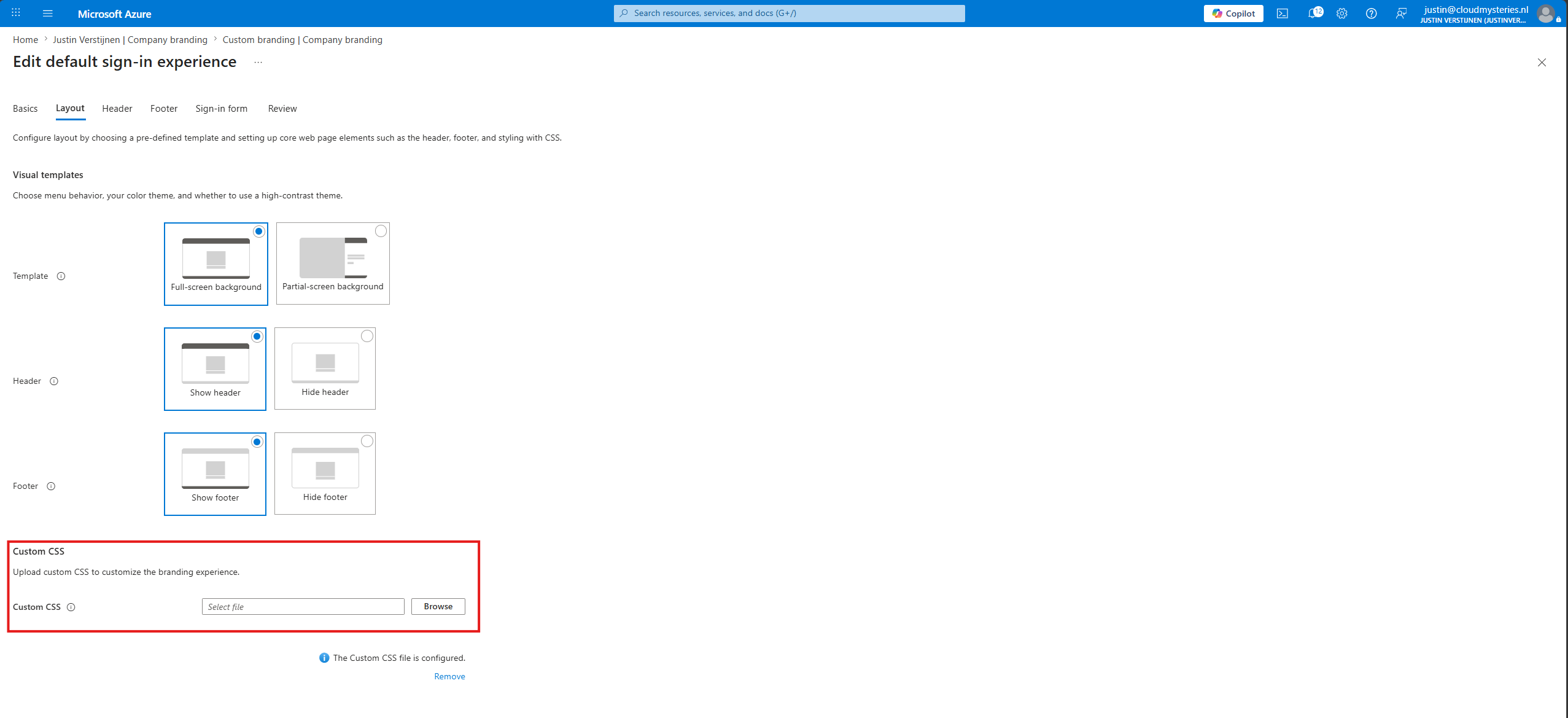
With this option, you can style some options in your sign-in pages to your own likings, enabling you to virtually use any CSS control available. In this guide I will show you how I have leveraged this option to change the sign-in pages to my own style. After some hours of trying different options, my sign-in page looks like this:
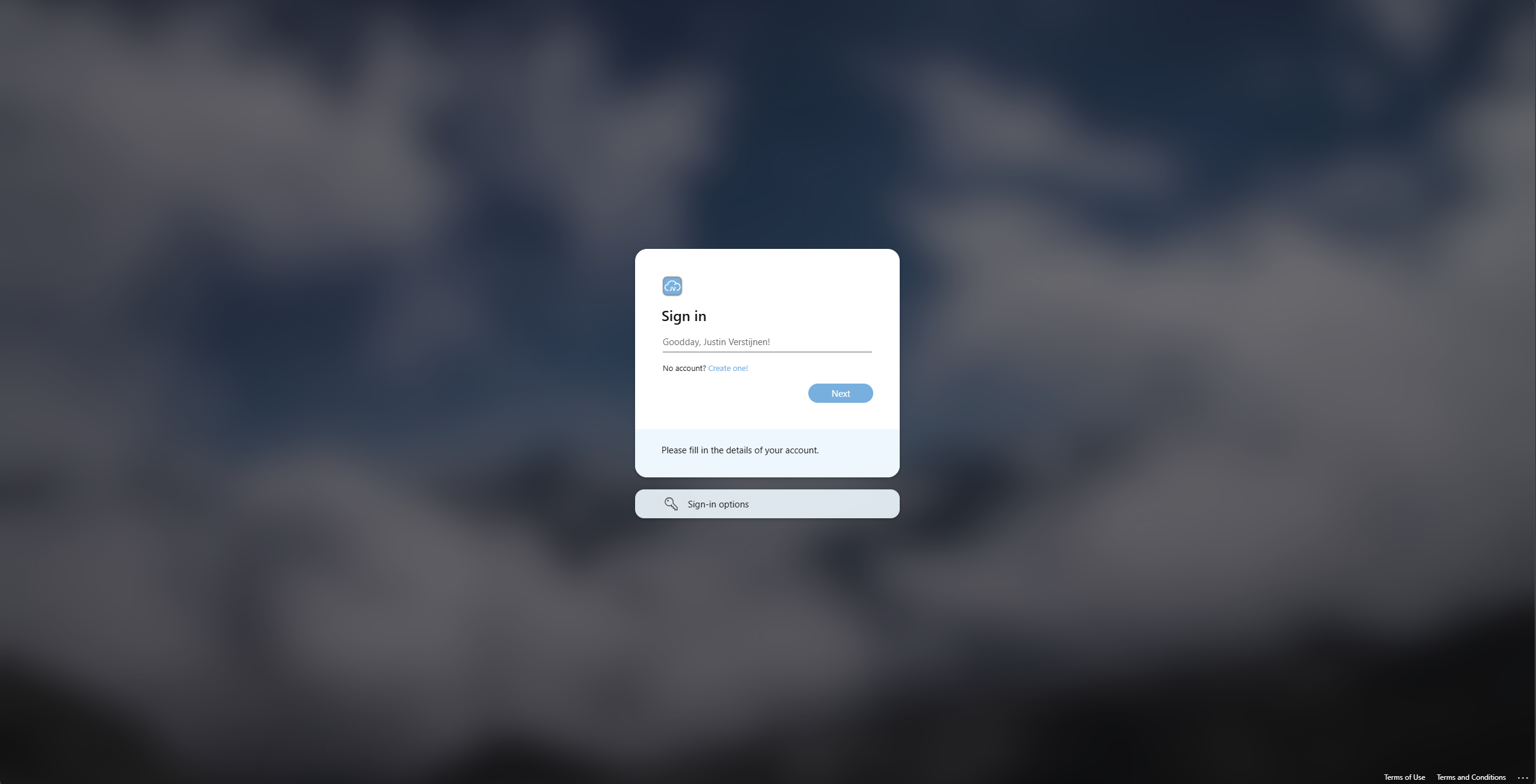
What has been changed in this sign-in prompt opposing the original:
- Custom color for links
- Custom color for buttons
- Custom color for the “Sign-in page text” block
- Custom color for the “Sign-in options” block
- Rounded Sign-in block
- Rounded buttons
Let’s take a look at how I achieved this step-by-step. However, I need you to understand that this guide dives into the custom CSS section only. The normal tenant branding options are pretty straight forward.
Requirements
The requirements of following this guide are:
- An Entra ID tenant created before January 5 2026 (tenants created after that date doesnt have this option available)
- Some knowledge about HTML and CSS
- Around 20 minutes of your time
Step 1: Defining the Custom CSS code
Let’s start by defining your CSS template. I have made an somewhat simpler template than the version of Microsoft, but the Microsoft version shows what elements can be customized. However, even that comprehensive list is very limited unfortunately so I picked out the most noticable options.
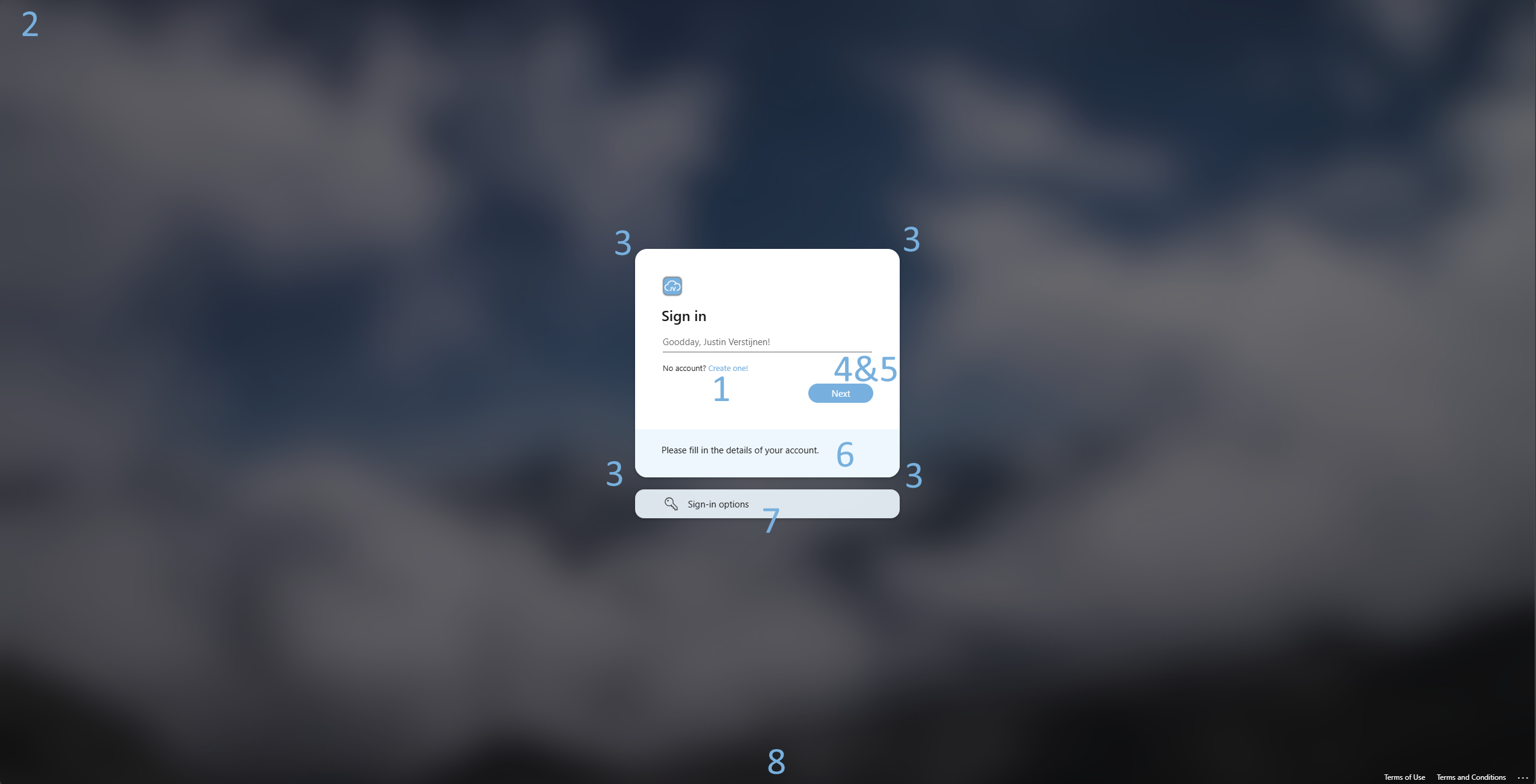
This is my full CSS file, where I have commented and so numbered the sections to show what options/classes define what on the page:
CSS
/* 1. Link colors */
a,
a:link
{
    color: #77B0DE;
}

a:hover
{
    color: #77B0DE;
}

a:focus
{
    color: #77B0DE;
}

a:focus:hover
{
    color: #77B0DE;
}

/* 2. Hiding top logo */
.ext-header-logo
{
    display: none;
}

/* 3. Rounded corners for sign-in box */
.ext-sign-in-box
{
    border-radius: 20px;
}

/* 4. Custom button color and rounded corners */
.ext-button.ext-primary
{
    color: #fff;
    border-color: #77B0DE;
    background-color: #77B0DE;
    display: block;
    width: 100%;
    border-radius: 999px;
}

.ext-button.ext-secondary
{
    color: #fff;
    border-color: #77B0DE;
    background-color: #77B0DE;
    display: block;
    width: 100%;
    border-radius: 999px;
}

/* 5. Custom button color when hovering */
.ext-button.ext-primary:hover
{
    border-color: #6fa4cf;
    background-color: #6fa4cf;
}

.ext-button.ext-secondary:hover
{
    border-color: #6fa4cf;
    background-color: #6fa4cf;
}

/* 6. Custom text background color */
.ext-boilerplate-text
{
    background-color: #ecf6fde8;
}

/* 7. Sign-in options color and rounded corners */
.ext-promoted-fed-cred-box
{
    border-radius: 15px;
    background-color: #ecf6fde8;
}

/* 8. Transparent footer background */
.ext-footer
{
    background: transparent;
}

.ext-footer.ext-has-background
{
    background: transparent;
}
Copy this full CSS contents and paste it into your favorite CSS editor. My pick is Visual Studio Code, as it has built-in error correction and color pickers. Now I will show you what setting changes what:
| CSS section | CSS classes definitions | Extra information |
|---|---|---|
| 1. Link colors | a a:link a:hover a:focus a:focus:hover | These settings define the color of the clickable links on the full website. |
| 2. Hiding top logo | .ext-header-logo | This setting hides the logo on the top-left corner. |
| 3. Rounded corners for sign-in box | .ext-sign-in-box | This setting makes the corners of the Sign-in box rounded. |
| 4. Custom button color and rounded corners | .ext-button.ext-primary | These settings changes the color of the buttons. |
| 5. Custom button color when hovering | .ext-button.ext-primary:hover | These settings changes the color of the buttons while hovering. |
| 6. Custom text background color | .ext-boilerplate-text | This setting changes the background of the custom sign-in text block. |
| 7. Sign-in options color and rounded corners | .ext-promoted-fed-cred-box | These settings changes the Sign-in options block, altering the corners and the background color. |
| 8. Transparent footer background | .ext-footer .ext-footer.ext-has-background | These settings remove the colored bar at the bottom of the page. |
To visualize this on the sign-in page:
Step 2: Changing the custom CSS
Now that we know what settings can be changed and what changes certain styles on the sign-in page, let’s customize the custom CSS to your likings. Copy/paste the CSS code from Step 1 if not already done and determine what colors you want to use.
Info
Tip: use my HTML Color Picker tool if needing inspiration for colors.
Now I have opened the custom CSS file into Visual Studio Code. Now determine your main color, secondary and slightly darker color and a lighter color and replace these into the existing color fields. You can use the CTRL + H option, find and replace.
- Main color: #77b0de
- Secondary (darker) color: #6fa4cf
- Tertiary (lighter) color: #ecf6fde8

The border-radius values defines the rounded corners. You could also change that, but thats up to you.
Save the file to a CSS file and let’s head to Entra ID.
Step 3: Uploading the CSS file into Entra ID
Now that we have defines our CSS file, let’s upload this new file. Open up Entra ID (https://entra.microsoft.com)
Then on the left, select “Custom branding”
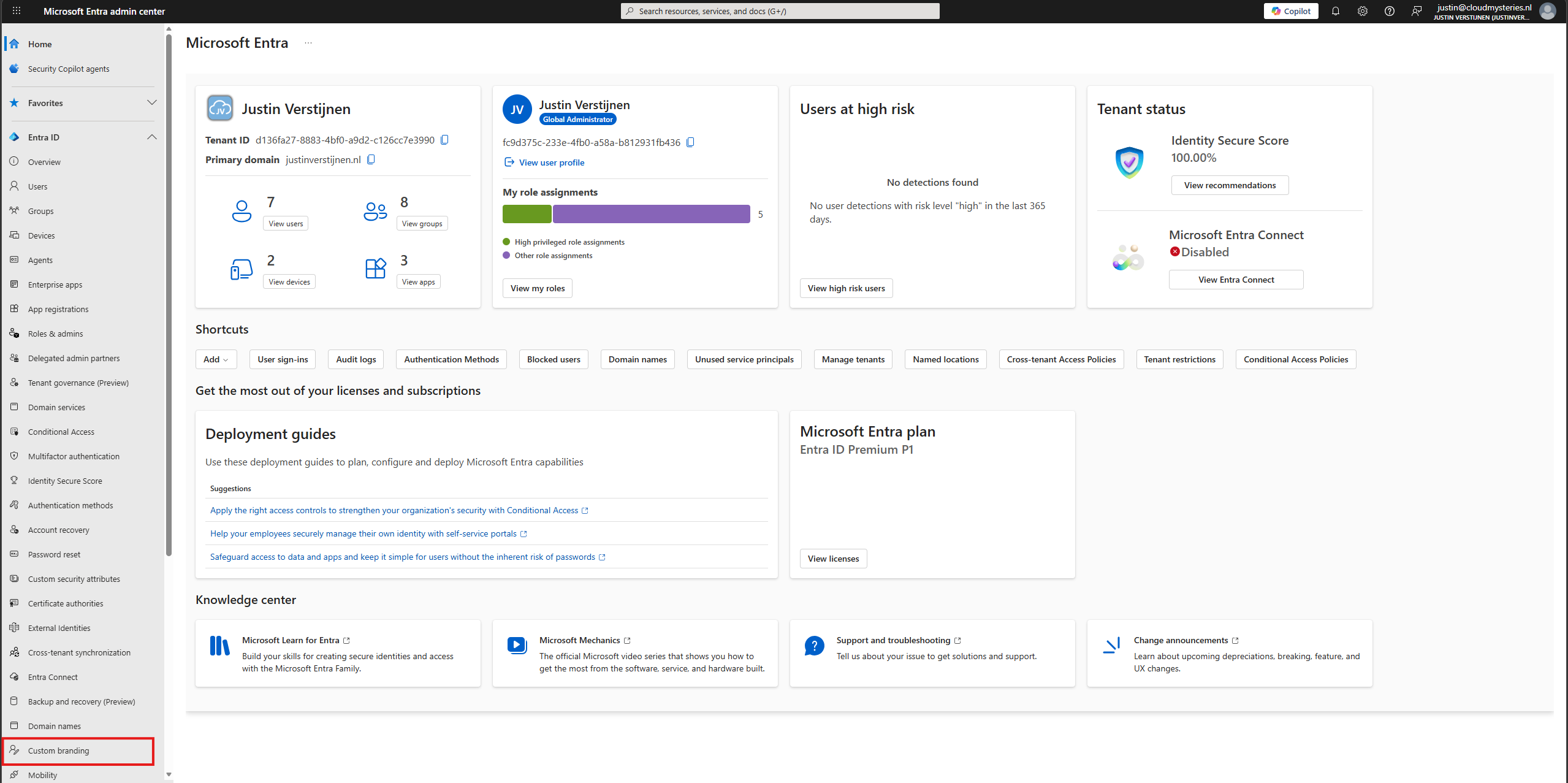
On the tab “Default sign-in”, edit your branding configuration by clicking “Edit”.
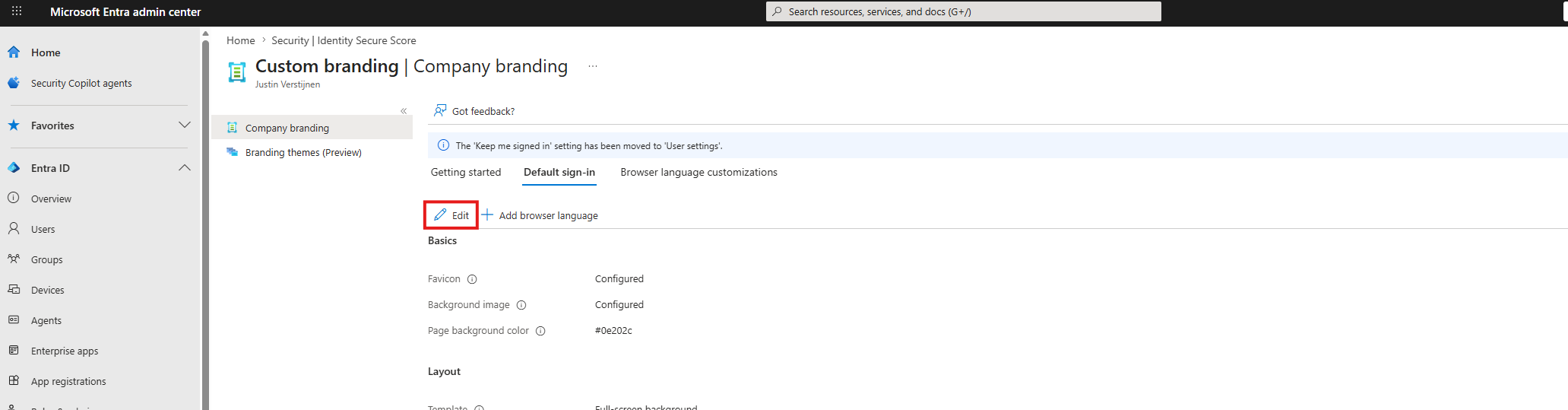
Click on the “Layout” tab and scroll down to the Custom CSS option.
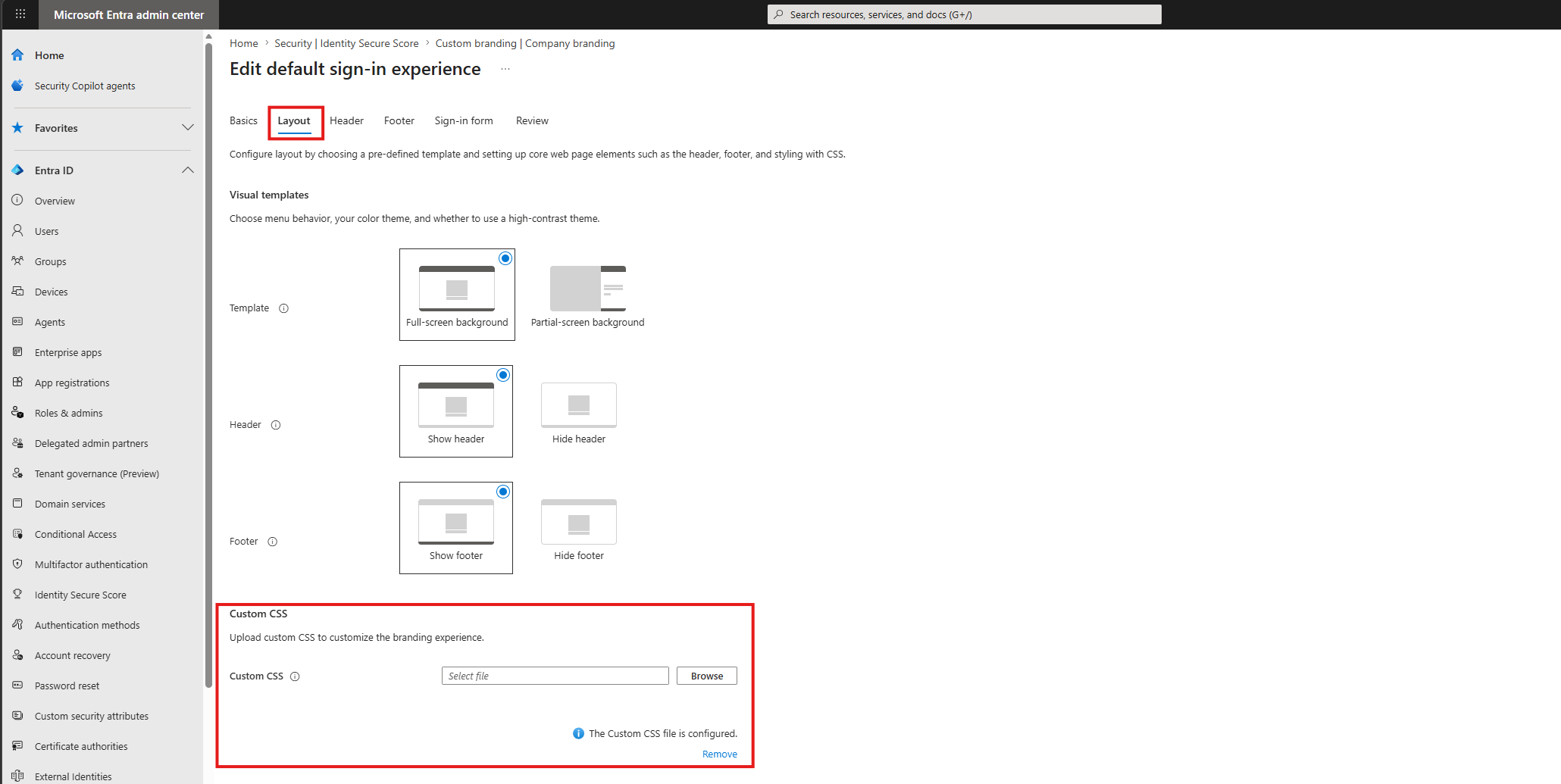
Click browse and select your just created CSS file. Then save the settings and let the system apply the changes.
Step 4: Let’s review the results
Now that we have applied our customized CSS, we can check the changes by opening a sign-in prompt of our tenant. The fastest way I know is to open up this link:
outlook.com/justinverstijnen.nlChange the domain-name after the “/” to your own primary domain name (like example.com). This automatically redirects to your tenants-login page immediately showing your company branding.
This should show the new branding within a few minutes.
Troubleshooting and customizing
Some things that could help you troubleshooting and possibly further customizing the sign-in experience:
- CSS are heavily cached, so you can expect different outcomes directly after changes, also across multiple devices
- Not every CSS control is correctly picked up as Microsoft does not support all options
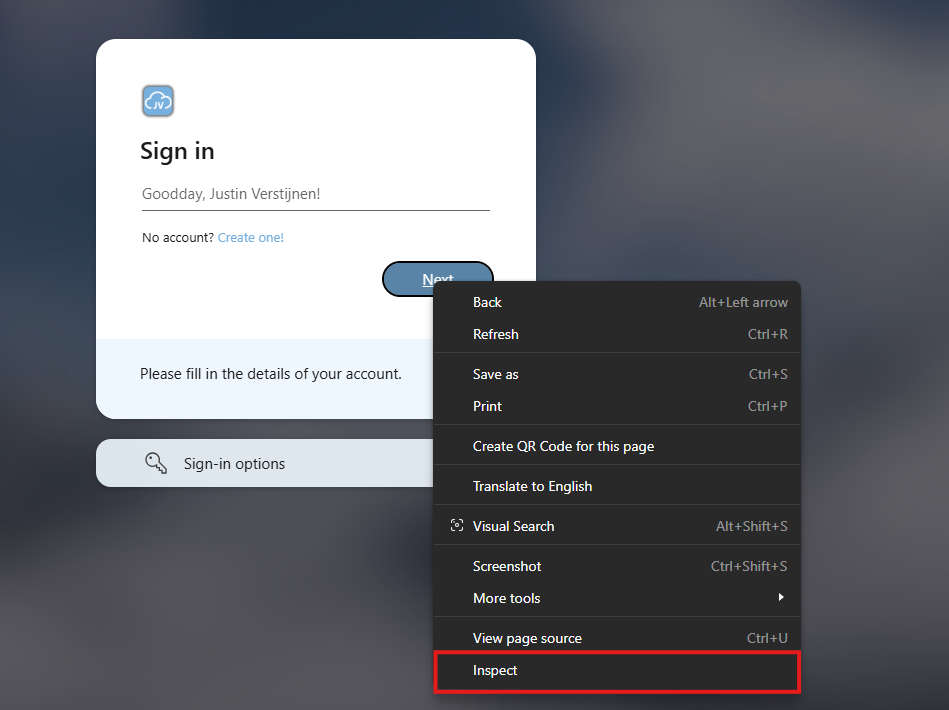
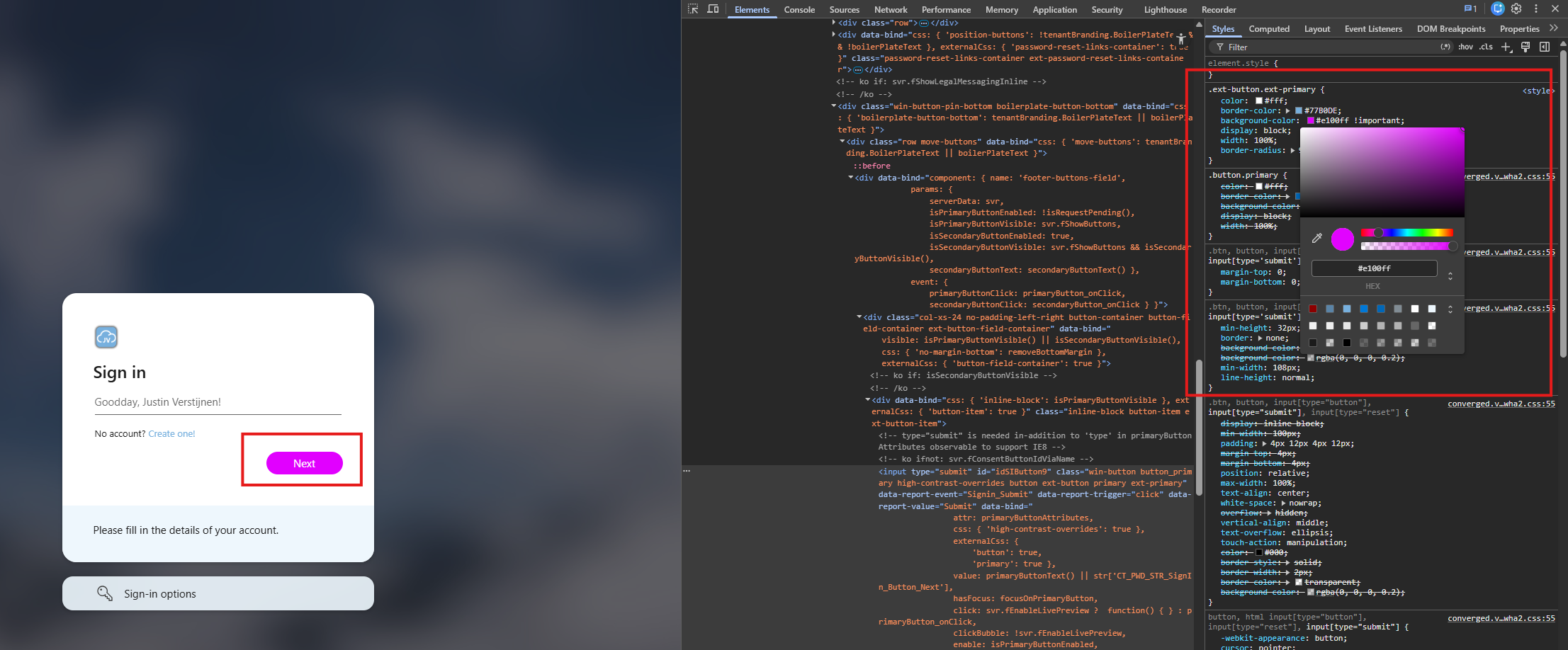
- If you want to live test some changes, you can use the “Devtools” of your browser. On Chrome and Edge browsers, this works like this:
Right-click the element (for example: the button) you want to customize and click on “Inspect”.
This opens up the Devtools where you can review the front-end code which makes up this page. The browser automatically shows the CSS on the right, exactly as we defined in our file:
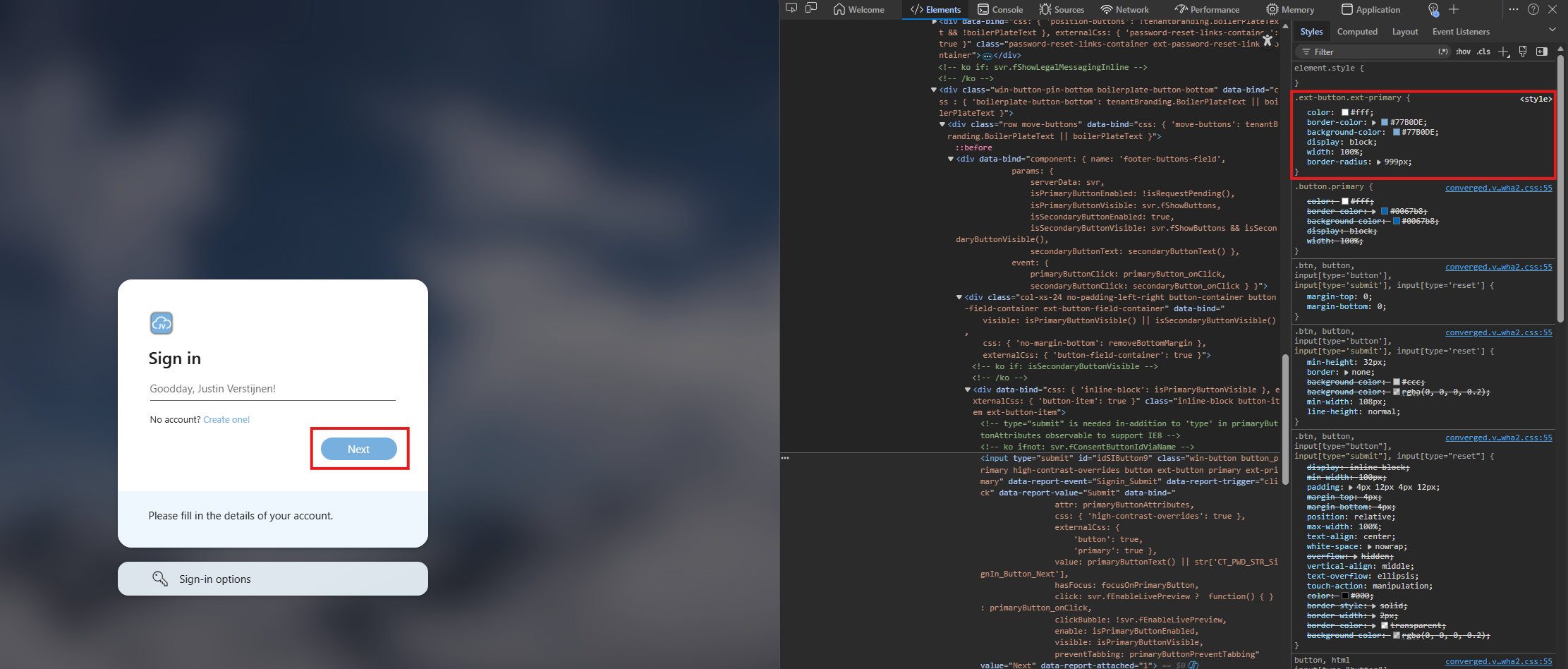
Now you can click the background-color option, but we cannot select a color yet. As we are using a color override, we need to add “!important” after the color code:
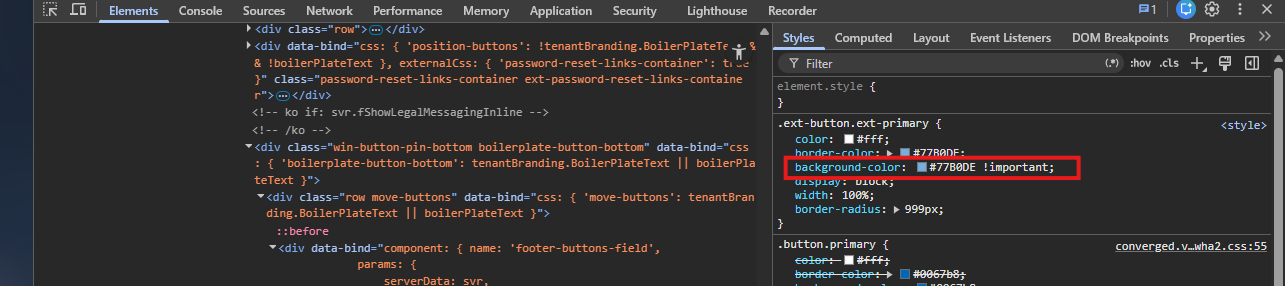
Now you can click the color-block before the HTML color code and live select the right color. If you have the right color, copy the value and paste that in the CSS file according to step 2.
Summary
This guide described how we can change some advanced appearance settings in Entra ID sign-in prompts. I really like to customize such things into the branding of an organization and end-users like that too.
Thank you for visiting this page and I hope it was helpful!
Sources 📖
These sources helped me by writing and research for this post;
End of the page 🎉
You have reached the end of the page. You can navigate through other blog posts as well, share this post on X, LinkedIn and Reddit or return to the blog posts collection page. Thank you for visiting this post.
Support the blog

Welcome to justinverstijnen.nl v2
Welcome to justinverstijnen.nl v2
Welcome to my completely renewed website. The past month I’ve been busy rebuilding my old Wordpress website to a completely new website based on GitHub Pages. I wanted to enhance this website on the following areas:
- Light/Dark mode
- Better experience on mobile devices
- Uniform pages and posts
- Scalable and future-proof solution
Why this new update?
My old website was great, but with Wordpress and some specific requirements I had, it became obsolete to me. I couldn’t find a great skin other than I already had for the complete lifecycle of it which I still really like. It required me to have around 300 lines of extra CSS to get the website to my likings but still had an inconsistent experience across multiple devices. Also I needed around 28 plugins to make everything work, making it a mess sometimes.
Flight blog
I also wanted to separate my technical career blog from my flight blog, which is also renewed. You can find this here if interested: flightblog.justinverstijnen.nl
On my flight blog, I write about achieving my Private Pilot License (PPL) and the flying lessons themselves which I really find fun to do.
CompTIA Security+ Course notes
This page contains my (unfinished) CompTIA Security+ notes.
Introduction to the study course
For this study I’ll follow the official book called: CompTIA Security+ Complete Study Guide. The book contains 6 different subjects with some categorizations.
The Exam Security+
The objectives are:
- Assess the security posture of an enterprise environment and recommend and implement appropriate security solutions.
- Monitor and secure hybrid environments, including cloud, mobile, Internet of Things (IoT), and operational technology.
- Operate with an awareness of applicable regulations and policies, including principles of governance, risk, and compliance.
- Identify, analyze, and respond to security events and incidents
The scoring is:
1.0: General Security Concepts (12%) 2.0: Threats, Vulnerabilities, and Mitigations (22%) 3.0: Security Architecture (18%) 4.0: Security Operations (28%) 5.0: Security Program Management and Oversight (20%)
Module 1: Introduction
Module 1 is all about the exam, how to use the study resources and how to learn. Nothing too interesting to note here. All is in the part above, about the exam.
Module 2: General Security Concepts
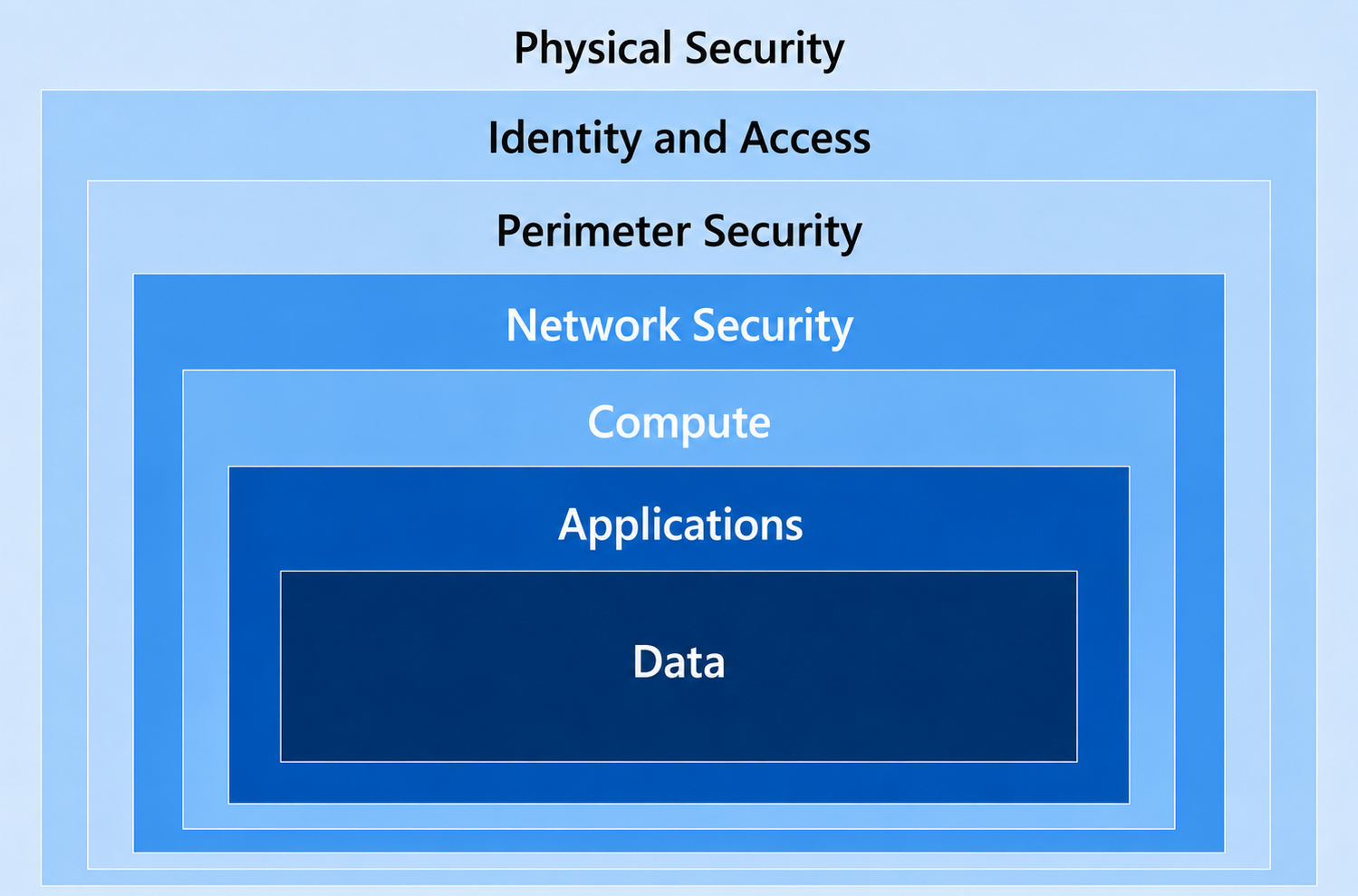
Security can be very complex, because it is not a license we can buy, or something that we can switch on or off. Security is a team-sport where the primary goal is to secure your company-data, secrets devices and personal information and this data is as secure as the weakest switch in the loop. This loop is a very big scope and can be categorized in 7 layers, where the order is important because it is almost similar to the generic OSI model.
| Layer | Explaination |
|---|---|
| 1. Physical security | Access to the physical systems must be secured so no unpermitted users can physically touch these devices. |
| 2. Network security | The network and data flow of your company must be secure. Most attacks come through a network. This not only means that the architecture is enough, the network also needs to be monitored and have advanced treat detection with certain software. |
| 3. Perimeter security | Gateways, firewalls and routers which can connect to your internal network has to be secure by configuring them, allowing only specified traffic, protocols, ports and proactively monitored. |
| 4. Endpoint security | The endpoints which users work on has to be secured. These are mostly mobile devices which can easily be stolen or have unwanted software installed. Most users want the permissions to install software which has to be proactively monitored. |
| 5. Application security | Applications which run on servers has to be secured. Not only the application, also the server it runs on. Remember, the weakest switch. |
| 6. Data security | The data stored and in transit on your network has to be secured. For data at-rest we can use encryption and integrity scanning and for data in-transit we can use encrypted transmission with SSL. |
| 7. User education | End users work with the data, applications and endpoints. They have to constantly be up to date with the latest type of attacks and must have a caring mentality. What you don’t want is users that don’t care and do anything a attacker states in an email for example. |
To bump up your security posture to around 99% which is logically the maximum percentage, we need to implement security over all these domains. Security is inhertiable most of the time. This means that compromise on a particular layer means also access to underlying layers. Let’s say, a hacker has breached a server. On that server runs a database, and on the database the (sensitive) data.
2.1.1 Security Controls
To improve your security on certain domains, we implement security controls. These are technical settings for limitations or giving an user only access to what they need.
The controls that are available are:
| Control | Focus | Real world examples |
|---|---|---|
| Technical | Technology | Firewall Intrusion Detection Bitlocker MFA Basic Access Controls Time based access Anti Malware |
| Managerial | Governance | Best practices Compliance against security guidelines Risk assessments |
| Operational | Procedures | Backup procedures Incident Response Security Awareness Trainings Sharing sensitive information secure |
| Physical | Physical access | Security camera’s Physical access to rooms Person-based access Visitor logging |
Security is all about preventing, deterrenting, detecting, correcting and compensating.
2.2.1 Confidentiality, Integrity and Availability (CIA)
Tthe CIA triad are 3 principles of information security:
- Confidentiality : Ensure only wanted in dividuals have access to specific data or resources
- Integrity : Ensure the accuracy and trustworthiness of data. Ensure it is not tampered and when so, you have integrity scanning with notifications
- Availability : Ensure resources are accessible to users when needed
These three principles align with the “Verify explicitly” pillar of the Zero trust model, where we want to verify the integrity and only give the right users access at the right time. This CIA triad is also known as:
- Keep it confidential
- Keep it real
- Keep it accessible
2.2.2 Non-repudiation
Non-repudiation is a process which ensures that a specific operation is done by the supposed party. For example that data is sent without tampering. Digital signatures and authentication helps in this process.
2.2.3 Authentication, Authorization and Accounting
The 3 A’s are:
- Authentication: This process proves you are who you say
- Authorization: This process determines your permissions, and allows you to perform certain actions
- Accounting/Auditing: This process logs and tracks changes done with your permissions
These 3 processes exist in almost every computer-system and are super important to understand, because some things and best practices need to be done at certain levels. For example:
| Authentication | Authorization | Accounting |
|---|---|---|
| Ensure users are authenticated with strong credentials | Ensure users don’t have too much permissions, only what they need | Ensure all login and change actions are audited |
| Ensure users are authenticated with a strong second factor (MFA/Passkeys) | Ensure users don’t have permissions at all times | Ensure changes done by users are monitored and double checked |
| Ensure your users are hard to breach with tranings | Ensure users’ permissions are assigned through RBAC processes | |
| Ensure users always use their own identity |
To remember and better understand these 3 A’s, consider the airport analogy: Authentication is showing your ID, Authorization is what your boarding pass allows, and Accounting is tracking your travel.
2.2.4 Gap analysis
In a Gap analysis, you analyze your environment against where you want to be. In this term, you analyze the gap between reality and your dream. This ensures you can define the steps needed to achieve the state where you dream of.
2.2.5 Zero Trust
In the Zero Trust model, you do exactly what is stated. We don’t trust anything. Great that a device is in our building and our network, but is it safe? Probably not.
For more information about the Zero Trust model where I completely wrote down the model and principles: https://justinverstijnen.nl/the-zero-trust-model/
2.2.6 Physical Security
Physical Security is the most important layer of security and determines security in terms of objects you can touch. We can utilize a million dollar solution with least privileged and time-based access for safe data storage. But what if the whole company has physical access to it?
Security is as bad as the weakest switch in the loop, and physical security can be this weakest switch very fast. For a better physical security, we can utilize:
- Locks on sensitive rooms
- Concrete and metal posts around sensitive objects like server rooms and vehicles
- Double doors for accessing a room where sensitive information resides like your (in house) datacenter
- Video surveillance
- Security guards
- Access badges (those help with all 3 the A’s from 2.2.3)
2.2.7 Deceptions and disruptions
In a network we can set-up some devices and user accounts which goal is only to reside and give alerts when an active attack targets them. They are mostly called honeypots and honeytokens. Attackers who scan a environment will search for anything which can carry “the gold” and will target those.
We as Defenders can configure direct alerts on those honeypots and honeytokens we can know that an attack awaits and can stop it before it targets real sensitive systems and data.
2.3 Change Management and processes
In each organization there are processes and changes for various tasks. Employees come and go, customers or partners come and go, and in those processes we want to be as secure as possible don’t we?
Important in processes is that they are described and visually available and clear for all stakeholders. They have to be reviewed in a case of an error or flaw and a process owner must be assigned. If a process was good or bad doesn’t matter. Review always and think of possible changes with security in mind.
2.4 Cryptographic Solutions
In the current digital age, we have to secure not only our processes. We have to secure our data, communications and business operations. A great way to enhance this security is to use cryptographic solutions.
2.4.1 Public Key Infrastructure
A Public Key Infrastructure is a process where data is encrypted using a public key and a private key. A typical use case of this of encryption is in SSL certificates.
It works like this:

- The sender encrypts the data using a public key
- Invisibly, a private key is generated. This is the “password” to de-encryption
- The data is encrypted and sent to the recipient
- The data is de-encrypted by matching the public and private key
- If these don’t match, de-encryption is not possible
- The recipient can view the data after a succesful match
2.4.2 Encryption
Encryption is a process where plain and human readable text is converted to unreadable text, making data unreadable with unpermitted access. This data can only be read if the text is de-encrypted. The reverse-process of encrypting.
Encryption comes in various strengths; 128-bit, 256-bit or even 4096-bits describing how many “bits” or 0’s and 1’s in computer language are used to encrypt the data. A higher number of bits typically mean a stronger encryption and so less chance of de-encryption and so unpermitted access to your data.
You can apply encryption to different levels of a system:
- Full disk encryption: The whole machine is encrypted
- Partition: Only a sensitive part of your disk is encrypted
- Volume: Only a sensitive volume is encrypted
- Database: only a database containing sensitive information is encrypted
- Table/record: only a specific part of the database is encrypted
- File: only one or some specific files are encrypted
Encryption can help protect against unpermitted individuals accessing and stealing your data, but also for insiders or even malware which want to steal your data.
2.4.3 Asymmetric vs. Symmetric encryption
There are two types of encryption methods;
- Asymmetric uses a matching pair of keys, so the key is different on both ends
- Symmetric uses the same key, so this key is the same on both ends
Typically, the Asymmetric option is more secure.
2.4.4 Tools and Hardware
Some types of encryption and storage of keys need to be done on certain hardware:
- Trusted Platform Module (TPM): Used to save Bitlocker de-encryption keys and Windows Hello for Business keys in a PC, laptop or server.
- Hardware Security Module (HSM): Used to save generic secrets, certificates and keys and facilitate secure access like Azure Key Vault.
2.4.5 Steganography and data masking
Sometimes, data will be masked for certain use cases. This can be done with multiple methods.
- Masking: Data is replaced with dots, much like when you fill in your Password.
- Hashing: Data is replaced with an has of the data. This is a reversible process.
- Salting: Data has random characters added before hashing.
2.4.6 Digital signatures
A digital signature is generated everytime a file or document is created or saved. THis can be used to verify the integrity of it. If an threat, attacker or insider makes a change to the file, the digital signature will be different.
It is a great way of scanning fire integrity and detecting threats early.
Summary Module 2
Module 2 is mostly about typical security domains, techniques and concepts. Those are very important to understand and needed to safeguard your data and those of your organization.
Module 3: Threats, Vulnerabilities and Mitigations
Module 3 is all about the different threat actors in the world of cybersecurity and their motivations. Why do they perform attacks and why do they attack organizations like yours. Also you learn why even the highest level of protection may not be enough.
3.1.1 Threat Actors
Threat actors are indiviuals or criminal parties that are responsible for cyberincidents that impact a organizations’ security. The actions they do are mostly to access unauthorized data, steal data, create backdoors or execute malicious actions like the installation of Ransomware where they can earn money of an organization paying a ransom to get their files back.
Threat actors can be classified into:
- Nation-state actors
- Unskilled attackers
- Hacktivists
- Insider Threats
- Organized Crime
- Ethical
- Shadow IT
| Type of Actor | Primary motivation | Real world example |
|---|---|---|
| Nation-state actor | Government and national interests, may be diplomatic | Russian interference in the 2016 U.S. elections |
| Unskilled attackers | Mostly hacking for fun, using predefined code | DDoS attacks or defacement of small websites |
| Hacktivists | Performing cyber-attacks for social or political agenda’s | Right wing person bringing down a left-wing political party’s website or environmental person bringing down the website of Shell or KLM. |
| Insider Threats | Mostly revenge, financial gain or ideology | Edward Snowden leaking NSA information A person in a company that steals data from the inside |
| Organized Crime | Financial gain and credential harvesting | Fake-invoices, phishing attacks or ransomware Stealing creditcard information Stealing a companies data (from competitiors) |
| Ethical | A white or grey hat hacker that finds vulnerabilities for fun or helping an organization without causing damage | Banks use an expert to test their systems on vulnerabilities Governments using experts to test their systems to enhance them |
| Shadow IT | Conveninience and productivity | A part of an organization using their own software Administrator access to install their own software Anything a person in an organization does that falls outside of IT policies |
3.1.2 Attributes of Actors
Apart of the terms above, we can assign some additional attributes to threat actors that further clarifies a attack:
- Internal or External
- Unskilled or Funded
- Capability (Script kiddie or sophisiticated)
3.2 Threat Vectors and Attack Surfaces
It is good to understand on what channels an organization does communicate. No channel is 100% secure but we can do some things to make each channel safer.
All channels used must comply with an company policy because they are configured to be as secure as possible. We don’t want to have a fully secured Microsoft Teams and email environment and an employee that receives a threat through his WhatsApp. Sounds stupid, but are scenario’s that happen in an organization.
In this module we discuss various threat vectors and surfaces of attack where we as IT guys can further secure and minimize the chance of data stealing.
{% alert color=“info” %}
The threat vector is known as the channel where an threat is coming through.
{% /alert %}
3.2.1 Message-based and files
The most important attack vectors are the message-based channels. These channels are:
- SMS
- Instant Messaging (WhatsApp/Telegram and such)
- Social Media (public and direct messages)
All these channels need the same level of security because they work in the same manner. It’s easy for an end user to click on the links and perform a certain action. That is exactly what the attacker wants to achieve.
Links can lead to malicious websites or fake payment requests and files can also be mailious or contain malicious code. Files can be manipulated to run malware when opening. Even with an PDF, image or Word file.
3.2.2 Image-based
Images can also contain malware or malicious code. They can also be used to hide information. You can do this easily with the use of an hex editor to hide secret messages in the picture itself.
Make sure you use antivitus software that can detect those actions and make use of file integrity scanning.
3.2.3 Unsupported Systems and Applications
In an organization, it is wise to document what systems your company plans on using. For example, if your company policy states it only uses Windows devices because that configuration is done in a good manner, ban MacOS devices. They do not comply with your company policy and so are unsafe.
This also applies to software, cloud apps and other hardware. Undocumented systems and applications doesn’t have your complete attention and are potentially unsafe.
3.2.4 Open Service Ports
Open ports are an really big security risk and must be closed as soon as possible. These ports are scanned by attackers with tool slike NMAP over the full internet to check for organizations and persons that did not do their configurations right.
The most sensitive ports are:
- Port 22 (SSH)
- Port 1433 (SQL Server)
- Port 3306 (MySQL)
- Port 3389 (Windows Remote Desktop)
Close ports as soon and as much as possible and only allow certain IP addresses to access those ports in your firewall. Perform monthly access reviews on those and decommision old IP addresses if not used.
3.2.5 Default Credentials
Change default usernames and passwords to something different that default. Default credentials can be found on the internet within 20 seconds. This applies to ALL of your devices;
- Laptops
- Computers
- Access Points
- Routers
- Firewalls
- Printers
- Printservers
- Meeting schedule screens
- IoT Coffee machine
Ensure you use unique and strong passwords and save them in your password manager.
3.2.6 External vectors
An attack doesn’t always target on you as organization. It can come through a external party as well, like;
- Managed Service Providers (MSP)
- Vendors
- Suppliers
3.2.7 Social Engineering and humans
Social engineering targets humans and triggers them one way or another to perform a wanted action for the attacker. This can be a whole lot of different things:
- Pay a fake invoice
- Login with credentials and MFA
- Login to device code Entra ID flow
- Open a file
Humans are the weakest link in the whole chain of events. Make sure you work with aware-humans and educate them regularly. Also perform scheduled phishing tests but don’t make them too obvious.
3.3 Types of Vulnerabilities
In cybersecurity, attackers often make use of vulnerabilities in systems and exploit them to perform a certain action. Vulnerabilities can mostly be exploited when using older software and software that is missing updates.
3.3.1 Importance of Understanding Vulnerabilities
Understanding the different types of vulnerabilities is crucial for identifying weaknesses in your system, which allows you to implement appropriate safeguards. Doing so proactively is key to preventing security breaches.
Regularly engage in vulnerability assessments and penetration testing to keep up-to-date with potential weaknesses in your systems. Also make sure you use tools to automatically detect new CVE’s when they are released to fix them even faster.
3.3.2 Application-based Vulnerabilities
Application-based Vulnerabilities are flaws or weaknesses in software. This can be buffer overflows, SQL injection and insecure storage of data.
Always keep your software updated to address as much vulnerabilities as possible.
3.3.3 OS based Vulnerabilities
Operating Systems like Windows, Linux, or macOS can have vulnerabilities such as privilege escalation or insecure file permissions. Maintain OS patches and updates to ensure that known
vulnerabilities are mitigated. Make sure those OS’s are updated as much as possible.
3.3.4 Web-based Vulnerabilities
These vulnerabilities are prevalent in web applications and services. Examples include Cross-Site Scripting (XSS), Cross-Site Request Forgery (CSRF), and insecure API endpoints. Utilize tools like OWASP ZAP or Burp Suite to regularly scan for web vulnerabilities.
3.3.5 Hardware Vulnerabilities
Even physical components can have vulnerabilities. The Meltdown and Spectre vulnerabilities in CPUs are prime examples. Make sure to apply firmware and BIOS updates as soon as they become available.
3.3.6 Virtualization Vulnerabilities
Virtualization software can also be susceptible. Issues might include weak isolation between virtual machines or insecure data transfer between them. Isolate different workloads and ensure secure
configurations for your hypervisor.
3.3.7 Cloud-specific Vulnerabilities
Cloud services may have configuration issues like improperly set permissions or unprotected data storage buckets. Use Cloud Security Posture Management (CSPM) tools to continuously monitor cloud
configurations.
3.3.8 Supply Chain Vulnerabilities
These vulnerabilities can arise from third-party vendors or software. The SolarWinds hack is an example. Conduct due diligence on all third-party services and software you integrate into your system.
3.3.9 Cryptographic Vulnerabilities
Weak encryption algorithms or poor key management can lead to cryptographic vulnerabilities. Always use industry-standard cryptographic algorithms and proper key management systems.
3.3.10 Misconfigurations
Even the best systems can be vulnerable if improperly configured, such as leaving debugging mode enabled in production. Conduct regular audits of your system configurations against best-practice
checklists.
3.3.11 Mobile Device Vulnerabilities
With the proliferation of smartphones, vulnerabilities like insecure data storage or communication are increasingly common. Use Mobile Device Management (MDM) software to manage and secure corporate
devices.
Also, keep business data and apps away from personal owned devices and personal owned data from business owned devices.
3.4 Analyzing Indicators of Malicious Activity
Indicators (IoC) are pieces of information used to detect malicious activity. These indicators can be much and a great advice is to use SIEM systems like Sentinel or Splunk where all of these indicators are sent to and co-related.
These information can be a broad variety like:
- IP address changes
- URLs
- Unusual file changes
- Unauthorized data transfers
- Surveillance camera footage
3.4.1 Importance of Early detection
The more early malicious activity is detected, the more effectively they can be remidiated. How faster they can be detected, the less potential damage it can do.
3.4.2 Malware Attacks
Malware attacks involve software or scripts that are designed to infiltrate or damage a computer system. Indicators may include unusual CPU, RAM or Disk usage, new files appearing, encrypted files appearing or registery changes.
Always make use of antivirus software and file integrity scanning, how important the system may be. Attackers often breach sensitive systems via non-sensitive systems.
3.4.3 Physical Attacks
Physical attacks involve unathorized access to the hardware of your organization. Indicators of these cloud be the surveillance camera footage and unfamilliar people around sensitive systems.
Audit access to physical systems and make sure they are reviewed regularly.
3.4.4 Network Attacks
Network attacks involve DDoS attacks used to interrupt a service. Also we have Man in the Middle attacks where an adversary tries to intercept network traffic to alter or capture them. Here passwords and other sensitive information can be stolen.
3.4.5 Application Attacks
Application attacks include attacks to specific software. Here attacks like SQL injection or Cross Site Scripting are done. Indicators of these can be failed login attempts or unexplained database changes.
3.4.6 Cryptographic Attacks
In attacks targeting encryption, watch for indicators such as the unexpected appearance of plain-text versions of encrypted files or failed decryption events.
3.4.7 Password Attacks
In these attacks, multiple failed login attempts or account lockouts can serve as indicators. Techniques are password spray attacks and brute-force attacks.
3.4.8 Indicators
Common indicators across different attack vectors include:
● Unusual account activity
● Unexpected data flows
● Altered configurations
● New or unexpected software installation
3.5 Mitigation Techniques
Mitigations refer to actions taken to reduce the severity or impact of threats and vulnerabilities. These actions might involve procedural, technical, or management-based controls, and aim to lower the risk to
an acceptable level.
3.5.1 Why mitigations are neccessary
A system most likely works, and it does what it’s intended to do. But is it also safe? Does it complys with several best practices and is a possible data breach impossible? These are good questions.
Mitigations are essential because threats and vulnerabilities are constantly evolving. Without them, organizations can be easily rendered unsafe because they do not evolve as fast as the attackers.
3.5.2 Segmentation
Segmentation involves dividing a network into smaller parts to isolate different types of traffic and make it harder for attackers to move laterally within the network. For example, you can separate
accounting and R&D into different subnets.
3.5.3 Access Control and Least privilege
Access control ensures that only authorized users have access to specific resources. Implementing roles and permissions is key. For instance, not everyone should have admin access to a database.
Basic access controls may be the most important factor of security. Always allow an user only what it needs to do. This for roles, groups and even file and folder permissions.
3.5.4 Application Allow list
Creating an application allow list involves specifying which applications are permitted to run on a system. This helps to prevent unapproved applications, including malware, from executing.
3.5.5 Isolation
Isolating systems or processes means separating them from others to minimize the risk of unauthorized access or lateral movement. For instance, deploying a DMZ/Perimeter network to isolate publicly accessible servers from the internal network. This to prevent a machine-level lateral movement attack from a publically available server.
3.5.6 Patching
Patching is the process of applying updates to software to fix security vulnerabilities. Timely patching can save a network from malicious attacks like WannaCry.
3.5.7 Encryption
Encryption protects the confidentiality of data by converting it into an unreadable format unless decrypted. Use it for sensitive data in transit and at rest.
3.5.8 Monitoring and Incident response
Constantly monitoring systems helps in early detection of anomalies or threats. Various tools and systems can be used for this, including SIEM solutions.
Also an organization has to define how to act on several various incidents. This is achieved with an incident response plan. Such plan contains the steps to remediate a compromised user, device or system and what to monitor in the hours after the incident and remediation.
3.5.9 Configuration Enforcement
Automated tools can enforce specific configurations across multiple systems, ensuring uniformity and compliance with security policies.
3.5.10 Decommissioning
Properly decommissioning hardware and software ensures that they do not pose a lingering security risk. This involves securely erasing data and revoking access but also physically damaging the disks before disposal.
Module 4: Security Architecture
This module goes into the ifferent cybersecurity incidents which we can resolve before they even happen. Which can be achieved by having a good architecture of your network, data and other pillars.
When we talk about architectures, we’re discussing the foundational design and organization of IT systems. This design influences how data flows, how users interact with applications, and how system components communicate with one another. The architecture chosen can significantly impact the system’s security posture:
- A tightly controlled centralized system may offer better control
over data but might present a single point of failure.
- A decentralized system might provide redundancy and failover
options but introduces challenges in data consistency and
synchronization.
4.1.1 Cloud
The cloud has changed the way we look at IT infrastructure. Physical access is no longer possible, and thus organizations aren’t bound by those restrictions. Employees are able to work from any location and sometimes from every device. This sounds like new challenges what they really are.
- Responsibility Matrix: In cloud environments, a shared responsibility model is often in place. This means that while the cloud provider is responsible for the security of the cloud (physical infrastructure, data centers, etc.), the customer is responsible for security in the cloud (data, applications, OS). This clear delineation ensures that both parties understand their roles and responsibilities.
- Hybrid Considerations: A hybrid cloud model merges the best of private and public clouds. While it offers flexibility, it also introduces complexity, especially when trying to maintain consistent security policies across both environments.
- Third-party Vendors: Cloud services often integrate with third-party vendors. Each integration can be a potential vulnerability, so it’s essential to ensure these third-party solutions follow robust security standards.
4.1.2 Infrastructure as Code (IaC)
Infrastructure as Code is a new way of managing your infrastructure, which is new by leveraging cloud services. This involves rolling out your infrastructure with code and performing this script to build it. Also we can do changes to the existing resources in the cloud and it’s possible to make use of Pipelines. With pipelines in IaC we can automate things, such as automatically perform the changes after releasing new code.
IaC is a new revolution in managing our infrastructure.
4.1.3 Serverless
Serverless is a term in cloud services that means literally: “No server layer”. This means we can run a application without managing the OS of it seperately. These services are mostly PaaS, and a customer can focus completely on the service itself where the cloud provider will take care of the operating system, network and hardware.
4.1.4 Microservices
An application can be devided into smaller independent components which can scale independently. We call this microservices.
An example of Microservices are containers/Kubernetes.
4.1.5 Network Infrastructure
You can build your network to reduce the chance of breach and several attacks from the in and outside. You can utilize techniques like:
- Physical Segmentation: Use different and infrastructure cables for sensitive networks
- Logical Segmentation: Use VLANs and different subnets with their own ACL
4.1.6 On-premises
Most organizations use on-premises infrastructure which is great, but must be secured in a particular way. When not secured properly, this can introduce huge security flaws. Organizations which utilize on-premises services must have certified personnel and proper maintenance.
4.1.7 Centralized vs Decentralized
Most systems helps you to centralize management and make life easier, while this of course introduces attack vectors. Decentralized systems means more control points.
4.1.8 Containerization
Containers such as Docker can package applications and dependencies. This ensures more consistency and decrease vulnerabilities.
4.1.9 Virtualization
It’s the creation of virtual versions of physical resources. Whether it’s a server or a network switch, virtualization allows for better resource utilization and agility. Security-wise, hypervisors and virtual machines need to be appropriately secured to prevent breaches. A breach of the hypervisor often means a breach to the virtual machines too.
4.1.10 High Availability
Most systems needs to be up 100% of the time, while this is not possible. Availability means extra attack vectors. Shutting down systems when not being used can help reducing cyber attacks.
4.1.11 Considerations
There are several architectural considerations when designing systems and applications, such as:
- Availability: How crucial is the system to be 24/7 available? What does 1 hour of outage cost and what costs 1 year of high availability?
- Resilience: How well can the system recover from failures or cyber attacks?
- Costs: More security means more costs, planning and maintenance
- Responsiveness: Systems need to be responsive as more responsiveness means better user experience
- Scalability: How well can the application scale in terms of usage growth
- Risk transfer: Is it possible to spread some risks by transferring some parts to 3rd parties
- Power and Compute needs: What are the needs to keep a system running in terms of power costs and compute costs.
Module 5: Security Operations
Module 6: Security Program Management and Oversight
Summary and thoughts
However I did not finished the course yet but I will in the future, I think it was a really great theoretical approach to security where no layer is being missed out.
End of the page 🎉
You have reached the end of the page. You can navigate through other blog posts as well, share this post on X, LinkedIn and Reddit or return to the blog posts collection page. Thank you for visiting this post.
Support the blog
Azure Key Vault
Azure Key Vault is a type of vault used to store sensitive technical information, such as: Certificates, Secrets and Keys.
Azure Key Vault is a type of vault used to store sensitive technical information, such as:
- Certificates
- Secrets
- Keys
What sets Azure Key Vault apart from a traditional password manager is that it allows software to integrate with the vault. Instead of hardcoding a secret, the software can retrieve it from the vault. Additionally, it is possible to rotate a secret every month, enabling the application to use a different secret each month.
Practical use cases include:
- Storing BitLocker encryption keys for virtual machines
- Storing Azure Disk Encryption keys
- Storing the secret of an Entra ID app registration
- Storing API keys
How does Azure Key Vault work?
The sensitive information can be retrieved via a unique URL for each entry. This URL is then used in the application code, and the secret is only released if sufficient permissions are granted.
To retrieve information from a Key Vault, a Managed Identity is used. This is considered a best practice since it is linked to a resource.
Access to Azure Key Vault can be managed in two ways:
- Access Policies
- Provides access to a specific category but not individual entries.
- RBAC (Recommended Option)
- Allows access to be granted at the entry level.
A Managed Identity can also be used in languages like PHP. In this case, you first request an access token, which then provides access to the information in the vault.
There is also a Premium option, which ensures that Keys in a Key Vault are stored on a hardware security module (HSM). This allows the use of a higher level of encryption keys and meets certain compliance standards that require this level of security.
End of the page 🎉
You have reached the end of the page. You can navigate through other blog posts as well, share this post on X, LinkedIn and Reddit or return to the blog posts collection page. Thank you for visiting this post.
Support the blog
The MITRE ATTACK Framework
How does the MITRE ATTACK framework work? Let’s find out in this guide.
The MITRE ATTACK (ATT&CK) Framework is a framework which describes all stages and methods cyberattacks attacks are launched on companies in the last 15 years. The main purpose of the framework is to help Red and Blue security teams to harden their systems and to provide a library of known attacks to help mitigate them.
MITRE is the organization who is in charge of this community-driven framework and is a non-profit organization. ATT&CK stands for:
- Adversary -> Our opponents
- Tactics
- Techniques
- Common Knowledge
The framework itself can help organizations help to secure their environment really good, but keep in mind that the framework is built based on known attacks and techniques. It doesn’t cover new techniques where an organization can be vulnerable to.
The framework itself
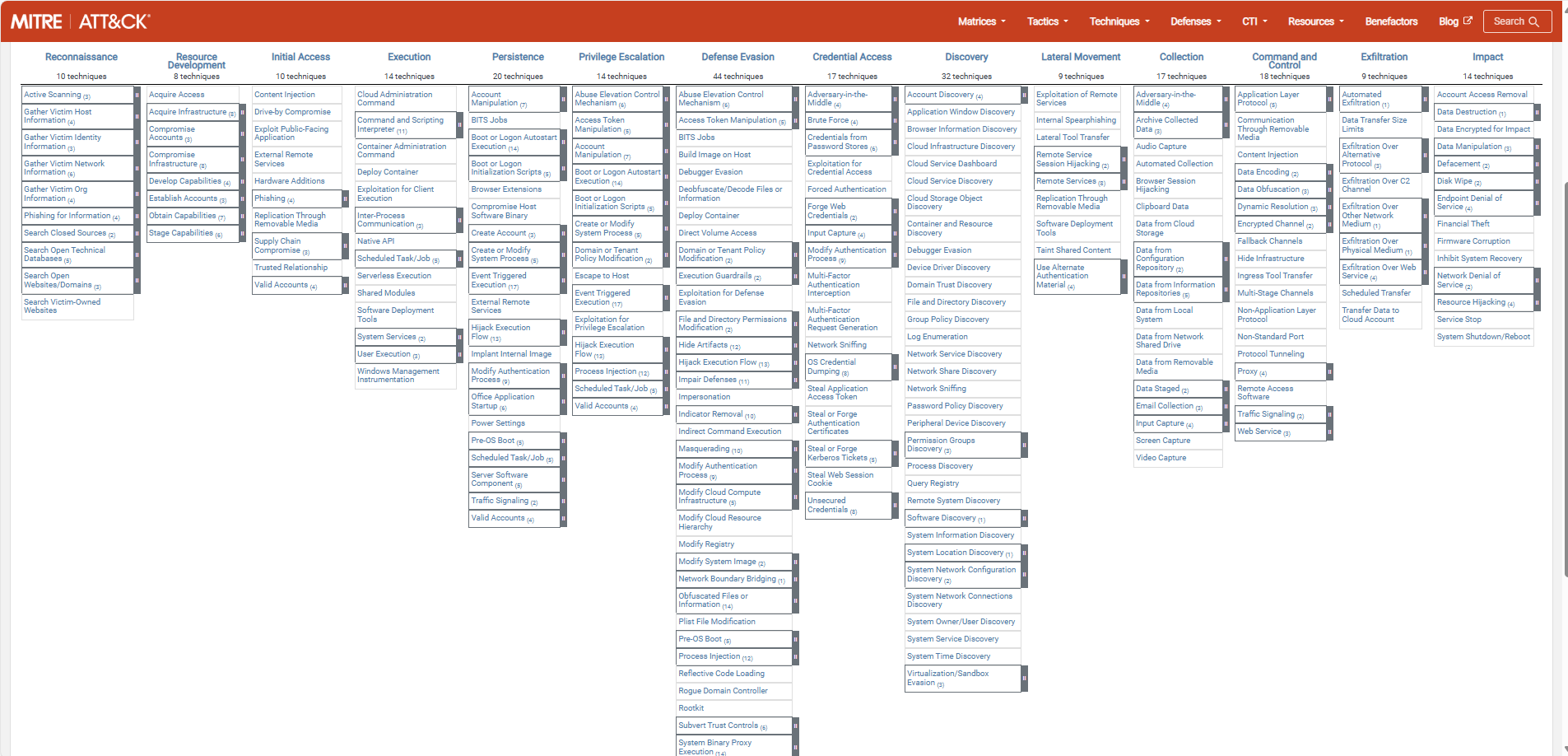
The framework can be found on this website: MITRE ATT&CK®
The stages of a cyberattack
Each cybersecurity attack follows multiple or all stages below. Also, I added a summary of that the stage contains:
| Stage | Primary goal |
|---|---|
| Reconnaissance | Gathering information prior to the attack |
| Resource Development | Aquiring the components to perform the attack |
| Initial Access | Initial attempts to get access, the attack starts |
| Execution | Custom-made code (if applicable) will be executed by the adversary |
| Persistence | The attacker wants to keep access to the systems by creating backdoors |
| Privilege Escalation | The attacker tries to get more permissions than he already has |
| Defense Evasion | The attacker wants to avoid detection for a “louder bang” |
| Credential Access | Stealing account names and passwords |
| Discovery | Performing a discovery of the network |
| Lateral Movement | Aquire access to critical systems |
| Collection | Collecting data which often is sensitive/PII* data |
| Command and Control | The attacker has full control over the systems and can install malware |
| Exfiltration | The attacker copies the collected data out of the victims network to his own storage |
| Impact | The attacker destroys your systems and data |
*PII: Personal Identifible Information, like birth names and citizen service numbers
The attack stages are described very consise, but the full explaination can be found on the official website.
Summary
The MITRE ATT&CK framework is a very great framework to get a clear understanding about what techniques and tactices an attacker may use. This is can be a huge improvement by securing your systems by thinking like a attacker.
The best part about the framework are the mitigation steps where you can implement changes to prevent attacks that already happend with a big impact.
End of the page 🎉
You have reached the end of the page. You can navigate through other blog posts as well, share this post on X, LinkedIn and Reddit or return to the blog posts collection page. Thank you for visiting this post.
Support the blog
The Zero Trust-model
The Zero Trust model is a widely approved approach to secure an IT environment. What is it and what does it stand for? You read it in this guide.
The Zero Trust model is a security model to enhance your security posture by using 3 basic principles, and segmenting aspects of your IT environment into pillars.
The 3 primary principles are:
- Verify Explicitly
- Least privileged access
- Assume Breach
At first, those terms seem very unclear to me. To further clarify the principles, I have added some practice examples to further understand what they mean:
| Principle | Outcomes |
|---|---|
| Verify Explicity | Ensure people are really who they say they are Audit every login attempt from specific users Audit login attempts Block access from non-approved countries |
| Least privileged access | Assign users only the permissions they need, not more Assign only the roles when they need them using PIM Use custom roles when default roles expose too much permissions |
| Assume breach | At every level, think about possible breaches Segment your network Password-based authentication only is too weak |
The model is the best illustrated like this:
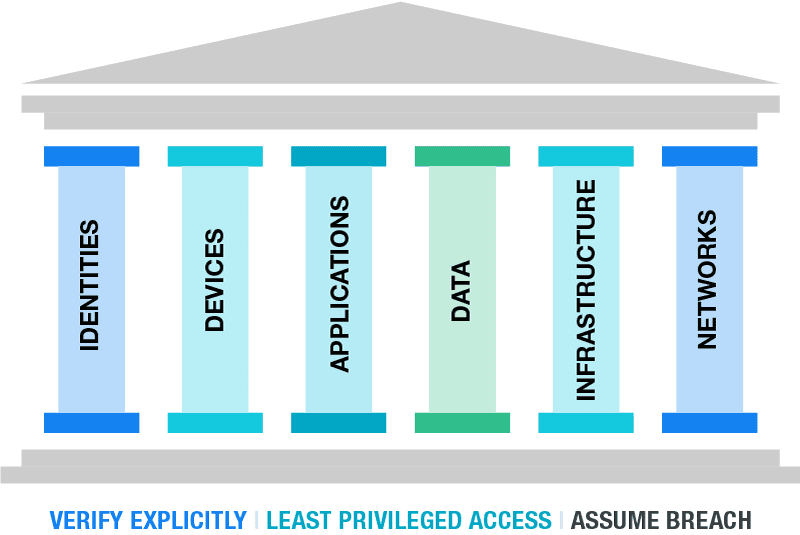
Your security posture can be seen as a building. The principles are the foundation, and all aspects in a organization are the pillars.
The fun fact in this model is, that if the foundation and/or one of the pillars are not secured enough, your security posture collapses like a unstable building.
A fun example of this can be a 5 million dollar cybersecurity budget, but users are not using strong authentication to logon and are getting compromised.
Zero Trust vs Traditional approaches
The last 20 years, the network was the primairy pillar. If a malicious user or device doesn’t have access to your network, no breach is possible.
The last 5 years, especially now in the post-COVID19 period, more people tend to work remotely. Also are companies shifting to cloud applications and infrastructure. This makes the pillar of Identity now the primary pillar, because this is the way users connecto to their infrastructure, applications and data. Breaching one of the pillar can give access to all.
The stupid part is, the Identity pillar is the pillar where the most people come along. People make mistakes and that is exactly where attackers are searching for. The path of the least resistance.
How to ramp up Zero Trust
Changes to your infrastructure, especially when talking about Security can take up very much of your time and can get complex very fast. Most companies will disregard the changes and go on, when still using unsecured systems until a great company-devastating breach.
To roll out the most critical Zero trust principles in a short timely manner, you can use the RaMP plan which is a Rapid Modernization plan. This gives you a kickstart, but leaves the more complex and time-consuming changes for the near-future.
To further expand your Zero Trust vision and security posture, a great resource is to use the following 2 references by Microsoft:
Azure Cybersecurity Benchmark: https://learn.microsoft.com/en-us/security/benchmark/azure/overview-v3
- This contains monthly updated benchmark points which you can lay against your organizations operations. These are all best practices from a security standpoint to secure the environment on all aspects and pillars
Azure Cybersecurity Reference Architectures: https://github.com/MicrosoftDocs/security/blob/main/Downloads/mcra-december-2023.pptx?raw=true
- To get some inspiration about how to build your cybersecurity architecture
End of the page 🎉
You have reached the end of the page. You can navigate through other blog posts as well, share this post on X, LinkedIn and Reddit or return to the blog posts collection page. Thank you for visiting this post.
Support the blog
Solved: August 2024 updates breaks GPO Item level targeting - user in group
Also impacted by the update where you can’t select users to filter your Group Policies (GPO)? Read this guide for a temporary solution.
If you are managing Windows Servers, Group Policies are a great way to distribute settings to your endpoints. However, a recent update of August 2024 in Windows Server 2022 and 2019 breaks user filtering in Group Policy (GPO) Item Level Targeting
The problem itself
When applying printers, registery settings or drive maps to users, we use Group Policy Item level targeting to filter users so only users with a group membership gets the policy applied.
Since the updates of August 2024 this isn’t working anymore:
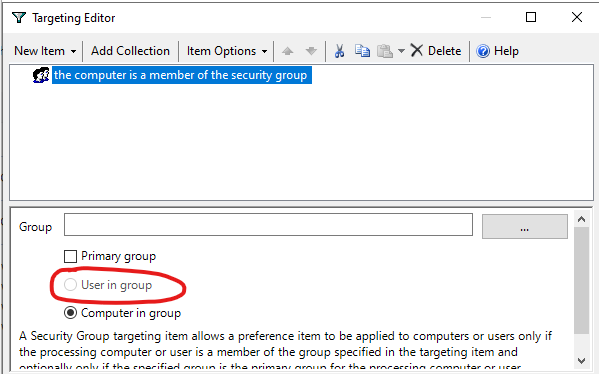
We cannot select “User in group”, only “computer in group”. This applies only to new and existing policies. If you already have policies in place with “User in group” selected before the updates, this will still work as expected.
The cause and solution of User GPO break
The cause of this problem are two updates which have to be removed to make it work again:
| Operating System | Update (KB) |
|---|---|
| Windows Server 2019 | KB5042350 |
| Windows Server 2022 | KB5041160 |
This update has to be removed on the server where you manage your Active Directory and/or Group Policies. You can keep the update installed on all other critical servers.
To remove this update, open Control Panel -> Programs and Features (appwiz.cpl)
Click on “View installed updates”
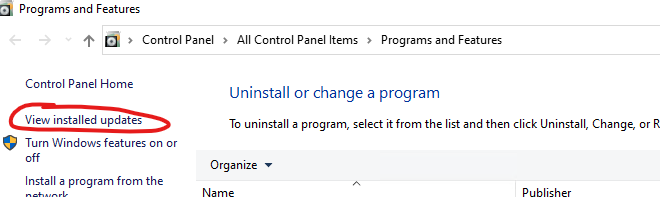
Select the right update for your OS and click “Uninstall”. After uninstalling the update the server has to be restarted. Make sure you perform this action in your maintenance window to decrease impact of this change.
Please note that this is a temporary solution, and not a persistent solution. Microsoft has to fix this in the coming update wave.
You can also check the latest installed updates through PowerShell:
PowerShell
(New-Object -ComObject Microsoft.Update.Session).CreateUpdateSearcher().QueryHistory(0,500) | Where-Object { $_.Operation -eq 1 -and $_.Title -match 'KB\d{6,7}' -and $_.Title -notmatch 'driver' } | Select-Object Date,@{Name='KB';Expression={[regex]::Match($_.Title,'KB\d{6,7}').Value}} | Group-Object KB | ForEach-Object { $_.Group | Sort-Object Date -Descending | Select-Object -First 1 } | Sort-Object Date -Descending | Format-Table -AutoSizeAnd then remove the update with this command:
Bash
wusa.exe /uninstall /kb:69696969My advice
My advice is to leave the update installed. Uninstalling a update can do more than letting it installed. My advice is to only remove the update when you must configure such policies. If all your policies are in place and working and you don’t have to change anything, my advice is to leave the server alone and wait for the next update wave and hope for a solution from Microsoft.
End of the page 🎉
You have reached the end of the page. You can navigate through other blog posts as well, share this post on X, LinkedIn and Reddit or return to the blog posts collection page. Thank you for visiting this post.
Support the blog
Introduction to the Microsoft Cloud Security Benchmark (MCSB)
In the modern era like where we are today, security is a very important aspect of every system you manage where the security is as high as your least secured system.
To have a good overview of how secure your complete IT environment is, Microsoft released the Microsoft Cloud Security Benchmark, which is an collection of high-impact security recommendations you can use to secure your cloud services, even when utilizing a hybrid environment. When using Microsoft Defender for Cloud, this MCSB is included in the recommendations.
Checking domains of the Cloud Security Benchmark
The Microsoft Cloud Security Benchmark checks your overall security and gives you recommendations about the following domains:
- Network security (NS)
- Identity Management (IM)
- Privileged Access (PA)
- Data Protection (DP)
- Asset Management (AM)
- Logging and Threat Detection (LT)
- Incident Response (IR)
- Posture and Vulnerability Management (PV)
- Endpoint Security (ES)
- Backup and Recovery (BR)
- DevOps Security (DS)
- Governance and Strategy (GS)
The recommendations look like the list below:
- AM-1: Track asset inventory and their risks
- AM-2: Use only approved services
- AM-3: Ensure security of asset lifecycle management
- AM-4: Limit access to asset management
- AM-5: Use only approved applications in virtual machine
The tool gives you overall recommendations which have previously compromised environments and are based on best practices to help you to secure you complete IT posture at all aspects. The aim is to secure all your systems, not just one.
For more information about this very interesting benchmark, check out this page: https://learn.microsoft.com/en-us/security/benchmark/azure/introduction
End of the page 🎉
You have reached the end of the page. You can navigate through other blog posts as well, share this post on X, LinkedIn and Reddit or return to the blog posts collection page. Thank you for visiting this post.
Support the blog
Introduction to the Azure Well-Architected Framework
The Azure Well Architected Framework (WAF) is a framework to improve the quality of your Microsoft Azure Deployment. This does it by spanning 5 pillars so an architect can determine with IT decision makers how they can get the most Azure with the planned budget.
The 5 pillars of the Well-Architected Framework are:
| Pillar | Target |
|---|---|
| Reliability | The ability to recover a system and/or contine to work |
| Security | Secure the environment in all spots |
| Cost Optimization | Maximize the value when minimizing the costs |
| Operational Excellence | The processes that keep a system running |
| Performance Efficiency | The ability to adapt to changes |
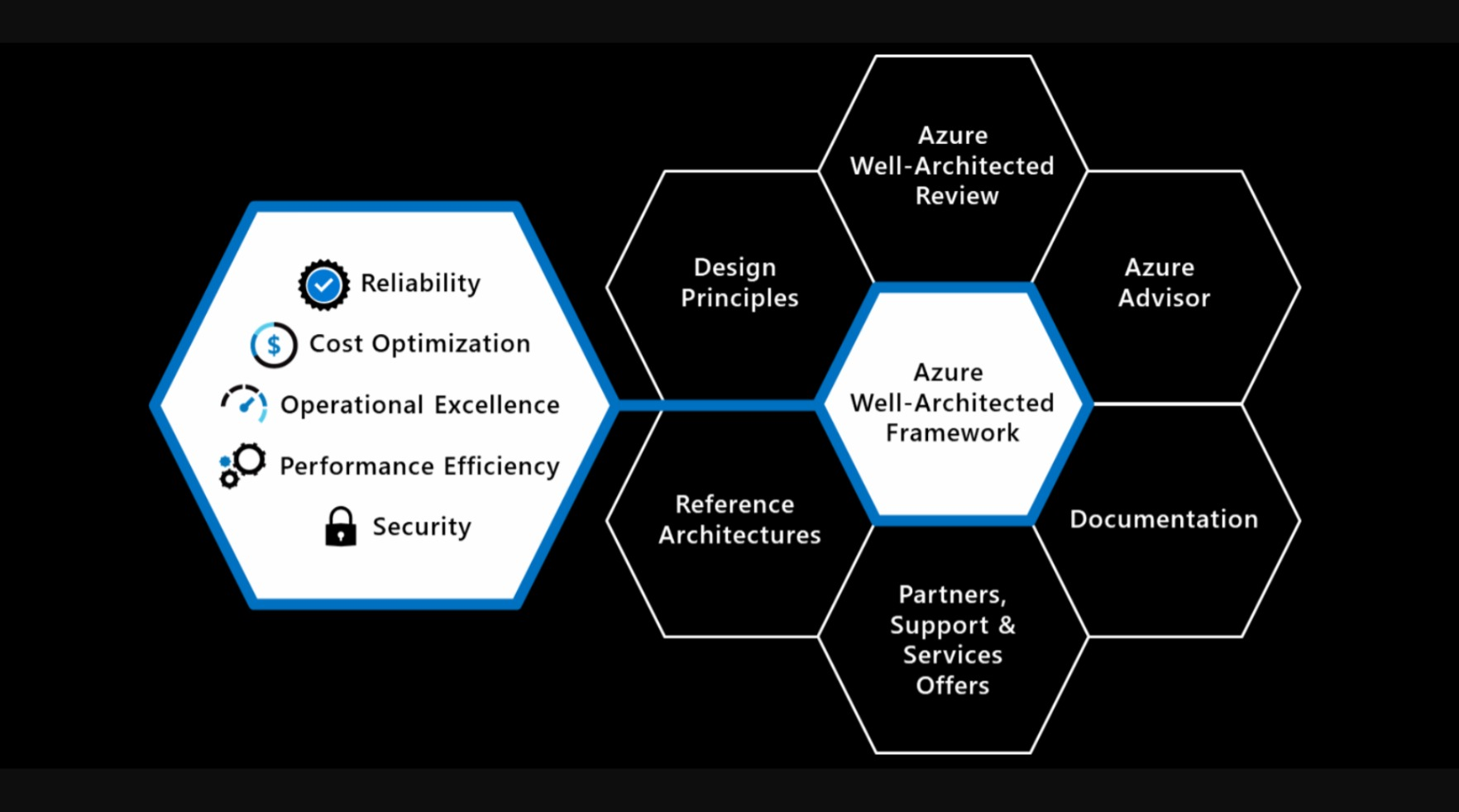
Like it is shown in the image up here is that the Well-Architected Framework is the heart of all Cloud processes. Without this well done, all other processes can fail.
Review your Azure design
Microsoft has a tool available to test your architecting skills ath the following page: https://learn.microsoft.com/en-us/assessments/azure-architecture-review/
With this tool you can link your existing environment/subscription or answer questions about your environment and cloud goal. The tool will give feedback on what to improve and how.
I filled in the tool with some answers and my result was this:
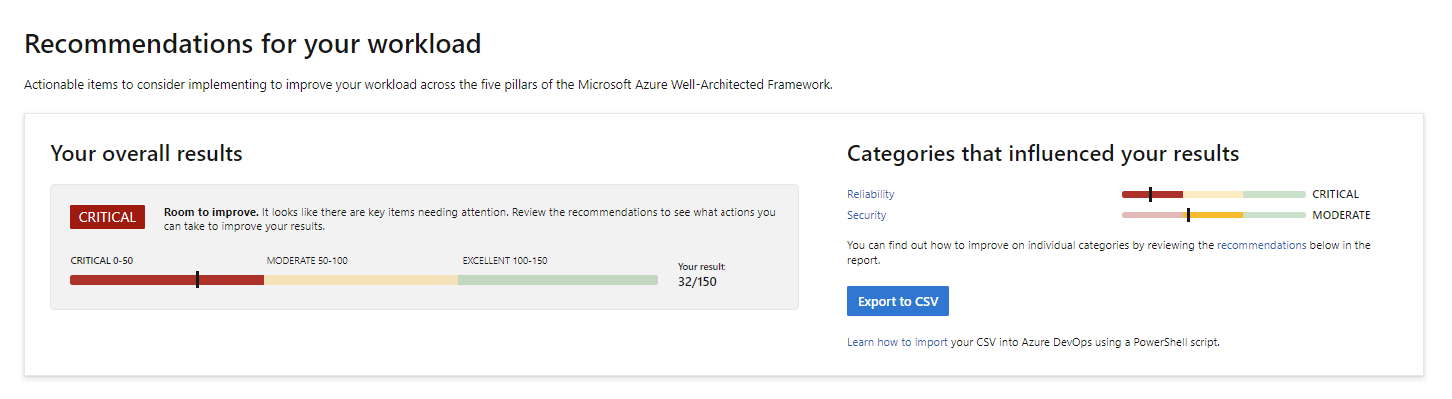
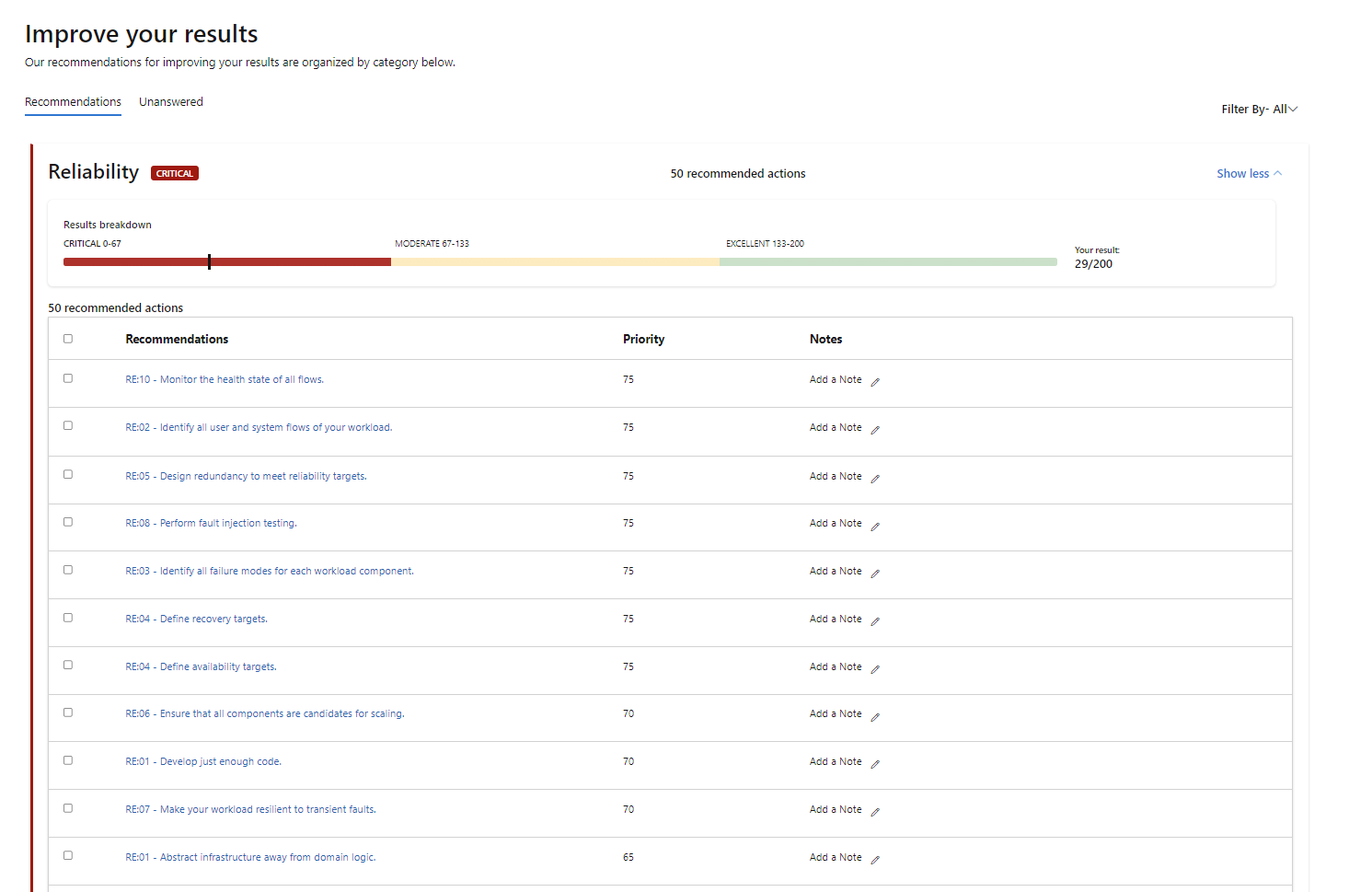
I only filled in the pillars Reliability and Security and filled it in as bad as possible to get as much as advices to improve. This looks like this:
End of the page 🎉
You have reached the end of the page. You can navigate through other blog posts as well, share this post on X, LinkedIn and Reddit or return to the blog posts collection page. Thank you for visiting this post.
Support the blog
Cloud Adoption Framework Introduction (CAF)
More and more organizations are moving to the cloud. In order to do this succesfully, we can use the Cloud Adoption Framework.
More and more organizations are moving to the cloud. In order to do this succesful, we can use the Cloud Adoption Framework which is described by Microsoft.
The framework is a succesful order of processes and guidelines which companys can use to increase the success of adopting the cloud. The framework is described in the diagram below:
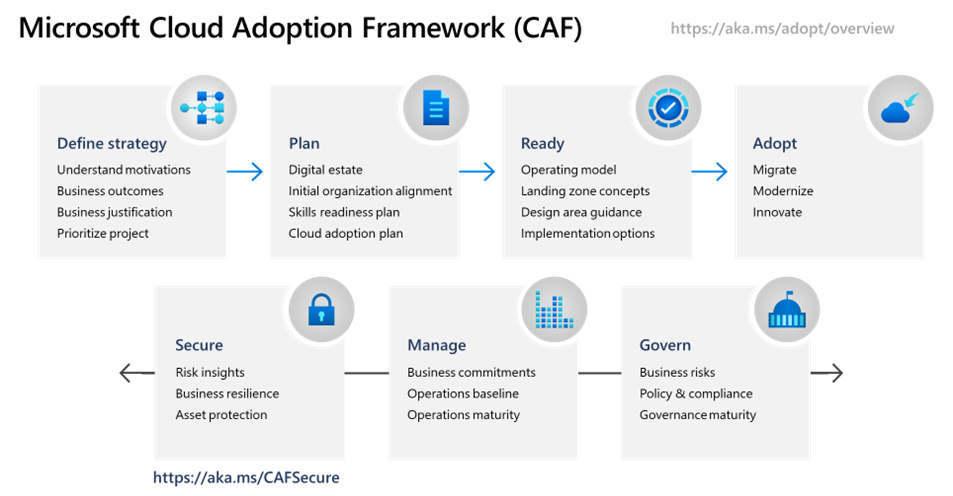
The CAF has the following steps:
- Strategy: Define the project, define what you want to achieve and define the business outcomes.
- Plan: Plan your migration, determine the plans and make sure the environment readiness is at a good level.
- Ready (and migrate): Prepare your new cloud environment for planned changes and migrate your workloads to the cloud.
- Optimize: After migrating to the cloud, optimize your environment by using the beste solutions possible and innovate at this level.
- Secure: Improve the security of your workloads and plan your perodical security checks.
- Manage: Manage operations for cloud and hybrid solutions.
- Govern: Govern your environment and its workloads.
Intention of use
- Increase the chance of your cloud success
- Gives you a best practice of how to perform the migration by proven methodology
- Ensures you don’t miss a crucial step
Intended users/audience
- IT Decision makers
- Company Management Teams
- Companies who want to profit from cloud solutions
- Companies that are planning to migrate to the cloud
- Technicians and project managers for planning the migration
For more information, check out this page: https://learn.microsoft.com/en-us/azure/cloud-adoption-framework/scenarios/
Summary
This framework (CAF) can be very useful if your organization decides to migrate to the cloud. It contains a variety of steps and processes from earlier migrations done by companies and their faults.
End of the page 🎉
You have reached the end of the page. You can navigate through other blog posts as well, share this post on X, LinkedIn and Reddit or return to the blog posts collection page. Thank you for visiting this post.
Support the blog
AI-900 My learning journey
This post contains my notes from back in 2022 of following the AI-900 course on Microsoft Learn, including me testing some of the services and features.
What is AI and what does Azure offer?
AI stands for Artificial Intelligence. It is a term for software that can make predictions, calculations, and estimates. It can act “smart” in a way that looks like human thinking.
Machine Learning (ML) is a type of AI. With ML, the system learns from the input data. More good data often means better results as the service has more data to base its decisions on.
Azure offers AI services across different areas, like:
- learning from data (Machine Learning)
- understanding images (Computer Vision)
- working with text and speech (NLP)
- searching and finding knowledge in large data (Knowledge Mining)
If you want a full study guide, you can start here:
- YouTube study guide: https://www.youtube.com/watch?v=bTkUTkXrqOQ
- PDF syllabus / study guide: https://query.prod.cms.rt.microsoft.com/cms/api/am/binary/RE4wGpB
1: Machine Learning
Machine Learning means that software learns from the data it receives. In many AI solutions, ML is seen as the “foundation”.
A typical goal of machine learning is:
- train a model with data
- then let the model make predictions or make choices
Example 1: Recognize apples
If software sees many apple images, it can learn what an apple looks like.
Then it can also estimate things like:
- “how rotten” an apple looks (for example: a percent)
In a real sorting process, you can use this to filter fruit (for example: mark B-quality) and automate decisions.
Example 2: Recognize a flower If you import many images of the same flower type, the software can recognize that flower across different photos and camera situations.
Azure offers functions to help with building ML solutions, like:
- Automated machine learning: Helps you create a model faster, even if you are not an ML expert.
- Azure Machine Learning designer: A visual (graphical) way to build ML solutions with less code (no-code style).
- Data and compute management: Cloud storage for data, so you can run experiments at larger scale.
- Pipelines: A way to define steps and automate tasks like model training and management.
We use two different outputs of Machine Learning:
- Regression: Predicts a continuous value (a number that can vary smoothly), like:
- sales per day
- quantity to buy
- revenue for a month/year
- Classification: Assigns a category (one of multiple choices), like:
- weather predictions
- a medical diagnosis
Azure Machine Learning Studio
Azure also has a specific tool for ML: https://ml.azure.com
In ML Studio, you create a workspace. A workspace is where you manage your ML setup, including compute options.
Your workspace can use 4 kinds of compute resources:
- Compute Instances: Developer workstations (for working with data and models)
- Compute Clusters: VM clusters for scale and processing when needed
- Inference Clusters: Used for running prediction services (when models are used to predict)
- Attached Compute: Links to existing Azure compute resources (for example VMs or Databricks)
Practice example: Bike rental predictions
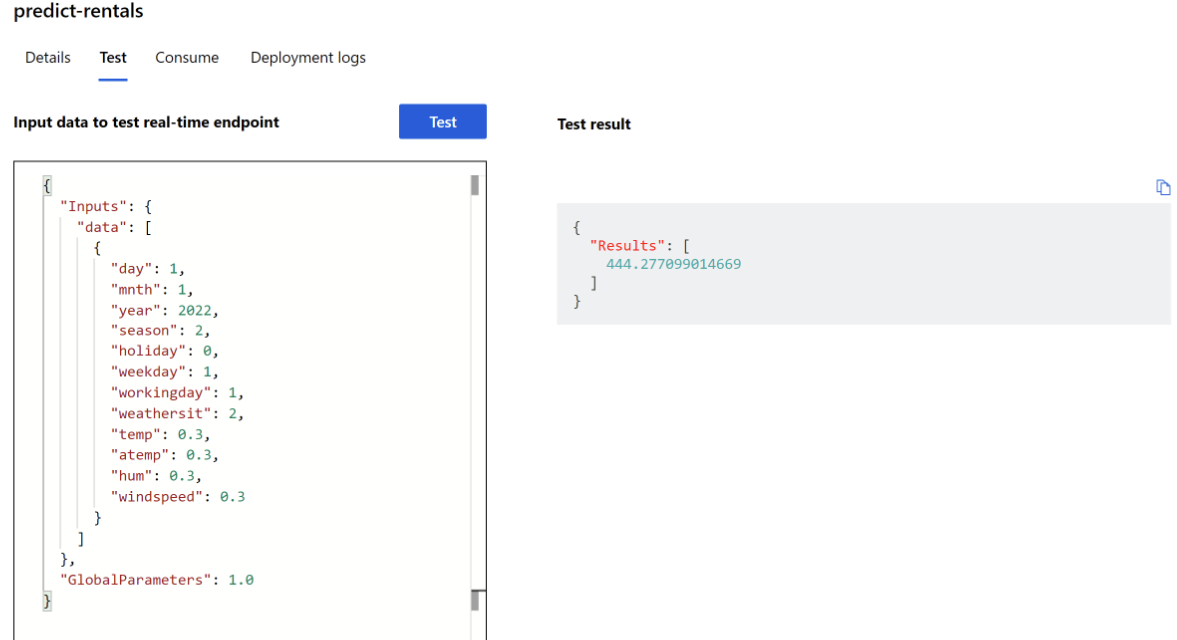
A bike rental company wants to predict how many bikes are available for a specific day.
They use historical data and input parameters such as:
- day, month, year
- season (spring/summer/autumn/winter)
- holiday (yes/no)
- weekday vs weekend
- workday (yes/no)
- weather (tropical/sunny/cloudy/rain)
- temperature
- humidity
- wind speed
With the data in a CSV file, Azure ML can predict how many bikes should be available on 1 January 2022. In the example, the prediction was 444 bikes, and the post notes that the result can change based on better predicted weather.
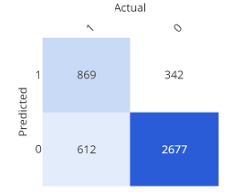
Confusion matrix (simple explanation)
A confusion matrix shows how often the expected and the real results match. It is one way to check model quality.
2: Guiding principles for implementing AI
Microsoft has guidance for building AI responsibly. Here are the main points, in simple terms:
- Fairness: AI should not discriminate. Example: in loan decisions, the system should not use gender, ethnicity, or religion to give someone an advantage or disadvantage
- Reliability and Safety: AI systems must work in a safe way and should be tested well. Example: if an AI model controls a vehicle or supports medical decisions, wrong results can cause serious harm
- Privacy and Security: Sensitive data must stay protected. Even after training, privacy and security should be monitored in production
- Inclusiveness: AI should help people and support better work for everyone, including people with different accessibility needs
- Transparency: Users should understand the goal, limits, and how the system works
- Accountability: People stay responsible for what AI does. Designers and developers should follow clear organization rules and frameworks so the solution is well-defined
3: Anomaly Detection
Anomaly Detection finds unusual patterns or “strange points” in data. This can help find issues like fraud or technical problems.
Example 1:
- In race sports: find a mechanical problem early, before it becomes critical.
- In production: detect faults in an automated production line at different times.
When anomalies are detected, you can trigger actions like:
- send a warning/alert
- run a script or automated fix process
Example 2: The post gives an example using an HVAC system (heating, ventilation, air conditioning).
AI can predict when temperature moves too high or too low, then trigger:
- extra cooling or heating
- alerts when a threshold is crossed
4: Computer Vision
Computer Vision is AI that can work with visual content (images). The post also mentions*Seeing AI, an app that can help blind or low-vision users by describing what is around them.
It can:
- describe an image in one sentence (max 10 words)
- read text (from a scan/photo)
- read money
- scan barcodes and explain the product
- recognize people
And it can also provide more image features:
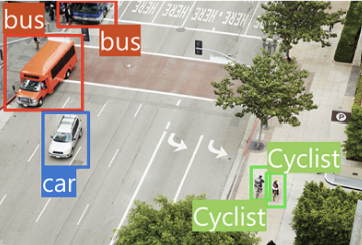
- Image classification: Find out what type of environment the image shows.
- Object detection: Detect different objects in an image.
- Semantic segmentation: Find which pixels belong to which object. Example is traffic monitoring where vehicles can be marked.
- Image analysis (tags): Describe an image using tags and confidence.The post says it can describe in up to 10 words by using the detected tags.
- Face detection, analysis, and recognition: Recognize faces and connect them to people. The post also states it can match known people and return an answer in about 2 seconds.
- Optical character recognition (OCR): Recognize characters in an image. The post uses Google Translate camera scan as an example.
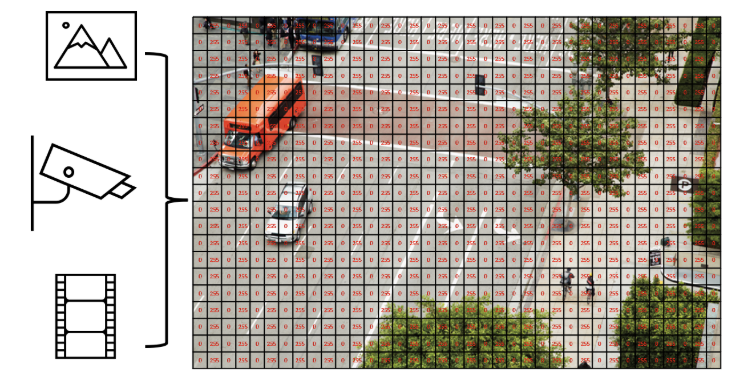
In AI, an image can be seen as numeric pixel values. These values can be used to train ML models that learn what the image content looks like.
Start using Computer Vision
To use Computer Vision, you need:
- a Computer Vision resource
- a Cognitive Services resource
Analyze an image (confidence)
Computer Vision can evaluate what objects are in an image and return a human-style description.
The results can include a confidence score, meaning how sure the service is about what it sees.
Example from the post (descriptions like):
- “A black and white photo of a city”
- “A black and white photo of a large city”
- “A large white building in a city”

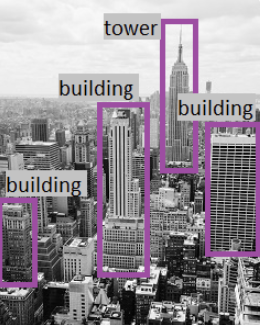
It also creates tags (example tags in the post):
- skyscraper
- tower
- building
Then object detection can label what the objects are (example: “building”).
Face recognition
Computer Vision can:
- estimate age
- place a square/box around the face

Azure and Computer Vision
Azure can use the following services to create and implement into your own applications:
- Computer Vision
- Custom Vision
- Face
- Form Recognizer
5: Natural Language Processing (NLP)
Natural Language Processing (NLP) is AI that understands and recognizes written and spoken language. This can be used in different scenarios:
- read and understand text in documents and emails
- understand spoken language and answer
- translate spoken or written sentences
- understand user commands and actions
The post mentions a VR game named Starship Commander that uses NLP so players can talk and the game can respond. It uses AI for these scenarios:
- the game reacts to what you say
- the game responds in a personal way to characters
Azure services for NLP
- Language
- Translator
- Speech
- Azure Bot
6: Knowledge Mining
Knowledge mining is a definition for finding information inside large data sources, including data that is not well structured. The goal is to build a searchable knowledge store.
Azure Cognitive Search
Azure has a service named Cognitive Search that helps you:
- build indexes
- support search for internal use or a secured internet-facing search
Azure can process images in this manner and extract information from documents or images, so you can ask for specific stuff and Cognitive Search does the rest for you.Cognitive Search is a PaaS solution, where Microsoft manages the infrastructure.
It can support:
- full-text search and analysis
- text derived from images
- entity detection and key phrase detection (via text analysis)
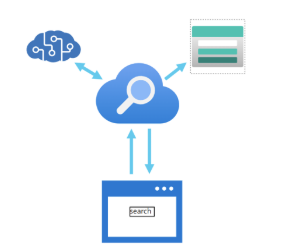
Features of Azure Cognitive Search
- data from many sources
- full-text search and analysis
- AI-driven search requests
- multiple languages
- location-based search
- customizable user experience
7: Challenges and risks
AI is very helpful and powerful, but it needs responsible use. Microsoft lists these risks:
- Bias: can affect results.
- Example: a loan approval model may discriminate if trained on biased data.
- Errors can cause damage
- Example: if an autonomous vehicle fails, it can cause an accident.
- Data can be exposed
- Example: a medical bot trained on sensitive patient data needs strong protection.
- Solutions may not work for everyone
- Example: a smart home assistant may not provide audio output for visually disabled users.
- Users may need to trust a complex system
- Example: an AI tool gives investment advice, but where are the reasons coming from?
- Who is responsible for AI decisions?
- Example from the post: someone is wrongly convicted based on face recognition—who is accountable?
8: Machine Learning + Computer Vision Practice test
This part is a step-by-step guide of some of the features of Machine Learning and Computer Vision, which I did according to the course which was really fun to do. You can use the same idea to learn how training changes results.
8.1: Preparing the training images
In the test environment, import 45 photos:
- 15 apple images
- 15 banana images
- 15 orange images
Source for the images: https://aka.ms/fruit-images
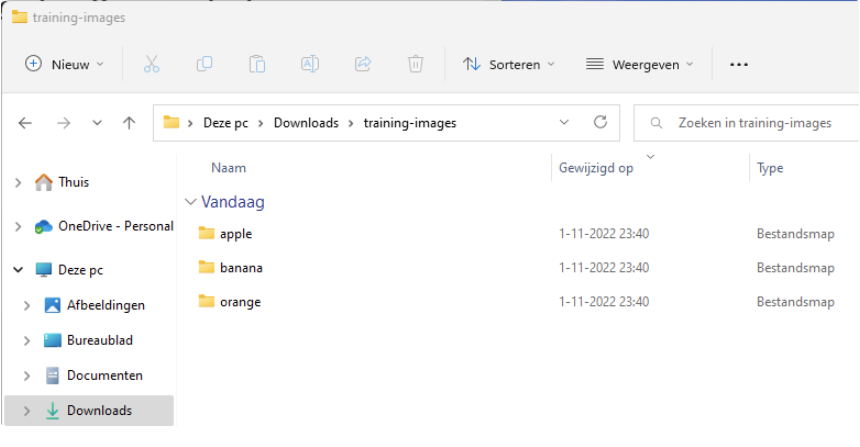
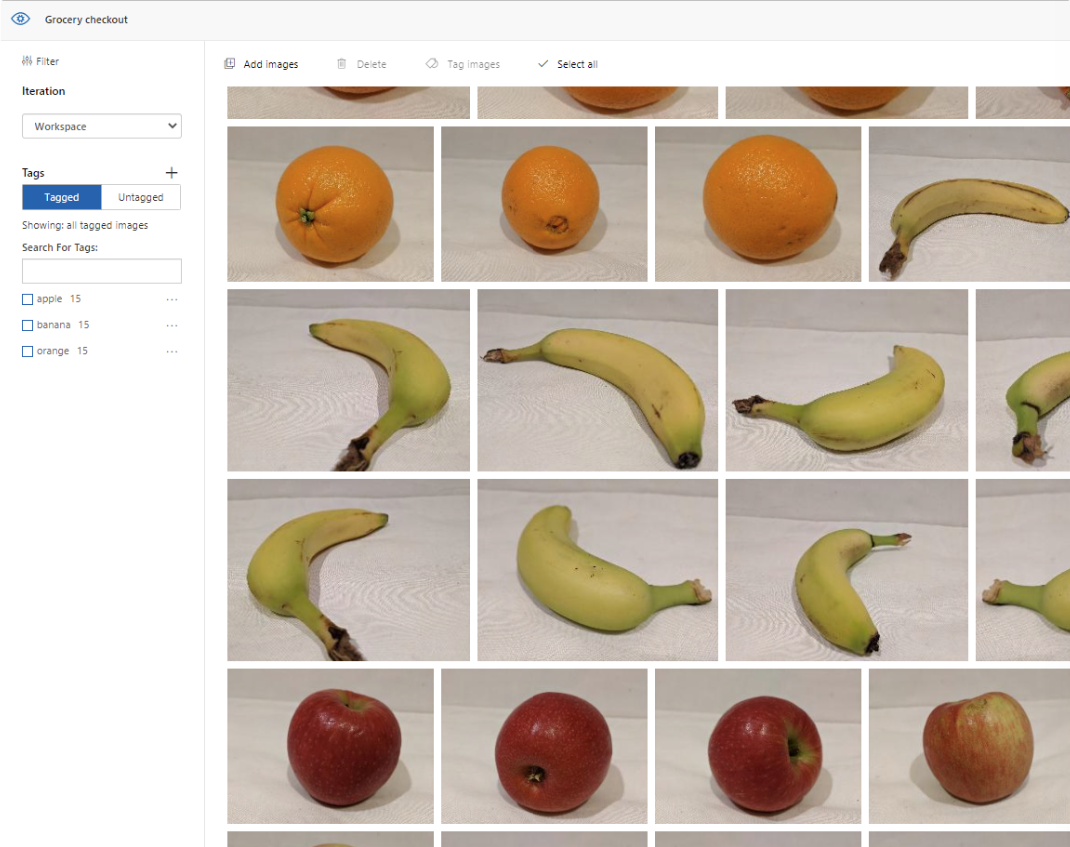
8.2: Importing into Cognitive Services and add tags
Import the photos into your Cognitive Services workspace.
When importing we add a tag so the system knows what each image is. After it learned what is an apple, what is a banana and what is an orange, the system uses these learned tags to judge new images.
8.3: Running a quick test
To test the system, we will quickly pick an image from google of an apple to see how sure the system is about other images which are slightly different than the images uploaded and trained with.
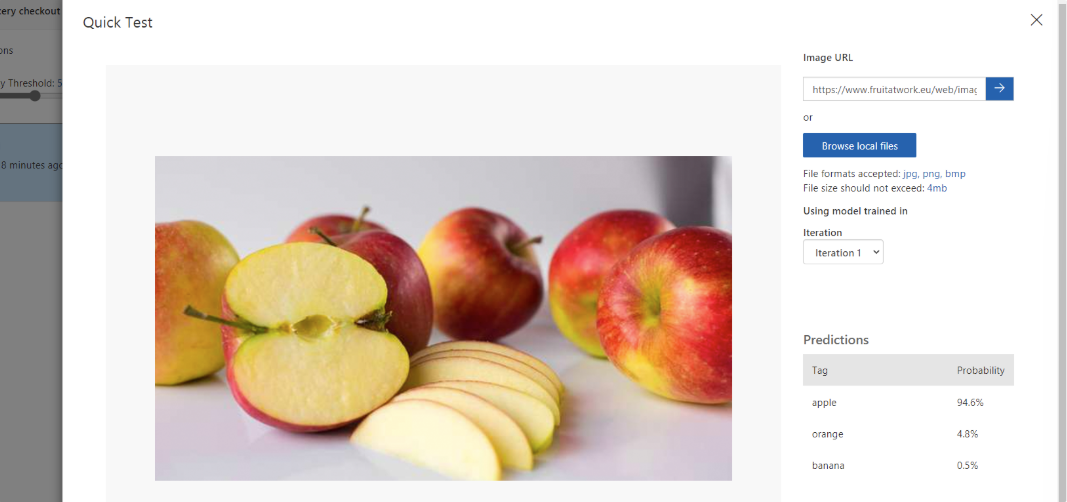
The system was 94.6% sure it was an apple, so this is already a very clever service.
8.4: Learning process
To teach the system something new, add apricot. This can give very fun results, as this can can be judged as:
- orange (color)
- apple (shape)
As a “0-measurement” test, I imported a picture of an apricot against the 3 known fruit types (apple, banana, orange). The post states the system predicted:
- 83.7% orange (mostly due to color)
- 14.3% apple (due to the same shape)
- 1,9% banana (doesnt find that much matching properties)
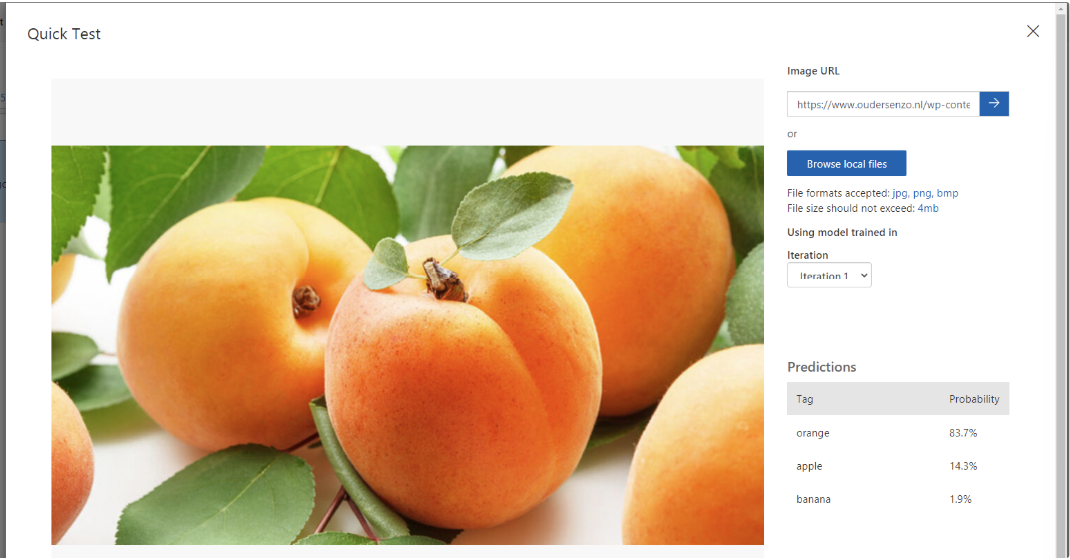
8.5: Uploading apricot images and train again
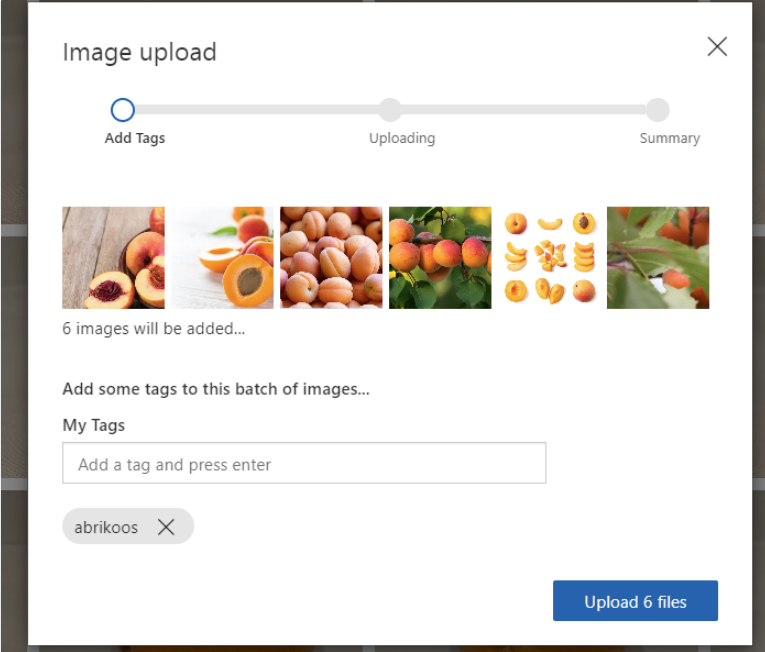
We will now upload 6 apricot photos, to train the service what a apricot is.
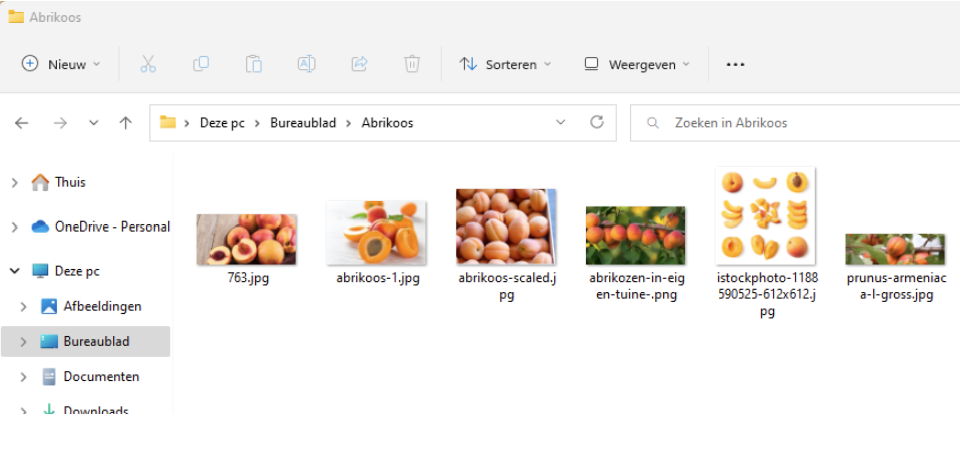
Add the tag:
- “apricot” (as the post says: “abrikoos”)
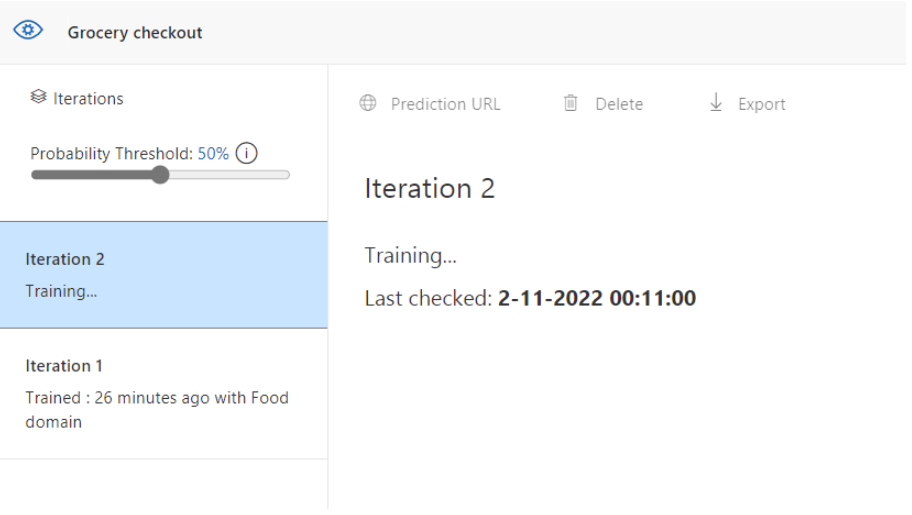
Then run training:
- Quick training (faster, but less compared to advanced training time/quality tradeoff mentioned in the post)
8.6: Test again with the same apricot image
After learning, test the same image again (from the 0-measurement). In the post, the result became:
- 98% apricot
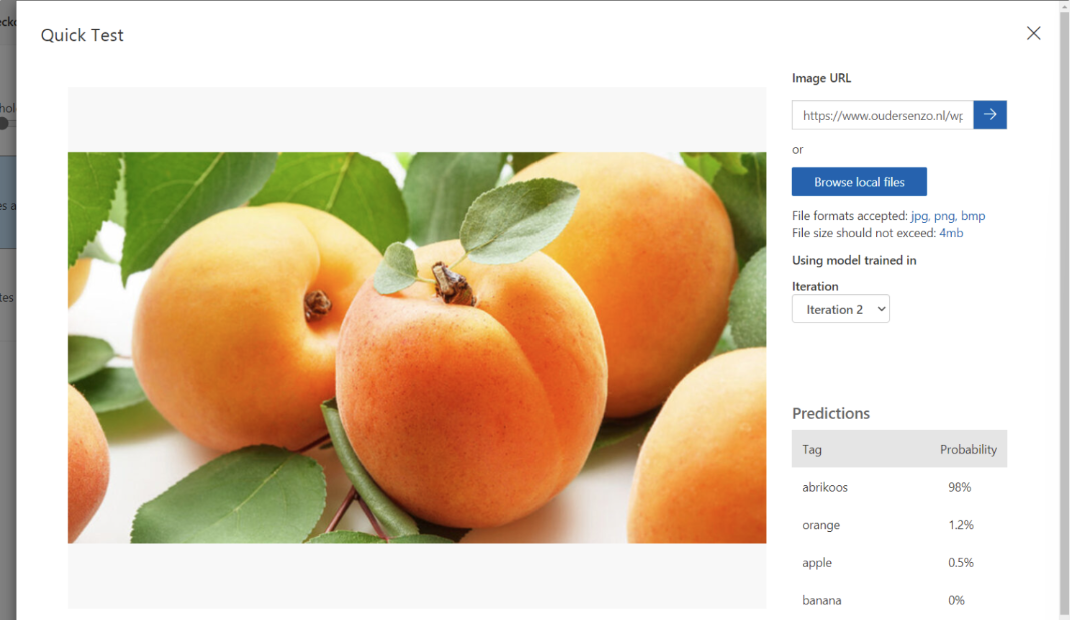
So, with only a few training/reference images, the system can learn a new category.
Summary
This post gave a simple overview of how Azure AI can be used:
- Machine Learning to learn from data and make predictions or categories
- Guiding principles for fairness, safety, privacy, transparency, and accountability
- Anomaly Detection to find unusual patterns in data
- Computer Vision to understand images (including confidence scores and image tagging)
- NLP to work with text and speech
- Knowledge Mining to build searchable knowledge using Cognitive Search
Thank you for reading this post and I hope it was helpful!
Sources 📖
These sources helped me by writing and research for this post;
End of the page 🎉
You have reached the end of the page. You can navigate through other blog posts as well, share this post on X, LinkedIn and Reddit or return to the blog posts collection page. Thank you for visiting this post.
Support the blog
MS-100 + MS-101 Course notes
This page contains my older MS-100 and MS-101 notes which became MS-102 later.
These notes cover the main concepts I studied around the MS-100 and MS-101 era of Microsoft 365 administration. The course material focused heavily on identity, access, device management, information governance and security. Product names, portals and individual features have changed over time, but many of the underlying principles are still useful when thinking about how a Microsoft 365 environment should be designed and operated.
The common theme across almost every subject is that Microsoft 365 is not just a collection of applications. Identity connects users to services, device management determines how trusted endpoints are configured, governance controls how information is handled and security tools bring signals from different parts of the environment together.
Identity
Identity sits at the center of Microsoft 365.
In a traditional on-premises environment, Active Directory Domain Services gives users one identity that can be used across domain-joined computers and internal applications. A cloud identity platform extends that idea beyond the local network. The same identity can be used to access email, collaboration tools, SaaS applications, administrative portals and custom applications.
This central identity makes life easier for users because they do not need a separate username and password for every service. It also makes administration more consistent. When access is managed centrally, disabling one identity can remove access to many connected services at once instead of relying on somebody to remember every separate application account.
That convenience also means identity becomes a very important security boundary. If an attacker gains control of an account, especially an administrative account, the impact can extend across many services. Identity management is therefore not only about creating users and assigning licenses. It is about controlling who can sign in, what they can access and under which conditions that access should be allowed.
Single sign-on is a major part of this model. A user authenticates with a trusted identity provider and can then access connected applications without repeatedly entering credentials. Different applications support different authentication methods, so the way single sign-on is implemented depends on the application.
Common standards include SAML, OAuth 2.0 and OpenID Connect. Some older or internal applications may use other methods, including password-based or Windows-integrated authentication.
The important idea is that central identity should reduce the number of separate credentials without reducing the amount of control administrators have over access.
Access
Once identities exist, the next challenge is making sure they receive the right access.
A user should have enough access to do their job, but not much more than that. This sounds simple until employees change roles, teams are reorganized, external partners are invited and temporary projects come and go. Access that was correct six months ago may no longer be correct today.
Identity governance helps bring structure to this problem.
External collaboration is a good example. A partner may need access to a shared team, a SharePoint site or an application, but that does not mean the partner should become a normal internal user. Guest access allows external identities to collaborate while remaining separate from the internal workforce.
The useful part is not simply being able to invite a guest. The real challenge is controlling the lifecycle of that access.
An external user may need access only to a specific project and only for a limited period. Terms of use can be presented before access is granted. Access packages can group resources together so that access is requested and approved as one logical package. Connected organizations can help structure collaboration with known external organizations.
Access reviews then provide a way to check whether permissions are still needed.
This is especially useful for groups, applications, privileged roles and guest users. Instead of assuming that access remains correct forever, the organization can periodically ask the relevant owner or reviewer to confirm it.
That turns access management into a lifecycle:
- Access is requested or assigned.
- The user receives only the resources that are required.
- Access is reviewed over time.
- Access is removed when the user, role or business need changes.
This same principle applies to internal users. A person moving to another department should not automatically keep every permission from the previous role. The longer an organization operates without reviewing access, the more likely it becomes that permissions accumulate.
The goal is not to create as many access rules as possible. The goal is to make access understandable and temporary where appropriate.
Authentication
A central identity is valuable only when the authentication process is strong enough to protect it.
Passwords alone are a weak foundation because they can be guessed, reused, phished or stolen. The more services that depend on one identity, the more valuable that password becomes to an attacker.
Multi-factor authentication adds another verification step. Instead of relying only on something the user knows, authentication can also require something the user has or another strong verification method.
This does not make every account impossible to compromise, but it significantly changes the attack. A stolen password by itself is no longer enough.
The way MFA is applied also matters. Enabling a security feature individually for hundreds or thousands of users is difficult to manage consistently. Policy-based access is a better model because the organization can define when additional verification is required.
Conditional Access is built around that idea.
Instead of treating every sign-in in exactly the same way, a policy can consider context such as:
- The user or group
- The application being accessed
- The device
- The location
- The sign-in method
- The risk level
- The compliance or trust state of the device
The result of the policy can then be to allow access, block access or require an additional control such as MFA.
This is much more flexible than a simple rule that says every sign-in is either allowed or denied.
A normal user signing in to a familiar application from a managed device may present a different level of risk than an administrator signing in to a management portal from an unknown device. The access decision should be able to reflect that difference.
Legacy authentication protocols are an important part of this discussion because older protocols often do not support modern authentication controls in the same way. Keeping an old protocol enabled for one forgotten application can create a path around stronger controls that protect the rest of the environment.
A good authentication strategy therefore combines strong authentication, modern protocols and policy-based access.
Password protection, self-service password reset and smart lockout can support that strategy as well. The goal is not only to make passwords more complicated. It is to reduce the dependency on passwords and make recovery safer when a credential is lost or compromised.
Privilege
Administrative access deserves more protection than normal user access.
A user account that can read email has a different impact from an account that can change identity settings, security policies or tenant-wide configuration. The more powerful the role, the more carefully it should be assigned and used.
Role-based administration helps by separating responsibilities.
A helpdesk administrator may need to reset passwords but does not need full control over every service. A groups administrator needs to manage groups. A billing administrator handles subscriptions and purchasing. A global reader may need broad visibility without the ability to make changes.
The exact roles are less important than the principle: do not use the most powerful role for every administrative task.
Global administrative access should be limited. Powerful accounts should use strong authentication and should not be used for ordinary daily work.
This is where privileged identity management becomes valuable.
Instead of giving somebody permanent administrative rights, a role can be made eligible and activated only when needed. The activation can be time-limited and may require extra controls such as MFA, approval or justification.
This is commonly described as just-in-time access.
The advantage is simple. If an account is compromised while it does not have an active privileged role, the attacker does not automatically inherit permanent administrative power.
Privileged work should also be separated from normal browsing and productivity where possible. An administrator who uses the same session for email, web browsing and highly sensitive management tasks creates more opportunities for a compromise to reach privileged credentials.
A dedicated administrative workstation or hardened administrative environment reduces that exposure by separating sensitive work from everyday activity.
The overall goal is to reduce standing privilege.
Administrative access should be:
- Assigned to the correct role
- Used only when needed
- Protected with strong authentication
- Monitored
- Reviewed
- Removed when it is no longer required
The strongest role should not be the default tool for getting work done.
Risk
Authentication policies can define what should happen under normal conditions, but some sign-ins deserve additional attention because they look unusual.
Identity risk systems use signals to detect behavior that may indicate a compromised account. A sign-in may originate from an unexpected location, follow a suspicious pattern or involve credentials that appear to have been exposed.
The useful part is not only detecting that risk. The environment should also have a response.
A risky sign-in may require stronger authentication. A risky user may be required to reset a password through a trusted recovery process. A sufficiently serious event may result in access being blocked until the identity can be investigated.
This makes identity security more dynamic.
Instead of relying only on static rules, access decisions can respond to what is happening around the account.
Risk should still be investigated in context. An unusual sign-in is not automatically an attack, and a normal-looking sign-in is not automatically safe. Risk signals are inputs into the access decision rather than perfect answers on their own.
The best result comes from combining identity signals with device state, application access, user behavior and broader security monitoring.
Trust
The move towards cloud services and mobile work changed the traditional idea of the network perimeter.
A user may work from home, from a mobile device or from a partner location. Applications may run in a datacenter, in a public cloud or as SaaS services. Data can move between all of these environments.
That makes the old assumption of “inside the network is trusted, outside the network is untrusted” much less useful.
Zero Trust starts from a different position.
Every access request should be evaluated based on the available context. Identity, device state, location, application, data sensitivity and unusual behavior can all contribute to the decision.
Three principles are particularly useful.
First, verify explicitly. Do not grant access only because a device is connected to a familiar network. Use the available signals to authenticate and authorize the request.
Second, use least privilege. Give users, services and administrators only the access they actually need, and prefer temporary privilege where practical.
Third, assume breach. Design the environment with the expectation that an account or device may eventually be compromised. Segmentation, monitoring and limited privilege reduce the amount of damage that one compromise can cause.
Zero Trust is therefore not one product or one policy.
It applies across several layers.
Identities need strong authentication and controlled access. Devices need to be managed and evaluated. Applications need to be monitored and given appropriate permissions. Data should be classified and protected. Infrastructure should be hardened and monitored. Networks should be segmented so that one compromised system does not automatically provide unrestricted access to everything else.
The useful way to think about Zero Trust is as a design principle that connects many separate security controls.
Applications
Modern authentication is also important when applications need to work with user identities.
An application should not need to collect and store a user’s password simply to access another service on that user’s behalf.
OAuth 2.0 and OpenID Connect solve different parts of this problem.
OAuth 2.0 is primarily an authorization framework. It allows an application to receive permission to access a resource without the user handing over the password for that resource.
OpenID Connect adds an identity layer on top of OAuth 2.0 and allows an application to authenticate the user.
A simplified flow looks like this:
- The user authenticates with the identity provider.
- The identity provider issues a token.
- The application receives the token.
- The application validates the token and uses the information it contains to make an access decision.
Tokens make it possible to separate authentication from the application itself.
This also allows the organization to apply central controls such as MFA, Conditional Access and account lifecycle management without requiring every application to invent its own identity system.
The broader lesson is that identity should be treated as a shared platform service.
Applications should integrate with trusted identity standards rather than creating isolated authentication systems wherever possible.
Deployment
Microsoft 365 administration is not only about identities and cloud services. The endpoint environment also needs to move with the organization.
A modern deployment should be treated as a process rather than one large migration weekend.
Before deploying a new operating system or productivity suite, start by understanding the current environment. Which devices are in use? Which applications are business-critical? Which drivers or integrations may cause problems? Which users represent the different types of work performed in the organization?
Inventory comes first because it is difficult to plan a migration around systems you do not know exist.
Once the inventory is clear, applications and devices can be prioritized. Critical applications deserve more testing than software that is rarely used. Compatibility problems can then be identified before they affect the entire organization.
A sensible deployment flow looks roughly like this:
- Inventory devices, applications and dependencies.
- Check hardware and application readiness.
- Review identity and network requirements.
- Prepare productivity applications and business software.
- Plan the migration of user files and settings.
- Update security and compliance configuration.
- Start with a representative pilot group.
- Expand the rollout in controlled stages.
- Train users on the changes that affect their work.
The pilot group is important because a technically successful deployment can still fail when it is tested only with IT staff.
A representative pilot should include different departments, device types and working styles. The purpose is not only to find technical bugs. It is also to discover process issues and user impact before the rollout becomes large.
Deployment is therefore a combination of technology, testing and communication.
Devices
As work became more mobile, device management moved from being an optional extra to becoming part of the security model.
A managed device can receive configuration, applications, security settings and compliance policies from a central platform. This gives administrators a more consistent way to support laptops, desktops, phones and tablets, regardless of whether the device is inside the office.
Planning device management starts with choosing the management model.
An organization may use cloud-based management, an existing on-premises management platform or a combination of both. The right model depends on the devices, applications and infrastructure already in place.
The important part is to avoid creating overlapping control without understanding which platform is responsible for which setting.
If the same device receives one configuration from traditional policy and a conflicting configuration from a mobile device management platform, troubleshooting becomes difficult. Policy ownership should therefore be planned before large-scale enrollment begins.
Infrastructure also matters.
Cloud management reduces the need for local management servers, but the endpoints still need reliable connectivity to cloud services. Moving software distribution, updates and management traffic to the internet can also change bandwidth requirements.
Technologies such as peer-to-peer delivery optimization can reduce repeated downloads by allowing devices to share content locally where appropriate.
Device policies should follow the same principle as identity policies: configure what is required for security and operations without adding unnecessary complexity.
The goal is a consistent device state that can be understood and evaluated.
That can include:
- Security settings
- Update requirements
- Encryption
- Application deployment
- Device restrictions
- Compliance requirements
- Remote actions when a device is lost or no longer trusted
Device management becomes especially important in a Zero Trust model because the identity of the user is only one part of the access decision. The condition of the device matters as well.
Governance
A productive cloud environment generates a lot of information.
Email, documents, chats and collaboration data can contain business records, personal information and other sensitive content. That information should not be kept forever without a reason, but it also should not disappear before legal, regulatory or business requirements allow it.
Information governance is about controlling that lifecycle.
Retention policies define how information should be kept and when it may be removed. Retention labels allow information to be classified so that different rules can be applied to different types of content.
The key difference is scope.
A policy can apply broadly to a workload, location or group of content. A label can be applied to specific information so that the content carries a particular retention or record-management behavior.
The exact configuration depends on the workload, but the underlying questions remain the same:
- What information are we storing?
- Why do we need to keep it?
- How long should it remain available?
- When should it be deleted?
- Who is allowed to change that decision?
- What happens when the organization is required to preserve information for an investigation or legal process?
Microsoft 365 workloads also provide service-level recovery and preservation features.
Exchange can retain recoverable items and provide archive and hold capabilities. SharePoint and OneDrive can maintain versions and provide recycle-bin or restoration features. These features are useful, but they should not be confused with a complete governance strategy.
Recovery answers the question “how do we get something back?”
Retention answers the question “how long are we required or allowed to keep it?”
Records management answers the question “which information must be controlled as an official record?”
Those are related problems, but they are not the same problem.
A good governance design begins with business and compliance requirements and then uses the platform controls to enforce them.
Email remains one of the most common paths used for impersonation and phishing, so domain authentication is an important part of protecting a mail environment.
Three technologies are commonly used together: SPF, DKIM and DMARC.
SPF publishes which mail systems are authorized to send email for a domain. The receiving system can compare the source of the message with the policy published in DNS.
DKIM adds a cryptographic signature to the message. The receiving system retrieves the corresponding public key from DNS and can use it to verify that the signed parts of the message were not modified after signing.
DMARC builds on SPF and DKIM by adding alignment and a domain-level policy.
Alignment matters because a message can technically pass SPF or DKIM while still presenting a different address to the user. DMARC checks whether the authenticated domain aligns with the domain visible to the recipient.
The domain owner can also publish a policy that tells receiving systems how messages that fail DMARC should be handled. Reporting can then provide visibility into which systems are sending mail for the domain and which messages are failing authentication.
These technologies are strongest when used together.
SPF identifies authorized sending infrastructure. DKIM protects message authenticity through signing. DMARC ties those results back to the visible sender domain and adds policy and reporting.
None of them should be treated as a complete anti-phishing solution on its own, but together they form an important foundation for domain protection.
Cloud
Cloud applications provide flexibility, but they also create visibility challenges.
Users can often start using a SaaS application without involving IT. From the user’s perspective, this may be convenient. From the security team’s perspective, it creates a question: where is company data going and which applications are processing it?
This is often called Shadow IT.
A Cloud Access Security Broker, or CASB, helps create visibility and control between users and cloud services.
The exact capabilities vary, but the main goals are usually similar.
First, discover which cloud applications are being used. You cannot evaluate the risk of an application you do not know exists.
Second, protect sensitive information. If company data is uploaded to a cloud service, the organization should understand what that data is and whether the service is appropriate for it.
Third, detect unusual behavior. A sudden mass download, impossible access pattern or other abnormal activity may indicate that an account or application has been compromised.
Fourth, evaluate the risk and compliance characteristics of cloud applications.
The goal is not to block every service that was not purchased by IT. The goal is to understand what is being used and make informed decisions about which applications are trusted, restricted or replaced.
Cloud security works best when identity, application behavior and data protection are considered together.
Threats
Attackers do not care which Microsoft 365 product an organization thinks is most important.
They look for the easiest path.
That path may begin with a phishing email, a stolen password, a vulnerable endpoint or a poorly controlled cloud application. Once access is gained, the attacker may move between identity, devices, email, applications and data.
This is why threat protection should not be designed as a set of isolated tools.
Email security can detect a malicious message. Endpoint protection can detect suspicious activity on a device. Identity systems can detect unusual sign-ins. Cloud application monitoring can identify abnormal behavior. When these signals are brought together, the security team gains a much better view of the complete attack.
A typical attack can move through several phases.
The attacker gathers information about the target. A user is then tricked or a credential is stolen. The attacker tries to expand access, maintain persistence and reach valuable information.
Security controls should therefore exist at several stages:
- Reduce the chance of initial access
- Detect suspicious activity
- Limit privilege
- Prevent lateral movement
- Protect sensitive data
- Investigate what happened
- Recover safely
User awareness remains part of that model because technical controls cannot remove every possible social-engineering attack.
The objective is not to believe that one product will stop every attack. The objective is to create overlapping controls so that one failure does not automatically become a complete compromise.
Monitoring
Security controls are useful only when the organization can see what they are doing.
A central security experience helps administrators understand signals across identities, data, devices and applications.
One useful concept is the security posture score.
A score can highlight recommended improvements and provide a way to track progress over time. It should not be treated as an absolute measurement of whether an environment is secure, but it can help identify configuration gaps and prioritize work.
Reporting should also be considered across several layers.
Identity reports can show sign-in and risk activity. Device reports can show compliance and endpoint status. Data reports can show how information is being protected. Application reports can show usage and suspicious behavior.
The real value comes from connecting those signals.
A risky sign-in becomes more interesting when the same user also performs an unusual download. A device alert becomes more serious when it is followed by suspicious account activity.
Monitoring therefore supports both prevention and investigation.
A healthy security process asks:
- What changed?
- Which identities were involved?
- Which devices were involved?
- Which applications and data were accessed?
- Was the activity expected?
- Which control should prevent the same problem from becoming worse next time?
The goal is not to collect every possible log forever.
The goal is to collect useful signals, make them understandable and turn them into actions.
Summary
The MS-100 and MS-101 course material covered a wide part of the Microsoft 365 environment, but the subjects connect to each other more closely than the separate exam topics suggest.
Identity provides the foundation. Authentication protects that identity. Conditional access decides when access should be granted. Privileged access management protects the most powerful roles. Device management adds another trust signal. Governance controls the lifecycle of information. Email authentication protects the domain. Cloud application controls provide visibility outside the traditional perimeter. Threat protection and monitoring then connect signals across the environment.
The most useful lesson is that none of these areas should be designed in isolation.
A strong Microsoft 365 environment is built by connecting identity, devices, applications, data and security operations into one consistent model.
End of the page 🎉
You have reached the end of the page. You can navigate through other blog posts as well, share this post on X, LinkedIn and Reddit or return to the blog posts collection page. Thank you for visiting this post.
Support the blog
MD-100 + MD-101 Course notes
This page contains my older MD-100 and MD-101 notes about Windows 10 and managing modern desktops.
These notes cover the main subjects I studied for MD-100 and MD-101 during the Windows 10 and Microsoft Endpoint Manager era. The exams focused on deploying Windows, managing devices and user data, securing endpoints, applying policies and keeping a desktop environment healthy over time.
Some names and individual services belonged specifically to that period. The useful concepts are broader: understand how Windows works, choose an appropriate deployment method, separate user data from the operating system, manage configuration centrally, protect identities and devices, and introduce changes in controlled stages.
Windows
Before managing Windows at scale, it helps to understand what is happening inside a single device. Windows is not one large application. It is a collection of components that start in a defined order, separate user activity from privileged system activity, store configuration in several places and expose management interfaces for administrators.
The operating system sits between applications and the hardware. Applications normally run in user mode, where they have limited access to the rest of the system. Core operating system components and hardware drivers operate with higher privileges in kernel mode. This separation limits the damage a normal application can cause, although a faulty or vulnerable kernel component can still affect the entire computer.
Boot
The startup process begins in the device firmware. Older systems use BIOS, while modern systems normally use UEFI. The firmware initializes the hardware, selects a boot device and hands control to the Windows boot environment.
Windows Boot Manager reads the Boot Configuration Data store, usually called BCD, to determine which operating system or recovery entry should be started. The Windows loader then loads the kernel, the hardware abstraction layer, essential drivers and the system registry data needed early in the startup process.
After the kernel has initialized the hardware and core subsystems, Windows starts system processes and services. The logon components can then present the sign-in screen and create a user session.
This sequence explains why startup problems can have very different causes. A device that never reaches Windows may have a firmware or storage problem. A BCD problem can prevent the loader from finding the correct installation. A faulty boot driver can stop Windows later in the process, while a service or profile problem may appear only after sign-in.
Secure Boot adds another control to this process by checking whether trusted software is being loaded during startup. The Trusted Platform Module, or TPM, can protect keys and measurements that are tied to the device. These technologies are also used by features such as BitLocker and Windows Hello for Business.
Windows Recovery Environment provides tools for situations where the normal installation cannot start. Depending on the problem, this environment can be used for startup repair, command-line recovery, restoring a system state, uninstalling a problematic update or resetting the device.
Processes
A running application is represented by one or more processes. A process receives its own virtual address space and contains one or more threads that perform the actual work.
This separation prevents a normal application from directly reading or changing the memory of every other application. Windows still provides controlled methods for processes to communicate, but access is checked against security boundaries.
Task Manager gives a practical view of processes, resource consumption, startup applications, users and services. It is useful when a device feels slow, an application stops responding or a background process consumes an unusual amount of CPU, memory, disk or network capacity.
A high utilization value is a symptom rather than a complete diagnosis. High CPU may be expected during compilation or installation. High disk activity can be normal during an update. The useful question is whether the behavior matches what the device is supposed to be doing.
Services
Services are background processes that can start before a user signs in and continue running independently of an interactive session. Windows uses services for functions such as networking, updates, event collection, printing and security.
Each service has a startup type and runs under a security identity. Some services use built-in identities such as Local System, Local Service or Network Service, while business applications may use a dedicated service account.
The selected identity matters because the service receives the permissions of that account. Giving a service more privilege than it needs increases the impact of a compromise. A service account should therefore have a clear purpose, controlled credentials and only the access needed by the application.
Services can depend on each other. Stopping one service may therefore affect several apparently unrelated functions. Before changing a startup type or disabling a service, first understand what uses it.
Drivers
Drivers allow Windows to communicate with hardware. The operating system provides a standard interface to applications, while the driver translates requests into commands that the device understands.
Drivers run close to the operating system and can have a large effect on stability. An incompatible storage, display or network driver can cause crashes, performance problems or startup failures.
This is why driver readiness belongs in every deployment plan. A device may meet the basic hardware requirements for an operating system and still be unsuitable when an essential driver or business peripheral is not supported.
Device Manager provides a view of installed hardware and driver state. Event logs and reliability information can provide additional clues when hardware repeatedly disconnects or a driver causes instability.
Registry
The Windows Registry is a hierarchical database used by Windows and many applications to store configuration.
Several root hives appear in Registry Editor:
| Hive | Main purpose |
|---|---|
HKEY_LOCAL_MACHINE | Computer-wide operating system and application configuration |
HKEY_CURRENT_USER | Settings for the currently signed-in user |
HKEY_USERS | Loaded user registry profiles |
HKEY_CLASSES_ROOT | File associations and component registration |
HKEY_CURRENT_CONFIG | Information about the active hardware profile |
User-specific registry settings are connected to the profile. The NTUSER.dat file inside a user profile is loaded as the user’s HKEY_CURRENT_USER hive during sign-in.
The Registry is powerful because it exposes settings that may not be available in a normal graphical interface. It is also unforgiving. Registry Editor generally accepts a value without checking whether it makes sense for the application that will later read it.
Where possible, use a supported application setting, policy or management interface instead of editing the Registry directly. Direct edits are most useful when the setting is documented and the effect is understood.
Accounts
Windows can work with several identity types.
A local account exists only on one computer and is stored in the local Security Account Manager database. The account can access local resources according to its group memberships and permissions, but it is not automatically recognized by another computer.
A domain account is stored in Active Directory Domain Services and can be used across domain-joined resources. Kerberos is commonly used for authentication inside an Active Directory domain, with the domain controller acting as a trusted authority for tickets.
The course material also covered Microsoft accounts and Azure Active Directory identities. These introduced cloud-based sign-in, synchronization and device registration scenarios in addition to traditional local and domain identities.
Authentication answers whether an identity is genuine. Authorization determines what that identity can do after authentication.
The Local Security Authority is a central part of this process. The lsass.exe process validates credentials, applies local security policy and creates access tokens. An access token contains information such as the user’s security identifier, group memberships and privileges. Windows uses that token when checking access to files, Registry keys, processes and other protected objects.
Local groups make common permissions easier to manage. For example, Administrators receive broad control of the device, Remote Desktop Users may sign in through Remote Desktop, and Event Log Readers can view event information without receiving full administrative rights.
The principle remains the same whether access is local or centralized: assign permissions to a role or group where practical instead of managing every user separately.
UAC
User Account Control separates normal activity from administrative activity.
Even when a user belongs to the local Administrators group, normal applications do not always run with the full administrative token. When an operation requires elevation, Windows can request consent or credentials.
This reduces the chance that every process started by an administrator automatically receives unrestricted control of the device.
UAC is not a replacement for using standard user accounts. It is an additional boundary. Daily work should use the least privilege needed, while administrative tasks should be elevated deliberately.
Profiles
A user profile combines personal files, application data and user-specific configuration.
Common profile folders include Desktop, Documents, Downloads, Pictures and AppData. The AppData\Roaming area was designed for application settings that may follow the user in traditional roaming profile scenarios, while other data remains specific to the device.
Windows environments have used several profile models:
- A local profile remains on one device.
- A roaming profile is copied between a server and domain-joined devices.
- A mandatory profile starts from a centrally controlled read-only profile and discards user changes.
- Cloud synchronization and OneDrive-based folder protection can move selected settings and user data without copying the complete legacy profile.
Roaming an entire profile can create long sign-in times and synchronization conflicts, especially when the profile contains large caches or when the user signs in to several devices at the same time.
A modern design should therefore separate the different kinds of state. Important user files can be redirected or synchronized, selected settings can roam, and device-specific caches can remain local.
Filesystems
A filesystem defines how data is organized and which capabilities are available on a volume.
NTFS is the main Windows filesystem for operating system and general-purpose data volumes. It supports permissions, auditing, encryption, quotas and other features that are not available in simpler filesystems such as FAT32.
ReFS was designed for resilient storage scenarios and integrates with features such as Storage Spaces. The correct filesystem depends on the workload and the Windows edition or platform being used.
Permissions on NTFS files and folders are based on access control entries. These entries can allow or deny actions such as reading, writing, modifying or taking ownership. Permissions are commonly inherited from the parent folder, which makes a consistent folder structure much easier to manage than many unrelated exceptions.
Group membership is cumulative. A user normally receives the combination of allowed permissions granted through the user’s account and groups. An explicit deny can override an allow and should be used carefully because it can make effective access difficult to understand.
Share permissions add another layer when a folder is accessed over the network. Local access is evaluated with NTFS permissions. Network access is evaluated against both share and NTFS permissions, with the most restrictive effective result applying.
A practical design often keeps share permissions broad enough for the intended audience and uses NTFS permissions for the detailed folder structure. The exact model matters less than being consistent and knowing where access is controlled.
Robocopy can copy large directory structures and preserve data such as timestamps, security information and ownership when the correct options are used. It is therefore useful during file migrations where a normal drag-and-drop copy would lose metadata or permissions.
Encryption
Windows provides encryption at different layers.
BitLocker encrypts an entire volume. It protects data at rest when a device or disk is lost, stolen or removed. The TPM can release the encryption key when the expected boot state is detected, while a recovery key provides an alternative when the normal protector cannot be used.
Recovery keys should be stored somewhere that remains accessible when the device itself is unavailable. In managed environments, that normally means a directory or management platform rather than a document on the encrypted computer.
Encrypting File System, or EFS, encrypts individual files for a user. EFS and BitLocker solve different problems. BitLocker protects the volume as a whole, while EFS is tied more closely to a user’s certificate and selected files.
EFS requires careful certificate and recovery planning. Losing the private key can make the data inaccessible even when the disk itself is healthy.
Storage
Windows sees physical disks, partitions, volumes and filesystems as related but separate layers.
A physical disk can contain one or more partitions. A partition can be formatted as a volume with a filesystem and assigned a drive letter or mount point. Applications then work with the filesystem rather than directly with disk sectors.
Storage Spaces adds a software-defined layer across multiple physical disks. Disks are grouped into a pool, and virtual disks can then be created with a resilience layout.
A simple layout provides capacity without redundancy. A mirror keeps additional copies of data, while parity stores recovery information more efficiently but introduces different performance characteristics.
The best choice depends on whether the priority is capacity, performance or fault tolerance. Redundancy also does not replace backup. Mirroring a deleted or corrupted file simply reproduces the same problem across the copies.
Networking
A Windows device needs a valid IP configuration before it can communicate with other systems.
The IP address identifies the device interface, while the subnet mask determines which addresses are considered local. Traffic for another network is sent to the default gateway. DNS translates names into addresses so users and applications do not need to remember IP addresses.
These settings can be assigned manually or provided by DHCP.
Windows also uses network profiles to apply different behavior to different environments. A domain profile is selected when the device recognizes its Active Directory domain. Private and public profiles represent increasingly less trusted networks.
The profile affects discovery and firewall behavior. A public network should normally expose fewer services than a trusted private or domain environment.
Windows Defender Firewall filters traffic based on direction, protocol, port, application, address and profile. A rule can allow or block specific traffic instead of switching the complete firewall off when one application does not work.
Troubleshooting should move through the network in layers. First check the adapter and link. Then check the address, subnet, gateway and DNS settings. Test local communication before testing a remote service. A successful ping also does not prove that a particular application port is reachable.
Wireless adds another layer of stored profiles, authentication and radio conditions. A device may see a network but still fail because of an incorrect security method, certificate, proxy, driver or policy.
Remote access methods such as VPN and Remote Desktop depend on both network connectivity and authorization. A correctly configured tunnel does not automatically give a user access to every internal resource.
Virtualization
Hyper-V allows a Windows device to host virtual machines.
A virtual machine receives virtual processors, memory, disks and network adapters while sharing the physical host. This makes it possible to run isolated operating systems for development, testing or specialized workloads.
Generation 1 virtual machines use a more traditional virtual hardware model, while Generation 2 virtual machines use UEFI-based virtual firmware and support features such as Secure Boot.
Hyper-V virtual switches define how virtual machines connect:
| Switch type | Connectivity |
|---|---|
| External | Connects virtual machines to a physical network adapter |
| Internal | Connects virtual machines to each other and to the host |
| Private | Connects virtual machines only to each other |
Virtual hard disks commonly use VHD or VHDX formats. VHDX was designed for newer platforms and provides advantages such as larger capacity and better resilience against certain interruptions.
Virtualization is useful, but the host still needs enough CPU, memory, storage and network capacity for all running guests. A virtual machine does not remove the underlying hardware limits.
Events
Windows records operational information in event logs.
The System log contains operating system and driver events. The Application log contains events written by applications. The Security log contains audited security activity when the relevant auditing policy is enabled.
Event Viewer can filter these logs by source, level, event ID and time. The event text should be treated as evidence rather than an automatic final answer. A visible error may be the result of an earlier failure elsewhere.
Reliability history provides another useful view by placing application failures, update events and hardware problems on a timeline.
At scale, logs can be collected centrally so that administrators can compare many devices and detect recurring patterns instead of opening each computer separately.
Recovery
Recovery planning should separate operating system recovery from user-data recovery.
A broken boot configuration may be fixed with startup tools. A damaged Windows installation may require repair or reset. A deleted user file may need a recycle bin, version history, backup or cloud restore.
System Restore can roll back selected system changes, but it is not a full backup of user data. Reset can reinstall Windows while offering different options for retaining or removing user files. A clean installation starts from a new operating system state and requires applications and configuration to be applied again.
A support process should know which recovery method matches the incident. Reinstalling a device is unnecessary when only one file was deleted, while restoring one file does not solve a corrupted operating system.
Editions
Windows editions provide different feature sets for different audiences.
Home was intended for consumer use. Pro added business features such as domain-related management, BitLocker, Group Policy and Hyper-V. Enterprise added broader security and management capabilities for centrally managed organizations. Specialized workstation and education editions targeted other scenarios.
The exact feature matrix changed over time, so an edition should be selected by checking the capabilities required for management, security, virtualization and application compatibility rather than assuming that every business device needs the highest edition.
Activation confirms that the installed edition has a valid license. The course covered digital licensing, product keys, volume activation and subscription-based edition activation.
Deployment and licensing are connected but not identical. Installing an edition does not automatically grant a license, and assigning a license does not fix a device that was deployed with an incompatible edition or activation method.
Deployment
Windows can be introduced to a device through several deployment methods. The correct method depends on whether the device is new, whether existing applications and user state should be retained, and how much control the organization needs over the installation.
Clean installation
A clean installation starts with a fresh operating system.
This is common for a new device, a wipe-and-load migration or a device that needs to return to a known state. The advantage is that old applications, temporary data and configuration problems are not automatically carried into the new installation.
The cost is that applications, settings and user data must be restored afterwards. A clean deployment therefore needs a plan for drivers, applications, configuration, identity, data and activation.
Upgrade
An in-place upgrade keeps supported applications, user data and much of the existing configuration while replacing the operating system version.
This can reduce migration effort, but it also preserves more of the old environment. An unsupported application, driver or damaged configuration can therefore continue to cause problems after the upgrade.
Before an upgrade, check the supported source version, destination edition, available storage, firmware, drivers, security software and business applications. A device should also have a recovery path if the upgrade cannot complete.
The choice between clean installation and in-place upgrade is not simply about which method is faster. It is a balance between preserving state and returning the device to a predictable baseline.
Images
Traditional deployment commonly uses a Windows image, often stored in WIM format. The image contains the operating system files that will be applied to the destination device.
An image can remain close to the standard Microsoft installation media, or it can be customized with language packs, applications, drivers and updates. Heavy customization can shorten the first deployment but increases image maintenance.
DISM can service both online and offline Windows images. An online image is the currently running installation. An offline image is mounted into a folder so that packages, drivers or features can be changed before deployment.
Language packs are packages that must match the operating system version they are intended for. Adding them to an image can help create a consistent deployment for users in different regions.
The general lesson is that every item added to an image becomes something that must be maintained. Where possible, keep the base image simple and apply frequently changing applications and policy through a management platform.
Migration
User State Migration Tool, or USMT, moves selected user files and settings between Windows installations.
ScanState collects the user state from the source. LoadState applies it to the destination. XML files define which applications, documents and settings should be included or excluded.
USMT is useful in a wipe-and-load deployment where the operating system must be replaced but the user experience should not start from zero.
A migration plan should answer several questions before running a tool:
- Which users are in scope?
- Which files and settings are business-relevant?
- Where will the migration store be kept?
- Is the device online or offline during capture?
- Which applications exist on the destination?
- How will the result be validated?
Migration tools do not remove the need to classify data. Copying every cache and temporary file can make the migration slower without helping the user.
Provisioning
A provisioning package changes the configuration of an existing Windows installation without deploying a complete custom image.
Windows Configuration Designer can create a package containing settings such as device naming, wireless profiles, certificates, applications and enrollment information.
This is useful when a device already has a suitable Windows installation but needs to be transformed into an organizational device.
A provisioning package should still be protected and tested because it may contain sensitive configuration. The fact that it is easier to apply than a full image does not make every setting low-risk.
Autopilot
Windows Autopilot moves more of the deployment process into cloud management.
Instead of building and maintaining a separate image for every device type, the organization registers a device identity and assigns a deployment profile. During the out-of-box experience, the user connects the device, signs in and receives the intended enrollment and configuration.
The hardware identity links the physical device to the deployment service. The deployment profile controls parts of the setup experience and defines how the device joins the organization’s identity and management environment.
Intune can then apply configuration profiles, compliance policies, applications and security settings.
Autopilot does not mean that a device configures itself without dependencies. The process still relies on a supported Windows edition, internet connectivity, identity, licensing, assigned profiles and reachable cloud services.
It is best understood as a modern orchestration method. The original Windows installation normally remains the starting point, while organizational configuration is applied during enrollment.
A reset scenario can return a managed device to an organizationally ready state without repeating every manual setup step. This is useful when a device changes user or needs remediation, but the behavior should be tested with the applications and policies used in the environment.
Pilot
Every deployment method should begin with a pilot.
The pilot group should represent real variations in the environment: different hardware, departments, applications, locations and working styles. Testing only with IT devices often misses the combinations that create problems for normal users.
A pilot should validate more than installation success. Check authentication, user data, applications, printers, network access, security policy, performance, recovery and support procedures.
The rollout can then expand through deployment rings. Each ring increases the audience while leaving time to observe problems before the change reaches every device.
Enrollment
Device identity determines which management and access models can be used.
A workgroup device is managed locally unless another management agent is installed. A domain-joined device trusts Active Directory Domain Services and receives traditional domain policy. An Azure Active Directory joined device uses a cloud identity relationship. A hybrid joined device participates in both the on-premises and cloud identity environments.
Registration is lighter than join. A registered personal device can be associated with a work identity without becoming a fully organizational device.
The correct model depends on application dependencies, network access, management tools and ownership.
A personally owned device may receive limited application-level protection. A corporate device may be fully enrolled, configured and evaluated for compliance. Mixing those models without clear ownership leads to confusing user expectations and privacy concerns.
Enrollment should therefore answer both a technical and an organizational question: who owns this device, and what level of control is appropriate?
Management
Windows can be configured locally, through Active Directory Group Policy, through mobile device management or through a combination of systems.
Local
Local management is useful for standalone devices and exceptions.
Local Users and Groups, Local Security Policy, Registry Editor and Local Group Policy expose many settings directly on the computer. PowerShell and command-line tools make the same kind of work repeatable.
The weakness of purely local management is consistency. A setting changed manually on one device is easy to forget and difficult to audit across hundreds of devices.
Local configuration is therefore best used for testing, troubleshooting or systems that genuinely cannot be managed centrally.
gpresult and Resultant Set of Policy help show which policy settings are affecting a device or user. This is useful because the final configuration may be the result of local settings, domain policies and management profiles rather than one visible source.
Group Policy
Group Policy provides centralized configuration for Active Directory joined devices.
Policies can target users or computers and can be linked to sites, domains and organizational units. Processing order, security filtering, inheritance and conflicts determine the effective result.
A good Group Policy design uses a small number of well-named policies with clear scope. One enormous policy is hard to troubleshoot, while hundreds of tiny policies can make processing and ownership difficult to understand.
Local Group Policy is processed before domain-based Group Policy. Domain policies can therefore override local settings when they configure the same value, subject to the normal processing and enforcement rules.
MDM
Mobile device management applies settings through a management service rather than relying only on traditional domain connectivity.
Intune can enroll devices and assign configuration profiles, compliance policies, applications and remote actions. Windows exposes many manageable settings through configuration service providers, which allow the management platform to configure operating system components.
MDM is especially useful for internet-based and cloud-joined devices because management does not depend on a direct connection to an on-premises domain controller.
The management model should still be planned. Two systems configuring the same setting can create conflict. The organization should decide which workloads are controlled by Group Policy, Configuration Manager or Intune and how that responsibility will move over time.
Co-management
Co-management allows an existing Configuration Manager device to also be managed through Intune.
Workloads can be moved in stages instead of requiring one immediate migration. For example, compliance policy may move to the cloud while application deployment remains in the existing platform.
This staged approach is useful when the organization has mature on-premises processes but wants cloud-based access and management capabilities.
The important part is workload ownership. A co-managed device should not receive two conflicting authorities for the same area without a deliberate precedence design.
Profiles
A device configuration profile groups settings that should be assigned to a defined population.
Examples include security restrictions, wireless configuration, VPN settings, certificates and browser configuration. Profiles make these settings repeatable and reduce the need for users or support staff to configure every device manually.
Assignment should follow the purpose of the setting. User-focused configuration can target users, while hardware or security baselines often make more sense at device scope.
Before broad assignment, test how the profile behaves on different Windows editions and device states. A setting that is unsupported may be ignored, while two settings that control the same behavior can create an unexpected result.
Security
Endpoint security combines hardware trust, operating system protection, identity controls and centralized policy.
No single control is enough. Disk encryption does not stop phishing. MFA does not fix a vulnerable driver. Antivirus does not prevent an administrator from granting excessive permissions.
Defender
Microsoft Defender Antivirus provides antimalware protection in Windows. It monitors files, processes and behavior and can receive security intelligence updates independently of major operating system releases.
A centrally managed environment should define how real-time protection, exclusions, scanning and reporting are configured.
Exclusions deserve particular care. They may solve a performance or compatibility problem, but they also create areas that receive less inspection. An exclusion should be specific, documented and based on a known application requirement.
Attack surface reduction and exploit protection add controls beyond traditional file scanning. The aim is to limit common behaviors used during an attack, even when the exact malicious file has not been seen before.
Firewall
Windows Defender Firewall protects the device on domain, private and public networks.
Rules can be based on application, service, protocol, port, address and direction. This is more precise than disabling the firewall when one application cannot communicate.
A troubleshooting process should determine what traffic the application needs, which profile is active and whether the block occurs locally or elsewhere in the network.
BitLocker
BitLocker protects data when a device is powered off or a drive is removed.
A managed rollout should define encryption method, protectors, recovery-key storage and the response to recovery events. Devices should be checked for readiness before enforcement, especially when firmware or TPM state is inconsistent.
BitLocker should be combined with secure startup, strong sign-in and remote management. Encryption protects the stored data but does not stop an attacker who has already signed in with a valid account.
Hello
Windows Hello for Business replaces reusable password-based sign-in with a device-bound key protected by a gesture such as a PIN or biometric verification.
The PIN is not simply a short password sent to a server. It unlocks cryptographic material protected on the device. This limits the usefulness of stealing the PIN without also possessing the enrolled device.
Deployment depends on identity, device registration, trust model and policy. Biometrics add convenience, but the underlying key-based authentication model is the more important security improvement.
LAPS
Local administrator accounts can become a widespread weakness when every device uses the same password.
Local Administrator Password Solution rotates a unique local administrator password for each managed device and stores it in an authorized directory location.
This allows support staff to recover local access when needed without maintaining one shared credential across the environment.
Access to retrieve those passwords should itself be limited and audited.
Compliance
A compliance policy evaluates whether a managed device meets defined requirements.
Examples include encryption, operating system version, password configuration or threat state. Noncompliance is a management signal. It becomes an access control when Conditional Access requires the device to be compliant before allowing access to an application.
This connection is important. Intune determines device state, while the identity platform evaluates whether that state is acceptable for the requested access.
A compliance policy should include a realistic remediation period and user communication. Immediately blocking every device for a minor configuration delay may create more operational disruption than security value.
Access
Conditional Access combines signals such as user, application, device state, location and risk.
For managed desktops, this makes it possible to require stronger authentication or a compliant device for sensitive applications.
Policies should be introduced carefully. Start in a reporting or limited pilot mode, protect emergency access accounts and confirm that service accounts and unsupported clients are not accidentally blocked.
Legacy authentication should be reduced because it cannot participate in many modern access controls.
Applications
Application management includes acquisition, packaging, deployment, configuration and removal.
Windows applications may come from a store, a traditional installer, a line-of-business package or an enterprise deployment platform. The installation format influences how the application can be detected, updated and removed.
Store applications use a packaged model with controlled installation and update behavior. Traditional Win32 applications may require custom command lines, detection rules and dependencies.
Sideloading allows a trusted application package to be installed outside the public store. This is useful for internal applications, but package signing and trust must be managed correctly.
Application deployment should also include version ownership. Installing software once is not the end of the lifecycle. The organization needs a method to update, replace and remove it.
User data should be separated from application binaries where practical. OneDrive and folder redirection can protect common user folders and make device replacement easier, while application caches can remain local.
Enterprise State Roaming was used to synchronize selected Windows settings for cloud identities. Like traditional roaming profiles, it was intended to improve continuity between devices, but it did not replace a full user-data strategy.
Updates
Windows servicing separates different kinds of change.
Quality updates address security and reliability and are delivered regularly. Feature updates move the device to a newer Windows release. Drivers and updates for other Microsoft products can follow their own approval and deployment behavior.
A healthy update process balances speed and risk. Security fixes should not wait indefinitely, but deploying every change to all devices at the same moment gives the organization little time to detect compatibility problems.
Windows Update for Business introduced policy-based control over when managed devices receive updates from the Microsoft update service. Administrators could configure deferrals, deadlines, restart behavior and deployment rings without hosting every update package locally.
Update rings divide devices into stages.
A small early ring receives the change first. A broader pilot ring follows after observation, and the largest production ring receives the update when confidence is higher. Critical devices may have their own timing based on operational requirements.
The rings should contain representative devices rather than only volunteers who all use the same hardware.
Delivery Optimization reduces repeated internet downloads by allowing Windows content to be shared between suitable devices. This can reduce WAN usage, but the boundary and bandwidth settings should match the network design.
The course also used Windows Analytics and Desktop Analytics for inventory, compatibility and deployment readiness. Those names belonged to that period, but the lasting concept is still useful: use real device and application data to decide which systems are ready before a large upgrade.
Monitoring the update result is as important as assigning the policy. Check installation failures, restart state, compatibility holds and devices that have stopped reporting.
Operations
A managed desktop environment needs an operating model after deployment.
Monitoring
Inventory provides a view of hardware, software, driver and operating system versions. Compliance reporting shows whether devices meet policy. Security reporting adds information about malware, vulnerabilities and risky behavior.
These views should lead to action. A dashboard that shows fifty outdated devices is useful only when somebody owns the process for contacting users, fixing the deployment or replacing unsupported hardware.
Event logs, update reports and management telemetry provide different parts of the picture. A support engineer should know where each type of evidence is collected.
Remote support
Remote Desktop provides a full remote session when it is enabled and the user is authorized. Quick Assist is designed for interactive support where the user can allow a helper to view or control the current session.
The choice depends on whether the user is present, how the device is connected and what the support policy allows.
Remote support should use trusted identities and should not become a way to bypass normal administrative controls.
Troubleshooting
A consistent troubleshooting process is more valuable than memorizing one fix for every symptom.
Start by defining the problem precisely. Determine what changed, which users and devices are affected and whether the issue can be reproduced.
Then collect evidence before making several unrelated changes. Event logs, Task Manager, network tests, gpresult, Device Manager and management reports all answer different questions.
Change one layer at a time and record the result. If a problem disappears after five simultaneous changes, the underlying cause remains unknown and may return later.
Maintenance
Routine maintenance includes updates, security scans, storage health, policy evaluation and cleanup.
Automatic Maintenance can schedule background tasks when the device is available. Enterprise management adds broader reporting and control, but the device still needs enough online time to receive policy and complete maintenance.
A laptop that is powered on for only a few minutes before every meeting may remain technically managed while repeatedly missing updates and scans.
Lifecycle
Every device eventually reaches the end of its useful life.
A replacement process should preserve required user data, remove organizational access, reset or wipe the old device and update inventory records.
Retiring a device from one management portal is not always enough. The identity object, Autopilot registration, encryption recovery information and application assignments may all have their own lifecycle.
The same applies when a device changes user. Reassigning the computer without removing the previous user’s data and access can create both privacy and support problems.
Summary
MD-100 and MD-101 connected the internal operation of Windows with the larger process of managing a desktop fleet.
Windows itself provides the foundations: boot, processes, services, drivers, identities, profiles, permissions, networking, encryption and recovery. Deployment methods then place that operating system on a device while preserving or rebuilding the required user state. Enrollment connects the device to a management and identity model. Policies, security controls, applications and update rings keep the environment consistent after deployment.
The most important lesson is that desktop management is a lifecycle rather than a one-time installation.
A device must be planned, deployed, enrolled, configured, protected, monitored, updated, supported and eventually retired. The more predictable each stage becomes, the easier the complete environment is to operate.
End of the page 🎉
You have reached the end of the page. You can navigate through other blog posts as well, share this post on X, LinkedIn and Reddit or return to the blog posts collection page. Thank you for visiting this post.
Support the blog
70-742 Course notes
This page contains my older 70-742 notes about identity with Windows Server 2016.
These notes cover the main subjects from 70-742: Identity with Windows Server 2016. The course focused on Active Directory Domain Services, users and groups, service accounts, replication, Group Policy, certificates, federation and rights management.
Active Directory is easier to manage when it is treated as an identity system rather than a directory full of user accounts. Its database, DNS records, replication topology, sites, policies and certificate services all contribute to how users and computers authenticate and receive access.
Some federation and rights-management workflows in this article reflect the Windows Server 2016 era. The foundational concepts remain useful.
Directory
Active Directory Domain Services stores identities and configuration in a distributed directory.
A domain is an administrative and replication boundary containing objects such as users, computers, groups and organizational units.
A tree is a set of domains in a contiguous DNS namespace. A forest contains one or more domain trees and forms the main security and schema boundary.
Domains inside one forest share the schema, configuration partition and global catalog and have transitive trust relationships.
An organizational unit, or OU, is a container used for delegation, organization and Group Policy targeting. It is not a security boundary. An administrator with sufficient rights at the domain level can still control objects inside an OU.
The directory database is stored in NTDS.dit. SYSVOL stores shared policy and script information that must be available across domain controllers.
Active Directory depends on DNS. Clients use service records to locate domain controllers, Kerberos services and global catalogs. A domain controller with broken DNS configuration may appear healthy locally while clients cannot find it correctly.
Controllers
A domain controller hosts writable or read-only directory partitions and provides authentication and directory services.
Installing the AD DS role prepares the server. Promotion then creates a new forest, adds a domain to an existing forest or adds another domain controller to an existing domain.
A production domain normally has more than one domain controller so authentication and directory services do not depend on one server.
A Global Catalog server holds a full writable copy of its own domain partitions and a partial attribute set for objects in other forest domains. This helps users and applications search the forest and supports universal group membership during sign-in.
The first domain controller in a forest establishes several defaults, but later controllers should share service responsibility. DNS and Global Catalog placement should match sites and application requirements.
A domain controller should use stable networking and reliable name resolution. It should not depend on an external DNS resolver for the Active Directory namespace.
RODC
A Read-Only Domain Controller hosts read-only copies of directory partitions and is designed for locations where physical security or administrative control is limited.
Changes cannot originate on the RODC and replicate back into the writable directory.
The Password Replication Policy controls which account credentials may be cached locally. Allowed accounts can sign in when the WAN connection is unavailable after their credentials have been cached. Denied accounts always depend on a reachable writable domain controller.
Administrative role separation allows a local technician to manage the server without becoming a domain administrator.
The RODC can also host read-only DNS zones and provide local authentication and name resolution in a branch.
The design should carefully decide which credentials may be cached. Highly privileged accounts should normally remain excluded.
IFM
Install from Media can seed a new domain controller from a recent directory backup or installation media rather than transferring every directory object across the network.
The new controller still contacts an existing domain controller for current changes and normal promotion, but the initial data can reduce WAN use.
Installation media must be created from a suitable domain controller and protected because it contains directory information.
Cloning
Domain controller cloning allows a supported virtual domain controller to be copied through a controlled process.
The source controller must meet the cloning requirements and use only clone-compatible applications and services. A cloning configuration file defines the new name, network settings and site.
Cloning is different from casually copying a running domain controller virtual machine. Active Directory relies on unique identities and replication state. Unsupported copying can create serious directory problems.
Modern virtualization safeguards also protect supported domain controllers against some rollback scenarios, but backup and cloning should still use documented methods.
Demotion
A domain controller should be demoted cleanly before it is removed.
Demotion transfers or removes directory responsibilities, updates metadata and allows other controllers to learn that the server is no longer part of replication.
If a controller is permanently lost and cannot be demoted, metadata cleanup removes the stale server, NTDS settings, connections and related records.
Before forced removal, confirm whether the lost controller held FSMO roles, Global Catalog responsibilities, DNS zones or application dependencies.
Removing the final domain controller in a domain or forest is a larger operation and should be treated as a decommissioning project rather than a normal server replacement.
FSMO
Most Active Directory changes use multi-master replication, but five operations are assigned to single role holders to avoid conflicting changes.
Two roles exist once per forest.
The Schema Master controls updates to the schema. Schema extensions add or modify object classes and attributes and should be treated as controlled forest-wide changes.
The Domain Naming Master controls adding and removing domains and application directory partitions in the forest.
Three roles exist once per domain.
The RID Master allocates pools of relative identifiers to domain controllers. A domain controller combines a RID with the domain identifier to create a unique security identifier for a new security principal.
The PDC Emulator processes several time-sensitive and compatibility functions. It is the preferred source for recent password changes, the normal target for Group Policy editing, the domain time authority and an important participant in account lockout behavior.
The Infrastructure Master maintains cross-domain object references. Its placement matters mainly in multi-domain forests when not every domain controller is a Global Catalog.
Role holders can be transferred during planned maintenance. A role is seized only when the previous holder will not return.
Seizing a role is not a normal load-balancing action. The old controller should not be returned to the environment without proper cleanup after a role has been seized away from it.
Objects
Users, computers and groups are directory objects with attributes, security descriptors and unique identifiers.
A naming standard makes objects easier to search, automate and audit. Display names can remain friendly while logon names, service accounts and computer names follow a predictable operational convention.
Organizational units should be designed around delegation and policy rather than copied blindly from an organization chart. A department may change frequently, while the management boundary for servers, clients or privileged accounts may remain stable.
Users
A user account has authentication information and attributes used by applications and administration.
Accounts can be created through graphical tools, command-line utilities or PowerShell.
PowerShell becomes especially useful for bulk operations. Data from a CSV file can be validated and used to create accounts consistently, assign group memberships and populate attributes.
Automation should include error handling and a clear source of truth. A script that creates five hundred incorrect accounts consistently is not a successful automation.
Templates or copied users can provide defaults, but inherited group membership and profile settings should be reviewed rather than accepted automatically.
When an employee leaves, disabling the account is often the first reversible action. Data ownership, group membership, delegated access and application assignments should be handled through an offboarding process before final deletion.
Computers
A computer account represents the trust relationship between a domain member and the domain.
The account has its own password, maintained automatically by the computer. A broken secure channel can cause domain sign-in and policy problems even when the user’s credentials are correct.
Computer accounts can be prestaged in the intended OU before deployment. This gives the device the correct delegation and policy location from its first domain join.
Offline Domain Join creates a provisioning package that can join a computer to the domain without contacting a domain controller during the join itself. The device still requires connectivity later to use normal domain services.
This is useful for remote deployment and image workflows where direct domain connectivity is not available at the exact joining stage.
Rights
User rights define operating system actions such as signing in locally, signing in through Remote Desktop, backing up files, changing the system time or running as a service.
These are different from permissions on a file or directory object.
A user may have permission to read a folder but still lack the user right required to sign in to the server hosting it.
User rights are normally assigned through groups and policy. Powerful rights such as debugging programs, taking ownership or acting as part of the operating system should be restricted carefully.
Groups
Groups make permissions and administration scalable.
A security group can receive permissions. A distribution group is intended mainly for messaging and is not used as a normal security principal.
Group scope determines where members can come from and where the group can be used.
A global group normally contains accounts or other global groups from its own domain and can receive permissions across trusted domains.
A domain local group can contain members from trusted domains and is normally used to receive permissions on resources in its own domain.
A universal group can contain accounts and groups from multiple forest domains and can receive permissions throughout the forest. Universal membership is stored in the Global Catalog, so changes should be considered in multi-site environments.
A common resource-access model is AGDLP:
- Accounts are placed in Global groups.
- Global groups are placed in Domain Local groups.
- Permissions are assigned to the Domain Local groups.
In a multi-domain design, AGUDLP introduces Universal groups between the global and domain local layers.
The benefit is separation of meaning. A global group describes who the people are, while a domain local group describes what access is granted to a resource.
Nested groups should remain understandable. Deep or circular-looking membership makes troubleshooting access difficult even when Active Directory can technically process it.
Group membership can also be controlled through Group Policy for selected local groups. Restricted Groups and Group Policy Preferences solve different management scenarios and should be tested so they do not unexpectedly replace required members.
Services
Applications and Windows services often need an identity.
A normal user account can technically run a service, but it introduces password-expiration, interactive sign-in and lifecycle problems.
A managed service account is designed for one computer and allows Windows and Active Directory to manage the password.
A group Managed Service Account can be authorized for several computers, making it useful for farms or clustered services that need the same identity.
The Key Distribution Service root key must exist before gMSAs can generate passwords. The account defines which computers are allowed to retrieve the managed password.
The service then uses the account without an administrator manually setting or rotating a password.
A service account should not receive normal interactive sign-in unless the workload explicitly requires it. Permissions should be limited to the service and resources it needs.
SPN
A Service Principal Name maps a Kerberos service instance to the account under which the service runs.
The SPN contains a service class and service name, often including the host and optional port.
Kerberos uses the SPN to determine which account owns the service and therefore which key can decrypt the service ticket.
Duplicate or missing SPNs cause authentication failures and may lead applications to fall back to another method.
SPNs should be registered on the correct computer or service account and checked before manually adding new entries.
Delegation
Kerberos delegation allows a front-end service to access another service on behalf of a user.
Unconstrained delegation gives broad capability and creates significant exposure if the delegated system is compromised.
Constrained delegation limits the account to specified back-end services.
Resource-based constrained delegation places the decision on the back-end resource and simplifies several cross-domain and deployment scenarios.
Delegation solves the double-hop problem, but it should be granted only where an application genuinely needs to pass a user’s identity to another service.
The service accounts, SPNs and supported authentication flow must align. Configuring a delegation checkbox without understanding the application path rarely fixes the underlying problem.
Policies
Account policies define password, lockout and Kerberos behavior.
The normal domain account policy should be configured at domain scope so domain controllers apply one consistent default.
Password policy includes minimum length, history, age and complexity behavior. Longer passwords and resistance to common or breached passwords matter more than requiring users to create predictable variations every few weeks.
Account lockout can slow password guessing but may also be abused to deny service to users. Threshold, duration and reset values should reflect the threat and support process.
Kerberos policy controls ticket lifetimes and renewal behavior. Defaults are usually appropriate unless an application or security requirement has been evaluated carefully.
Fine-Grained Password Policies allow different password and lockout settings for selected users or global security groups in one domain.
They are useful for privileged or service populations that require a different policy, but too many policies make the effective result difficult to understand.
The resultant policy is determined through precedence, and the target should be verified rather than assumed.
Maintenance
Active Directory is a distributed database and needs operational maintenance even when replication appears healthy.
Database
The directory database reuses free space internally after objects are removed. Offline defragmentation can create a compact database file but requires stopping directory services and is rarely routine maintenance.
Snapshots created through ntdsutil can provide a point-in-time view of directory data for comparison. They are not a normal writable restore and should not replace backup.
The Active Directory Recycle Bin preserves additional information for deleted objects and allows supported objects to be restored without an authoritative system-state restore.
It should be enabled as a forest-wide decision and included in the recovery process.
Backup
A system-state backup of a domain controller protects the directory database, SYSVOL, registry and other required system components.
A non-authoritative restore returns the controller to a known backup state and then allows normal replication to update it from other domain controllers.
An authoritative restore marks selected objects or data so the restored version replicates outward as the version that should win.
The appropriate method depends on whether the controller itself failed or whether valid directory objects were deleted or corrupted throughout replication.
Restoring a very old domain controller backup can violate directory lifetime and replication assumptions. Backup retention should align with Active Directory’s supported recovery limits.
Recovery procedures should be practiced in an isolated environment. A forest recovery is not the time to discover that nobody knows the Directory Services Restore Mode password or where the system-state backups are stored.
Metadata
A failed domain controller that cannot return must be cleaned from the directory.
Metadata cleanup removes the server object, NTDS settings and replication references. DNS records, sites, services and application configuration should also be checked.
If the controller held FSMO roles, those roles may need to be seized. If it was a DNS server or Global Catalog, clients and sites may need replacement services.
The cleanup process should begin only after confirming that the old server will not be brought back.
Replication
Active Directory uses multi-master replication for most writable directory data.
Domain controllers replicate naming contexts through connection objects generated by the Knowledge Consistency Checker or configured manually.
Within a site, replication is optimized for speed and frequent convergence. Between sites, site links, costs, schedules and transport assumptions control how replication uses WAN connections.
Change notification and scheduled polling help partners learn about updates. Update sequence numbers and invocation identifiers allow controllers to track which changes have already been received.
Replication metadata is more useful than simply comparing timestamps because clocks can differ and one object may contain attributes updated independently on different controllers.
Tools such as repadmin and directory event logs help identify failures, lingering objects and topology problems.
Sites
An Active Directory site represents one or more well-connected IP subnets.
Clients use their subnet to find the nearest site and prefer suitable domain controllers and services in that location.
If subnets are missing or assigned incorrectly, clients may authenticate across slow WAN links even when a local domain controller exists.
Site links describe connectivity between sites. Cost expresses preference, while schedule and replication interval control when normal intersite replication occurs.
Site link bridging assumes that site links are transitively routable. Designs with restricted network paths may need explicit control rather than relying on the default assumption.
Bridgehead servers handle intersite replication traffic. The KCC normally selects them automatically.
A site design should follow network connectivity, not office naming alone.
RODC replication
An RODC receives directory changes from writable partners but does not originate normal changes.
The Password Replication Policy controls credential caching. The administrator can review which credentials have been cached and which accounts authenticated through the RODC.
Prepopulating selected credentials can prepare a branch for WAN failure. Sensitive accounts should remain denied.
A stolen RODC can be removed while identifying the accounts whose credentials were cached so those passwords can be reset.
Forests
A single forest provides the simplest identity, schema and trust model.
Additional domains may be used for namespace, administrative or historical requirements, but they add domain controllers, policies, replication and operational complexity.
A separate forest creates a stronger identity and schema boundary. It may be appropriate for isolation, acquisition, administrative separation or incompatible directory requirements.
Domain and forest functional levels enable directory capabilities after all relevant domain controllers support the required Windows Server version.
Raising a functional level should be planned because older domain controller versions can no longer participate afterwards.
The forest root domain has special significance because it is created first and contains forest-wide administrative groups. Some designs use an empty-root model, while many environments keep the first domain as the normal production root.
The best design is normally the simplest one that meets the actual boundary requirements.
Trusts
A trust allows authentication relationships between domains or forests.
Domains inside one forest use automatic transitive trusts. External trusts connect specific domains. Forest trusts connect forest namespaces. Realm trusts support Kerberos relationships with compatible non-Windows realms.
A one-way trust direction describes which side trusts identities from the other side. Access still requires permissions on the resource.
Trust authentication can be forest-wide or selective. Selective authentication requires explicit permission for trusted identities to authenticate to selected computers or services.
A shortcut trust can improve authentication paths between domains in a complex forest.
Trusts do not merge directories. User objects, groups, policies and administration remain in their original domains or forests.
DNS resolution, time, ports and name suffix routing must work before a trust can be used reliably.
GroupPolicy
Group Policy applies central configuration to users and computers.
A Group Policy Object contains computer and user settings. The object is linked to a site, domain or OU, and its scope is further controlled through security filtering and optional WMI filters.
The basic processing order is Local, Site, Domain and Organizational Unit, often remembered as LSDOU.
Later settings normally win when several policies configure the same value, although inheritance blocking, enforcement, loopback processing and setting-specific behavior can change the result.
Policies linked to nested OUs are processed from parent to child. Link order determines precedence when several GPOs are linked at the same level.
The Default Domain Policy and Default Domain Controllers Policy provide baseline domain settings. Keeping them focused on their intended purposes makes recovery and troubleshooting easier. Additional settings should normally use clearly named separate GPOs.
Processing
Security filtering determines whether the user or computer has permission to read and apply the GPO.
A WMI filter evaluates device information such as operating system version or hardware. WMI filters are powerful but can slow processing and are often avoidable through better OU or group targeting.
Enforced links prevent lower containers from overriding selected policy. Block Inheritance stops normal policies from higher containers but does not stop enforced links.
Loopback processing applies user settings according to the computer’s OU. Replace mode ignores the user’s normal user-GPO list and uses the computer location. Merge mode combines both, with the computer-linked user settings receiving later precedence.
Loopback is useful for kiosks, Remote Desktop Session Hosts and other computers where the user experience should be based mainly on the device.
Slow-link detection can change which client-side extensions are processed across limited connections.
gpresult, Resultant Set of Policy, event logs and the Group Policy Results wizard show the effective policy and processing history.
Preferences
Group Policy Preferences configure items such as mapped drives, shortcuts, files, scheduled tasks, local users and registry values.
Preferences can use item-level targeting based on group membership, IP range, operating system, registry information and other conditions.
Unlike policy settings, preferences often tattoo a setting: removing the GPO may not automatically return the previous value unless the item was configured to remove itself when no longer applied.
Actions such as Create, Replace, Update and Delete determine how the preference item changes the destination.
Preferences improve flexibility but should not be used to store reusable passwords or other secrets.
Delegation
GPO creation, editing, linking and reporting can be delegated separately.
A team may be allowed to edit approved GPOs without receiving permission to link them anywhere. Another team may link existing policies to a particular OU.
Separating these rights reduces the chance that one delegated administrator can introduce an uncontrolled domain-wide setting.
Backups preserve the GPO contents and can be imported into another GPO. Starter GPOs provide templates for selected Administrative Template settings.
Every GPO should have an owner, purpose, scope and rollback plan.
Certificates
Active Directory Certificate Services provides a public key infrastructure for issuing and managing certificates.
A certificate binds a public key to an identity or service name. The corresponding private key must remain protected.
Certificates can support authentication, encryption, signing, TLS, EFS, smart cards, VPN and many other services.
Trust depends on the certification authority chain. A client trusts a certificate when it trusts the issuing CA path, the certificate is valid for the intended purpose and revocation checks do not indicate that it has been revoked.
Hierarchy
A root CA is the trust anchor.
An enterprise CA integrates with Active Directory and certificate templates. A standalone CA has less directory integration and is useful for offline roots or isolated issuance scenarios.
A common enterprise hierarchy uses an offline standalone root CA and one or more online enterprise subordinate issuing CAs.
Keeping the root offline reduces exposure of the most important private key. The root is brought online only for controlled operations such as signing subordinate CA certificates or publishing a new revocation list.
A single-tier hierarchy is simpler but exposes the root during normal issuance. A multi-tier hierarchy increases operational work but separates trust from day-to-day certificate enrollment.
The hierarchy should match the organization’s scale and recovery ability. A complicated PKI that nobody can maintain is not automatically safer.
Templates
Certificate templates define subject information, key usage, cryptographic settings, validity, enrollment permissions and whether private keys may be exported or archived.
Enterprise CAs issue certificates from published templates.
Autoenrollment can automatically request and renew certificates for users and computers through Group Policy.
Template permissions should separate who may read, enroll and autoenroll. Granting enrollment on a powerful authentication template to a broad group can create an unintended privilege path.
Template versions provide different capabilities and compatibility.
Enrollment
Certificates can be requested through the Certificates console, command-line tools, web enrollment, autoenrollment, Network Device Enrollment Service or application-specific methods.
The subject and Subject Alternative Name must match the service. A web server certificate with the wrong DNS name will not become valid simply because it was issued by a trusted CA.
Private keys should be generated and stored in a suitable provider, preferably hardware-backed where the threat model requires it.
Key archival allows selected encryption private keys to be recovered by authorized key recovery agents. It should be used only where business recovery requirements justify the added sensitivity.
Revocation
A CA publishes Certificate Revocation Lists containing certificates that should no longer be trusted.
CRL Distribution Point extensions tell clients where the lists can be retrieved. Authority Information Access can identify issuer certificates and Online Certificate Status Protocol responders.
An offline root still needs to publish valid revocation information before its CRL expires.
Revocation design should remain reachable from every relying network. A certificate can be technically valid yet unusable when the client cannot check the required revocation endpoint.
CA backup includes the CA database, configuration and private key. Restoring the server without the issuing key does not restore the same CA identity.
Federation
Active Directory Federation Services provides claims-based federation.
Instead of giving an external application direct access to the directory password, AD FS authenticates the user and issues a signed security token containing claims.
A relying party trusts tokens from the federation service. A claims provider supplies or authenticates identities.
Claims can describe information such as user identifier, group, email address or other attributes. Claim rules transform directory information into the claim set expected by the application.
Certificates protect several parts of the service:
- The service communication certificate protects HTTPS.
- The token-signing certificate signs issued tokens.
- The token-decrypting certificate protects encrypted token content where used.
A federation server farm provides availability. Farm members share configuration through the supported database model.
Web Application Proxy publishes AD FS externally and acts as the federation proxy. External clients connect to the proxy rather than directly to the internal federation servers.
Federation trusts do not work merely because two servers are installed. Names, certificates, time synchronization, DNS, endpoints and claim rules must all align.
AD FS solves application federation and claims scenarios. It should not be confused with a normal Active Directory domain or forest trust.
Rights
Active Directory Rights Management Services protects supported documents and messages through usage rights.
Traditional file permissions control access to the file in its storage location. Rights management travels with the protected content and can continue to restrict actions after the file has been copied elsewhere.
A rights policy template may allow a user to read content while preventing printing, editing or forwarding.
The AD RMS cluster issues licenses and protects content encryption keys. A service connection point helps domain clients discover the service.
Applications must support the rights-management format and enforcement. Rights management cannot stop every possible way of capturing information, such as photographing a screen, but it can significantly reduce normal redistribution and misuse.
The service requires careful recovery planning because protected information may depend on the cluster keys and configuration long after the original server was deployed.
Summary
70-742 connects directory structure, authentication and policy into one identity platform.
Domain controllers store and replicate the directory. Sites and DNS help clients locate the correct services. Users, computers, groups and managed service accounts represent identities with different lifecycles. Kerberos, SPNs and delegation allow applications to use those identities securely.
Group Policy turns directory placement into configuration, while Certificate Services adds public key trust. AD FS extends identity to claims-based applications, and AD RMS adds controls to supported information.
The central lesson is that Active Directory should be designed for recovery and delegation from the beginning.
A directory may continue working for years with informal naming, permanent privilege and untested backups, but every future migration or outage becomes harder. A predictable structure, limited administration, healthy replication and tested recovery make identity dependable rather than merely available.
End of the page 🎉
You have reached the end of the page. You can navigate through other blog posts as well, share this post on X, LinkedIn and Reddit or return to the blog posts collection page. Thank you for visiting this post.
Support the blog
70-741 Course notes
This page contains my older 70-741 notes about networking with Windows Server 2016.
These notes cover the main subjects from 70-741: Networking with Windows Server 2016. The course moved from IP addressing into DHCP, DNS, IP Address Management, routing, remote access, Network Policy Server, Distributed File System and BranchCache.
The individual server roles are easier to understand when they are treated as parts of one network service. DHCP gives a client its configuration, DNS helps it find services, routing moves traffic between networks and access policies determine which users and devices are allowed to connect.
Some technologies, particularly DirectAccess and several IPv6 transition mechanisms, belong strongly to the Windows Server 2016 period. They remain useful here as historical networking concepts.
Addressing
Every network service depends on correct IP addressing.
An IPv4 address identifies an interface, while the subnet mask or prefix determines which addresses are local. Traffic for another network is sent to a router, normally through the configured default gateway.
Private IPv4 ranges are used inside networks and are not routed directly across the public internet. Network Address Translation can translate internal addresses when clients communicate externally.
A subnet plan should provide enough addresses without creating unnecessarily large broadcast domains. The plan should also leave space for new sites, device types and services.
Static addresses are appropriate for infrastructure that must remain reachable at a predictable address. Dynamic addresses reduce manual work for clients and are normally supplied by DHCP.
An automatically assigned address in the 169.254.0.0/16 range usually indicates that an IPv4 client could not obtain a normal DHCP lease and fell back to link-local addressing.
IPv6
IPv6 provides a much larger address space and changes several assumptions from IPv4.
IPv6 commonly uses a /64 prefix on a normal LAN. Interfaces can have more than one IPv6 address for different scopes and purposes.
Link-local addresses are automatically available on an interface and are used for communication on the local link. Global unicast addresses are routable through the wider IPv6 network. Unique local addresses provide private-style addressing for internal designs. Multicast replaces many broadcast-style functions.
Neighbor Discovery replaces several IPv4 mechanisms, including ARP. Router Advertisements can tell clients about prefixes and default routes.
Stateful DHCPv6 provides addresses and other options through a DHCP server. Stateless configuration allows the client to create its own address from an advertised prefix while DHCPv6 may still provide additional settings.
The correct model depends on the network design and client support.
Transition
IPv4 and IPv6 can coexist through dual stack, tunneling and translation.
Dual stack gives hosts both protocols and lets applications select the appropriate path.
Technologies such as 6to4, ISATAP and Teredo were designed to tunnel IPv6 through IPv4 networks in different scenarios. NAT64 and DNS64 allow IPv6-only clients to communicate with IPv4 services through translation.
Transition technologies solve a temporary compatibility problem. They should not become an excuse to avoid a clear long-term addressing design.
Routing
Windows Server can route traffic between interfaces through the Remote Access role.
Static routes are suitable when paths are small and predictable. Dynamic routing protocols exchange reachability information and adapt when the topology changes.
Border Gateway Protocol is used to exchange routes between autonomous systems and appears in larger enterprise, service-provider and hybrid-cloud designs. BGP policy is based on advertised prefixes and path attributes rather than simply selecting the route with the fewest router hops.
A Windows-based router can be useful in labs, branch scenarios and specialized server designs, but the routing role should still be treated as critical infrastructure. Interfaces, forwarding, route persistence, firewall rules and high availability all require planning.
DHCP
Dynamic Host Configuration Protocol provides clients with IP configuration.
The basic IPv4 exchange is often described as DORA:
- The client broadcasts a discover message.
- A DHCP server offers an address.
- The client requests the selected offer.
- The server acknowledges the lease.
The server must be authorized in Active Directory in a domain environment before it can normally issue leases. This helps prevent an accidental or unauthorized Windows DHCP server from serving domain clients.
Scopes
A scope defines the address range and configuration for one subnet.
The scope includes the pool of addresses, subnet mask, exclusions, reservations, lease duration and options.
An exclusion removes a range from normal dynamic allocation. A reservation maps a client identifier or MAC address to a predictable address while still delivering the configuration through DHCP.
Common options include:
- Default gateway
- DNS servers
- DNS domain name
- Time or boot service information where required
- Vendor or user class options for specialized clients
The lease duration controls how long a client may use an address before renewal. Short leases return addresses quickly in networks with frequent client turnover. Long leases reduce renewal traffic in stable networks.
A superscope groups several IPv4 scopes for a physical network that contains more than one logical subnet. A multicast scope provides addresses for multicast applications rather than normal unicast clients.
A clean design normally uses one normal scope per routed subnet.
DNS
DHCP and DNS often work together.
A DHCP server can register address records for clients and remove them when leases expire. The update behavior should match the security model of the DNS zone.
Name protection helps prevent one client type from overwriting a name used by another client. Credentials may be configured for secure dynamic updates so records are owned consistently rather than by individual DHCP server computer accounts.
The interaction should be tested during lease renewal, client replacement and device decommissioning. Stale DNS records can make a healthy DHCP service appear unreliable.
Policies
DHCP policies apply different settings based on client characteristics.
A policy can evaluate attributes such as vendor class, user class, relay information, client identifier or MAC address and then assign a different address range, options or lease behavior.
This is useful for separating phones, deployment clients or other device classes without operating a completely separate DHCP server.
Policies should remain understandable. If every exception becomes a new policy, it becomes difficult to predict which configuration a client will receive.
Relay
DHCP clients begin with broadcasts, and routers do not normally forward broadcasts between subnets.
A DHCP relay agent receives the client message and forwards it as unicast to a DHCP server. The server uses the relay information to identify the originating subnet and select the correct scope.
This allows central DHCP servers to serve many routed networks without placing a server in every subnet.
The relay configuration must point to the correct servers, and the network and firewall must allow the required traffic in both directions.
PXE
Preboot Execution Environment allows a device to start a deployment workflow from the network before a normal operating system is installed.
The client uses DHCP-related discovery to find boot services and download a network boot program.
DHCP and deployment roles may run on the same server or on separate systems. The configuration must avoid conflicting assumptions about which service answers which part of the request.
IP helper or relay configuration is generally more flexible than embedding deployment-specific options into every DHCP scope because the relay can forward the required discovery traffic to the appropriate services.
Failover
Windows Server DHCP failover replicates IPv4 lease information and scope configuration between two partner servers.
Load-balance mode allows both partners to serve clients. Hot-standby mode keeps one partner ready to take over selected scopes.
The Maximum Client Lead Time helps determine how long one partner can extend a lease without confirming the state with the other partner.
Failover protects lease availability but does not remove the need to back up configuration, monitor replication state and plan for maintenance.
The Server 2016 implementation applied to IPv4 rather than DHCPv6.
Database
The DHCP database contains leases, reservations and related state.
Windows performs automatic database maintenance and keeps backup information, but administrators should still know where backups are stored and how to restore or migrate the service.
Export and import can move DHCP configuration between servers. Migration should preserve authorization, credentials, failover relationships and DNS update behavior.
Troubleshooting begins by checking server authorization, service state, scope activation, available addresses, relay configuration, event logs and network reachability.
A scope with no free addresses and a client on the wrong VLAN can produce similar symptoms from the user’s perspective, so evidence should be collected at each layer.
DNS
Domain Name System maps names to records and creates the naming foundation used by Active Directory and most applications.
A DNS client asks a recursive resolver to find an answer. The resolver may already have the result in cache. Otherwise it follows referrals through the DNS hierarchy or forwards the request to another resolver.
An authoritative server hosts the zone containing the requested name. A recursive server finds answers on behalf of clients. One Windows DNS server can perform both functions for different queries.
Resolution
Root hints identify the root DNS servers used when the resolver needs to begin an iterative lookup.
A forwarder sends unresolved queries to another DNS server. Conditional forwarders apply only to selected domain names and are useful for partner, forest or specialized namespace resolution.
A delegation tells resolvers that authority for a child namespace is hosted by another set of name servers.
Recursion should be available only where it is required. An internet-facing authoritative DNS server should not automatically become an open recursive resolver for unknown clients.
The DNS socket pool randomizes the source ports used for queries and makes some cache-poisoning attacks more difficult. Cache locking reduces the chance that cached records are overwritten before their normal lifetime expires.
Response Rate Limiting can reduce the usefulness of the DNS server in amplification attacks by limiting repeated similar responses.
Zones
A primary zone is writable on the hosting server.
An Active Directory-integrated zone stores zone data in AD DS and can replicate through the directory to selected domain controllers. This supports multi-master updates and secure dynamic updates.
A secondary zone is a read-only copy received through zone transfer from an authoritative server. It provides additional availability without becoming a writable source.
A stub zone contains selected records that identify authoritative servers for another namespace. It helps a resolver keep track of where that namespace is hosted.
The GlobalNames zone was designed to provide limited single-label name resolution as a transition from WINS-style environments. A normal DNS namespace with fully qualified names remains easier to scale and understand.
Zone transfers should be restricted to approved servers. Active Directory-integrated replication normally removes the need for traditional zone transfers between domain controllers hosting the same integrated zone.
Records
Common resource records include:
| Record | Purpose |
|---|---|
| A | Maps a name to an IPv4 address |
| AAAA | Maps a name to an IPv6 address |
| CNAME | Creates an alias for another name |
| MX | Identifies mail exchangers |
| NS | Identifies authoritative name servers |
| PTR | Maps an address back to a name |
| SRV | Locates a service |
| TXT | Stores text used by several verification and policy systems |
| SOA | Describes the zone authority and timing values |
Active Directory depends heavily on SRV records to help clients locate domain controllers and services.
Round robin returns records in varying order when several records share the same name. It can distribute requests but does not by itself check service health or preserve application state.
Record aging and scavenging remove stale dynamically registered records. The no-refresh and refresh intervals should be coordinated with DHCP leases and client update behavior so valid records are not removed prematurely.
Policies
DNS policies in Windows Server 2016 can change responses based on conditions.
Client subnet, time of day, transport protocol, query name and other criteria can select a policy. Zone scopes can contain different versions of records, while recursion scopes define different recursive behavior.
This enables scenarios such as:
- Split-brain DNS for internal and external clients
- Geographic or subnet-based responses
- Time-based redirection
- Traffic distribution
- Query filtering
- Sinkhole responses for known malicious names
DNS policies add flexibility but also make resolution less obvious. The normal zone contents no longer tell the complete story, so policy order and scope must be documented.
DNSSEC
DNS Security Extensions add origin authentication and integrity to DNS data.
A signed zone publishes signatures and DNSKEY records. A chain of trust allows a validating resolver to check that the answer came from the expected signed zone and was not changed in transit.
Key signing keys and zone signing keys divide signing responsibilities. Trust anchors allow validating servers to establish where the trusted chain begins.
DNSSEC does not encrypt the query or response. It validates authenticity and integrity.
DANE uses DNSSEC-protected TLSA records to publish information about the certificates or keys expected for a service. Its usefulness depends on DNSSEC validation throughout the path.
Logging
DNS audit logs record configuration changes. Analytical logs provide detailed query and response events but can generate significant volume.
Debug logging can assist with temporary troubleshooting but should not be enabled broadly without considering performance and storage.
Performance tuning should begin with measured behavior. Cache use, recursion design, zone placement, network latency and client configuration often matter more than a single server setting.
IPAM
IP Address Management provides a central view of address space and Windows DNS and DHCP infrastructure.
Without an IPAM system, information often becomes spread across spreadsheets, DHCP consoles, DNS zones and personal notes. That makes it difficult to know which addresses are free, who changed a scope or where a static address is used.
IPAM combines several functions:
- Discovering managed servers
- Tracking address blocks and ranges
- Monitoring utilization
- Managing selected DHCP and DNS settings
- Auditing address and configuration activity
- Delegating administration through role-based access
The IPAM server maintains its own database. Windows Internal Database can be sufficient for smaller installations, while SQL Server can support designs that require an external database.
Provisioning can use Group Policy to configure the firewall rules and access settings required on managed servers. Manual provisioning is possible but requires the same permissions to be configured consistently.
Server discovery identifies DNS, DHCP and domain controller systems in the configured scope. Administrators then select which discovered servers are managed.
Address blocks represent larger assigned spaces. Ranges and subnets divide those blocks into usable networks. Individual addresses can be tracked as dynamic, static, reserved or otherwise categorized.
Utilization reporting helps identify scopes that are nearly exhausted and ranges that have been allocated but remain unused.
IPAM can manage servers across supported trust and forest designs when permissions and connectivity are configured. Role-based access allows responsibilities to be split between address-space administrators, DHCP operators, DNS operators and auditors.
Virtual address spaces help separate overlapping provider or tenant networks in virtualized environments.
IPAM is not a replacement for a clear addressing standard. It is a system for recording and operating that standard.
Access
Remote access allows users, sites and administrators to reach resources across untrusted or routed networks.
The Remote Access role can provide routing, NAT, VPN, site-to-site connectivity and DirectAccess functionality.
NAT
Network Address Translation maps addresses between networks.
Source NAT allows many private clients to share one or more external addresses. Destination NAT or port forwarding maps incoming traffic to an internal service.
NAT is useful for address conservation and boundary design, but it is not a security policy by itself. Firewall rules still determine which traffic is permitted.
VPN
A remote-access VPN creates an encrypted tunnel for an individual client. A site-to-site VPN connects networks through gateways.
Windows Server 2016 supported several VPN protocols:
- PPTP was simple and widely compatible but represented an older and weaker security model.
- L2TP combined tunneling with IPsec protection.
- SSTP carried VPN traffic over HTTPS and could traverse networks that allowed normal web traffic.
- IKEv2 supported modern IPsec behavior and VPN Reconnect scenarios.
The selected protocol affects certificates, firewall ports, client support and resilience.
Authentication can use passwords, certificates, smart cards, EAP methods or combinations enforced through NPS policy.
A connection profile can preconfigure servers, routes, authentication and user experience. Split tunneling sends only selected traffic through the VPN, while force tunneling sends client internet traffic through the organizational network as well.
The choice should reflect security inspection, bandwidth, privacy and application routing.
DirectAccess
DirectAccess provided seamless, always-on connectivity for supported domain-joined clients.
The client established protected IPv6-based connectivity automatically rather than waiting for the user to start a traditional VPN session. This allowed administrators to manage remote computers even when the user had not signed in.
The design depended on Active Directory, Group Policy, DNS, certificates or supported simplified deployment choices, public reachability and suitable transition technologies when the underlying internet path was IPv4.
DirectAccess could use IP-HTTPS, Teredo or 6to4 according to the client network and configuration.
The wizard simplified deployment, while advanced designs allowed multiple sites, load balancing, stronger certificate integration and more specific infrastructure servers.
Troubleshooting required checking client policy, name resolution, certificates, IPsec, transition adapters, network location detection and server reachability.
DirectAccess is an important historical example of device-centric remote access. It connected and managed the computer automatically rather than making connectivity depend entirely on user action.
NPS
Network Policy Server implements RADIUS services in Windows Server.
A RADIUS client is a network device or access server that sends authentication and accounting requests to NPS. Typical clients include VPN servers, wireless controllers, switches and remote access gateways.
NPS can act as a RADIUS server and make the policy decision itself, or as a RADIUS proxy and forward requests to another RADIUS group.
Connection Request Policies decide whether a request is processed locally or forwarded. Network Policies decide whether access is allowed and which settings are returned.
Conditions can include group membership, access server type, time, authentication method and other request attributes.
Constraints define requirements such as the allowed EAP method. Settings can return VLAN or session information to the access device.
Certificates are important for EAP-TLS, PEAP and server authentication. The certificate name, purpose, trust chain and private key must match the selected authentication design.
RADIUS accounting records start, stop and interim session information. Logs can be written to files or a database for audit and usage analysis.
Templates make shared RADIUS clients, secrets, health policies and other settings easier to reuse.
Policies for wired, wireless and VPN access should be separated clearly so one change does not unintentionally affect every access method.
Publishing
Web Application Proxy provides reverse proxy and preauthentication capabilities for selected web applications.
It is commonly associated with AD FS, where it publishes federation services or claims-aware applications to external clients without placing the internal application directly on the internet.
The proxy terminates external connections and forwards permitted requests to the internal service. Certificates, name resolution, federation trust and firewall rules must all align.
Preauthentication allows identity policy to be applied before traffic reaches the internal application. Pass-through publishing forwards traffic without that additional claims-based gate.
A reverse proxy reduces direct exposure but does not remove the need to patch and secure the application behind it.
Files
Distributed File System provides a logical namespace and replication for file services.
DFS Namespaces give users one consistent path even when data is hosted on several servers. A domain-based namespace stores configuration in Active Directory and can have several namespace servers.
Folders in the namespace point to one or more folder targets. Clients receive referrals that direct them to an appropriate target according to site cost and target state.
DFS Replication synchronizes folder contents between servers through a multi-master replication engine.
Remote Differential Compression transfers changed portions of files rather than always sending the entire file. A staging folder temporarily stores files prepared for replication.
Replication groups define members, replicated folders, connections, schedules and bandwidth.
DFS Replication is not simultaneous file locking across sites. If the same file is changed independently on two servers, conflict handling selects a winning version and preserves the losing version according to the conflict process.
Staging and conflict folders need capacity and monitoring. A full staging area or long replication backlog can reduce performance and delay convergence.
Database cloning can speed deployment of a new DFS Replication member by pre-seeding data and importing the replication database through the supported process.
A namespace improves path resilience, while DFS Replication provides additional copies. Neither replaces independent backup.
BranchCache
BranchCache reduces repeated WAN transfers between a central content server and clients in a branch office.
When one client downloads supported content, the content is divided into blocks and identified through hashes. Later clients can retrieve matching blocks from a local cache after receiving authorization from the original content server.
Distributed cache mode stores content across client computers. Hosted cache mode uses a designated server in the branch.
Distributed mode requires no branch server but depends on client availability. Hosted mode provides a more predictable cache for larger branches.
BranchCache can work with supported SMB and HTTP-based content. Group Policy or command-line configuration enables the clients and selects the mode.
The cache does not bypass authorization. The central server still confirms that the requesting client is allowed to access the content.
BranchCache and DFS Replication solve different problems. DFS Replication maintains server copies of folder data, while BranchCache accelerates client access to content that remains centrally controlled.
Summary
70-741 shows how several Windows Server roles combine into one network platform.
Addressing and routing create reachability. DHCP gives clients the configuration they need. DNS gives services stable names. IPAM records and operates the address, DHCP and DNS environment. Remote Access and NPS extend controlled connectivity to users, devices and locations. DFS and BranchCache improve how file services are presented and consumed across sites.
The most important lesson is that network services depend on each other.
A client with a valid address but incorrect DNS still appears offline to the user. A working VPN without an access policy can expose too much. A replicated file service without monitoring can silently build a backlog.
Reliable networking comes from designing the complete path and then monitoring every dependency along it.
End of the page 🎉
You have reached the end of the page. You can navigate through other blog posts as well, share this post on X, LinkedIn and Reddit or return to the blog posts collection page. Thank you for visiting this post.
Support the blog
70-740 Course notes
This page contains my older 70-740 notes about installing, storing and computing with Windows Server 2016.
These notes cover the main subjects from 70-740: Installation, Storage, and Compute with Windows Server 2016. The exam combined operating system deployment, storage, Hyper-V, containers, clustering, backup and monitoring into one large technical foundation.
Some technologies in this article belong specifically to the Windows Server 2016 period. Nano Server, the original Windows container tooling and several deployment workflows changed considerably afterwards. The architecture principles remain useful: keep the server installation as small as practical, separate workloads, design storage around performance and resilience, automate repeatable configuration and test every recovery path before it is needed.
Installation
A Windows Server deployment starts by understanding the workload rather than immediately clicking through the installation wizard. A domain controller, Hyper-V host, file server and application server have different security, storage and management requirements. The selected edition and installation option should support those requirements without adding unnecessary components.
Windows Server 2016 was available in editions aimed at different scales and feature sets. Standard and Datacenter were the main editions for general server workloads. Datacenter included the broadest virtualization and software-defined datacenter capabilities, while Standard was intended for environments with lighter virtualization requirements. Essentials targeted smaller organizations with a simplified model.
Licensing and installation are related but separate. Installing an edition does not itself grant the right to run it, and changing the workload later can affect both licensing and architecture decisions.
Options
The two main installation experiences were Server Core and Server with Desktop Experience.
Server with Desktop Experience included the familiar graphical shell and local management tools. It was easier for administrators who depended on local graphical interfaces, but it installed more components and therefore created a larger servicing and attack surface.
Server Core removed most of the graphical desktop while retaining the server roles and management interfaces needed for production workloads. It used fewer resources, required fewer graphical components to be serviced and encouraged remote administration.
The absence of a desktop did not mean that Server Core could not be managed. Server Manager, Microsoft Management Console tools, PowerShell, Windows Admin Center in later environments and other remote tools could administer a Core server from another workstation.
A sensible approach was to use the smallest installation option that supported the workload and the operational team. Installing a graphical interface merely because it felt familiar added components that might never be used.
Nano
Nano Server was introduced as an even smaller, headless deployment option for selected cloud-style and infrastructure workloads. In its original Windows Server 2016 form, it was built as an image with only the packages and drivers required for its intended role.
Nano Server had no normal local logon experience and was managed remotely. This reduced the footprint but also required administrators to prepare networking, packages, drivers and management access before deployment.
The image could be created through PowerShell or Nano Server Image Builder. Roles and features were added as packages rather than selected later from the normal graphical Add Roles and Features wizard.
Nano Server is best remembered as an example of workload-focused deployment. A server image should contain what the workload needs and little else. The exact Nano Server lifecycle changed after Windows Server 2016, but this principle continued in Server Core, containers and minimal cloud images.
Roles
Windows Server separates roles from features.
A role describes a primary server function such as Hyper-V, File and Storage Services, DHCP or DNS. Features provide supporting capabilities that may be used by several roles.
Server Manager can install roles and features locally or on another managed server. PowerShell provides the same capability in a repeatable form. This matters when several servers need the same configuration because a documented command or automation workflow is easier to reproduce than a series of manual clicks.
Before installing a role, identify its dependencies, required ports, storage needs, service accounts and recovery method. A role that installs successfully can still be unusable if the surrounding network or identity requirements were not planned.
DSC
PowerShell Desired State Configuration, or DSC, introduced a declarative approach to server configuration.
Instead of describing every manual step, a configuration describes the intended state. A server can then apply that configuration and report or correct differences.
For example, the desired state may say that a particular role must be installed, a service must be running and a file must have specific content. The Local Configuration Manager on the target system processes the compiled configuration.
DSC can operate in push or pull scenarios. Push sends a configuration directly to a node. Pull allows nodes to retrieve assigned configurations from a central service.
The important idea is configuration consistency. A server should not depend on somebody remembering every manual setting. The desired state should be documented in a form that can be checked and reapplied.
Migration
A server migration can be an in-place upgrade, a clean deployment followed by workload migration or a replacement of one role with a newer platform.
An in-place upgrade keeps applications, settings and data where the supported upgrade path allows it. This can reduce migration effort, but it also retains more of the existing configuration and any hidden problems inside it.
A clean deployment provides a more predictable starting point. The workload is installed or migrated to a new server while the old server remains available as a fallback until validation is complete.
The correct method depends on application support, downtime, hardware, domain or forest boundaries, data size and the ability to roll back.
Before moving a role, document:
- Services and dependencies
- Network addresses and firewall requirements
- Service accounts
- Certificates
- Data locations
- Scheduled tasks
- Clients and applications that connect to it
- Backup and recovery procedures
Windows Server Migration Tools could assist with selected roles, settings and data. Other workloads had their own migration methods.
Cross-domain or cross-forest migrations required additional planning because identities, permissions and service dependencies may reference the original security identifiers or domain names.
Activation
Windows Server supported several activation models.
Retail and OEM activation were associated with individual installations or hardware. Volume environments commonly used Multiple Activation Keys or Key Management Service.
MAK activates a limited number of systems against Microsoft activation services. KMS provides activation through an internal service once the environment meets the required activation threshold.
Active Directory-Based Activation can publish activation information through the domain for supported systems. Automatic Virtual Machine Activation allows supported guest editions to activate through an appropriately licensed Hyper-V host.
The technical model should match the licensing arrangement and the way servers are deployed. An isolated datacenter, a lab and a large domain-connected environment do not necessarily need the same activation method.
Imaging
Images make repeatable deployment possible.
Windows Imaging Format files can contain one or more Windows images. A deployment process applies the selected image to a volume and then completes configuration for the destination system.
A heavily customized image can shorten the first deployment, but every embedded application, driver and update becomes something that must be maintained. A thinner image is easier to service and can receive frequently changing software later through an automation or management platform.
DISM can inspect, mount and service images. Packages, features, language components and drivers can be added or removed from an offline image before it is deployed.
The Windows Assessment and Deployment Kit supplied deployment and assessment tools. Microsoft Deployment Toolkit provided task sequences and deployment orchestration. The Microsoft Assessment and Planning Toolkit helped inventory environments and assess readiness.
The value of these tools was not merely that they automated installation. They turned deployment into a process with known inputs and repeatable results.
Updates
Images age quickly when they are not maintained.
A newly deployed server should not require months of updates before it is safe to use. Servicing the image with current cumulative updates reduces the time between installation and production readiness.
Windows Server Update Services can provide centralized approval and reporting for Microsoft updates. Computers can be divided into groups so updates first reach a test population and then broader production groups.
A mixed environment may combine WSUS, Configuration Manager and other servicing tools. The important operational principle is staged deployment. Updates should be tested on representative workloads before the largest production ring receives them.
Windows Defender could also receive security intelligence updates through the chosen update infrastructure. Antivirus exclusions should be limited and documented because an exclusion reduces inspection in the selected path or process.
Storage
Storage design begins with the workload.
A file server with large sequential transfers has different requirements from a database that performs many small random operations. Capacity is only one dimension. IOPS, throughput, latency, fault tolerance, expandability and recovery all matter.
Windows distinguishes physical disks, partitions, volumes and filesystems. A physical disk may contain one or more partitions. A partition can be formatted as a volume, assigned a drive letter or mount point and exposed to applications through a filesystem.
Modern systems normally use GPT rather than MBR for large disks and UEFI-based deployments. Sector size and alignment also matter for some storage platforms and applications.
Filesystems
NTFS is the general-purpose Windows filesystem used for operating system and data volumes. It supports access control lists, auditing, compression, quotas, EFS and a broad set of application scenarios.
ReFS was designed with resilience and large-scale storage scenarios in mind. It uses integrity features and works closely with Storage Spaces. Feature support differed from NTFS, so ReFS was not simply a drop-in replacement for every volume.
The filesystem should be chosen for the workload and supported feature set. A volume hosting an application that depends on an NTFS feature should not be converted to ReFS merely because ReFS sounds newer.
Shares
Windows file services can expose data through SMB and NFS.
SMB is the normal Windows file-sharing protocol and supports features such as transparent failover, encryption, multichannel and continuous availability in suitable server configurations.
NFS is useful when Unix or Linux clients require a native file-sharing protocol.
Access over an SMB share is evaluated through both share permissions and NTFS permissions. The most restrictive effective result applies.
A common operational model is to keep the share permission broad enough for the intended audience and manage detailed access through NTFS groups and inheritance. Whatever model is chosen should be consistent and documented.
Permissions are easier to manage when assigned to groups rather than directly to users. Folder structures should inherit normal access wherever possible, with exceptions kept small and understandable.
Virtual disks
VHD and VHDX files represent virtual hard disks.
VHDX supports larger capacities and includes improvements for resilience and modern storage alignment. Virtual disks can be fixed-size, dynamically expanding or differencing.
A fixed disk reserves its capacity immediately and provides predictable allocation. A dynamically expanding disk grows as data is written but still has a configured maximum. A differencing disk stores changes relative to a parent image and is useful for some lab or image scenarios, although long differencing chains add dependency and management risk.
Pass-through disks expose a physical disk directly to a virtual machine. They reduce abstraction but also remove several capabilities available with virtual disk files, so they are less flexible for normal Hyper-V management.
Checkpoints capture a virtual machine state for temporary rollback. They are useful during controlled changes but should not be confused with backups. A checkpoint remains dependent on the original virtual disk chain and does not protect against loss of the host storage.
Pools
Storage Spaces groups physical disks into a storage pool and creates virtual disks on top of that pool.
The virtual disk layout determines how data is distributed:
- Simple maximizes capacity and performance without resilience.
- Mirror keeps additional copies and provides good performance with lower usable capacity.
- Parity stores recovery information more efficiently but has different write-performance characteristics.
Storage tiers can combine faster and slower media. Frequently accessed data can remain on a performance tier while colder data is placed on a capacity tier.
The pool can be expanded by adding supported disks. Capacity planning should leave room for repair operations and growth rather than allocating every available byte on the first day.
Deduplication
Data Deduplication reduces storage consumption by identifying repeated chunks of data and storing shared copies.
It is particularly useful for workloads with large amounts of similar content, such as deployment images, software repositories, general file shares and some virtualization libraries.
Deduplication is a post-processing system. Data is written normally and later optimized according to policy. Frequently accessed portions can remain unoptimized or be recalled transparently.
The feature should be enabled only for supported workloads. Databases and other applications with their own storage behavior may not be suitable.
A backup product must understand the deduplicated volume or protect it through a supported Windows mechanism. Monitoring should include optimization rate, savings, job state and available capacity.
iSCSI
iSCSI transports block storage commands over IP networks.
The target exposes virtual disks or logical units. The initiator connects to those targets and presents the storage to Windows as locally attached block devices.
Because iSCSI depends on the network, storage traffic should be designed with suitable bandwidth, redundancy and isolation.
Multipath I/O provides multiple paths between the server and storage. If one network adapter, switch or path fails, another can remain available. The device-specific multipath configuration must match the storage platform.
Internet Storage Name Service can assist with discovery in larger iSCSI environments, although static target configuration is often sufficient in smaller deployments.
Datacenter Bridging and technologies such as RDMA can improve selected converged networking scenarios by controlling traffic classes and reducing CPU overhead.
Replica
Storage Replica synchronizes block-level changes between servers or clusters.
Synchronous replication waits for both locations to confirm a write and is intended for low-latency links where near-zero data loss is required. Asynchronous replication acknowledges locally and sends changes to the remote location afterwards, allowing greater distance at the cost of a possible recovery gap.
Storage Replica can support server-to-server, cluster-to-cluster and stretch-cluster scenarios.
Replication is not a backup. A deletion or corruption can also be replicated. The environment still needs independent recovery points.
Hyper-V
Hyper-V provides hardware virtualization in Windows Server.
A Hyper-V host allocates processor, memory, storage and networking resources to virtual machines while maintaining isolation between guests.
Planning begins with the workloads. Count not only virtual processors and memory but also storage IOPS, network throughput, backup windows, failover capacity and growth.
A host that can run all virtual machines during normal operation may still be undersized if another host fails and those workloads need to restart elsewhere.
Machines
Generation 1 virtual machines use legacy virtual hardware and BIOS-style firmware. Generation 2 virtual machines use UEFI-based firmware, synthetic devices and features such as Secure Boot.
Generation 2 is normally preferred for supported modern operating systems. Generation 1 remains useful for older guests or specific compatibility requirements.
Integration Services improve communication between host and guest. They support time synchronization, graceful shutdown, heartbeat, backup integration and other management functions.
Windows guests include the appropriate integration components. Linux and FreeBSD guests require supported integration capabilities for their distribution and release.
Enhanced Session Mode provides a richer local connection experience for suitable Windows guests. PowerShell Direct allows an administrator on the host to run PowerShell inside a supported Windows guest without depending on the guest network.
Nested virtualization exposes virtualization extensions to a virtual machine so the guest can run Hyper-V or another supported nested workload. This is useful for labs, training and some container scenarios, but it adds overhead and design limitations.
Discrete Device Assignment can map selected PCI Express devices directly to a virtual machine. The hardware and driver must support this model, and the device is no longer available for normal host use while assigned.
Memory
Static memory assigns a fixed amount to the virtual machine.
Dynamic Memory allows Hyper-V to adjust assigned memory between configured minimum, startup and maximum values. The host considers guest demand and configured priority when distributing available memory.
Smart Paging provides temporary disk-backed memory during specific restart situations when the host cannot immediately provide the configured startup amount. It is not a normal substitute for physical RAM.
Non-Uniform Memory Access matters on larger hosts. Processor and memory are divided into NUMA nodes, and a virtual machine performs best when its virtual processors and memory can remain local to a suitable node.
Resource Metering records historical resource use per virtual machine. It can assist with capacity planning, chargeback and troubleshooting.
Storage
Hyper-V storage can use local disks, SMB shares, Cluster Shared Volumes, iSCSI and other supported block or file platforms.
Virtual Fibre Channel exposes supported Fibre Channel connectivity to a guest. Storage Quality of Service can limit or reserve IOPS so one virtual machine does not dominate a shared storage system.
Production checkpoints use guest-aware backup technology to create a data-consistent point. Standard checkpoints save memory and device state and are better suited to development and test scenarios.
Virtual disks should be placed according to performance and recovery requirements. Keeping every workload on one large volume may be simple, but it can also create one contention and failure domain.
Networking
A Hyper-V virtual switch connects virtual network adapters.
An external switch connects guests to a physical network adapter. An internal switch connects guests to each other and to the host. A private switch connects guests only to each other.
Synthetic adapters provide normal high-performance virtual networking. Legacy adapters emulate older hardware and were mainly useful for old operating systems or pre-boot scenarios.
VLANs can isolate traffic on a shared virtual switch. More advanced network virtualization can separate overlapping tenant address spaces from the provider network.
MAC addresses can be assigned dynamically or statically. Static assignments are useful when an application or network policy depends on a stable address, but duplicate MAC addresses must be prevented.
NIC Teaming combines adapters for resilience and, depending on the mode, traffic distribution. Switch Embedded Teaming integrates teaming into the Hyper-V virtual switch and supports modern technologies such as RDMA in suitable designs.
Virtual Machine Queue allows a physical adapter to direct traffic for virtual adapters into separate processor queues. RDMA reduces CPU involvement in suitable storage and cluster traffic. Bandwidth management and QoS can prevent one workload from consuming every available link.
These features should be enabled according to hardware support and measured need. More offload settings do not automatically mean better performance.
Containers
Windows containers package an application and its dependencies into an isolated environment that shares parts of the host operating system.
A container image is a read-only set of filesystem layers. A running container adds a writable layer on top. When the container is removed, that writable layer disappears unless data was stored in a persistent location.
Windows Server containers provide process and namespace isolation while sharing the host kernel. Hyper-V isolated containers add a small virtual machine boundary around each container for stronger isolation or kernel compatibility.
The host and image versions must follow the compatibility rules for the selected isolation model.
Docker tooling was commonly used to pull images, create containers, inspect them, map ports, attach storage and publish new image layers.
An image tag identifies a version or variant. Tags should be deliberate rather than relying only on latest, because production deployment should be able to reproduce the exact application image that was tested.
Containers are not small virtual machines. A virtual machine packages a complete operating system and kernel, while a container packages the application environment around a shared or isolated host kernel.
Persistent state should be separated from the disposable container layer. Configuration, secrets and application data need their own controlled storage and lifecycle.
Availability
High availability is the ability to continue providing a service when a component fails. It is different from backup and disaster recovery.
A highly available service may survive a node failure but still replicate accidental deletion. A backup may recover deleted data but take too long for a service that requires immediate continuity. A complete design uses the right combination.
Backup
Windows Server Backup can protect files, volumes, system state and selected bare-metal recovery information.
The required backup depends on the server role. A file server needs data and permission recovery. A Hyper-V host requires a supported host or guest backup design. Active Directory requires system-state-aware protection. Web and application servers may also depend on external databases, certificates and configuration.
A backup is useful only if it can be restored.
Restore testing should verify not only that files appear in the backup catalog but also that applications start, identities and permissions remain correct and dependencies are available.
Monitoring
Performance Monitor collects counters from Windows subsystems and applications.
Processor utilization, available memory, disk latency, queue length, network throughput and application-specific counters can help explain workload behavior.
Resource Monitor provides a live view of CPU, memory, disk and network activity. Event Viewer provides operational and diagnostic events. Server Manager shows role and server state across managed systems.
A single counter rarely proves a root cause. High disk latency may result from storage pressure, a backup job or insufficient memory causing paging. Monitoring should compare several related counters and establish a normal baseline.
Data Collector Sets can record counters, events and configuration over time. Historical data is far more useful than opening Task Manager after the problem has already disappeared.
Thresholds should match the workload. A brief CPU peak can be normal, while sustained latency during a business-critical transaction may require investigation.
Clustering
Failover Clustering groups independent servers into nodes that cooperate to provide highly available roles.
Cluster validation checks hardware, networking, storage and configuration. A production cluster should use supported components and pass the relevant validation tests.
The cluster database keeps configuration consistent between nodes. Cluster networks carry management, client, storage or heartbeat traffic according to the design.
Quorum determines whether enough members remain available for the cluster to continue operating. Dynamic quorum adjusts node votes as membership changes. A witness adds an additional vote to help clusters make a decision during a partition.
Witness options include disk witness, file share witness and cloud witness. The correct choice depends on node count, storage and site design.
Cluster Shared Volumes allow multiple nodes to access the same clustered storage namespace. They are widely used for clustered Hyper-V and Scale-Out File Server workloads.
Cluster-Aware Updating coordinates patching by moving or draining workloads, updating a node and returning it to service before continuing with the next node.
A cluster operating system rolling upgrade allows supported Hyper-V clusters to move between Windows Server versions in stages while workloads remain available.
Files
A File Server for General Use provides highly available traditional file shares through an active node.
Scale-Out File Server provides active-active access to continuously available SMB shares and is designed for application workloads such as Hyper-V or SQL Server storage rather than normal end-user document shares.
Guest clustering places cluster nodes inside virtual machines. Shared VHDX, virtual Fibre Channel or other supported shared-storage methods can provide the storage required by the guest cluster.
A cluster without a traditional network name can be useful for selected infrastructure roles that do not require a client access point.
S2D
Storage Spaces Direct combines local drives from cluster nodes into shared software-defined storage.
A hyper-converged design runs virtual machines and storage on the same nodes. A disaggregated design separates the storage cluster from the compute cluster and exposes storage over SMB.
The hardware, drives, networking and firmware must be designed as one supported system. Cache and capacity media are distributed across nodes, and resilience is provided by the storage layout.
Storage Spaces Direct reduces dependence on a separate SAN, but it does not remove the need for capacity planning, fault-domain design, monitoring and backup.
Failover
Cluster roles can have preferred owners, failover thresholds and restart policies.
VM Monitoring can watch a service or event inside a virtual machine and trigger recovery when the guest is running but the monitored workload is unhealthy.
Node Fairness balances virtual machines across nodes when one node becomes more heavily loaded.
Site-aware and stretch clusters understand fault domains across racks or locations. Storage Replica can synchronize data between sites, while quorum and preferred-site configuration determine how the cluster behaves during a site failure.
Every automated failover policy should be tested. A workload that starts on another node but cannot reach its database or network is not truly available.
Replica
Hyper-V Replica asynchronously copies virtual machine changes to another Hyper-V host or cluster.
It is designed for disaster recovery rather than shared-storage failover. The replica remains offline until a planned, test or unplanned failover is initiated.
A test failover verifies recovery without affecting the normal protected virtual machine. A planned failover coordinates the transition while both sides are available. An unplanned failover is used when the primary side cannot be reached.
Replication frequency and retained recovery points determine the possible data-loss window and available rollback choices.
Migration
Live Migration moves a running virtual machine between compatible hosts with little interruption.
Shared-nothing Live Migration can move compute and storage without requiring both hosts to use the same shared storage. Storage Migration moves the virtual disks while the virtual machine remains on the same host.
Authentication can use CredSSP or constrained delegation. CredSSP is straightforward for an interactive single hop. Kerberos constrained delegation supports remote orchestration when configured correctly.
Quick Migration saves the virtual machine state, moves ownership and restores it on another node. It causes more interruption than Live Migration but has different compatibility requirements.
Export and import provide another way to move or copy virtual machines. Import modes can register the existing files, restore them or copy them into a new location.
Network health protection can move a clustered virtual machine when the current node loses required network connectivity. Drain on shutdown moves roles before a planned node shutdown.
NLB
Network Load Balancing distributes client connections across several independent Windows servers.
It is suitable for stateless or externally synchronized services where each node can handle a request.
Port rules define the protocol, port range, filtering mode and affinity. Affinity controls whether requests from a client continue to use the same node.
Unicast, multicast and IGMP multicast modes determine how the cluster MAC address is handled on the network. The network switching design must support the selected mode.
NLB is not the same as Failover Clustering. NLB distributes traffic across active nodes, while Failover Clustering transfers ownership of a clustered role when a node fails.
Summary
70-740 connected many server technologies that are often studied separately.
Installation choices determine the footprint that must be secured and maintained. Imaging and DSC make configuration repeatable. Storage design connects filesystems, permissions, pools, deduplication and replication to the needs of the workload. Hyper-V turns those resources into isolated virtual machines, while containers provide a lighter application model.
Backup, monitoring, clustering, replication and migration then determine how well the environment can survive change and failure.
The central lesson is that a server is not complete when the role installs successfully. It must also be supportable, recoverable, measurable and able to operate within the availability requirements of the service it hosts.
End of the page 🎉
You have reached the end of the page. You can navigate through other blog posts as well, share this post on X, LinkedIn and Reddit or return to the blog posts collection page. Thank you for visiting this post.
Support the blog