AI-900 My learning journey
What is AI and what does Azure offer?
AI stands for Artificial Intelligence. It is a term for software that can make predictions, calculations, and estimates. It can act “smart” in a way that looks like human thinking.
Machine Learning (ML) is a type of AI. With ML, the system learns from the input data. More good data often means better results as the service has more data to base its decisions on.
Azure offers AI services across different areas, like:
- learning from data (Machine Learning)
- understanding images (Computer Vision)
- working with text and speech (NLP)
- searching and finding knowledge in large data (Knowledge Mining)
If you want a full study guide, you can start here:
- YouTube study guide: https://www.youtube.com/watch?v=bTkUTkXrqOQ
- PDF syllabus / study guide: https://query.prod.cms.rt.microsoft.com/cms/api/am/binary/RE4wGpB
1: Machine Learning
Machine Learning means that software learns from the data it receives. In many AI solutions, ML is seen as the “foundation”.
A typical goal of machine learning is:
- train a model with data
- then let the model make predictions or make choices
Example 1: Recognize apples
If software sees many apple images, it can learn what an apple looks like.
Then it can also estimate things like:
- “how rotten” an apple looks (for example: a percent)
In a real sorting process, you can use this to filter fruit (for example: mark B-quality) and automate decisions.
Example 2: Recognize a flower If you import many images of the same flower type, the software can recognize that flower across different photos and camera situations.
Azure offers functions to help with building ML solutions, like:
- Automated machine learning: Helps you create a model faster, even if you are not an ML expert.
- Azure Machine Learning designer: A visual (graphical) way to build ML solutions with less code (no-code style).
- Data and compute management: Cloud storage for data, so you can run experiments at larger scale.
- Pipelines: A way to define steps and automate tasks like model training and management.
We use two different outputs of Machine Learning:
- Regression: Predicts a continuous value (a number that can vary smoothly), like:
- sales per day
- quantity to buy
- revenue for a month/year
- Classification: Assigns a category (one of multiple choices), like:
- weather predictions
- a medical diagnosis
Azure Machine Learning Studio
Azure also has a specific tool for ML: https://ml.azure.com
In ML Studio, you create a workspace. A workspace is where you manage your ML setup, including compute options.
Your workspace can use 4 kinds of compute resources:
- Compute Instances: Developer workstations (for working with data and models)
- Compute Clusters: VM clusters for scale and processing when needed
- Inference Clusters: Used for running prediction services (when models are used to predict)
- Attached Compute: Links to existing Azure compute resources (for example VMs or Databricks)
Practice example: Bike rental predictions
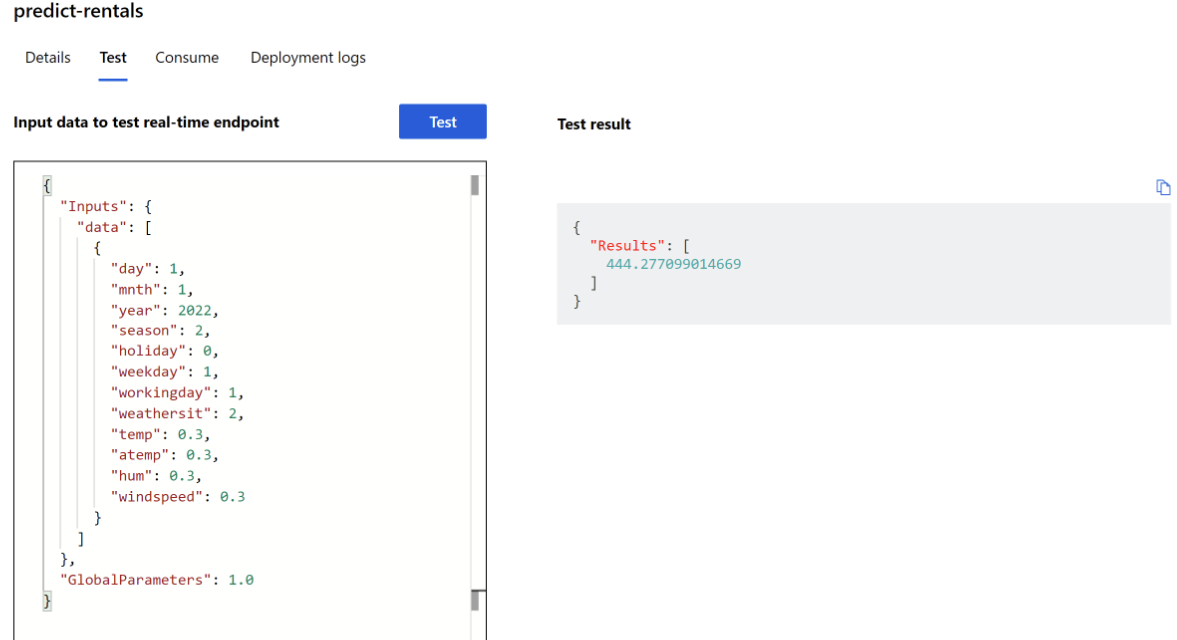
A bike rental company wants to predict how many bikes are available for a specific day.
They use historical data and input parameters such as:
- day, month, year
- season (spring/summer/autumn/winter)
- holiday (yes/no)
- weekday vs weekend
- workday (yes/no)
- weather (tropical/sunny/cloudy/rain)
- temperature
- humidity
- wind speed
With the data in a CSV file, Azure ML can predict how many bikes should be available on 1 January 2022. In the example, the prediction was 444 bikes, and the post notes that the result can change based on better predicted weather.
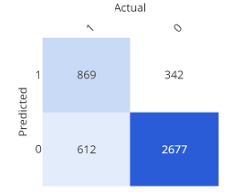
Confusion matrix (simple explanation)
A confusion matrix shows how often the expected and the real results match. It is one way to check model quality.
2: Guiding principles for implementing AI
Microsoft has guidance for building AI responsibly. Here are the main points, in simple terms:
- Fairness: AI should not discriminate. Example: in loan decisions, the system should not use gender, ethnicity, or religion to give someone an advantage or disadvantage
- Reliability and Safety: AI systems must work in a safe way and should be tested well. Example: if an AI model controls a vehicle or supports medical decisions, wrong results can cause serious harm
- Privacy and Security: Sensitive data must stay protected. Even after training, privacy and security should be monitored in production
- Inclusiveness: AI should help people and support better work for everyone, including people with different accessibility needs
- Transparency: Users should understand the goal, limits, and how the system works
- Accountability: People stay responsible for what AI does. Designers and developers should follow clear organization rules and frameworks so the solution is well-defined
3: Anomaly Detection
Anomaly Detection finds unusual patterns or “strange points” in data. This can help find issues like fraud or technical problems.
Example 1:
- In race sports: find a mechanical problem early, before it becomes critical.
- In production: detect faults in an automated production line at different times.
When anomalies are detected, you can trigger actions like:
- send a warning/alert
- run a script or automated fix process
Example 2: The post gives an example using an HVAC system (heating, ventilation, air conditioning).
AI can predict when temperature moves too high or too low, then trigger:
- extra cooling or heating
- alerts when a threshold is crossed
4: Computer Vision
Computer Vision is AI that can work with visual content (images). The post also mentions*Seeing AI, an app that can help blind or low-vision users by describing what is around them.
It can:
- describe an image in one sentence (max 10 words)
- read text (from a scan/photo)
- read money
- scan barcodes and explain the product
- recognize people
And it can also provide more image features:
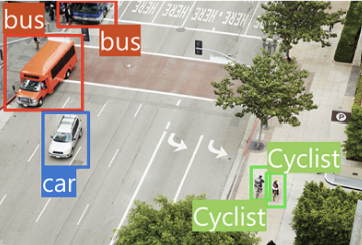
- Image classification: Find out what type of environment the image shows.
- Object detection: Detect different objects in an image.
- Semantic segmentation: Find which pixels belong to which object. Example is traffic monitoring where vehicles can be marked.
- Image analysis (tags): Describe an image using tags and confidence.The post says it can describe in up to 10 words by using the detected tags.
- Face detection, analysis, and recognition: Recognize faces and connect them to people. The post also states it can match known people and return an answer in about 2 seconds.
- Optical character recognition (OCR): Recognize characters in an image. The post uses Google Translate camera scan as an example.
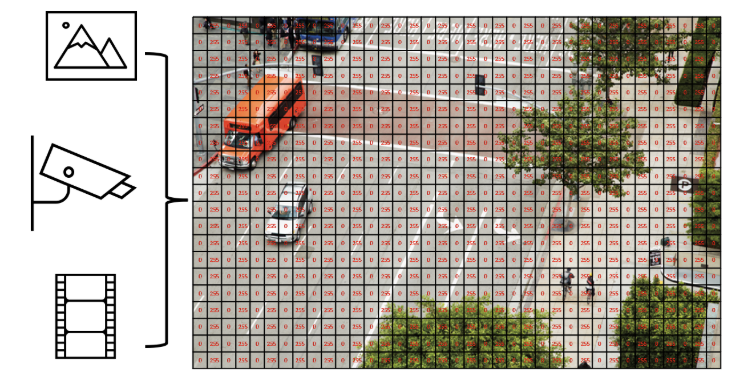
In AI, an image can be seen as numeric pixel values. These values can be used to train ML models that learn what the image content looks like.
Start using Computer Vision
To use Computer Vision, you need:
- a Computer Vision resource
- a Cognitive Services resource
Analyze an image (confidence)
Computer Vision can evaluate what objects are in an image and return a human-style description.
The results can include a confidence score, meaning how sure the service is about what it sees.
Example from the post (descriptions like):
- “A black and white photo of a city”
- “A black and white photo of a large city”
- “A large white building in a city”

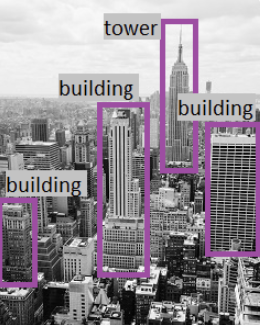
It also creates tags (example tags in the post):
- skyscraper
- tower
- building
Then object detection can label what the objects are (example: “building”).
Face recognition
Computer Vision can:
- estimate age
- place a square/box around the face

Azure and Computer Vision
Azure can use the following services to create and implement into your own applications:
- Computer Vision
- Custom Vision
- Face
- Form Recognizer
5: Natural Language Processing (NLP)
Natural Language Processing (NLP) is AI that understands and recognizes written and spoken language. This can be used in different scenarios:
- read and understand text in documents and emails
- understand spoken language and answer
- translate spoken or written sentences
- understand user commands and actions
The post mentions a VR game named Starship Commander that uses NLP so players can talk and the game can respond. It uses AI for these scenarios:
- the game reacts to what you say
- the game responds in a personal way to characters
Azure services for NLP
- Language
- Translator
- Speech
- Azure Bot
6: Knowledge Mining
Knowledge mining is a definition for finding information inside large data sources, including data that is not well structured. The goal is to build a searchable knowledge store.
Azure Cognitive Search
Azure has a service named Cognitive Search that helps you:
- build indexes
- support search for internal use or a secured internet-facing search
Azure can process images in this manner and extract information from documents or images, so you can ask for specific stuff and Cognitive Search does the rest for you.Cognitive Search is a PaaS solution, where Microsoft manages the infrastructure.
It can support:
- full-text search and analysis
- text derived from images
- entity detection and key phrase detection (via text analysis)
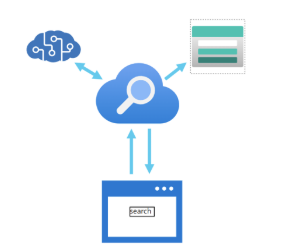
Features of Azure Cognitive Search
- data from many sources
- full-text search and analysis
- AI-driven search requests
- multiple languages
- location-based search
- customizable user experience
7: Challenges and risks
AI is very helpful and powerful, but it needs responsible use. Microsoft lists these risks:
- Bias: can affect results.
- Example: a loan approval model may discriminate if trained on biased data.
- Errors can cause damage
- Example: if an autonomous vehicle fails, it can cause an accident.
- Data can be exposed
- Example: a medical bot trained on sensitive patient data needs strong protection.
- Solutions may not work for everyone
- Example: a smart home assistant may not provide audio output for visually disabled users.
- Users may need to trust a complex system
- Example: an AI tool gives investment advice, but where are the reasons coming from?
- Who is responsible for AI decisions?
- Example from the post: someone is wrongly convicted based on face recognition—who is accountable?
8: Machine Learning + Computer Vision Practice test
This part is a step-by-step guide of some of the features of Machine Learning and Computer Vision, which I did according to the course which was really fun to do. You can use the same idea to learn how training changes results.
8.1: Preparing the training images
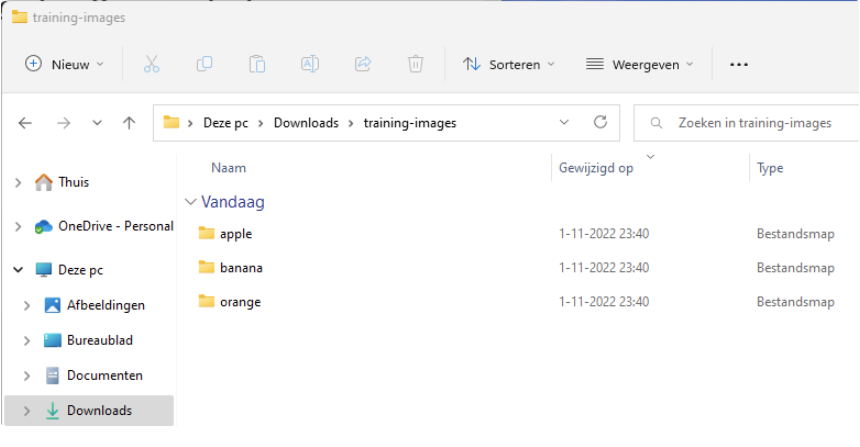
In the test environment, import 45 photos:
- 15 apple images
- 15 banana images
- 15 orange images
Source for the images: https://aka.ms/fruit-images
8.2: Importing into Cognitive Services and add tags
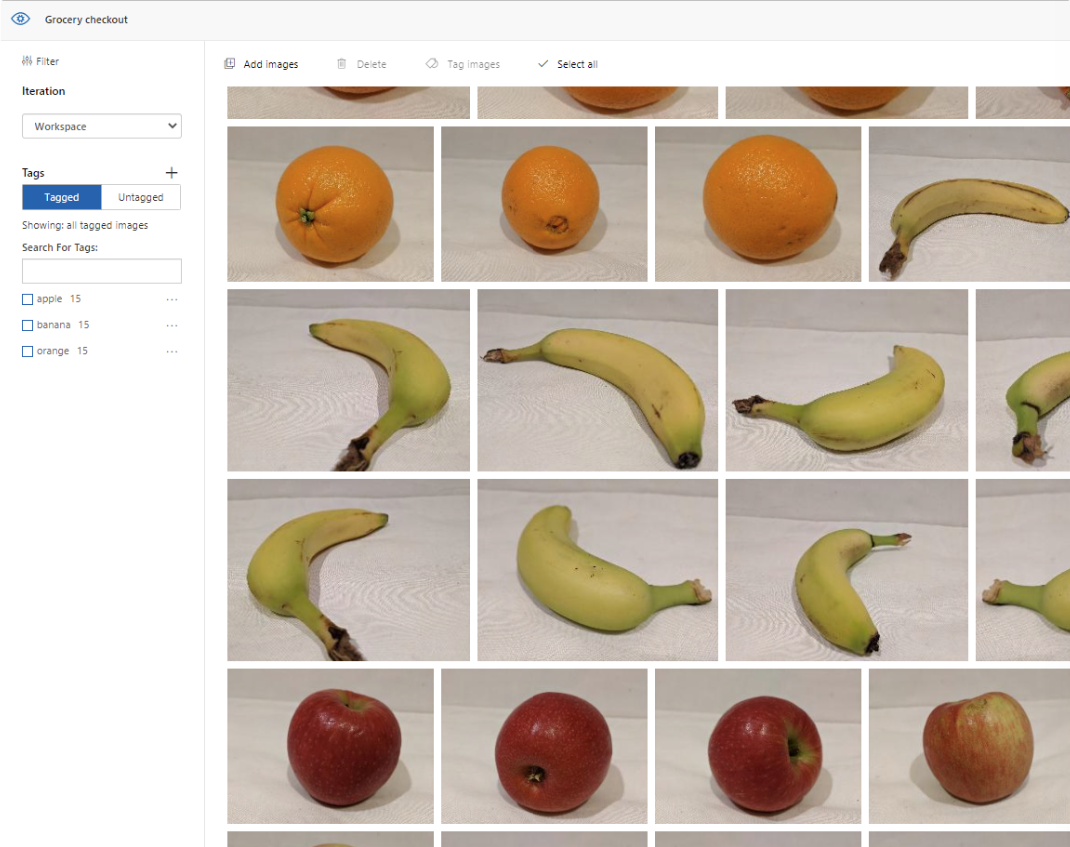
Import the photos into your Cognitive Services workspace.
When importing we add a tag so the system knows what each image is. After it learned what is an apple, what is a banana and what is an orange, the system uses these learned tags to judge new images.
8.3: Running a quick test
To test the system, we will quickly pick an image from google of an apple to see how sure the system is about other images which are slightly different than the images uploaded and trained with.
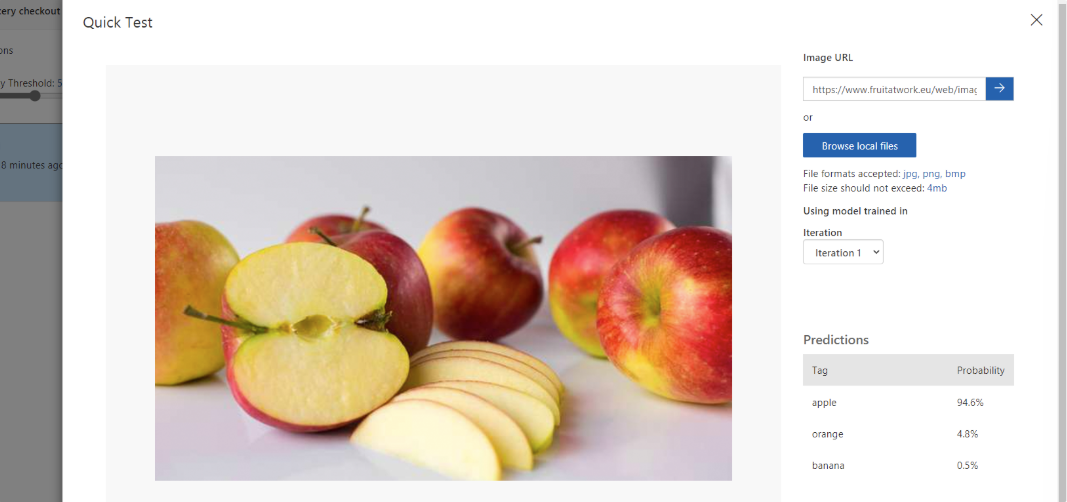
The system was 94.6% sure it was an apple, so this is already a very clever service.
8.4: Learning process
To teach the system something new, add apricot. This can give very fun results, as this can can be judged as:
- orange (color)
- apple (shape)
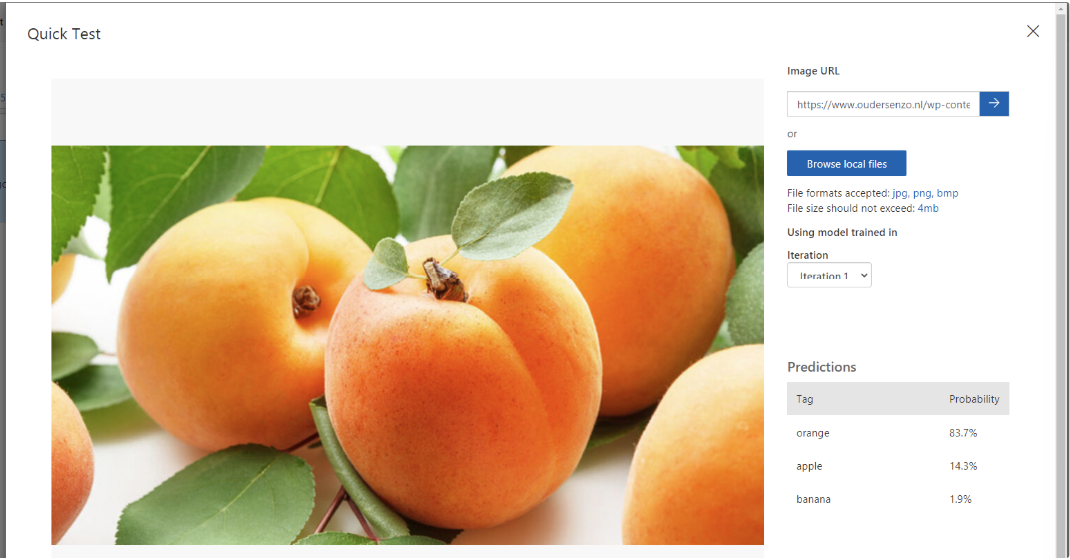
As a “0-measurement” test, I imported a picture of an apricot against the 3 known fruit types (apple, banana, orange). The post states the system predicted:
- 83.7% orange (mostly due to color)
- 14.3% apple (due to the same shape)
- 1,9% banana (doesnt find that much matching properties)
8.5: Uploading apricot images and train again
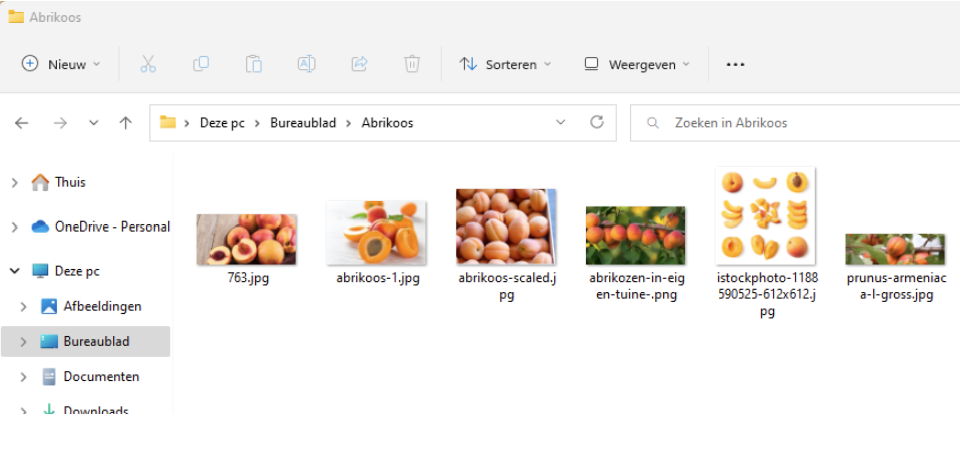
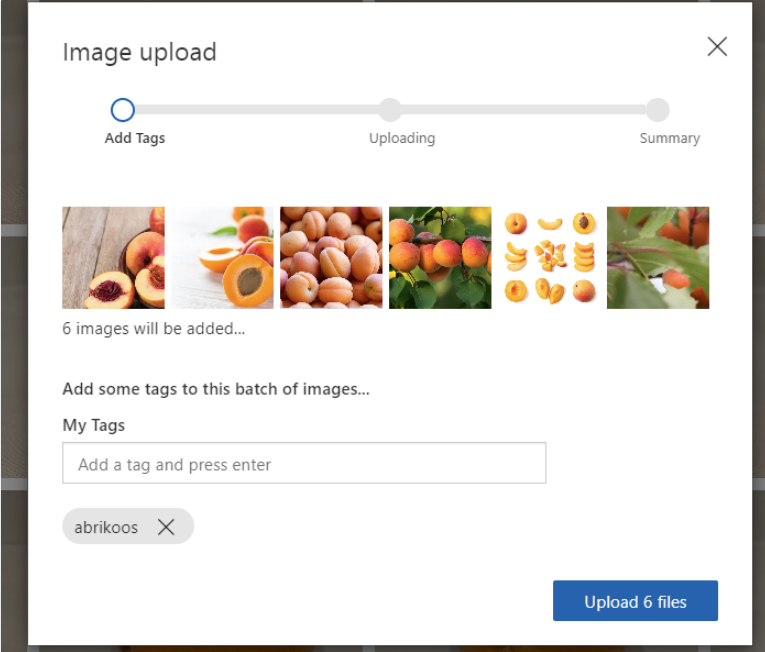
We will now upload 6 apricot photos, to train the service what a apricot is.
Add the tag:
- “apricot” (as the post says: “abrikoos”)
Then run training:
- Quick training (faster, but less compared to advanced training time/quality tradeoff mentioned in the post)
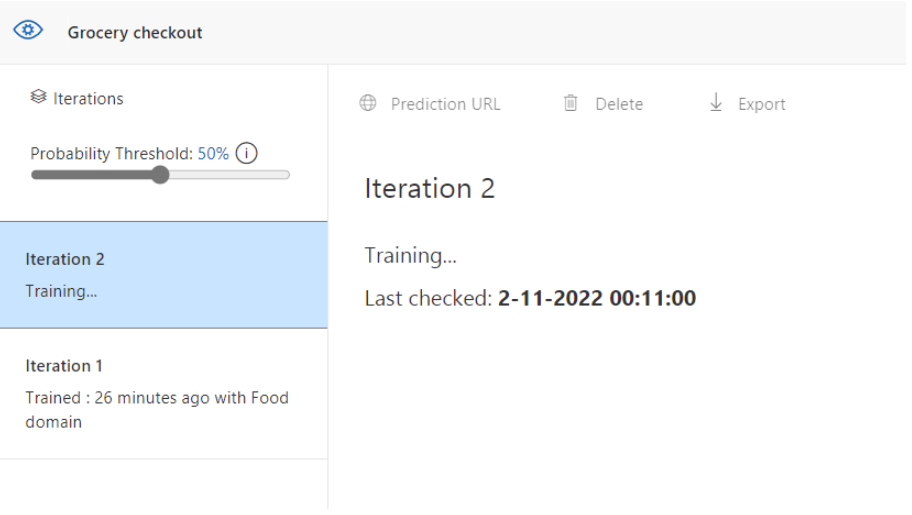
8.6: Test again with the same apricot image
After learning, test the same image again (from the 0-measurement). In the post, the result became:
- 98% apricot
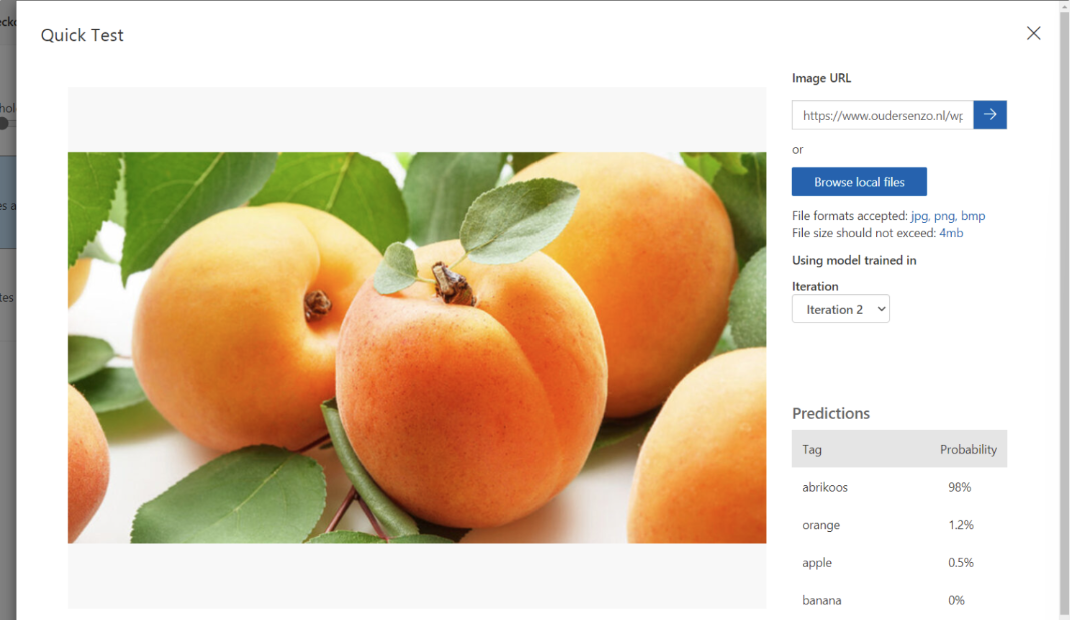
So, with only a few training/reference images, the system can learn a new category.
Summary
This post gave a simple overview of how Azure AI can be used:
- Machine Learning to learn from data and make predictions or categories
- Guiding principles for fairness, safety, privacy, transparency, and accountability
- Anomaly Detection to find unusual patterns in data
- Computer Vision to understand images (including confidence scores and image tagging)
- NLP to work with text and speech
- Knowledge Mining to build searchable knowledge using Cognitive Search
Thank you for reading this post and I hope it was helpful!
These sources helped me by writing and research for this post;
End of the page 🎉
You have reached the end of the page. You can navigate through other blog posts as well, share this post on X, LinkedIn and Reddit or return to the blog posts collection page. Thank you for visiting this post.
Support the blog
