Module 4: Resiliency and Redundancy in Azure
Areas to implement resilliency
The different layers where you can and should apply resiliency and how you can improve the area are:
- Software: Operating system, application, runtime
- Replication
- Hardware: UPS, server, switch, infrastructure, network, data center
- Replication
- Corruption/Encryption: Ransomware, corrupted data, avoid using replication as a backup
- Backup
- Attack/DDoS: DDoS protection, firewall
- Isolated export/backup/other
- Regulatory Requirements: Uptime according to an SLA, specific methods for data storage
- Backup
- Humans: Human errors, wrong implemented changes or processes
- Processes
How to decrease outages of infrastructure
There are several ways to protect yourself against infrastructure problems, depending on the issue and the service.
- Replication: Replication helps mitigate infrastructure problems and provides a quick way to get back online. However, replication is not a backup and does not protect against data corruption.
- Snapshot: A snapshot is a package that contains the changes between a specific state and the current state. Snapshots protect against data corruption but do not protect against infrastructure issues. Moreover, there is a risk that the source becomes corrupted, in which case a snapshot becomes useless.
- Backup: A backup is considered a complete copy of current data stored elsewhere. Typically, you create at least two backups for each system:
- Internal Backup: A backup on the same infrastructure for quick data recovery.
- External Backup: A backup on a completely separate infrastructure, ideally located in a different geographic region, as a last resort in case of data loss.
How to decrease outages of human errors
People should have as little contact as possible with production environments. For any changes, ensure the presence of a test/acceptance environment. Human errors are easily made and can have a significant impact on a company or its users, depending on the nature of the mistake.
The best approach is to automate as much as possible and minimize human interaction. Also make use of seperated user/admin accounts and use priveleged access workstations.
Recovery Point Objective (RPO)
It is important to define the Recovery Point Objective (RPO) for each service. This determines the maximum amount of data you can afford to lose based on real-life scenarios. A customer might often say, “I can’t afford to lose any data,” but achieving such a solution could cost hundreds of thousands or even millions.
An acceptable RPO is determined based on a cost-benefit analysis, such as: “If I lose one day of data, it will cost me €1,000, which is acceptable.” In this case, the backup solution can be configured to ensure that, in the event of an issue, no more than one day of data is lost.
Recovery Time Objective (RTO)
The Recovery Time Objective (RTO) defines the amount of time required to initiate a specific recovery action, such as a disaster recovery to a secondary region.
Know your solution
The most important aspect is to thoroughly understand the application you are building in Azure. When you understand the application, you will more quickly identify improvements or detect issues. Additionally, it is crucial to know all the dependencies of the application. For example, Azure Virtual Desktop has dependencies such as Active Directory, FSLogix, and Storage.
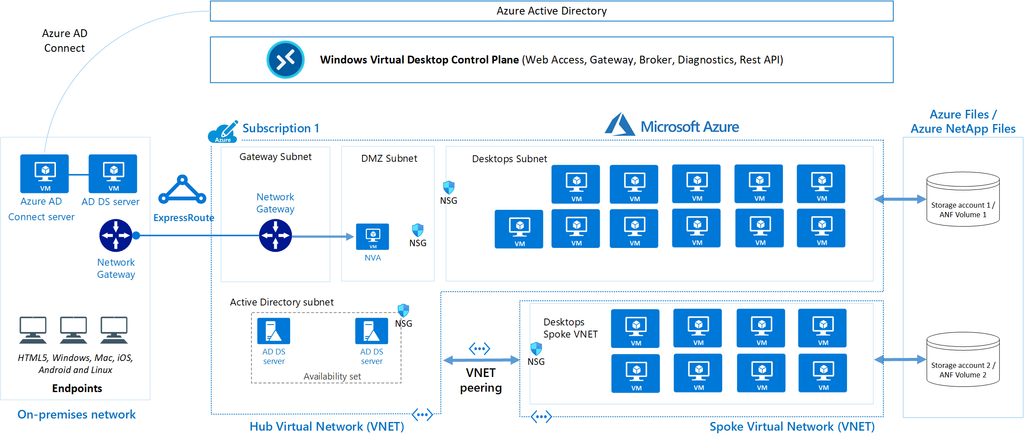
In solutions as these, documentation is key. Ensure your organization has a proper tool to write topologies like these down.
Requirements and SLAs
When designing and building an environment in Microsoft Azure, it is important to understand the requirements.
In Azure, most services come with a specific SLA (Service Level Agreement) that defines the annual uptime percentage. It is crucial to choose the right SLA in relation to the costs. For example, adding an additional “9” to achieve 99.999999% uptime might provide just a few extra minutes of availability but could cost an additional €50,000 annually.
To get a nice overview of the services available with all SLA options available, you can check this page: https://azurecharts.com/sla?m=adv
Azure Chaos Studio
Azure Chaos Studio is a fault simulator in Azure that can perform actions such as:
- Shutting down a virtual machine
- Adding latency to the network
- Disabling a virtual network
- Disabling a specific availability zone
In summary, Azure Chaos Studio enables you to test the resiliency of your application/solution and enhance its resilience.
Azure Resiliency Contructs
To create actual resiliency for your application in Azure, the following functionalities can be used:
- Fault Domains
- Availability Sets
- Availability Zones
To achieve resiliency in your Azure application, these constructs must always be properly designed and configured. Simply adding a single virtual machine to an availability set, scale set, or availability zone does not automatically make it highly available.
Fault Domains, Availability Sets and Virtual Machine Scale Sets (VMSS)
A Fault Domain is a feature of Availability Sets and VM Scale Sets that ensures multiple virtual machines remain online in the event of a failure within a physical datacenter. However, true resiliency requires designing and configuring the application to handle such disruptions effectively, as fault domains are only one part of the broader resiliency strategy.
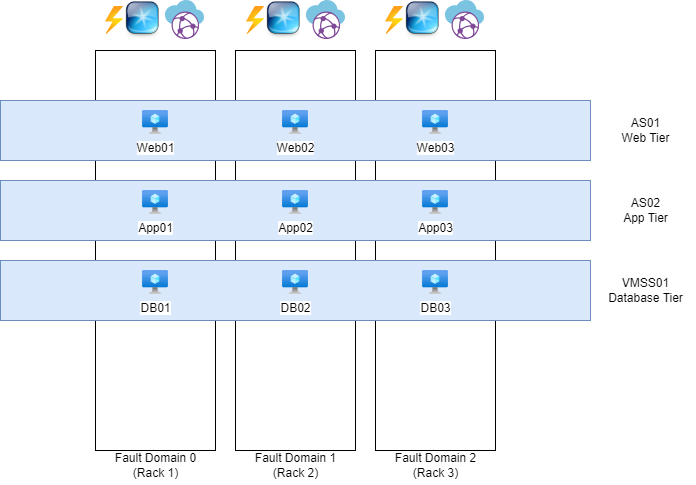
The white blocks represent physical server racks, each with its own power, network, and cooling systems. Each rack is considered a “Fault Domain,” meaning a domain or area where a failure could impact the entire domain/area.
The blue blocks represent Availability Sets (AS) and Virtual Machine Scale Sets (VMSS), which distribute multiple virtual machines with the same role across three fault domains. For instance, if one of the three server racks catches fire or loses power, the other two machines will remain online.
To maintain clarity and organization, ensure that each application has its own separate set. So you have implemented a good level of redundancy.
Availability Sets, Virtual Machine Scale Sets, and Fault Domains do not provide protection against failures at the datacenter level. You need Availability Zones for that.
Availability Zones
Nearly every Microsoft Azure region has 3 Availability Zones. These are groups of datacenters with independent power, network, and cooling systems. This allows you to make solutions zone-redundant, protecting your application from failures at the datacenter level. However, this redundancy and resiliency must be specifically designed. This can be done by using a method like the method below:
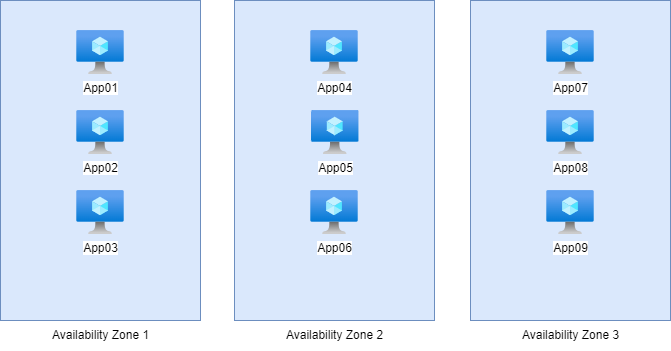
Here, we have 9 servers with the exact same role, distributed across the 3 Availability Zones in groups of 3. In this setup, if one of the three zones goes down, it will not impact the service. The remaining 6 servers in the other two zones will continue to handle the workload, ensuring uninterrupted service.
This type of design is a good example of zone-redundant architecture, providing resilience against datacenter-level failures while maintaining service availability.
Availability Sets vs. Availability Zones
The exact difference between these options, which appear very similar, lies in their uptime and redundancy:
Here’s a concise comparison of the options with their uptime and redundancy:
| Option | Uptime | Redundancy |
|---|---|---|
| Availability Set | 99.95% | Locally redundant |
| Availability Zone | 99.99% | Zone-redundant |
Proximity Placement Group
Azure does not guarantee that multiple virtual machines will be physically located close to each other to minimize latency. However, with a Proximity Placement Group (PPG), you can instruct Azure: “I want these machines to be as close to each other as possible.” Azure will then place the machines based on latency, ensuring they are located as close together as possible within the physical infrastructure.
This is particularly useful for applications where low latency between virtual machines is critical, such as high-performance computing (HPC) workloads or latency-sensitive databases.
You can configure this Proximity Placement Group on your Virtual Machines.
Azure Backup
Azure offers two distinct services to configure backups for your resources:
1.Recovery Services Vault:
- Designed for broad disaster recovery and backup scenarios.
- Supports Azure Backup, Azure Site Recovery, and other recovery solutions.
- Ideal for long-term data retention and regulatory compliance.
- Commonly used for virtual machine backups, SQL Server backups, and more.
2.Backup Vault:
- A lightweight and cost-optimized service specifically for Azure Backup.
- Focused on storing backup data for IaaS VMs, databases, and file shares.
- Designed for simplified deployment and management of backup solutions.
- Ideal for environments where disaster recovery is not a primary concern.
Key Difference:
- Recovery Services Vault is a comprehensive solution for backup and disaster recovery needs, including advanced scenarios. We also use this solution often in business workloads.
- Backup Vault is a streamlined, cost-effective solution for basic backup storage and operations. We often use this solution for testing purposes.
Choose based on the scope and complexity of your backup requirements.
Summary Module 4
Backup and Resilience in Microsoft Azure is very important. This starts with knowing exactly what your solution does. Therefore you can apply high availability and backup to it.
To go back to the navigation page: https://justinverstijnen.nl/blog/azure-master-class/
End of the page 🎉
You have reached the end of the page. You can navigate through other blog posts as well, share this post on X, LinkedIn and Reddit or return to the blog posts collection page. Thank you for visiting this post.
Support the blog
