Azure Default VM Outbound access deprecated
What does this new requirement mean?
This requirement means that every virtual machine in Azure created after 30 September 2025 needs to have an outbound connectivity method configured. You can see this as a “bring your own connection”.
If you do not configure one of these methods, you will end up with a virtual machine that is not reachable from the internet. It can be reached from other servers (Jump servers) on the internal network or by using Azure Bastion.
The options in Azure we can use to facilitate outbound access are:
| Type | Pricing | When to use? |
|---|---|---|
| Public IP address | 4$ per VM per month | Single VMs |
| Load Balancer | 25$ - 75$ per network per month | Multiple different VMs (customizable SNAT) |
| NAT Gateway | 25$ - 40$ per subnet per month | Multiple similar VMs (default SNAT) |
| Azure Firewall | 800$ - 1300$ per network per month | To create complete cloud network with multiple servers |
| Other 3rd party Firewall/NVA | Depends on solution | To create complete cloud network with multiple servers |
Load balancer, NAT Gateway, Azure Firewall and 3rd party firewall (NVA) also need a Public IP address.
To further explain what is going on with these types:
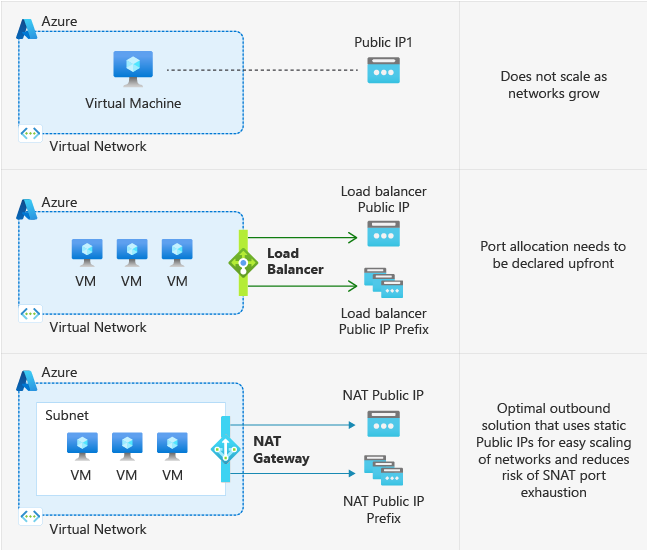
These are the Azure native solutions to achieve defualt outbound access with the details on the right.
This change means that Microsoft actually mark all subnets as “Private Subnet”, which you can already configure today:

Why would Microsoft choose for this?
There are some different reasons why Microsoft would choose to change this. It’s primary reason is to embrace the Zero Trust model, and so “secure-by-default”. Let’s find out all reasons:
- Security by default: Not connecting VMs to the internet that doesn’t need them increases security
- Predictable IP ranges: In the old situation, the outbound IP address could change anytime which increases confusion
- Explicit method: With this change you can choose what VMs need internet access and what VMs don’t. This because you actually have to configure them. In the old situation all VMs have internet access
- Cost management: The costs of the machines will be more expected as there will be less automated traffic and you can decide which VMs need internet access and what machines does not
What to do with existing VMs?
Existing VMs will not be impacted by this change.
Only when deploying a new VM after the migration date: 30 September 2025, the VM will not have outbound internet access and one of the methods must be configured.
Summary
I thnk this is a great change of Microsoft to change this behaviour. Yes, your environment will cost more, but the added security and easier manageability will really make up for it.
I hope I informed you about this change and thank you for reading.
Sources:
- https://learn.microsoft.com/en-us/azure/virtual-network/ip-services/default-outbound-access
- https://azure.microsoft.com/nl-nl/updates?id=default-outbound-access-for-vms-in-azure-will-be-retired-transition-to-a-new-method-of-internet-access
End of the page 🎉
You have reached the end of the page. You can navigate through other blog posts as well, share this post on X, LinkedIn and Reddit or return to the blog posts collection page. Thank you for visiting this post.
Support the blog
