Test Azure Virtual Desktop connectivity and RTT
I created a script to test the connectivity, if it is allowed through Firewall and also test the RTT to the Azure Virtual Desktop service. The script then gives the following output:
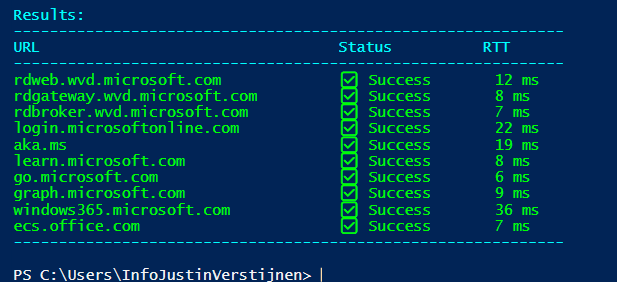
The script to test Azure Virtual Desktop connectivity
I have the script on my Github page which can be downloaded here:
Download TestRTTAVDConnectivity script
What is Round Trip Time (RTT)?
The Round Trip Time is the time in milliseconds of an TCP packet from its source to it’s destination and from destination back to the source. It is like ping, but added with the time back like described in the image below:
This is an great mechanism to test connectivity in some critical applications where continious traffic to both the source and destination is critical. These applications can be Remote Desktop but also in VoIP.
RTT and Remote Desktop experience:
- Under 100ms RTT: Very good connection
- 100 to 200ms RTT: User can experience some lags in input. It feels different to a slow computer as the cursor and typing text might stutter and freeze
- Above 200ms RTT: This is very bad and some actions might be done.
The script described
The script tests the connection to the required endpoints of Azure Virtual Desktop on the required ports. Azure Virtual Desktop heavily relies on port 443, and is the only port needed to open.
- The script starts with the URLs which come from this Microsoft article: https://learn.microsoft.com/en-us/azure/virtual-desktop/required-fqdn-endpoint?tabs=azure#end-user-devices
- Then it creates a custom function/command to do a TCP test on port 443 on all those URLs and then uses ICMP to also get an RTT time. We also want to know if an connection was succeeded, how long it took.
- Then summarizes everything into a readable table. This is where the table marup is stated
- Test the connectivity and write the output, and waits for 50 seconds
The script takes around 10 seconds to perform all those actions and to print those. If one or all of them are “Failed”, then you know that something has to be changed in your Firewall configurations. If all of them succeeds then everything is alright, and the only factor can be a eventually low RTT.
Summary
This script is really useful to test connectivity to Azure Virtual Desktop. It can be used in multiple scenario’s, like initial setup, testing and troubleshooting.
Thank you for reading this guide and I hope it was useful.
These sources helped me by writing and research for this post;
- The old and discontinued “Azure Virtual Desktop Experience Estimator”
- https://learn.microsoft.com/en-us/azure/virtual-desktop/required-fqdn-endpoint?tabs=azure#end-user-devices
End of the page 🎉
You have reached the end of the page. You can navigate through other blog posts as well, share this post on X, LinkedIn and Reddit or return to the blog posts collection page. Thank you for visiting this post.
Support the blog
