Email Security
Email security is becoming more and more important, because email is still one of the main ways attackers try to get access to organizations.
Attackers know that email can be a very direct route to sensitive data, systems, and sometimes even privileged access. This often happens through users who are not aware of the risks, or who accidentally click something, share information, or approve access they should not.
To reduce the most basic risks, I’ve created a dedicated category with essential email security settings that should be applied to every domain we own. This also includes domains that are not actively used for sending or receiving email, because attackers can still abuse those domains for spoofing or impersonation.
In the pages in this category, I dive into how to configure different security mechanisms to enhance your email security, get the lowest amount of possible messages marked as spam and minimize the risk of your domain(s) being spoofed in various attacks happening every minute of the day.
Check you domains’ email security posture
To check your domains’ email security posture based on configurations, I have made the DNS MEGAtool where you get an overview of the configuration within seconds.
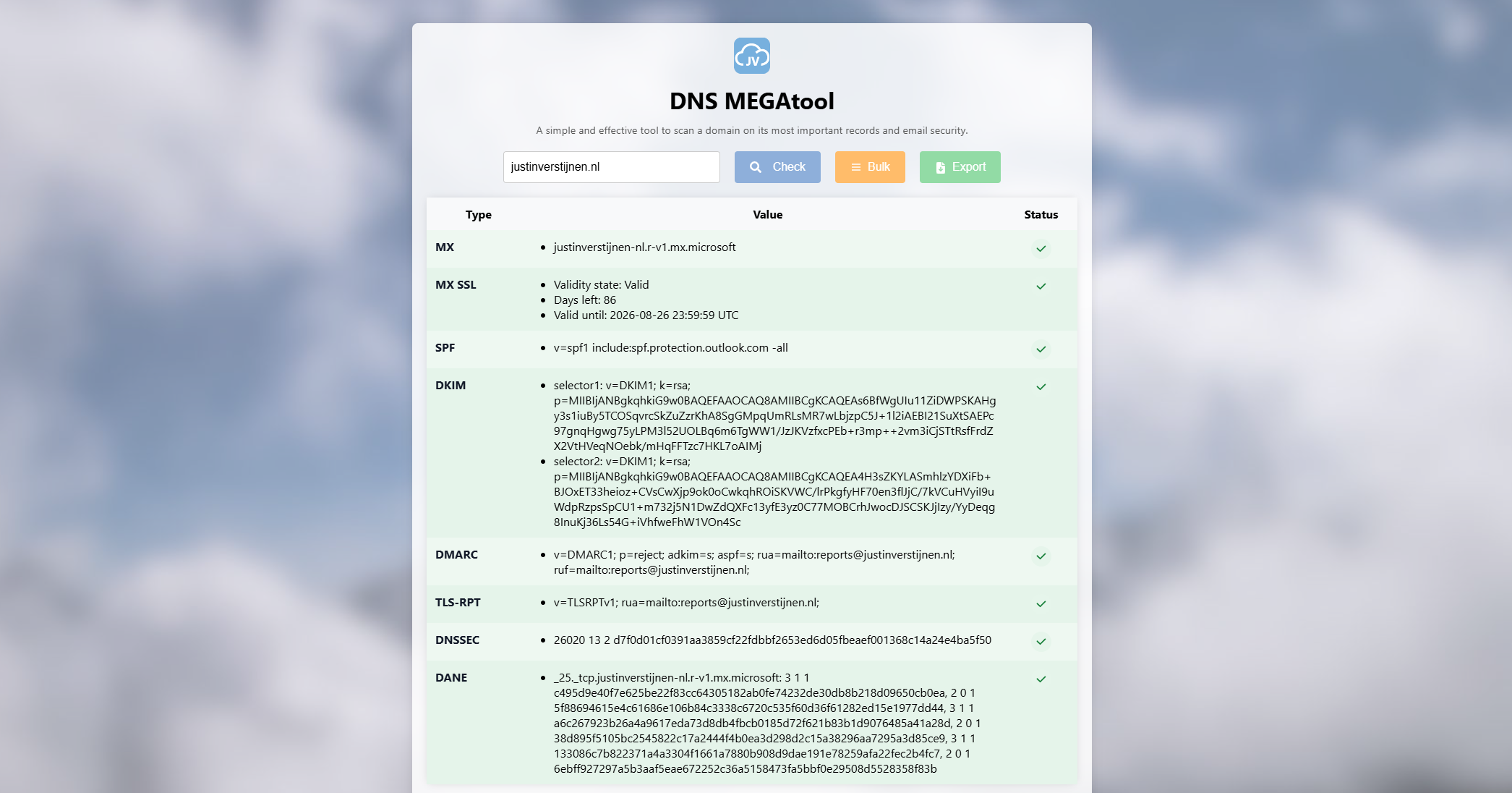
Configure on any domain
The underlying security mechanisms must be configured on any domain you own in my opinion. Most companies have various stale/stand-by domains. Even there you should configure at least the basics. This will help you prevent spoofing and similar attacks.
1. SPF record
On all your domains, make sure you use an SPF record with a Hardfail policy active. If having stale/stand-by domains, configure the following:
v=spf1 -allThis says that no entity is trusted to send through your domain. Without this record, every entity on the internet is possibly trusted as you did not release any list of trusted senders. This depends on the configuration of recipients.
To configure SPF records for active domains, refer to my SPF guide:
SPF record configuration guide
2. DMARC record
On all your domains, make sure you use an DMARC record with a reject policy active. If having stale/stand-by domains, configure the following:
v=DMARC1; p=reject;This will ensure that your domain is not available for spoofing anymore, as you released a policy that says: “If this domain is being used outside of my SPF and DKIM mechanisms, reject the email messages”.
To configure DMARC records for active domains, refer to my DMARC guide:
DMARC record configuration guide
Configure on sending/receiving domains
These records only have to be configured on domains where you send and receive email messages. They are all related to sending and receiving email messages.
3. DKIM record
Configure DKIM records for every service that sends email on your domain. Refer to my setup guide on to how to configure this and how DKIM helps you preventing man in the middle attacks by email.
DKIM record configuration guide
4. TLS-RPT record
Configure a TLS-RPT record to receive TLS deliverability reports by senders to your domain to detect possible email deliverability problems before they cost you customers and possible projects.
TLS-RPT record configuration guide
5. MTA-STS record
Configure a MTA-STS record including policy to increase email security by leveraging the MTA-STS protocol.
MTA-STS record configuration guide
6. SMTP DANE (supported services only)
If using Microsoft 365, configure SMTP DANE to further increase email security by leveraging the DNSSEC protocol.
SMTP DANE record configuration guide
Introduction to Analyzing Email Headers
In this post, we will dive into how to analyze Email Headers and to use this information to enhance your email delivery. Also you can view why a message went up in a user's junk folder.
What is MTA-STS and how to use it to protect your email flow
In this post I will be configuring MTA-STS for better email security alongside the theoretical explaination including different hosting options you can use.
What is TLS-RPT and how to configure
In this post I will explain TLS-RPT which is an email security reporting mechanism that gives you reports about TLS encryption problems for incoming email to your domain. In this guide, I will explain what TLS-RPT is, how it works and how you can configure it...
Enhance email security with SPF/DKIM/DMARC
When it comes to basic email security, we have 3 techniques that can enhance our email security and delivery by some basic initial configuration. Those are called SPF, DKIM and DMARC. This means, configure, monitor and almost never touch again.
Configure DNSSEC and SMTP DANE Microsoft 365
Recently, Microsoft announced the general availability of 2 new security protocol when using Microsoft 365 and the service Exchange Online in particular. SMTP DANE and DNSSEC. What are these protocols, what is the added value and how can they help you secure your organization? Lets find...