CompTIA Security+ Course notes
Introduction to the study course
For this study I’ll follow the official book called: CompTIA Security+ Complete Study Guide. The book contains 6 different subjects with some categorizations.
The Exam Security+
The objectives are:
- Assess the security posture of an enterprise environment and recommend and implement appropriate security solutions.
- Monitor and secure hybrid environments, including cloud, mobile, Internet of Things (IoT), and operational technology.
- Operate with an awareness of applicable regulations and policies, including principles of governance, risk, and compliance.
- Identify, analyze, and respond to security events and incidents
The scoring is:
1.0: General Security Concepts (12%) 2.0: Threats, Vulnerabilities, and Mitigations (22%) 3.0: Security Architecture (18%) 4.0: Security Operations (28%) 5.0: Security Program Management and Oversight (20%)
Module 1: Introduction
Module 1 is all about the exam, how to use the study resources and how to learn. Nothing too interesting to note here. All is in the part above, about the exam.
Module 2: General Security Concepts
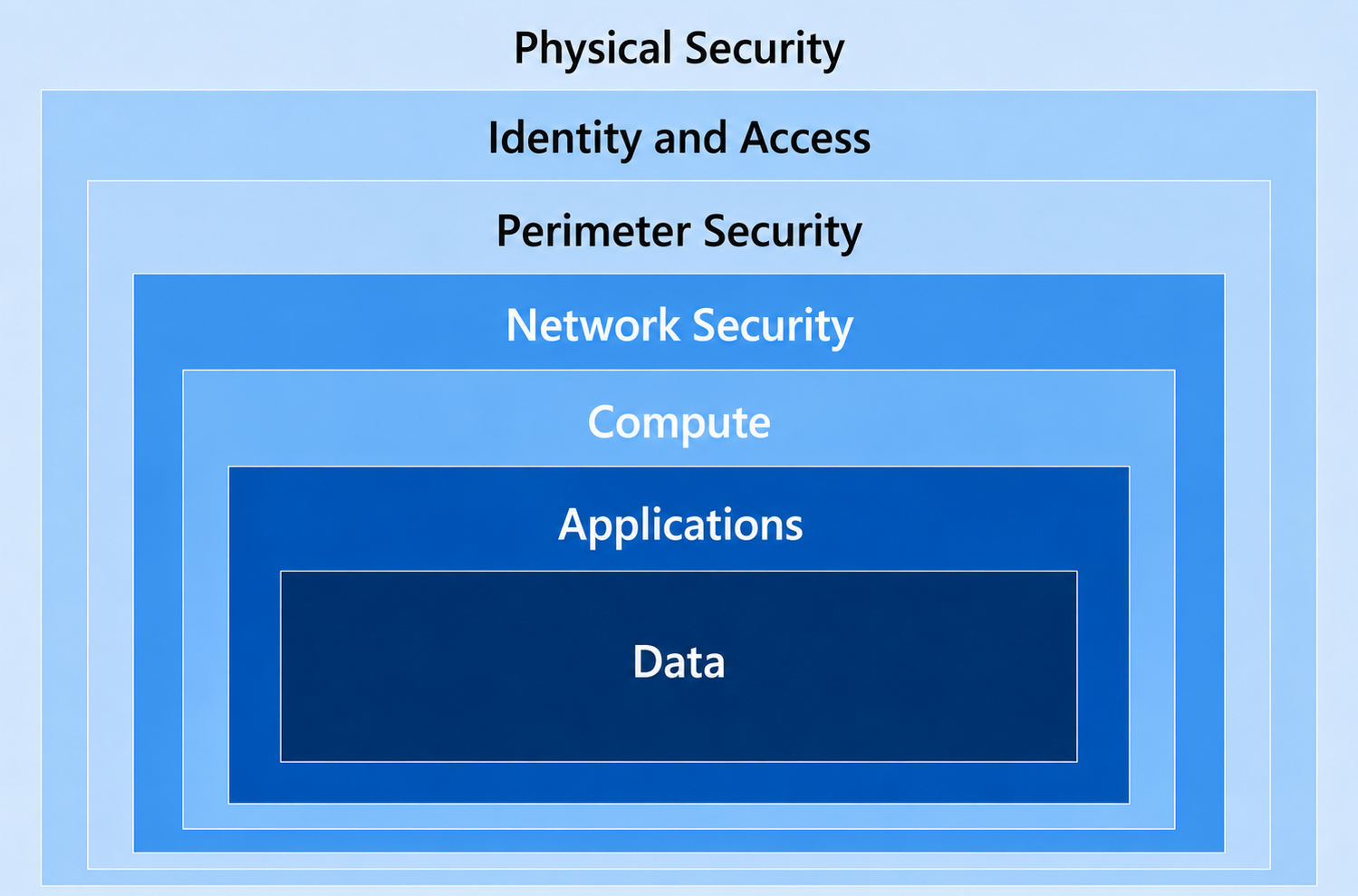
Security can be very complex, because it is not a license we can buy, or something that we can switch on or off. Security is a team-sport where the primary goal is to secure your company-data, secrets devices and personal information and this data is as secure as the weakest switch in the loop. This loop is a very big scope and can be categorized in 7 layers, where the order is important because it is almost similar to the generic OSI model.
| Layer | Explaination |
|---|---|
| 1. Physical security | Access to the physical systems must be secured so no unpermitted users can physically touch these devices. |
| 2. Network security | The network and data flow of your company must be secure. Most attacks come through a network. This not only means that the architecture is enough, the network also needs to be monitored and have advanced treat detection with certain software. |
| 3. Perimeter security | Gateways, firewalls and routers which can connect to your internal network has to be secure by configuring them, allowing only specified traffic, protocols, ports and proactively monitored. |
| 4. Endpoint security | The endpoints which users work on has to be secured. These are mostly mobile devices which can easily be stolen or have unwanted software installed. Most users want the permissions to install software which has to be proactively monitored. |
| 5. Application security | Applications which run on servers has to be secured. Not only the application, also the server it runs on. Remember, the weakest switch. |
| 6. Data security | The data stored and in transit on your network has to be secured. For data at-rest we can use encryption and integrity scanning and for data in-transit we can use encrypted transmission with SSL. |
| 7. User education | End users work with the data, applications and endpoints. They have to constantly be up to date with the latest type of attacks and must have a caring mentality. What you don’t want is users that don’t care and do anything a attacker states in an email for example. |
To bump up your security posture to around 99% which is logically the maximum percentage, we need to implement security over all these domains. Security is inhertiable most of the time. This means that compromise on a particular layer means also access to underlying layers. Let’s say, a hacker has breached a server. On that server runs a database, and on the database the (sensitive) data.
2.1.1 Security Controls
To improve your security on certain domains, we implement security controls. These are technical settings for limitations or giving an user only access to what they need.
The controls that are available are:
| Control | Focus | Real world examples |
|---|---|---|
| Technical | Technology | Firewall Intrusion Detection Bitlocker MFA Basic Access Controls Time based access Anti Malware |
| Managerial | Governance | Best practices Compliance against security guidelines Risk assessments |
| Operational | Procedures | Backup procedures Incident Response Security Awareness Trainings Sharing sensitive information secure |
| Physical | Physical access | Security camera’s Physical access to rooms Person-based access Visitor logging |
Security is all about preventing, deterrenting, detecting, correcting and compensating.
2.2.1 Confidentiality, Integrity and Availability (CIA)
Tthe CIA triad are 3 principles of information security:
- Confidentiality : Ensure only wanted in dividuals have access to specific data or resources
- Integrity : Ensure the accuracy and trustworthiness of data. Ensure it is not tampered and when so, you have integrity scanning with notifications
- Availability : Ensure resources are accessible to users when needed
These three principles align with the “Verify explicitly” pillar of the Zero trust model, where we want to verify the integrity and only give the right users access at the right time. This CIA triad is also known as:
- Keep it confidential
- Keep it real
- Keep it accessible
2.2.2 Non-repudiation
Non-repudiation is a process which ensures that a specific operation is done by the supposed party. For example that data is sent without tampering. Digital signatures and authentication helps in this process.
2.2.3 Authentication, Authorization and Accounting
The 3 A’s are:
- Authentication: This process proves you are who you say
- Authorization: This process determines your permissions, and allows you to perform certain actions
- Accounting/Auditing: This process logs and tracks changes done with your permissions
These 3 processes exist in almost every computer-system and are super important to understand, because some things and best practices need to be done at certain levels. For example:
| Authentication | Authorization | Accounting |
|---|---|---|
| Ensure users are authenticated with strong credentials | Ensure users don’t have too much permissions, only what they need | Ensure all login and change actions are audited |
| Ensure users are authenticated with a strong second factor (MFA/Passkeys) | Ensure users don’t have permissions at all times | Ensure changes done by users are monitored and double checked |
| Ensure your users are hard to breach with tranings | Ensure users’ permissions are assigned through RBAC processes | |
| Ensure users always use their own identity |
To remember and better understand these 3 A’s, consider the airport analogy: Authentication is showing your ID, Authorization is what your boarding pass allows, and Accounting is tracking your travel.
2.2.4 Gap analysis
In a Gap analysis, you analyze your environment against where you want to be. In this term, you analyze the gap between reality and your dream. This ensures you can define the steps needed to achieve the state where you dream of.
2.2.5 Zero Trust
In the Zero Trust model, you do exactly what is stated. We don’t trust anything. Great that a device is in our building and our network, but is it safe? Probably not.
For more information about the Zero Trust model where I completely wrote down the model and principles: https://justinverstijnen.nl/the-zero-trust-model/
2.2.6 Physical Security
Physical Security is the most important layer of security and determines security in terms of objects you can touch. We can utilize a million dollar solution with least privileged and time-based access for safe data storage. But what if the whole company has physical access to it?
Security is as bad as the weakest switch in the loop, and physical security can be this weakest switch very fast. For a better physical security, we can utilize:
- Locks on sensitive rooms
- Concrete and metal posts around sensitive objects like server rooms and vehicles
- Double doors for accessing a room where sensitive information resides like your (in house) datacenter
- Video surveillance
- Security guards
- Access badges (those help with all 3 the A’s from 2.2.3)
2.2.7 Deceptions and disruptions
In a network we can set-up some devices and user accounts which goal is only to reside and give alerts when an active attack targets them. They are mostly called honeypots and honeytokens. Attackers who scan a environment will search for anything which can carry “the gold” and will target those.
We as Defenders can configure direct alerts on those honeypots and honeytokens we can know that an attack awaits and can stop it before it targets real sensitive systems and data.
2.3 Change Management and processes
In each organization there are processes and changes for various tasks. Employees come and go, customers or partners come and go, and in those processes we want to be as secure as possible don’t we?
Important in processes is that they are described and visually available and clear for all stakeholders. They have to be reviewed in a case of an error or flaw and a process owner must be assigned. If a process was good or bad doesn’t matter. Review always and think of possible changes with security in mind.
2.4 Cryptographic Solutions
In the current digital age, we have to secure not only our processes. We have to secure our data, communications and business operations. A great way to enhance this security is to use cryptographic solutions.
2.4.1 Public Key Infrastructure
A Public Key Infrastructure is a process where data is encrypted using a public key and a private key. A typical use case of this of encryption is in SSL certificates.
It works like this:

- The sender encrypts the data using a public key
- Invisibly, a private key is generated. This is the “password” to de-encryption
- The data is encrypted and sent to the recipient
- The data is de-encrypted by matching the public and private key
- If these don’t match, de-encryption is not possible
- The recipient can view the data after a succesful match
2.4.2 Encryption
Encryption is a process where plain and human readable text is converted to unreadable text, making data unreadable with unpermitted access. This data can only be read if the text is de-encrypted. The reverse-process of encrypting.
Encryption comes in various strengths; 128-bit, 256-bit or even 4096-bits describing how many “bits” or 0’s and 1’s in computer language are used to encrypt the data. A higher number of bits typically mean a stronger encryption and so less chance of de-encryption and so unpermitted access to your data.
You can apply encryption to different levels of a system:
- Full disk encryption: The whole machine is encrypted
- Partition: Only a sensitive part of your disk is encrypted
- Volume: Only a sensitive volume is encrypted
- Database: only a database containing sensitive information is encrypted
- Table/record: only a specific part of the database is encrypted
- File: only one or some specific files are encrypted
Encryption can help protect against unpermitted individuals accessing and stealing your data, but also for insiders or even malware which want to steal your data.
2.4.3 Asymmetric vs. Symmetric encryption
There are two types of encryption methods;
- Asymmetric uses a matching pair of keys, so the key is different on both ends
- Symmetric uses the same key, so this key is the same on both ends
Typically, the Asymmetric option is more secure.
2.4.4 Tools and Hardware
Some types of encryption and storage of keys need to be done on certain hardware:
- Trusted Platform Module (TPM): Used to save Bitlocker de-encryption keys and Windows Hello for Business keys in a PC, laptop or server.
- Hardware Security Module (HSM): Used to save generic secrets, certificates and keys and facilitate secure access like Azure Key Vault.
2.4.5 Steganography and data masking
Sometimes, data will be masked for certain use cases. This can be done with multiple methods.
- Masking: Data is replaced with dots, much like when you fill in your Password.
- Hashing: Data is replaced with an has of the data. This is a reversible process.
- Salting: Data has random characters added before hashing.
2.4.6 Digital signatures
A digital signature is generated everytime a file or document is created or saved. THis can be used to verify the integrity of it. If an threat, attacker or insider makes a change to the file, the digital signature will be different.
It is a great way of scanning fire integrity and detecting threats early.
Summary Module 2
Module 2 is mostly about typical security domains, techniques and concepts. Those are very important to understand and needed to safeguard your data and those of your organization.
Module 3: Threats, Vulnerabilities and Mitigations
Module 3 is all about the different threat actors in the world of cybersecurity and their motivations. Why do they perform attacks and why do they attack organizations like yours. Also you learn why even the highest level of protection may not be enough.
3.1.1 Threat Actors
Threat actors are indiviuals or criminal parties that are responsible for cyberincidents that impact a organizations’ security. The actions they do are mostly to access unauthorized data, steal data, create backdoors or execute malicious actions like the installation of Ransomware where they can earn money of an organization paying a ransom to get their files back.
Threat actors can be classified into:
- Nation-state actors
- Unskilled attackers
- Hacktivists
- Insider Threats
- Organized Crime
- Ethical
- Shadow IT
| Type of Actor | Primary motivation | Real world example |
|---|---|---|
| Nation-state actor | Government and national interests, may be diplomatic | Russian interference in the 2016 U.S. elections |
| Unskilled attackers | Mostly hacking for fun, using predefined code | DDoS attacks or defacement of small websites |
| Hacktivists | Performing cyber-attacks for social or political agenda’s | Right wing person bringing down a left-wing political party’s website or environmental person bringing down the website of Shell or KLM. |
| Insider Threats | Mostly revenge, financial gain or ideology | Edward Snowden leaking NSA information A person in a company that steals data from the inside |
| Organized Crime | Financial gain and credential harvesting | Fake-invoices, phishing attacks or ransomware Stealing creditcard information Stealing a companies data (from competitiors) |
| Ethical | A white or grey hat hacker that finds vulnerabilities for fun or helping an organization without causing damage | Banks use an expert to test their systems on vulnerabilities Governments using experts to test their systems to enhance them |
| Shadow IT | Conveninience and productivity | A part of an organization using their own software Administrator access to install their own software Anything a person in an organization does that falls outside of IT policies |
3.1.2 Attributes of Actors
Apart of the terms above, we can assign some additional attributes to threat actors that further clarifies a attack:
- Internal or External
- Unskilled or Funded
- Capability (Script kiddie or sophisiticated)
3.2 Threat Vectors and Attack Surfaces
It is good to understand on what channels an organization does communicate. No channel is 100% secure but we can do some things to make each channel safer.
All channels used must comply with an company policy because they are configured to be as secure as possible. We don’t want to have a fully secured Microsoft Teams and email environment and an employee that receives a threat through his WhatsApp. Sounds stupid, but are scenario’s that happen in an organization.
In this module we discuss various threat vectors and surfaces of attack where we as IT guys can further secure and minimize the chance of data stealing.
{% alert color=“info” %}
The threat vector is known as the channel where an threat is coming through.
{% /alert %}
3.2.1 Message-based and files
The most important attack vectors are the message-based channels. These channels are:
- SMS
- Instant Messaging (WhatsApp/Telegram and such)
- Social Media (public and direct messages)
All these channels need the same level of security because they work in the same manner. It’s easy for an end user to click on the links and perform a certain action. That is exactly what the attacker wants to achieve.
Links can lead to malicious websites or fake payment requests and files can also be mailious or contain malicious code. Files can be manipulated to run malware when opening. Even with an PDF, image or Word file.
3.2.2 Image-based
Images can also contain malware or malicious code. They can also be used to hide information. You can do this easily with the use of an hex editor to hide secret messages in the picture itself.
Make sure you use antivitus software that can detect those actions and make use of file integrity scanning.
3.2.3 Unsupported Systems and Applications
In an organization, it is wise to document what systems your company plans on using. For example, if your company policy states it only uses Windows devices because that configuration is done in a good manner, ban MacOS devices. They do not comply with your company policy and so are unsafe.
This also applies to software, cloud apps and other hardware. Undocumented systems and applications doesn’t have your complete attention and are potentially unsafe.
3.2.4 Open Service Ports
Open ports are an really big security risk and must be closed as soon as possible. These ports are scanned by attackers with tool slike NMAP over the full internet to check for organizations and persons that did not do their configurations right.
The most sensitive ports are:
- Port 22 (SSH)
- Port 1433 (SQL Server)
- Port 3306 (MySQL)
- Port 3389 (Windows Remote Desktop)
Close ports as soon and as much as possible and only allow certain IP addresses to access those ports in your firewall. Perform monthly access reviews on those and decommision old IP addresses if not used.
3.2.5 Default Credentials
Change default usernames and passwords to something different that default. Default credentials can be found on the internet within 20 seconds. This applies to ALL of your devices;
- Laptops
- Computers
- Access Points
- Routers
- Firewalls
- Printers
- Printservers
- Meeting schedule screens
- IoT Coffee machine
Ensure you use unique and strong passwords and save them in your password manager.
3.2.6 External vectors
An attack doesn’t always target on you as organization. It can come through a external party as well, like;
- Managed Service Providers (MSP)
- Vendors
- Suppliers
3.2.7 Social Engineering and humans
Social engineering targets humans and triggers them one way or another to perform a wanted action for the attacker. This can be a whole lot of different things:
- Pay a fake invoice
- Login with credentials and MFA
- Login to device code Entra ID flow
- Open a file
Humans are the weakest link in the whole chain of events. Make sure you work with aware-humans and educate them regularly. Also perform scheduled phishing tests but don’t make them too obvious.
3.3 Types of Vulnerabilities
In cybersecurity, attackers often make use of vulnerabilities in systems and exploit them to perform a certain action. Vulnerabilities can mostly be exploited when using older software and software that is missing updates.
3.3.1 Importance of Understanding Vulnerabilities
Understanding the different types of vulnerabilities is crucial for identifying weaknesses in your system, which allows you to implement appropriate safeguards. Doing so proactively is key to preventing security breaches.
Regularly engage in vulnerability assessments and penetration testing to keep up-to-date with potential weaknesses in your systems. Also make sure you use tools to automatically detect new CVE’s when they are released to fix them even faster.
3.3.2 Application-based Vulnerabilities
Application-based Vulnerabilities are flaws or weaknesses in software. This can be buffer overflows, SQL injection and insecure storage of data.
Always keep your software updated to address as much vulnerabilities as possible.
3.3.3 OS based Vulnerabilities
Operating Systems like Windows, Linux, or macOS can have vulnerabilities such as privilege escalation or insecure file permissions. Maintain OS patches and updates to ensure that known
vulnerabilities are mitigated. Make sure those OS’s are updated as much as possible.
3.3.4 Web-based Vulnerabilities
These vulnerabilities are prevalent in web applications and services. Examples include Cross-Site Scripting (XSS), Cross-Site Request Forgery (CSRF), and insecure API endpoints. Utilize tools like OWASP ZAP or Burp Suite to regularly scan for web vulnerabilities.
3.3.5 Hardware Vulnerabilities
Even physical components can have vulnerabilities. The Meltdown and Spectre vulnerabilities in CPUs are prime examples. Make sure to apply firmware and BIOS updates as soon as they become available.
3.3.6 Virtualization Vulnerabilities
Virtualization software can also be susceptible. Issues might include weak isolation between virtual machines or insecure data transfer between them. Isolate different workloads and ensure secure
configurations for your hypervisor.
3.3.7 Cloud-specific Vulnerabilities
Cloud services may have configuration issues like improperly set permissions or unprotected data storage buckets. Use Cloud Security Posture Management (CSPM) tools to continuously monitor cloud
configurations.
3.3.8 Supply Chain Vulnerabilities
These vulnerabilities can arise from third-party vendors or software. The SolarWinds hack is an example. Conduct due diligence on all third-party services and software you integrate into your system.
3.3.9 Cryptographic Vulnerabilities
Weak encryption algorithms or poor key management can lead to cryptographic vulnerabilities. Always use industry-standard cryptographic algorithms and proper key management systems.
3.3.10 Misconfigurations
Even the best systems can be vulnerable if improperly configured, such as leaving debugging mode enabled in production. Conduct regular audits of your system configurations against best-practice
checklists.
3.3.11 Mobile Device Vulnerabilities
With the proliferation of smartphones, vulnerabilities like insecure data storage or communication are increasingly common. Use Mobile Device Management (MDM) software to manage and secure corporate
devices.
Also, keep business data and apps away from personal owned devices and personal owned data from business owned devices.
3.4 Analyzing Indicators of Malicious Activity
Indicators (IoC) are pieces of information used to detect malicious activity. These indicators can be much and a great advice is to use SIEM systems like Sentinel or Splunk where all of these indicators are sent to and co-related.
These information can be a broad variety like:
- IP address changes
- URLs
- Unusual file changes
- Unauthorized data transfers
- Surveillance camera footage
3.4.1 Importance of Early detection
The more early malicious activity is detected, the more effectively they can be remidiated. How faster they can be detected, the less potential damage it can do.
3.4.2 Malware Attacks
Malware attacks involve software or scripts that are designed to infiltrate or damage a computer system. Indicators may include unusual CPU, RAM or Disk usage, new files appearing, encrypted files appearing or registery changes.
Always make use of antivirus software and file integrity scanning, how important the system may be. Attackers often breach sensitive systems via non-sensitive systems.
3.4.3 Physical Attacks
Physical attacks involve unathorized access to the hardware of your organization. Indicators of these cloud be the surveillance camera footage and unfamilliar people around sensitive systems.
Audit access to physical systems and make sure they are reviewed regularly.
3.4.4 Network Attacks
Network attacks involve DDoS attacks used to interrupt a service. Also we have Man in the Middle attacks where an adversary tries to intercept network traffic to alter or capture them. Here passwords and other sensitive information can be stolen.
3.4.5 Application Attacks
Application attacks include attacks to specific software. Here attacks like SQL injection or Cross Site Scripting are done. Indicators of these can be failed login attempts or unexplained database changes.
3.4.6 Cryptographic Attacks
In attacks targeting encryption, watch for indicators such as the unexpected appearance of plain-text versions of encrypted files or failed decryption events.
3.4.7 Password Attacks
In these attacks, multiple failed login attempts or account lockouts can serve as indicators. Techniques are password spray attacks and brute-force attacks.
3.4.8 Indicators
Common indicators across different attack vectors include:
● Unusual account activity
● Unexpected data flows
● Altered configurations
● New or unexpected software installation
3.5 Mitigation Techniques
Mitigations refer to actions taken to reduce the severity or impact of threats and vulnerabilities. These actions might involve procedural, technical, or management-based controls, and aim to lower the risk to
an acceptable level.
3.5.1 Why mitigations are neccessary
A system most likely works, and it does what it’s intended to do. But is it also safe? Does it complys with several best practices and is a possible data breach impossible? These are good questions.
Mitigations are essential because threats and vulnerabilities are constantly evolving. Without them, organizations can be easily rendered unsafe because they do not evolve as fast as the attackers.
3.5.2 Segmentation
Segmentation involves dividing a network into smaller parts to isolate different types of traffic and make it harder for attackers to move laterally within the network. For example, you can separate
accounting and R&D into different subnets.
3.5.3 Access Control and Least privilege
Access control ensures that only authorized users have access to specific resources. Implementing roles and permissions is key. For instance, not everyone should have admin access to a database.
Basic access controls may be the most important factor of security. Always allow an user only what it needs to do. This for roles, groups and even file and folder permissions.
3.5.4 Application Allow list
Creating an application allow list involves specifying which applications are permitted to run on a system. This helps to prevent unapproved applications, including malware, from executing.
3.5.5 Isolation
Isolating systems or processes means separating them from others to minimize the risk of unauthorized access or lateral movement. For instance, deploying a DMZ/Perimeter network to isolate publicly accessible servers from the internal network. This to prevent a machine-level lateral movement attack from a publically available server.
3.5.6 Patching
Patching is the process of applying updates to software to fix security vulnerabilities. Timely patching can save a network from malicious attacks like WannaCry.
3.5.7 Encryption
Encryption protects the confidentiality of data by converting it into an unreadable format unless decrypted. Use it for sensitive data in transit and at rest.
3.5.8 Monitoring and Incident response
Constantly monitoring systems helps in early detection of anomalies or threats. Various tools and systems can be used for this, including SIEM solutions.
Also an organization has to define how to act on several various incidents. This is achieved with an incident response plan. Such plan contains the steps to remediate a compromised user, device or system and what to monitor in the hours after the incident and remediation.
3.5.9 Configuration Enforcement
Automated tools can enforce specific configurations across multiple systems, ensuring uniformity and compliance with security policies.
3.5.10 Decommissioning
Properly decommissioning hardware and software ensures that they do not pose a lingering security risk. This involves securely erasing data and revoking access but also physically damaging the disks before disposal.
Module 4: Security Architecture
This module goes into the ifferent cybersecurity incidents which we can resolve before they even happen. Which can be achieved by having a good architecture of your network, data and other pillars.
When we talk about architectures, we’re discussing the foundational design and organization of IT systems. This design influences how data flows, how users interact with applications, and how system components communicate with one another. The architecture chosen can significantly impact the system’s security posture:
- A tightly controlled centralized system may offer better control
over data but might present a single point of failure.
- A decentralized system might provide redundancy and failover
options but introduces challenges in data consistency and
synchronization.
4.1.1 Cloud
The cloud has changed the way we look at IT infrastructure. Physical access is no longer possible, and thus organizations aren’t bound by those restrictions. Employees are able to work from any location and sometimes from every device. This sounds like new challenges what they really are.
- Responsibility Matrix: In cloud environments, a shared responsibility model is often in place. This means that while the cloud provider is responsible for the security of the cloud (physical infrastructure, data centers, etc.), the customer is responsible for security in the cloud (data, applications, OS). This clear delineation ensures that both parties understand their roles and responsibilities.
- Hybrid Considerations: A hybrid cloud model merges the best of private and public clouds. While it offers flexibility, it also introduces complexity, especially when trying to maintain consistent security policies across both environments.
- Third-party Vendors: Cloud services often integrate with third-party vendors. Each integration can be a potential vulnerability, so it’s essential to ensure these third-party solutions follow robust security standards.
4.1.2 Infrastructure as Code (IaC)
Infrastructure as Code is a new way of managing your infrastructure, which is new by leveraging cloud services. This involves rolling out your infrastructure with code and performing this script to build it. Also we can do changes to the existing resources in the cloud and it’s possible to make use of Pipelines. With pipelines in IaC we can automate things, such as automatically perform the changes after releasing new code.
IaC is a new revolution in managing our infrastructure.
4.1.3 Serverless
Serverless is a term in cloud services that means literally: “No server layer”. This means we can run a application without managing the OS of it seperately. These services are mostly PaaS, and a customer can focus completely on the service itself where the cloud provider will take care of the operating system, network and hardware.
4.1.4 Microservices
An application can be devided into smaller independent components which can scale independently. We call this microservices.
An example of Microservices are containers/Kubernetes.
4.1.5 Network Infrastructure
You can build your network to reduce the chance of breach and several attacks from the in and outside. You can utilize techniques like:
- Physical Segmentation: Use different and infrastructure cables for sensitive networks
- Logical Segmentation: Use VLANs and different subnets with their own ACL
4.1.6 On-premises
Most organizations use on-premises infrastructure which is great, but must be secured in a particular way. When not secured properly, this can introduce huge security flaws. Organizations which utilize on-premises services must have certified personnel and proper maintenance.
4.1.7 Centralized vs Decentralized
Most systems helps you to centralize management and make life easier, while this of course introduces attack vectors. Decentralized systems means more control points.
4.1.8 Containerization
Containers such as Docker can package applications and dependencies. This ensures more consistency and decrease vulnerabilities.
4.1.9 Virtualization
It’s the creation of virtual versions of physical resources. Whether it’s a server or a network switch, virtualization allows for better resource utilization and agility. Security-wise, hypervisors and virtual machines need to be appropriately secured to prevent breaches. A breach of the hypervisor often means a breach to the virtual machines too.
4.1.10 High Availability
Most systems needs to be up 100% of the time, while this is not possible. Availability means extra attack vectors. Shutting down systems when not being used can help reducing cyber attacks.
4.1.11 Considerations
There are several architectural considerations when designing systems and applications, such as:
- Availability: How crucial is the system to be 24/7 available? What does 1 hour of outage cost and what costs 1 year of high availability?
- Resilience: How well can the system recover from failures or cyber attacks?
- Costs: More security means more costs, planning and maintenance
- Responsiveness: Systems need to be responsive as more responsiveness means better user experience
- Scalability: How well can the application scale in terms of usage growth
- Risk transfer: Is it possible to spread some risks by transferring some parts to 3rd parties
- Power and Compute needs: What are the needs to keep a system running in terms of power costs and compute costs.
Module 5: Security Operations
Module 6: Security Program Management and Oversight
Summary and thoughts
However I did not finished the course yet but I will in the future, I think it was a really great theoretical approach to security where no layer is being missed out.
End of the page 🎉
You have reached the end of the page. You can navigate through other blog posts as well, share this post on X, LinkedIn and Reddit or return to the blog posts collection page. Thank you for visiting this post.
Support the blog
