CWL Azure Red Team Certification - What I learned
Categories:
14 minute read
“If you don’t test your infrastructure as an attacker, someone else will.”
The CWL Azure Red Team course
I started on the site cyberwarfare.live by purchasing the course. I found this very fun looking and interesting to use that information to further secure environments. Learn to attack environments also gains knowledge in how to defend yourself. During 2026 as the amount of cyberincidents explosively increases we need to keep our environments safe and I found this course to be very interesting gaining some extra knowledge to achieve this.
The full name of the course was: CWL Certified Azure Red Team Specialist (AzRTS).
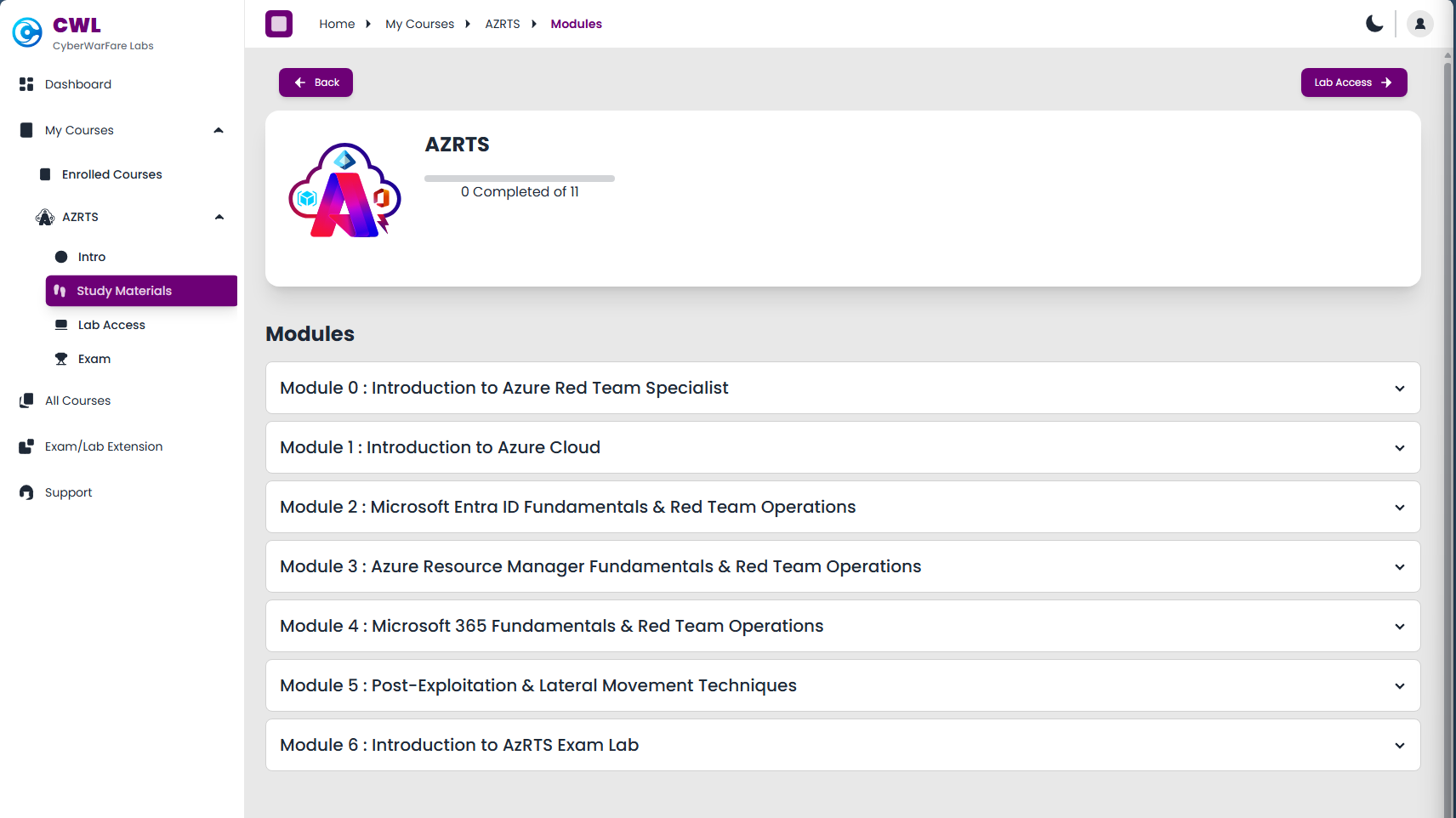
Cyberwarfare offers some courses which you can buy or do free and they take advantage of giving you lab assessments that you have to take. In different scenarios you need to find certain information like which IP or account did the attackers use to breach your environment and check your input. All of this must be done through a honeypot Azure environment they deliver for you. You only can proceed if you submit the right information (called Flags) which makes it really fun and helpful.
This course gives you access to an environment with theory about the Microsoft Entra, Azure and Entra Connect Sync topics. Then it gives you guidance about how these services can be abused, giving you enough details on why you should stick with best practices, least privileges, zero trust and simply removing test configurations or permissions after testing is done.
You get demonstrations about 4 different attack approaches which are known to be abused in the industry.
After that you get your own lab environment, a Microsoft Entra tenant with Azure Subscription where you have to complete 16 objectives.
Certification subjects
The objectives of the certification are:
- Develop a strong understanding of Microsoft Azure cloud architecture from an offensive security perspective
- Gain practical knowledge of how attackers target core cloud services such as Microsoft Entra ID, Azure Resource Manager, and Microsoft 365
- Understand the Azure attack lifecycle, including initial access, privilege escalation, persistence, and lateral movement
- Identify and analyze security misconfigurations and weak access controls within Azure environments
- Learn techniques to simulate real-world red team attack scenarios in cloud infrastructures
- Perform identity-based attack techniques against Microsoft cloud identity services
- Understand how attackers pivot between on-premises infrastructure and cloud environments in hybrid setups
- Map cloud attack techniques to frameworks such as the MITRE ATT&CK Cloud Matrix
- Develop the ability to conduct structured cloud threat research and adversary emulation
- Gain hands-on experience through practical lab exercises simulating Azure attack scenarios
The overall key objective is to gain knowledge to defend your environmen from those attackers.
Key learning points
During and after completing this course, these were my key takeaways. While many of these points were already familiar, the course helped reinforce why they matter even more.
Watch your Service Principal and Managed Identity permissions and always apply least privileges + audit them periodically
When having a hybrid environment, apply hybrid security
Attacks and escalation happen due to these major factors
- Misconfigurations or non-removed testing configurations
- Failure to apply basic access controls
- Ease of use over security
- Untrained employees who don’t understand what they do
Read-only access is more deadly than it looks
OAuth apps are very sensitive for hacks and backdoors and mostly hiding in plain sight
Basic Endpoint and Server security software and rules are highly needed to block from running malicious software
Again, watch your Service Principal and Managed Identity permissions and always apply least privileges + audit them periodically
Attacker motives
Hacks happen very often, but what exactly are the motives of hacking other people?
- Stealing personal information
- Selling personal information
- Increase their reach by bulk sending phishing emails
- Loss of face for companies
1: Red Team Operations in Microsoft Entra ID
We have two types of applications in Microsoft Entra ID:
- App registrations : Application Instance
- Enterprise Application (Service Principals): Application Identity which has the permissions
If an App Registration is created using the Azure Portal, you also get a Service Principal. This is the identity who has the permissions and can exists in multiple tenants if configured to do so. Both the App Registration and Service Principal may represent the same app, they are two different objects in Entra ID.
An attack described
An attacker these days wants to target normal users. They doesn’t seem valuable but they really are. With a correct login with an user an attacker has read access to the whole tenant. This means it can enumerate different users, groups, applications, devices and roles which it can use to escalate its privileges. The ultimate goal is to breach into a Global Administrator account of an organization which can do a LOT of harm.
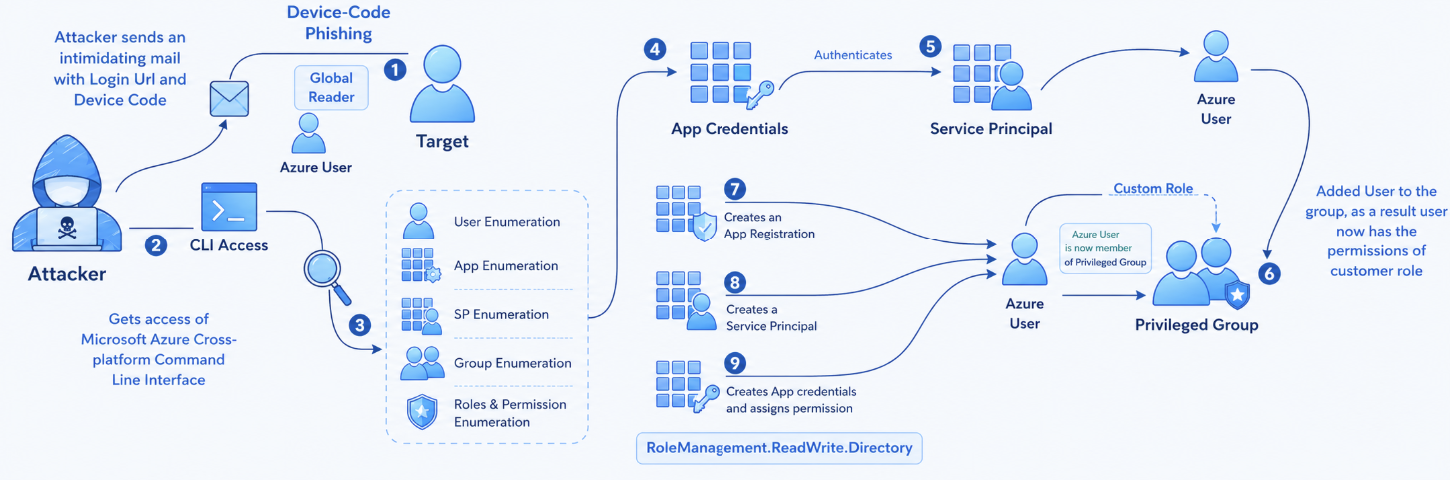
The fun fact is that administrator accounts are normally secured properly but normal users a lot less.
- Initial target: Employee
- Information about an employee
- Access method: Device Code, Credential Harvesting, Shoulder Surfing
- Target environment: Microsoft Entra ID
- Motive: Gaining access with an access token and perform lateral movement
- Enumeration: The attacker will inventory the environment for possible users, devices and service principals to breach/attack
- End goal: Gaining Global Administrator privileges
Attackers will mostly contact users by phone or email, and will push them at the needed action is high priority. This pushes the end user even more to do things they normally don’t and shouldn’t.
High Risk permissions
Attacker will inventory your environment and search for permissions which gives them a lot of power. These permissions can be:
- Global Administrator (user role) -> can do everything
- RoleManagement.ReadWrite.Directory (API permission) -> Can all assign roles to principals, even Global Administrator role making privilege escalation easy
- Global Reader -> Can read everything, so complete attack surface is visible to hacker in a few minutes
Conditional Access and Targets
High risk targets for attackers are users that are excluded from Conditional Access policies. These users doesn’t need further authentication like trusted locations, MFA or session/token limitations. They can just perform a password spray attack to try and breach into this account. Now they have the real gold in their hands.
Access tokens
Microsoft Azure uses Microsoft Entra ID as Identity Provider. This identity provider is basically a system that checks the users’ credentials and then assigns a token where the user can login to all authorized applications and resources. By default, this token is valid for 90 days.
Every principal which is being authenticated by Entra ID gets this token. We speak of principals every object that can get roles and scopes assigned:
- Users
- Groups
- Service Principals (App registration)
- Managed Identity
An access token looks like this and can be further defined with this tool:
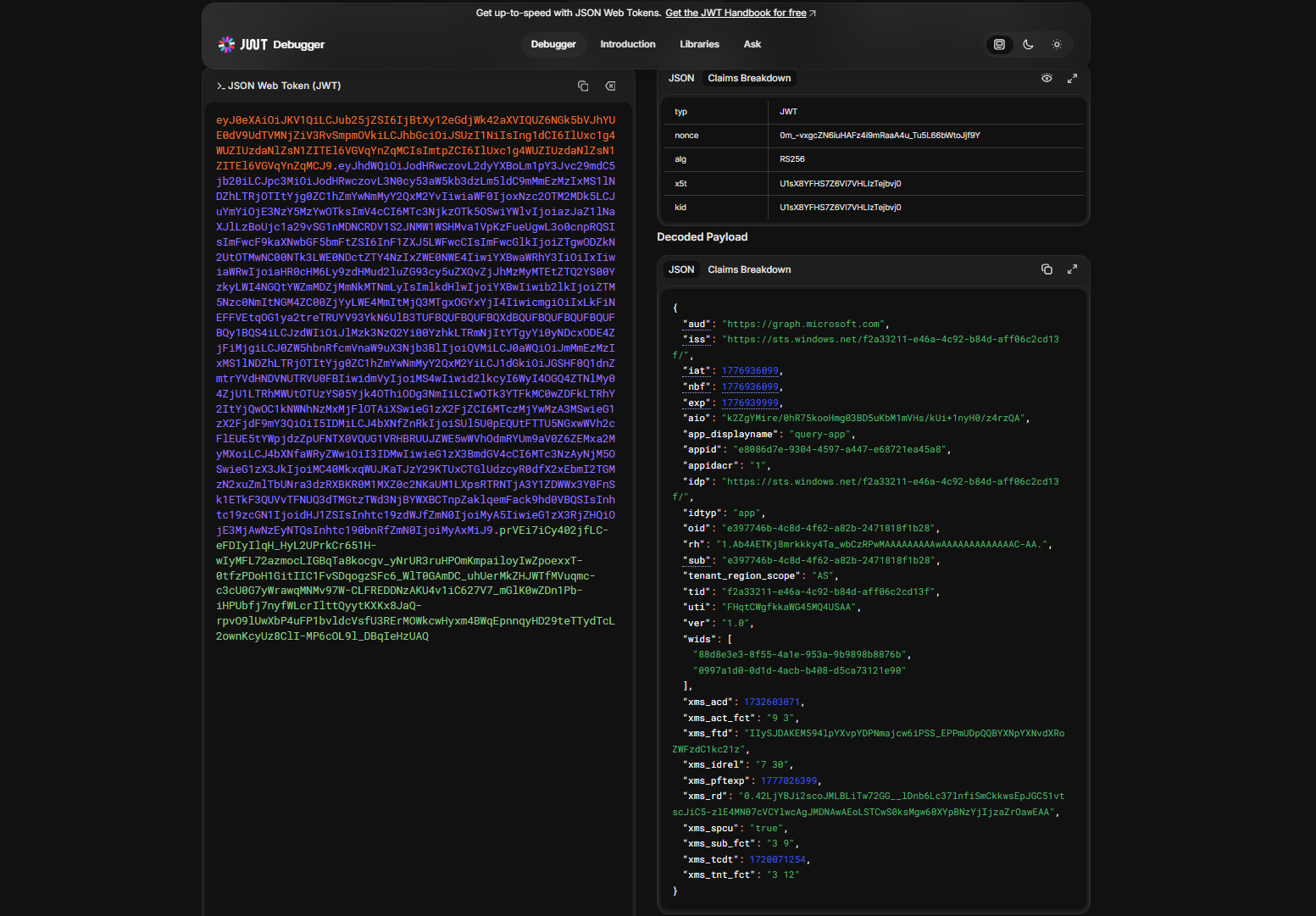
This token is then saved into the cache of the browser so the user does not have to reauthenticate for every resource or application.
Control plane and Data plane
Some resources in Azure needs security on both the control and data planes of the resource:
- Control plane : What users can access the resource, during what time windows and what are their privileges?
- Data plane : What users can access what data of the resources, during what time windows and what are their privileges? Dataplanes are also more vulnerable as secrets are a possibility, which are just longer passwords
2: Red Team Operations in Azure Resource Manager
Azure Resource Manager is the control plane of Microsoft Azure. Everything you do in the Portal, PowerShell and Azure CLI works with Azure Resource Manager by API calls. This makes viewing, creating and deleting resources pretty easy as the mechanism works the same across multiple platforms.
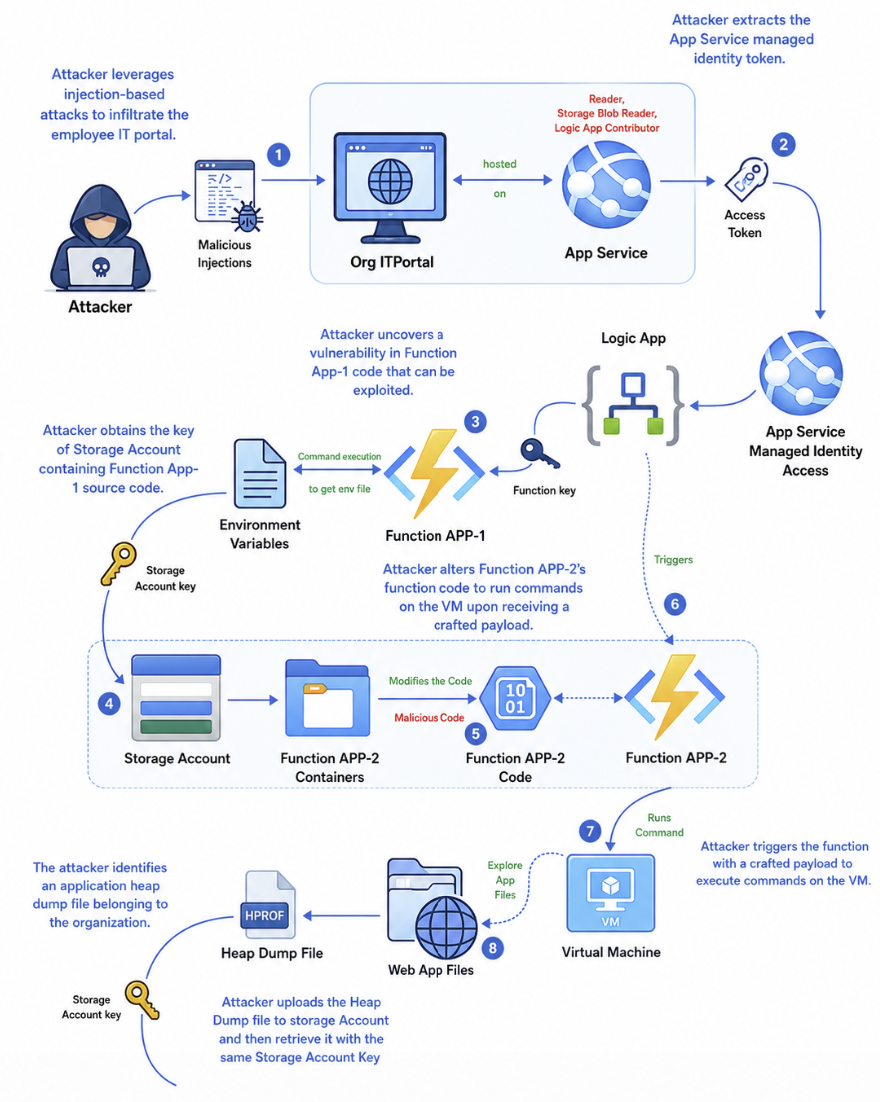
An attack on Azure Resource Manager can look like this:
- Initial target: Publicly exposed web app
- Information about the organization
- Access method: Public facing web portal
- Target environment: Microsoft Azure Resource Manager
- Motive: Gaining access to organizations cloud environment
- End goal: Data exfiltration (steal)
You see, we use newer cloud solutions but attack vectors still are using techniques like SQL injection.
The MicroBurst PowerShell module
The MicroBurst PowerShell module can be used to execute assessments of your Microsoft Azure environment. This checks the security and possible attack surfaces like Web apps. You can find this here:
Managed Identities
Managed Identities are a great target for hackers as they have always have standing permissions. Managed Identities are used in links between Azure Resources, like a Logic App that needs permissions to turn on and off a virtual machine or a Logic App that needs permissions to a Storage Account. The actual identity used in these processes is a Managed Identity.
To learn more about Logic Apps and Managed Identities, check out this article
3: Red Team Operations in Microsoft 365
Attacks in Microsoft 365 are often performed by abusing OAuth 2.0 consent/grant flows. An attack flow for Microsoft 365 can look like this:
- Initial target: Employee of an organization
- Information about employees, organization details
- Access method: OAuth Consent Grant attack
- Target environment: Microsoft Entra ID and Microsoft 365
- Motive: Gaining access to organization
- End goal: Data exfiltration (steal)
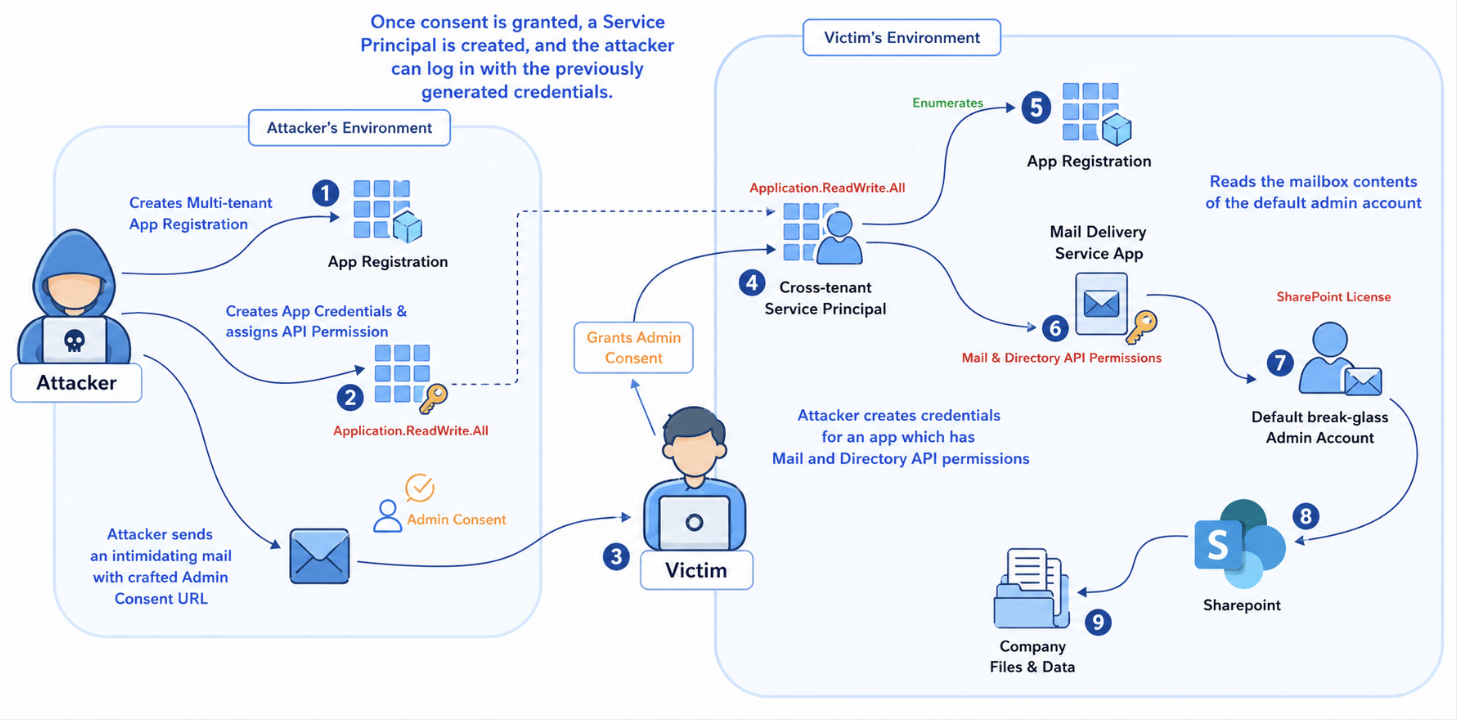
OAuth 2.0 consents and results
An OAuth 2.0 consent window looks like this:
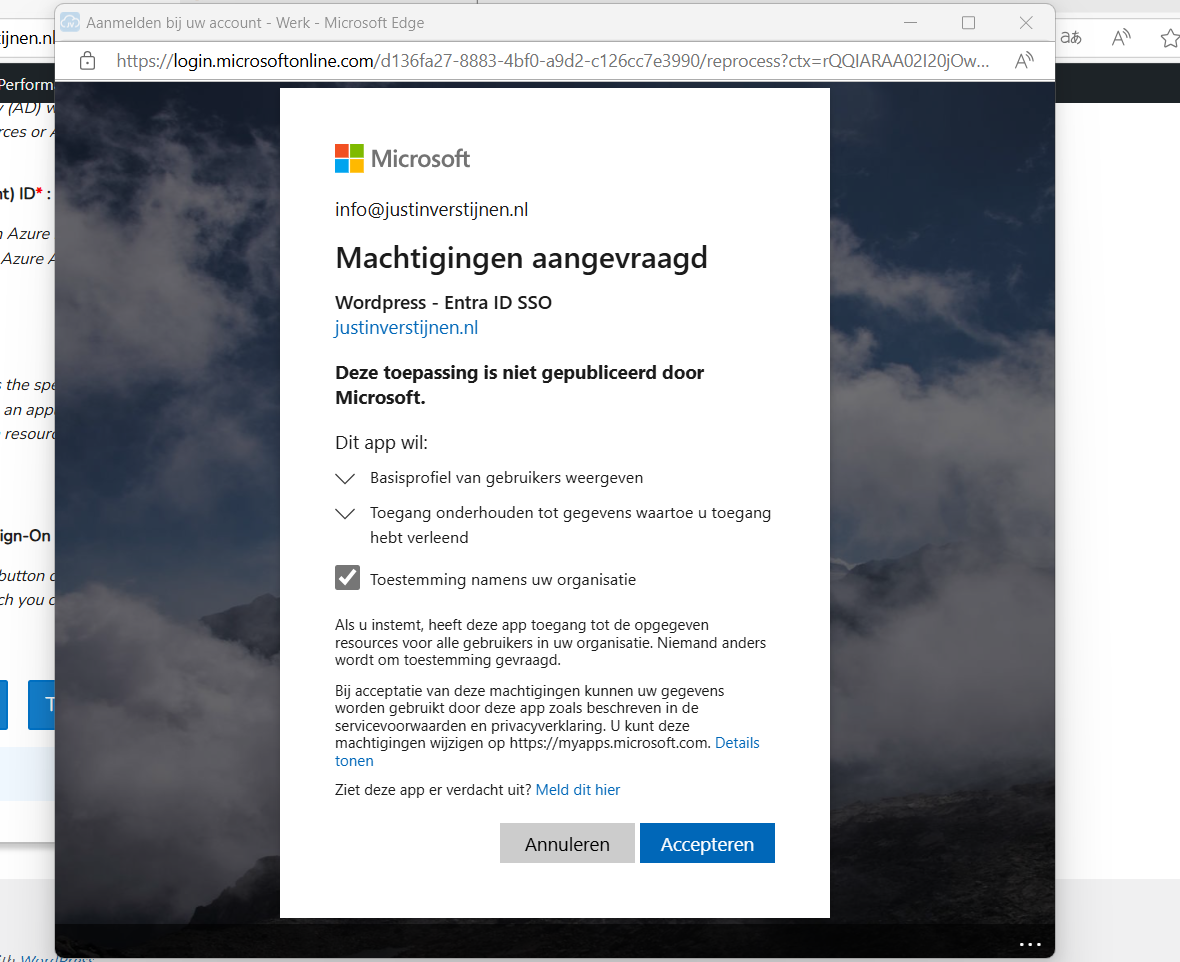
This is an consent request of an application to gain information about the user and organization where this is possible by default. We administrators often want to disable this for standard users because of this attack surface. Why these apps are also highly useable to the attackers is that they bypass the needs for credentials as the user gave permissions themselves. Attackers can create some malicious app in their tenant and creates them “multi-tenant”. This makes it possible to publish this app to multiple organizations like the victims.
When the victim accepts the application, an Service Principal is created in the victims tenant. This means we as the attacker have permissions in the victims tenant. The good part for us attackers is that these Service Principals are often hiding in plain sight as they are missed by administrators. Especially if we make the app good looking with a logo and such.
When an attacker assigns the right permissions to the OAuth 2.0 applications, it can escalate its privileges to higher permissions without the need of an administrator. Then it can target administrator accounts to have even more gold.
4: Primary Refresh Token attacks
Attacks on hybrid environments often happen and a breach of one of the systems can easily result in a breach of both.
- Initial target: Client device
- Access method: Pass the Primary Refresh Token
- Target environment: Active Directory and Microsoft Entra ID
- Motive: Gaining access to organizations’ Entra ID
- End goal: Access Entra ID resources
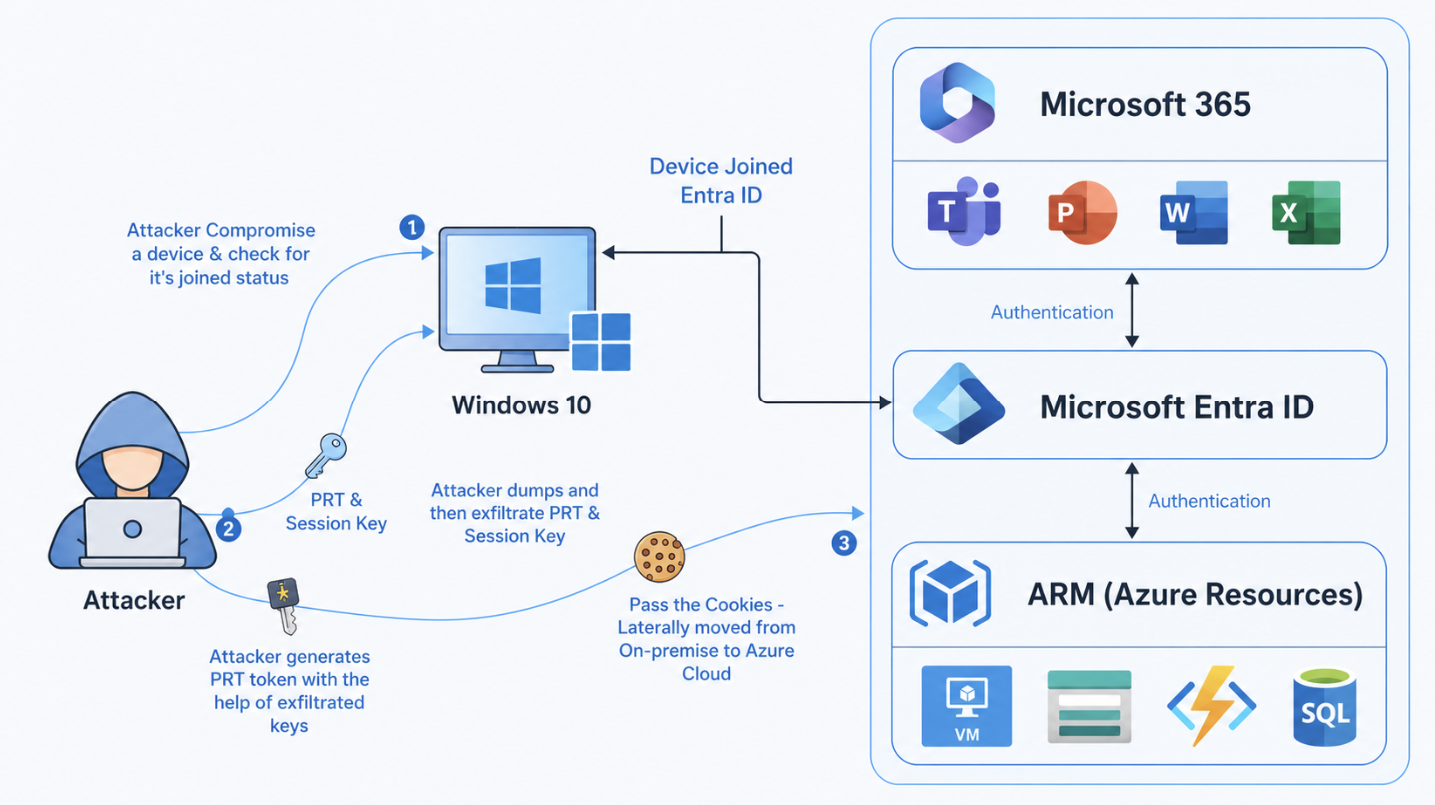
Attacks with the Primary Refresh Token has huge advantages for attackers. This bypasses:
- Password Authentication
- Multi Factor Authentication
- Conditional Access Policies
Primary Refresh Token (PRT)
To understand this attack, we need to first look at what a Primary Refresh Token is. This token is provided by Microsoft Entra ID to a device that allows it to do MFA. This PRT is device-bound and is given to the device after enrolling into Entra ID or Hybrid Entra join.
The PRT is different to an Access token, where the PRT is device bound till a new enrollment is the access token a provided token for a specific application. This PRT token is then used to tell Entra ID “Hey im this device, give me a new access token for Microsoft SharePoint”.
An session key is encrypted and linked to the Primary Refresh Token which can be seen as a private key to the PRT, the public key. By passing both of these keys, Entra ID will trust your login attempt. This session key is secured by the Trusted Platform Module (TPM) chip of your device.
Enumeration device
To get all the needed information, we can use this command on the compromised Windows device:
dsregcmd /statusThis tells us to what kind of identity service the computer is linked including more information like the tenant. Attackers will often use this command to search for this: AzureAdPrt : YES
Extract PRT
To extract PRT’s you can use the tool mimikatz, which you can find here:
This tool you can run on a Windows device and it extracts the PRT and session key which can be used on another device to pass this new token.
5: Entra Connect Password Hash Synchronization attacks
Attacks can also perform reverse attacks if having access to the Entra Connect server first.
- Initial target: Entra Connect server
- Access method: Password Hash Synchronization
- Target environment: Active Directory and Microsoft Entra ID
- Motive: Gaining access to organizations’ Entra ID
- End goal: Access Entra ID resources
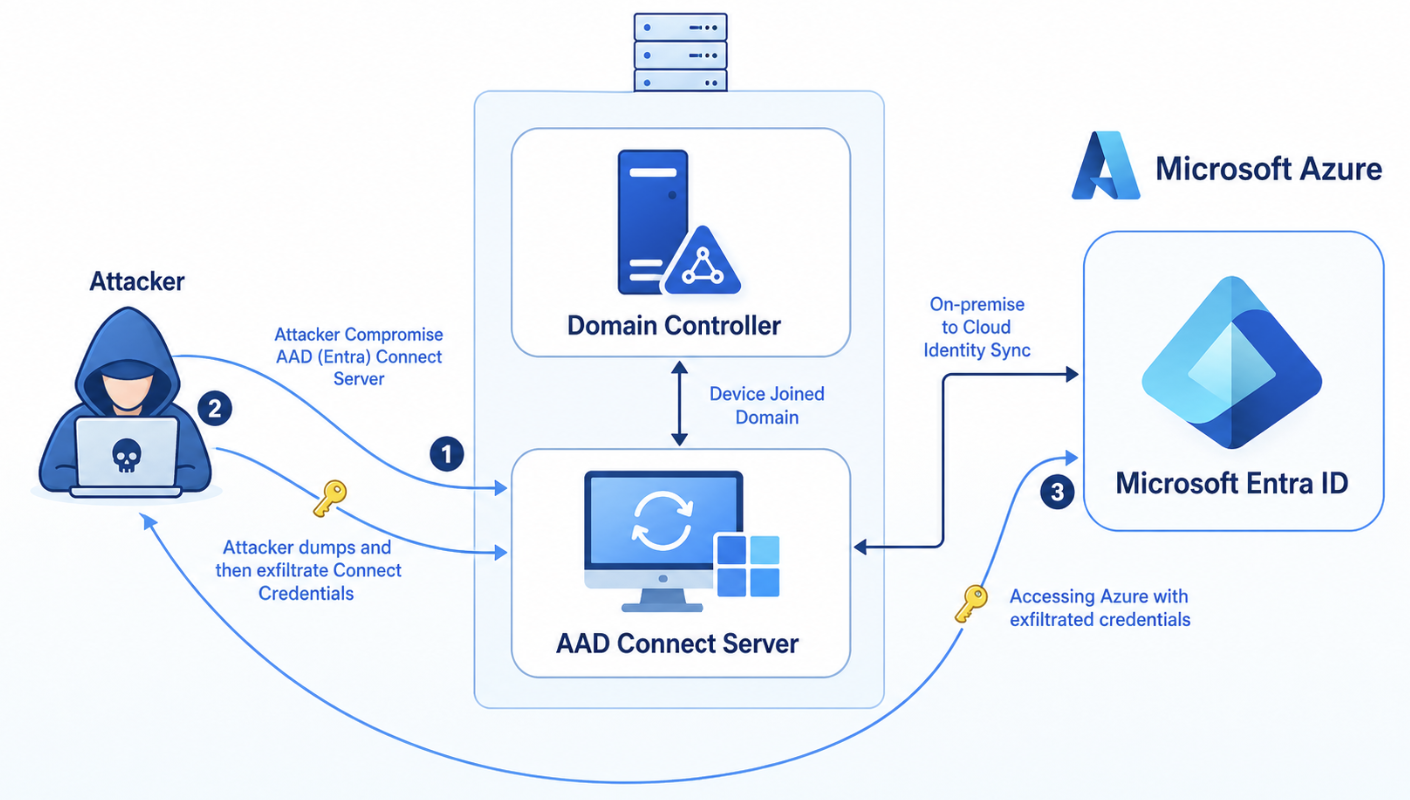
On the Entra Connect Server, the attacker can extract the connect credentials to use to authenticate to Microsoft Entra ID. This only works if the Password Hash Sync (PHS) option is selected in Entra Connect which is by default. The password are stored in an entrypted SQL instance on the Entra Connect server which can be extracted by administrators in plain text.
With this command you can view the complete configuration of the Entra Connect instance:
Get-ADSyncConnectorMy exam/lab experience
As we have to pass the exam/lab by actually breaching an environment, which was really fun by the way, we needed to think like an attacker like shown and demonstrated in the course. Because everyone has to learn like they describe in the course, I will not dive into the details of the course and the objectives themselves but give an overview of how I completed the breach from access to full blown access.
1. Initial access
Initial access to the lab is gained by a simulated device code flow misabuse. It works like, you retieve a code from your local Powershell window and paste that into a field simulating a phishing attack that always work.
Then I gained access to a user that had no roles and some small API permissions.
2. Enumeration
We start by checking for any leads by enumerating every object in the tenant. I did this using some commands and eventually found a high-privileged Service Principal with Global Administrator permissions. By enumerating every part of the tenant, these leads come into view which can be missed if a person or team daily manages a tenant.
We look for highly privileged roles and API permissions in this part.
3. Privilege escalation
The best part is, the user which is simulated to be phished is owner of this application/service principal so we can create a new client secret to gain access using that service principal. This is how easy this can get.
4. Signed in using Service Principal
Now I had a second PowerShell window with the Service Principal logged in, with Global Administrator permissions. This makes it very easy to create a new user and also assign that user this Global Administrator role. We can now login as a user and full privilege escalation is completed.
5. Azure Subscription
As we are now logged in using Global Administrator permissions in Entra ID, we can easily also get every Azure RBAC permission we want. Global Administrator can assign the User Access Administrator role to themselves, using this checkmark at the Entra ID properties:

Now we have gone from a simple user, to a Service Principal, to a newly created user with Global Administrator permissions to also extend that access into Azure Subscriptions.
While this sounds pretty cool, as I now did this around 2 times, this costed me around 5-6 hours but professional hackers will do this much faster.
Summary
In this post, I share my experiences of the CWL Certified Azure Red Team Specialist (AzRTS) training by cyberwarfare.live and the key lessons learned. By approaching Azure and Microsoft 365 environments from an attacker’s perspective, it becomes clear how misconfigurations, weak access controls failure to use least privileges and unaware users can lead to successful compromises. COmpromises who can cost companies a lot of money in terms of outage, employees not able to do work or loss of face and indirectly customers and work.
I hope I gave you a good understanding of my experience with this course and would recommend it to everyone interested.
Sources
End of the page 🎉
You have reached the end of the page. You can navigate through other blog posts as well, share this post on X, LinkedIn and Reddit or return to the blog posts collection page. Thank you for visiting this post.
If you find this page and blog very useful and you want to leave a donation, you can use the button below to buy me a beer. Hosting and maintaining a website takes a lot of time and money. Thank you in advance and cheers :)

The terms and conditions apply to this post.