Introduction to Azure roles and permissions (RBAC/IAM)
When managing a Microsoft Azure environment, permissions and roles with RBAC is one of the basic ways to improve your security. At one hand, you want to have the permissions to do basic tasks but at the other hand you want to restrict an user to be able to do only what he needs to. This is called, the principle of “least-privilege”.
In this guide, I want to you to understand the most of the basic knowledge of managing access controls in Azure without very complex stuff.
Basic definitions in roles and permissions Azure
When talking about roles and permissions in Azure, we have the basic terms below, and later in this article all pieces of the puzzle will be set in place.
Terms to understand when planning and managing permissions:
- Roles
- Data Roles
- Custom Roles
- Scope
- Role assignments
- Principals
- Managed Identity
What is a role?
A role is basically a collection of permissions which can be assigned to a principal in Azure. While there are over 100 roles available, they all follow the structure below:
| Reader (1) | Contributor (2) | Owner (3) |
|---|---|---|
| Can only read a resource but cannot edit anything. “Read only” | You can change anything in the resource, except permissions. “Read/write” | You can change anything in the resource including permissions. “Read/Write/Permissions” |
Those built in roles are available in Azure, but for more granular permissions there are some more defined roles:
- Virtual Machine Contributor
- Can change a lot of settings of the virtual machine, but not the permissions.
- Backup Reader
- Can only read the settings and back-up states, but cannot make changes.
- Backup Contributor
- Can change settings of the backups, except changing permissions.
- SQL Server Contributor
- Can change SQL Server settings but cannot change permissions or access the SQL database.
As you can see, almost every built-in role in Azure follows the 1-2-3 role structure and allows for simple and granular security over your resources.
What are Data Roles?
Aside from resource-related roles for managing security on a resource, there are also roles for the data a resource contains. These are called Data Roles and are also considered as a collection of permissions.
Data Roles are used to control what a principal can do with the data/content a resource hosts. You may think of the following resources:
- SQL Databases
- Key Vaults
- Storage Accounts
To make your permissions management a lot granular, you might want to have a person managing the resource and another person te manage the content of the resouce. In this case you need those data roles.
What are Custom Roles?
Azure has a lot of built in roles available that might fulfill your requirements, but sometimes you want to have a role with some more security. A custom role is a role that is completely built by yourself as the security administrator.
You can start customizing a role by picking a builtin role and add permissions to that role. You can also build the role completely using the Azure Portal.
To begin creating a custom role, go to any access control blade, click “Add” and click “Add custom role”.
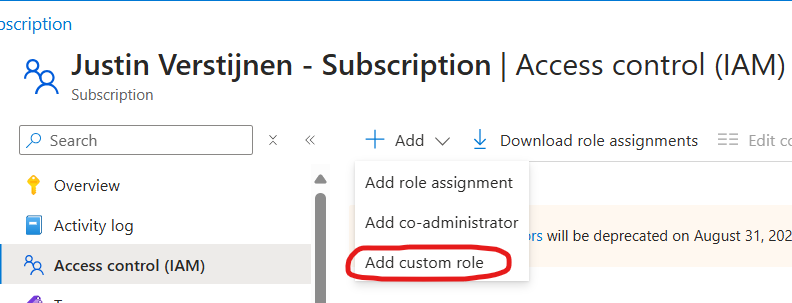
From there you have the option to completely start from scratch, or to clone a role and add or delete permissions from it to match your goal.
Creating your own role is the best way, but can take up a lot of time to build and manage. My advice is to stick to built in roles wherever it’s possible.
What is the scope of a role?
The scope of a role is where exactly your role is applied. In Azure we can assign roles at the following scopes:
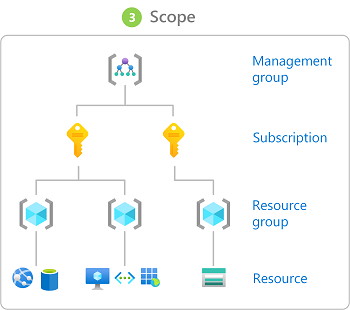
Management Group (MG) Contains subscriptions
Subscription (Sub) Contains resource groups
Resource Group (RG) Contains resources
Resource (R) Contains data
- Role assignments will inherit top to bottom, assigning roles to the subscription level allows this role to “flow” down to all resource groups and resources of that subscription.
- Caution when using role assignments on the management group or subscription level.
Some practical examples of assigning roles to a certain scope:
- You have a financial person who wants to view the costs of all subscriptions in your environment.
- You assign him the role (Reader) on the Management group level.
- You have a administrator that is allowed to make changes in 2 of the 3 resource groups, but not in the third.
- You assign him the role (Contributor) on the 2 resource groups
- You want to have a administrator to do everything one 1 subscription but not on your other subscriptions.
- You assign him the role (Owner) at the “everything” subscription.
What are role assignments and how do they work?
A role assignment is when we assign a role to a principal. As stated above, this can be done on 4 levels. Azure RBAC is considered an additive model.
It is possible to assign multiple roles to one or multiple principals. The effective outcome is that all those permissions will stack so all the permissions assigned will apply.
For example:
- User1 has the Reader role on Subscription1
- User1 has the Contributor role on RG1 which is in Subscription1
- The outcome is that User1 can manage everything in RG1, and read data in other RG’s.
You can also check effective permissions at every level in the Azure Portal by going to “Access control (IAM)” and go to the tab “Check access”.
- With the “View my access” button, you list your stack of permissions at your current scope
- With the “Check access” button, you can check permissions of another principal at your current scope
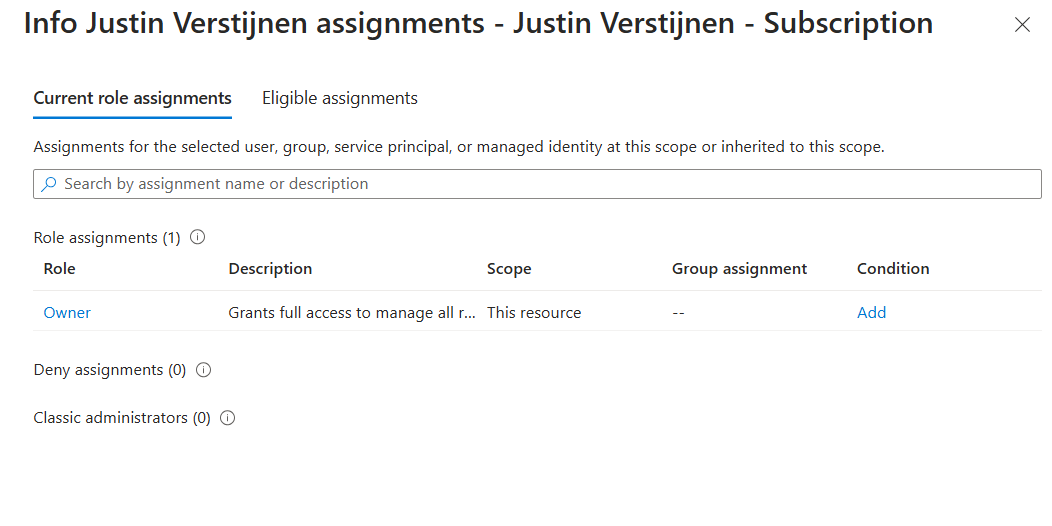
This is my list of permissions. Only “Owner” is applied to the subscription level.
Conditions in role assignments
A relatively new feature is a condition in a role assignment. This way you can even further control:
- What roles your users can assign, even when they have the “Owner” role.
- What principals he can assign roles to
- For example, only to users, but not to groups or managed identities
- Or only to exactly what principals you choose
- Block/filter some roles like priveleged roles
- For example, a user may assign some reader/contributor roles but not the “Owner” role.
What are principals?
In Azure and Entra ID, principals are considered identities where you can assign roles to. These are:
- Users
- Groups
- Service Principals
- Managed Identities
Users and groups remain very basic terms, and since you made it to this far into my guide, I consider you as technically proven to fully understand those terms. Good job ;).
Service Principals
A service principal is a identity created for a application or hosted service. This can be used to assign a non-Azure application permissions in Azure.
An example of a service principal can be a third party built CRM application that needs access a Exchange Online mailbox. At the time of writing, July 2024, Basic authentication is deprecated and you need to create a service principal to reach this goal.
Managed Identities
A managed identity is a identity which represents a resource in Azure like a virtual machine, storage account or web app. This can be used to assign a resource a role to another resource.
For example; a group of virtual machines need access to your SQL database. You can assign the roles on the SQL database and define the virtual machines as principal. This will look like this the image below.
All principals are stored in Microsoft Entra ID which is considered a Identity Provider, a database which contains all principals.
Summary
So to summarize this page; the terms mean:
- Roles: A role is a collection of permissions to a resource.
- Data Roles: A Data Role is a collection of permissions to the data of a resource like a SQL database, Azure Storage Account, Key Vault or Backup vault.
- Custom Roles: A custom role is a role created by a administrator to have the highest level or granurality based on permissions you are allowed or not allowed (Actions/NotActions)
- Scope: The level where the role is assigned. For example a Management group, Resource group or Subscription.
- Role assignments: A role assignment is a role assigned to a principal.
- Principals: A principal is a identity where a role can be assigned to like a User, Group or Managed Identity.
- Managed Identity: A managed identity is a account linked to a resource, so a resource can have permissions assigned.
This guide is very basically how permissions works. Basic access management and knowing who have what access is a basic tool to improve your security posture and prevent insider risks. This is nothing different in a system like Azure and fortunately has various options for roles permissions.
This page is a great preparation of this subject for the following Microsoft exams:
- AZ-104
- AZ-500
- SC-300
- SC-900
End of the page 🎉
You have reached the end of the page. You can navigate through other blog posts as well, share this post on X, LinkedIn and Reddit or return to the blog posts collection page. Thank you for visiting this post.
Support the blog
