Introduction to Networks
Requirements
- Some basic networking knowledge
- Some basic subnetting knowledge
- Around 20 minutes of your time
Introduction to Networking
Networking is the process of connecting devices to share data and resources. It allows communication between users over local or global distances. Networks can range from small home setups to large corporate infrastructures. Key components include routers, switches, and protocols that manage data traffic. Effective networking ensures reliable, secure, and efficient information exchange. As technology advances, networking plays a critical role in enabling digital communication worldwide.
Logically this means that every device will have an IP address and this can be used to communicate with other devices. This can look like the diagram below:
This shows a simple network with 8 devices, all connected to each other. In practice, the circle will represent the infrastructure; the Routers and Switches.
Routers
In every network, we have a device that plays the “Router” role. This is basically connecting different networks to each other. In most bigger networks, this can be the firewall.
On Azure, the routing and switching part is done with creating a virtual network. This means that this is all managed and you only select the network you want to connect with.
Switches
Switches are the distribution part of a network. These are literally like power strips but then for networks. One cable goes in (called the “Uplink)”, and all other cables are going out of the switch (called “Downlinks)”. Connecting a device to a downlink of a switch gives access to the network.
Routers and Switches can seem the same as terms but they are different in a particular way. Routers connects our devices to different networks, and Switches redistribute those networks.
IP addressing
IP addresses are needed on a network for every device to know where to deliver a package. You can compare this like in a real world city, where every street has a name and every house has a house number. IP addressing works kind of the same way, but translated in a way so computers can also work with it.
We have two types/versions of IP addresses:
- IPv4, where we will focus on in this guide
- IPv6, for more information about IPv6 I recommend first understand IPv4 and then read this guide: https://justinverstijnen.nl/basic-ipv6-explaination/
IP address are built in this way:
The first part represents the “Network ID”, which is a static part and will remain till configured different. The last part represents the “Host ID” which is a number that is different for every host. The Network ID can be compared to a real life Street and the Host ID is the house number.
Class A, Class B and Class C networks
Now this is a basic explaination of a Class C address, where we only use the last number. We have 3 classes that we use in networking:
- Class A (255.0.0.0 to 255.254.0.0)
- Class B (255.255.0.0 to 255.255.254.0)
- Class C (255.255.255.0 to 255.255.255.255)
Now this tells us how many devices we can use in our network:
- In Class A, we can connect millions of devices because there are many available addresses
- In Class B, we can connect up to 65.000 devices
- In Class C, we can connect up to 254 devices
The most important here is the Subnet mask which tells devices on what part of the IP addressing scheme they are.
Introduction to Subnet masks
You must have seen them in your daily life of being an IT guy, Subnet masks. This is a number like:
- 255.255.255.0 or /24
- 255.255.0.0 or /16
This number decides how many hosts we can use in our network. The more zeros in the subnet mask, the more host addresses are available. For example, /24 (255.255.255.0) allows 254 usable hosts, while /16 (255.255.0.0) allows 65.534 usable hosts. Subnet masks help divide networks into smaller parts, making management and security easier. A best practice is always to have your subnets as small as possible for networks or VLANs, but the bottom line is mostly /24.
A smaller subnet is basically a higher performance. Because some requests, like broadcasts are sent to every address. This process is faster to 254 addresses than to 65.000 addresses.
Tip: use my Subnet calculator to calculate your networks: https://subnet.justinverstijnen.nl/
Deep dive into IP addresses
IPv4 addresses, like 172.16.254.1, are decimal representations of four 8-bit binary blocks, known as octets. Each octet ranges from 0 to 255, making every IPv4 address 32 bits in total.
The IP address 172.16.254.1 can be represented in binary format like shown in the picture below:
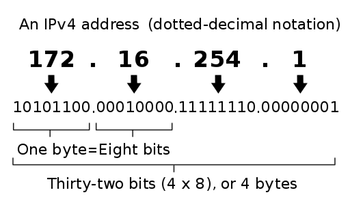
So an IP address is basically a human readable way of how the devices work under the hood. All based on 0’s and 1’s.
Subnets, Segmentation and VLANs
Subnetting is a technique used in networking to divide a larger IP network into smaller, more manageable subnetworks (subnets). It helps optimize IP address allocation, improve network performance, and enhance security by segmenting traffic.
Each subnet operates as an independent network while still being part of the larger network. By using subnetting, organizations can efficiently manage IP address space, reduce network congestion, and implement better access control.
Subnetting is achieved by modifying the subnet mask, which determines how many bits are used for the network and how many for the host portion of an IP address. Understanding subnetting is essential for network engineers and administrators to design scalable and efficient network infrastructures.
In Azure, we do this by creating a virtual network which has an address space (for example: 10.0.0.0/16) and we can build our subnets in that space (10.0.0.0/24, 10.0.1.0/24, 10.0.2.0/24 etc.). I have done this for demonstration in the picture below:
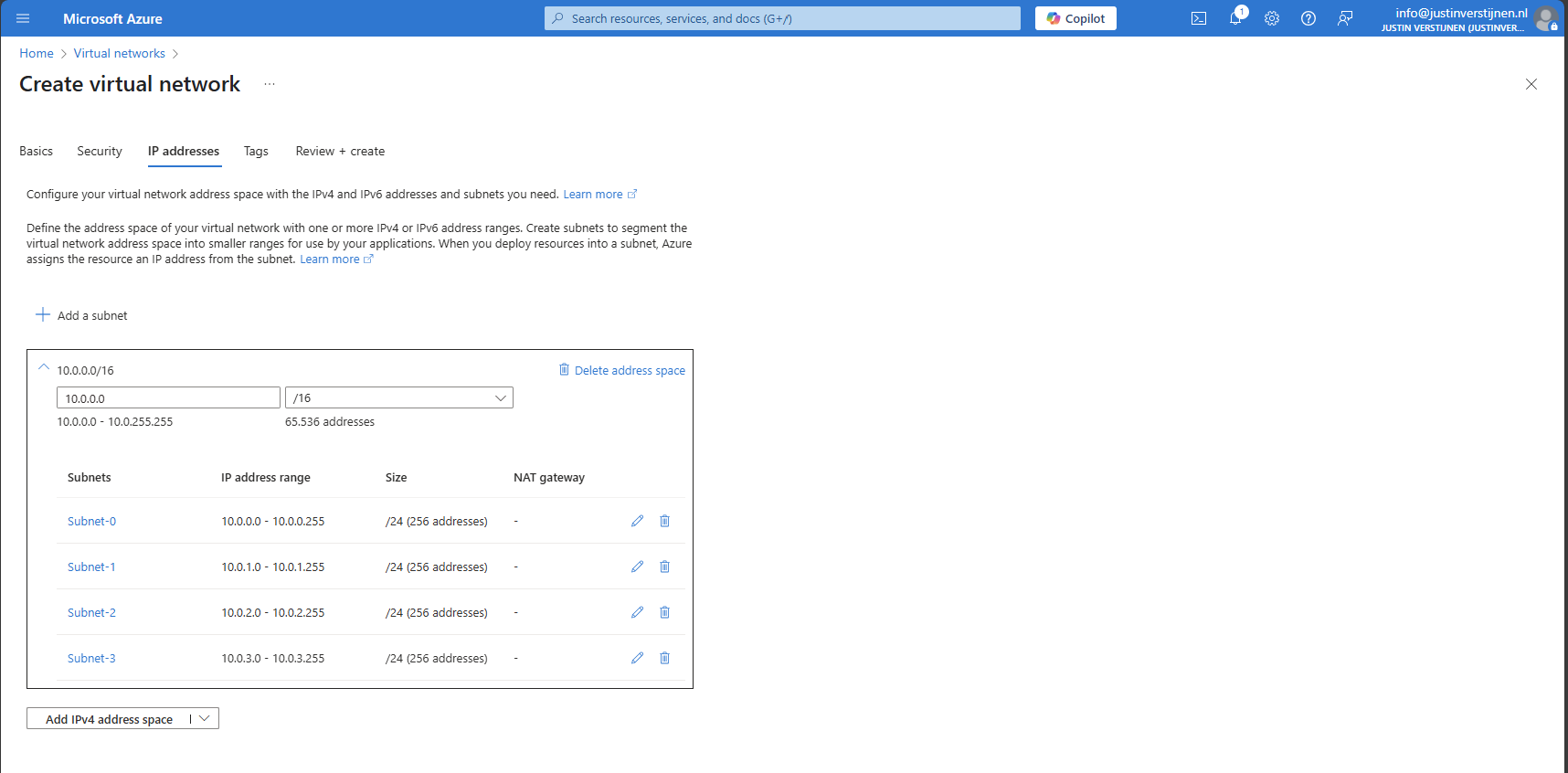
When using routers and switches, we can segment our network in different, Virtual networks which are called VLANs. This can help us by dividing devices into different isolated networks without the need of having seperate physical networks.
For designing VLANs you have to calculate the subnet sizes and ip address schemes. I have a tool available for doing this:
Tips for understandable network addressing
So when designing networks, you will never know how long you are gonna use it. My advice is to always have a good networking plan and document your plan for future use and expansion.
I have some tips for designing networks that work well:
- Always use as small as possible networks, with /24 as bottom line
- Segment devices with good logic (Servers to servers, Guest to guest etc.)
- Link your VLAN IDs to your Network IDs
- For example;
- VLAN ID 10 to 10.0.10.0/24
- VLAN ID 20 to 10.0.20.0/24
- VLAN ID 99 to 10.0.99.0/24
- For example;
Complete overview of Subnet masks and usable addresses
To have a cheat sheet of subnet masks, I have created a complete table of all usable Subnet masks including how much addresses you can assign in those networks:
| Prefix | Subnet mask | Usable addresses |
|---|---|---|
| Supernets (ISPs) | ||
| /0 | 0.0.0.0 | Used as wildcard |
| /1 | 128.0.0.0 | 2,147,483,646 |
| /2 | 192.0.0.0 | 1,073,741,822 |
| /3 | 224.0.0.0 | 536,870,910 |
| /4 | 240.0.0.0 | 268,435,454 |
| /5 | 248.0.0.0 | 134,217,726 |
| /6 | 252.0.0.0 | 67,108,862 |
| /7 | 254.0.0.0 | 33,554,430 |
| Class A networks | ||
| /8 | 255.0.0.0 | 16,777,214 |
| /9 | 255.128.0.0 | 8,388,606 |
| /10 | 255.192.0.0 | 4,194,302 |
| /11 | 255.224.0.0 | 2,097,150 |
| /12 | 255.240.0.0 | 1,048,574 |
| /13 | 255.248.0.0 | 524,286 |
| /14 | 255.252.0.0 | 262,142 |
| /15 | 255.254.0.0 | 131,070 |
| Class B networks | ||
| /16 | 255.255.0.0 | 65,534 |
| /17 | 255.255.128.0 | 32,766 |
| /18 | 255.255.192.0 | 16,382 |
| /19 | 255.255.224.0 | 8,190 |
| /20 | 255.255.240.0 | 4,094 |
| /21 | 255.255.248.0 | 2,046 |
| /22 | 255.255.252.0 | 1,022 |
| /23 | 255.255.254.0 | 510 |
| Class C networks | ||
| /24 | 255.255.255.0 | 254 |
| /25 | 255.255.255.128 | 126 |
| /26 | 255.255.255.192 | 62 |
| /27 | 255.255.255.224 | 30 |
| /28 | 255.255.255.240 | 14 |
| /29 | 255.255.255.248 | 6 |
| /30 | 255.255.255.252 | 2 |
| /31 | 255.255.255.254 | 0 |
| /32 | 255.255.255.255 | 0 |
Comma’s used in Usable addresses to not be confused with IP addresses ;)
Knowledge check
This quiz needs JavaScript to show the questions and feedback.
Summary
I hope I gave you a great basic understanding of how networks work and the fundamentals to use networking in Azure. Its part of our jobs and not very easy to start out with.
Thank you for reading my guide and I hope it was helpful.
End of the page 🎉
You have reached the end of the page. You can navigate through other blog posts as well, share this post on X, LinkedIn and Reddit or return to the blog posts collection page. Thank you for visiting this post.
Support the blog
