Monitor and reduce carbon emissions (CO2) in Azure
Carbon Optimization dashboard
Azure offers several Carbon Optimization options to help organizations to monitor and reduce their CO₂ emissions and operate more sustainable. You can find this in the Azure Portal by searching for “Carbon optimizations”:
At this dashboard we can find some interesting information, like the total emissions from when your organization started using Azure services, emissions in the last month and the potential reductions that your organization can make.
Emissions details
On the Emissions details pane we can find some more detailed information, like what type and resources contributed to the emissions:
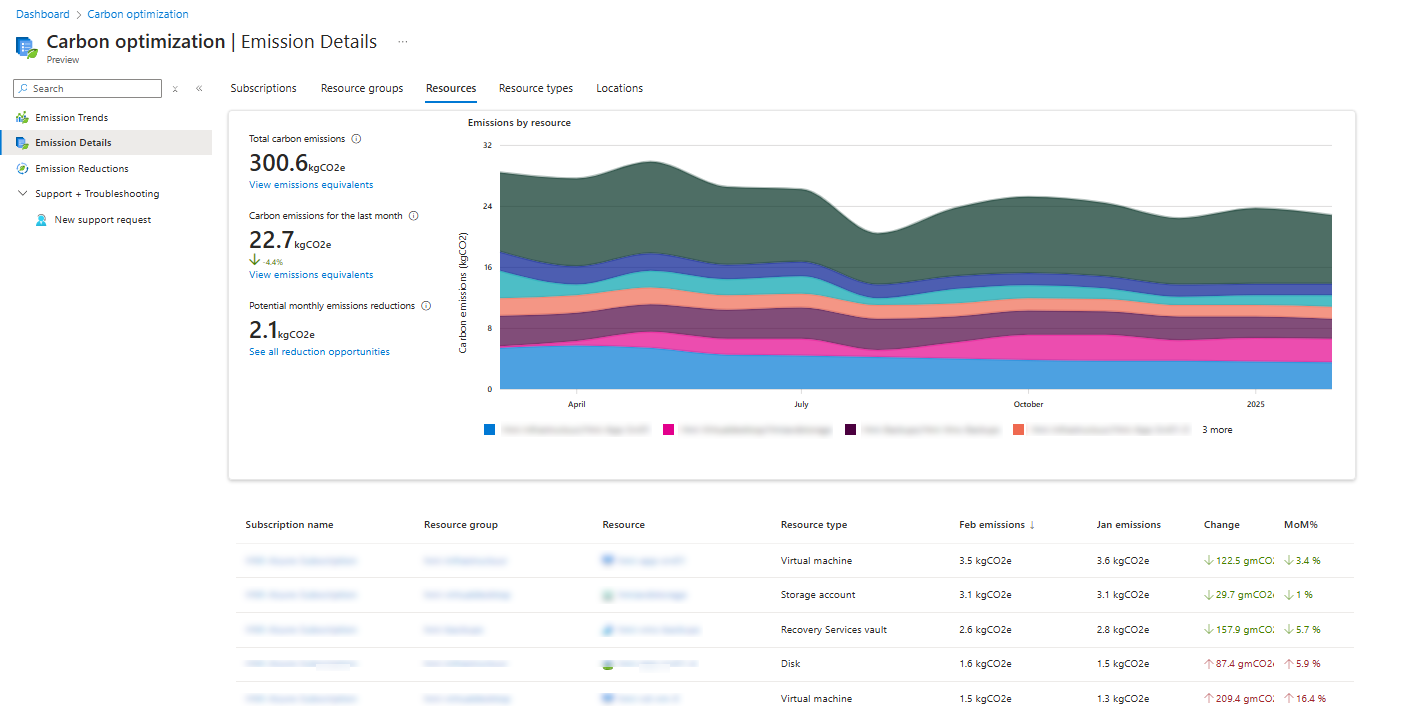
Here we have an overview of an Azure environment with 5 servers, a storage account including backup. You see that the virtual machine on top is the biggest factor of the emissions each month. This has the most impact on the datacenters of Microsoft in terms of computing power. The storage account takes the 2nd place, because of all the redundant options configured there (GRS).
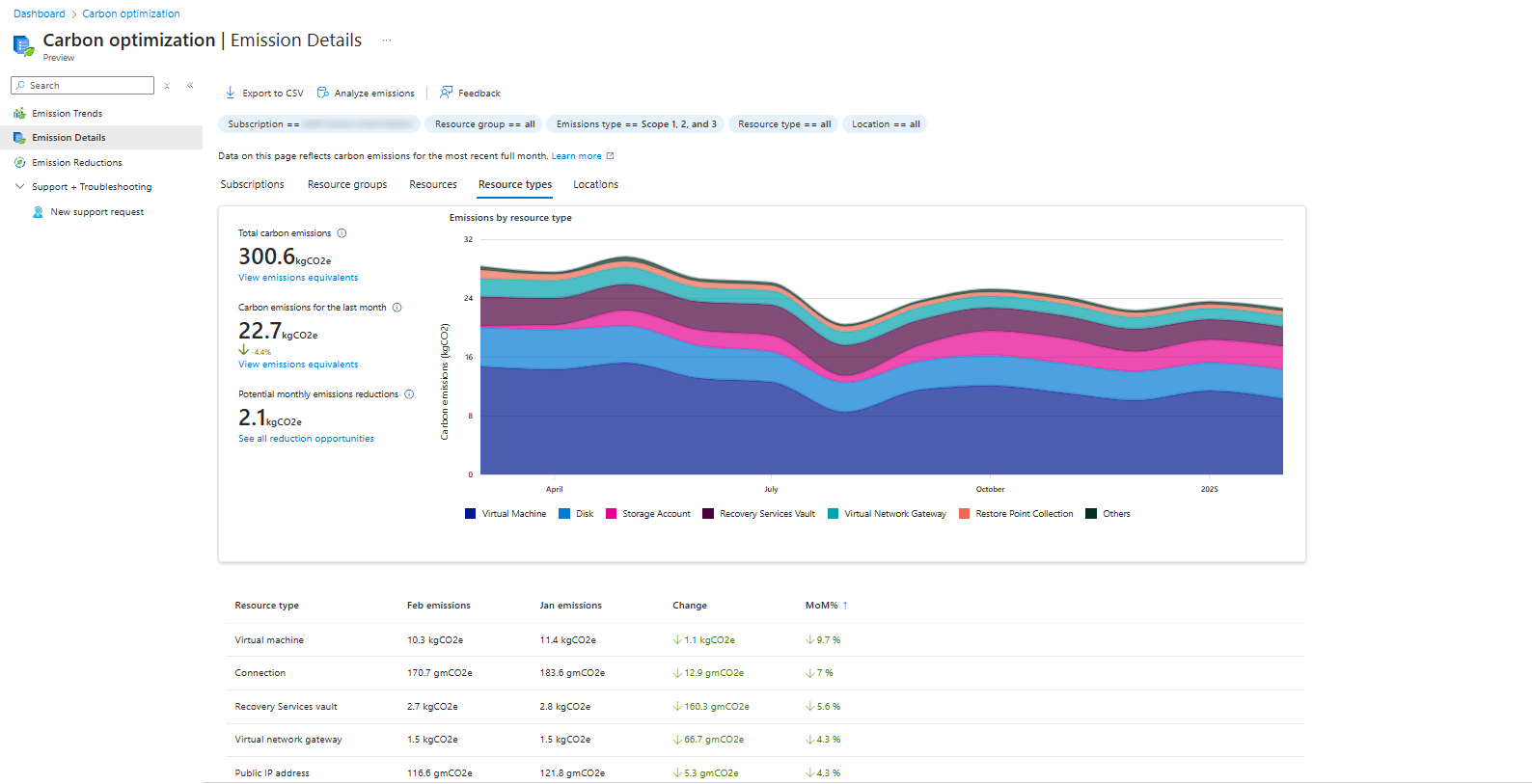
We can also search per type of resources, which makes the overview a lot better and summarized:
Emissions Reductions and advices
The “Emissions Reductions” detail pane contains advices about how to reduce emissions in your exact environment:
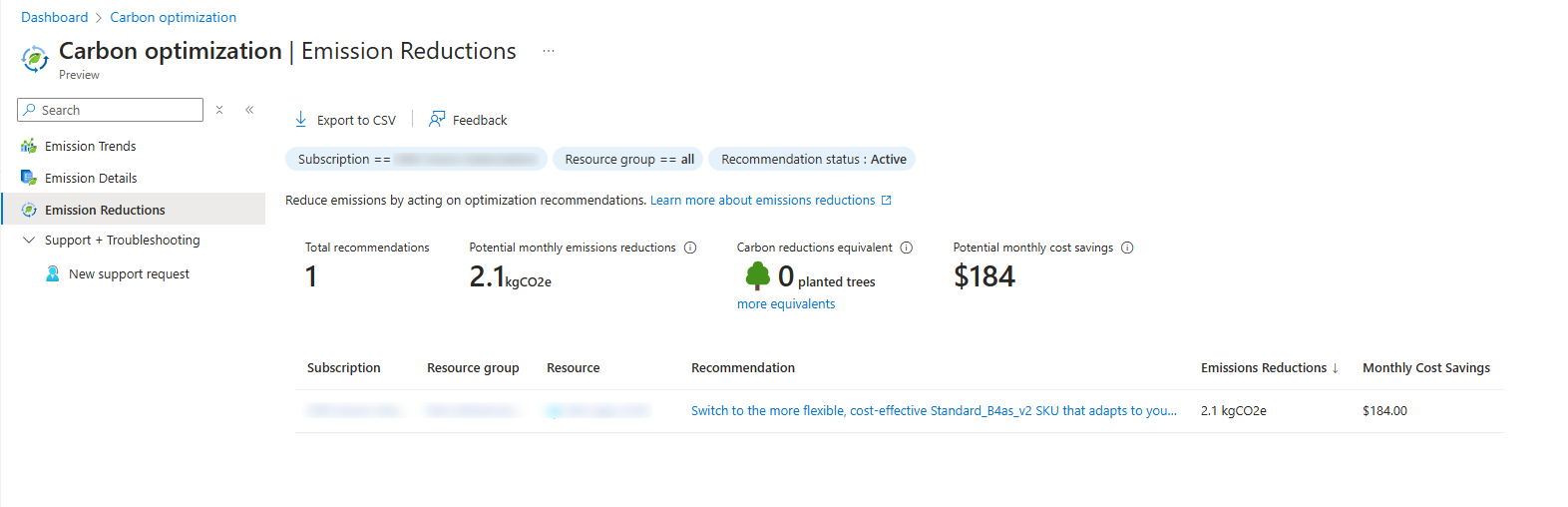
In my environment I have only 1 recommendation, and that is to downgrade one of the servers that has more resources than it needs. However, we have to stick to system requirements of an specific application that needs those resources at minimum.
Types/Scopes of emissions
To understand more about generic Carbon emission calculating, I will add a simple clarification.
Carbon emissions for organizations are mostly calculated in those 3 scopes:
| Scope | Type of Emissions | Sources | Example |
|---|---|---|---|
| Scope 1 | Direct emissions | Company-owned sources | Company vehicles, on-site fuel combustion, refrigerant leaks |
| Scope 2 | Indirect emissions from purchased energy | Electricity, heating, cooling | Powering offices, data centers, factories |
| Scope 3 | Indirect emissions from the value chain | Upstream (suppliers) and downstream (customers) | Supply chain, product use, business travel, employee commuting |
Like shown in the table, cloud computing will be mostly calculated as Scope 3 emissions, because of external emissions and not internal. On-premises computing will be mostly calculated as Scope 2. As you already saw, the scopes count for the audited company. This means that Scope 3 emissions of an Microsoft customer may be Scope 2 emissions for Microsoft itself.
Emissions Azure vs on-premises
While we can use the Azure cloud to host our environment, hosting on-premises is still an option too. However, hosting those servers yourself means a lot of recurring costs for;
- Hardware
- Energy costs
- Maintenance
- Cooling
- Employee training
- Reserve hardware
- Licenses
An added factor is that energy to power those on-premises servers are mostly done with “grey” energy. Microsoft Azure guarantees a minimum of 50% of his energy is from renewable sources like solar, wind, and hydro. By the end of 2025, Microsoft strives to reach the 100% goal. This can make hosting your infrastructure on Azure 100% emissions free.
Summary
While this page may not be that technical and interesting for you and your company, for some companies this can be interesting information.
However, Microsoft does not recommend using these numbers in any form of marketing campaigns and to only use as internal references.
Thank you for reading this guide and I hope it was interesting.
End of the page 🎉
You have reached the end of the page. You can navigate through other blog posts as well, share this post on X, LinkedIn and Reddit or return to the blog posts collection page. Thank you for visiting this post.
Support the blog
