Network security in Azure with NSG and ASG
What does an Network Security Group (NSG) do?
A network Security Group is a layer 4 network security layer in Azure to filter incoming and outgoing traffic which you can apply to:
- A single VM, you assign it to the NIC (Network Interface Card)
- A subnet, which contains similar virtual machines or need the same policy
In a Network Security Group, you can define which traffic may enter or leave the assigned resource, this all based on layer 4 of the OSI model. In the Azure Portal, this looks like this:
To clarify some of the terms used in a rule;
- Source: This is the source of where the traffic originates from. To allow everything, select “Any” but to specify IP-adresses select “IP-adresses”.
- Source port ranges: This is the source port which the source uses. The best way is to leave this a “*” so a client can determine its own port.
- Destination: This is the destination of the traffic. This will mostly be your Azure resource or subnet.
- Service: These are predefined services which use common TCP/UDP ports for easy creation.
- Destination port ranges: This is the port of the destination which traffic has.
- Protocol: Select TCP, UDP or ICMPv4 based on your requirements.
- Action: Select if you want to block or allow the traffic
- Priority: This is the priority of the rule. A number closer to zero means the rule will be processed first and priorities with a higher number will be processed in the order after that.
To learn more about NSG’s in Azure, check out this webpage: https://learn.microsoft.com/en-us/azure/virtual-network/network-security-groups-overview
Rule processing of NSGs
When having rules in a Network Security Group, we can have theoretically thousands of rules. The processing will be applied like the rules below;
- When applying a NSG to both the virtual machine and the subnet of the machine, the rules will stack. This means you have to specify all rules in both NSG’s.
- My advice is to use NSG’s on specific servers on machine level, and to use NSG’s on subnets when you have a subnet of identical or similar machines. Always apply a NSG but on one of the 2 levels.
- A rule with a higher priority will be processed first. 0 is considered the highest priority and 65500 is considered the lowest priority.
- The first rule that is matched will be applied and all other rules will be ignored.
Inbound vs. Outbound traffic in Azure networks
There are 2 types of rules in a Network Security Group, inbound rules and outbound rules which have the following goal;
- Inbound rules: These are rules for traffic incoming from another Azure network or internet to your Azure resources. For example;
- A host on the internet accessing your Azure webserver on port 443
- A host on the internet accessing your Azure SQL server on port 1433
- A host on the internet accessing your Azure server on port 3389
- Outbound rules: These are rules for traffic from your Azure network to another Azure network or the internet. For example;
- A Azure server on your network accessing the internet via port 443
- A Azure server on your network accessing a application on port 52134
- Restricting outbound traffic by only allowing some ports
NSGs of Azure in practice
To further clarify some practice examples I will create some different examples:
Example 1:
When you want to have your server in Azure accessible through the internet, we need to create a inbound rule and will look like below:

We have to create the rule as shown below:
A advice for opening RDP ports to the internet is to specify at least one IP-adress. Servers exposed with RDP to the internet are easy targets to cybersecurity attacks.
Example 2:
When you want to only allow certain traffic from your Azure server to the internet, we need to create 2 outbound rules and will look like below:
Here I have created 2 rules:
- A rule to allow outbound internet access with ports 80, 443 and 53 with a priority of 100
- A rule to block outbound internet access with all ports and all destinations with a priority of 4000.
Effectively only ports 80, 443 and 53 will work to the internet and all other services will be blocked.
Application Security Groups
Aside from Network Security Groups we also have Application Security Groups. These are fine-grained, application-assigned groups which we can use in Network Security Groups.
We can assign virtual machines to Application Security Groups which host a certain service like SQL or webservices which run on some certain ports.
This will look like this:
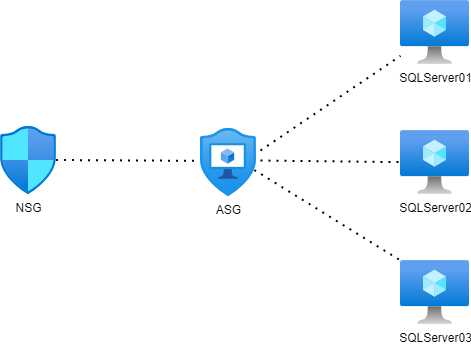
This will come in handy when managing a lot of servers. Instead of changing every NSG to allow traffic to a new subnet or network, we can only add the new server to the application security group (ASG) to make the wanted rules effective.
To create a Application Security Group, go in the Azure Portal to “Application Security Groups” and create a new ASG.
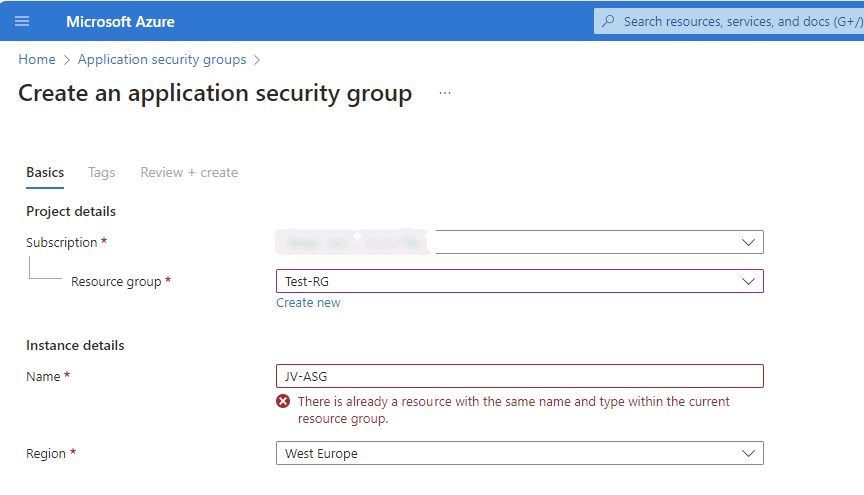
Name the ASG and finish the wizard.
After creating the ASG we can assign a virtual machine to it by going to the virtual machine, and assign the ASG to it:
Now we have a Application Security Group with virtual machines assigned we can go and create a Network Security Group and define the new ASG in it:
After this we have replicated the situation like in the diagram above which will be future proof and scalable. This situation can be replicated for every situation where you have a set of identical machines that need to be assigned to a NSG.
Summary
Network Security Groups (NSG)s are an great way to protect your Azure network on Layer 4 of the OSI model. This means you can configure any IP based communication with ports and such. However, this is no complete replacement of an Firewall hosted in Azure. A firewall can do much more, like actively block connections, block certain applications and categories and websites.
I hope this guide was interesting and thank you for reading.
These sources helped me by writing and research for this post;
End of the page 🎉
You have reached the end of the page. You can navigate through other blog posts as well, share this post on X, LinkedIn and Reddit or return to the blog posts collection page. Thank you for visiting this post.
Support the blog
