Remote Entra Connect Sync script for management servers
You can find the script here:
What the script does
The script does five simple steps:
- Connects remotely to the Entra Connect server using the existing authentication context
- Starts a delta sync on the remote server
- Prints the result on screen
- Catches and shows errors if the action fails
- Waits and shows possible errors for 15 seconds and closes the PowerShell window
Script settings at a glance
There is only one setting you normally need to change:
| Variable | Example value | Purpose |
|---|---|---|
$adconnectserver | JV-DC-SRV01.justinverstijnen.nl | The FQDN of your Entra Connect server |
Open the script and change the $adconnectserver variable to the FQDN of your own Entra Connect server.
For example:
$adconnectserver = "YourEntraConnectServer.yourdomain.local"After that you can run the script from the management server which is joined to the same domain as your Entra Connect server.
Let’s test the script
Open PowerShell on your management server and run the script. You possibly need to bypass the PowerShell execution policy once:
Set-ExecutionPolicy -ExecutionPolicy Unrestricted -Scope Process -ForceThen you can run the script without any errors for the duration of the PowerShell window:
.\JV-RemoteADSyncScript.ps1This will look like this:
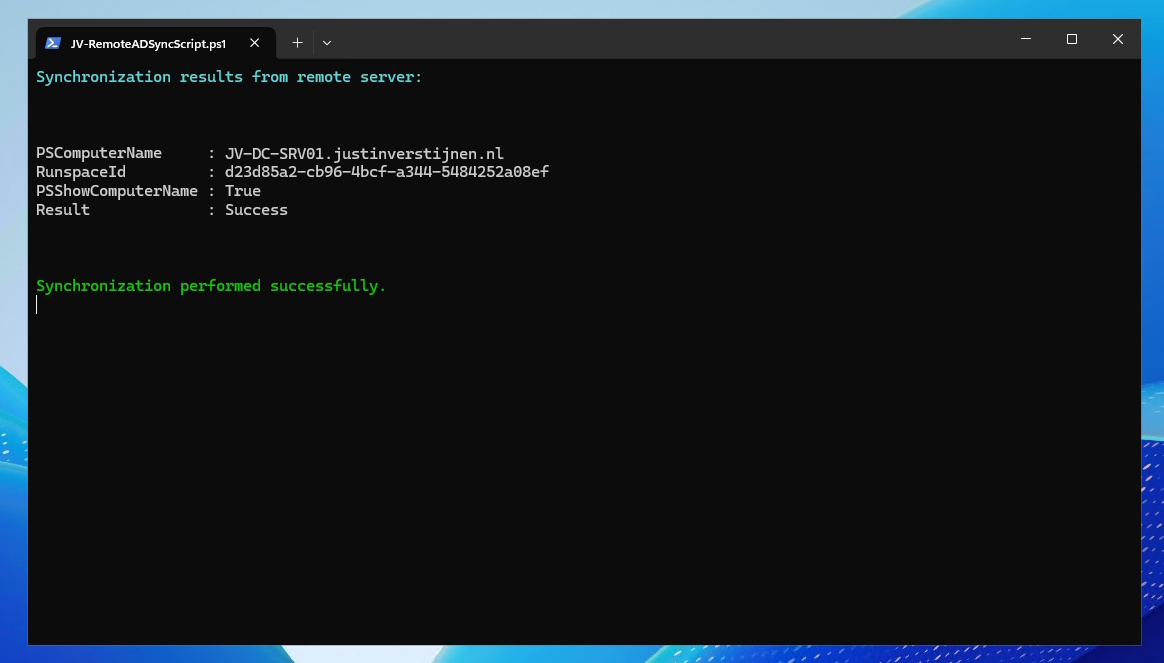
If the remote connection works and the sync starts correctly, the script prints the returned result and checks whether the result equals Success followed by a green line that the synchronization has been successfully executed. Otherwise, the exact error will be printed as error into the same window. This gives you the chance to immediately fix that particular issue.
Summary
This remote Entra Connect sync script is a simple way to trigger a delta sync from a management server. You only need to set the FQDN of your Entra Connect server, make sure remoting works, and run the script. It will start the sync, print the result, and show any error if something goes wrong.
If you want a quick and practical way to start a manual Entra Connect sync without logging on to the Entra Connect server itself, this script does exactly that.
Thank you for reading this post and I hope it was helpful!
These sources helped me by writing and research for this post;
End of the page 🎉
You have reached the end of the page. You can navigate through other blog posts as well, share this post on X, LinkedIn and Reddit or return to the blog posts collection page. Thank you for visiting this post.
Support the blog
