Solved - FSLogix release 25.02 breaks Recycle Bin - Azure Virtual Desktop
Categories:
This issue has been solved in the newest release of FSLogix 25.04: https://learn.microsoft.com/en-us/fslogix/overview-release-notes
Please use this newer version instead of version 25.02. This fixes the bug in this article without any change in policies and settings.
The problem/bug described
When testing the new FSLogix 25.02 version, I came across a very annoying problem/bug in this new version.
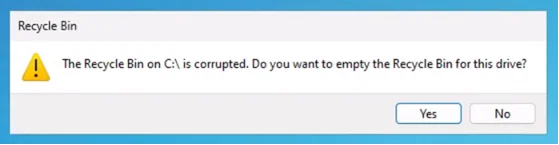
“The Recycle Bin on C:\ is corrupted. Do you want to empty the Recycle Bin for this drive?”
I tried everything to delete the folder of the Recycle bin on the C:\ drive but nothing worked. Only warnings about insufficient permissions and such, which is good but not in our case. This warning appears everytime you log in to the hostpool and every 2 minutes when working in the session. Something you definitely want to fix.
How to solve the problem with GPO (1)
To solve the bug, you have to disable the Recycle Bin roaming in the FSLogix configuration. You can do this by going to your FSLogix Group Policy and open it to edit the settings. Make sure you already updated the FSLogix policies to this new version to match the agent and policy version. I also addedd a fix for using the Windows registry.
Go to the following path:
Computer Configuration -> Policies -> Administrative Templates -> FSLogix
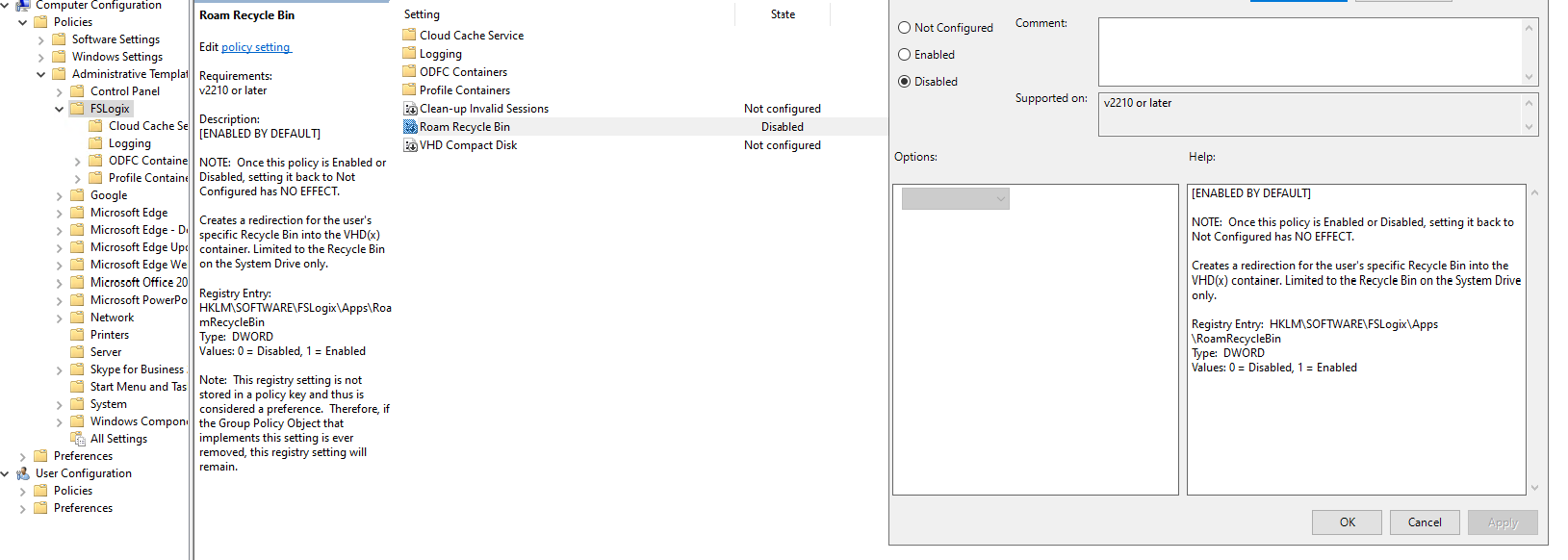
Here you can find the option “Roam Recycle Bin”, which is enabled by default -> even when in a “Not Configured” state. Disable this option and click on “OK”.
After this change, reboot your session host(s) to update the FSLogix configuration and after rebooting log in again and check if this solved your problem. Otherwise, advance to the second option.
How to solve the problem with a registry key (1)
When using Registery keys to administer your environment, you can create the following registery key that does the same as the Group Policy option:
HKEY_LOCAL_MACHINE\SOFTWARE\FSLogix\Apps\RoamRecycleBinThis must be a default DWORD;
- 1: Enabled (which it is by default)
- 0: Disabled (Do this to fix the issue)
After this change, reboot your session host(s) to update the FSLogix configuration and after rebooting log in again and check if this solved your problem. Otherwise, advance to the second option.
How to solve the problem - Profile reset (2)
If disabling the recycle bin did not fix your problem, we have to do an extra step to fix it. In my case, the warning still appeared after disabling the recycle bin. FSLogix changed something in the profile which makes the recycle bin corrupt.
We have 2 options to “fix” the profile:
- Backup all of your data in the profile and delete it. Then let FSLogix regenerate a new profile
- Restore a backup of the profile, before the FSLogix update to 25.02
After logging in with a new or restored profile, the problem is solved.
Summary
This problem can be very annoying, especially when not wanting to disable the recycle bin. This version seems to change something in the profile which breaks usage of the the recycle bin. I did not manage to solve it with a profile that had this problem.
In existing and sensitive environments, my advice is to keep using the last FSLogix 2210 hotfix 4 version. As far as I know, this version is completely bug-free and does not have this problem.
After some more research, I came across a page of Microsoft about a lot of features deprecated in this version of FSLogix. Be aware of those changes before they might impact your environment: https://learn.microsoft.com/en-us/fslogix/troubleshooting-feature-deprecation
If I helped you with this guide to fix this bug, it was my pleasure and thank you for reading it.
Sources
- https://learn.microsoft.com/en-us/fslogix/reference-configuration-settings?tabs=profiles#roamrecyclebin
- https://learn.microsoft.com/en-us/fslogix/overview-release-notes
End of the page 🎉
You have reached the end of the page. You can navigate through other blog posts as well, share this post on X, LinkedIn and Reddit or return to the blog posts collection page. Thank you for visiting this post.
If you think something is wrong with this post or you want to know more, you can send me a message to one of my social profiles at: https://justinverstijnen.nl/about/
If you find this page and blog very useful and you want to leave a donation, you can use the button below to buy me a beer. Hosting and maintaining a website takes a lot of time and money. Thank you in advance and cheers :)

The terms and conditions apply to this post.