Storage Account performance and pricing for Azure Virtual Desktop
In this blog post I will explain everything about hosting your FSLogix profiles on Azure Virtual Desktop and the storage account performance including pricing. AFter that we will do some real world performance testing and a conclusion.
Billing types for Storage Accounts
Before looking into the details, we first want to decide which billing type we want to use for our Storage Account. There are two billing types for storage accounts:
- Provisioned: Fixed storage size and fixed performance based on provisioning capacity
- Pay as you go: Pay only the storage what you need
You select this billing type at the storage account wizard. After creating the storage account, you can’t change the type. If you want to use premium storage account, then “provisioned” is required.
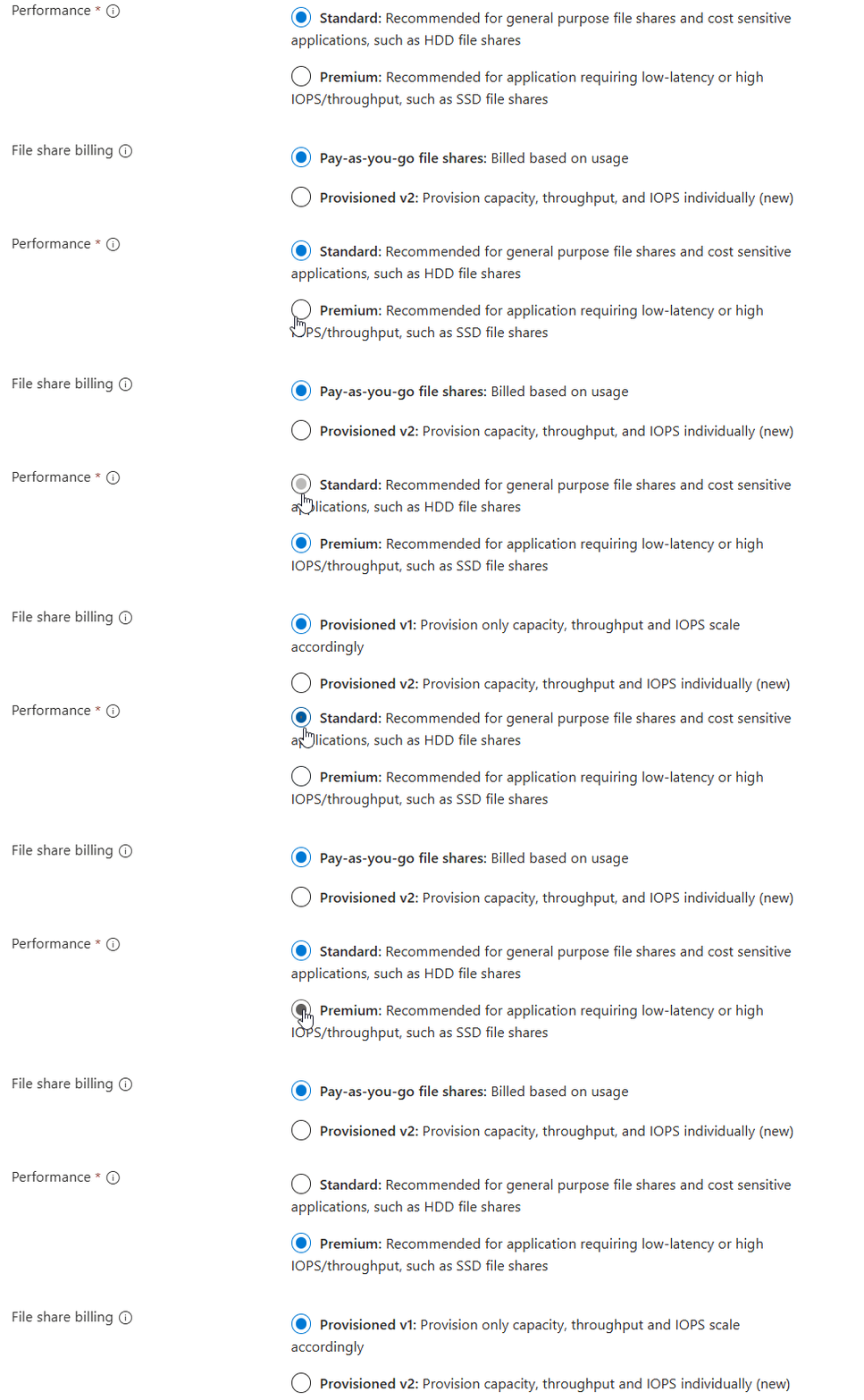
As you can see in this animation. For standard (HDD based) you can choose both, and for premium (SSD based) we have to provision storage.
Provisioned billing (V1 and V2)
When you want to be billed based on how many storage you provision/reserve, you can choose “provisioned”. This also means that we don’t pay for the transactions and egress costs as we pay a full package for the storage and can use it as much as we want.
We have two types of “provisioned” billing, V1 and V2:

The big difference between those two values is that in V1, you are stuck with Microsoft’s chosen performance based on how much you provision and with V2, you can change those values independently, as shown in the pictures below:
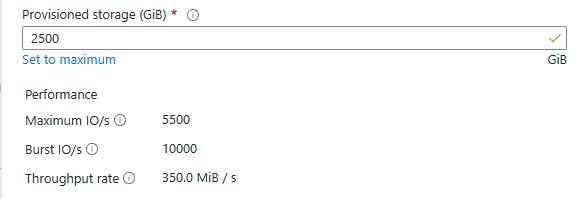
Provisioned v1
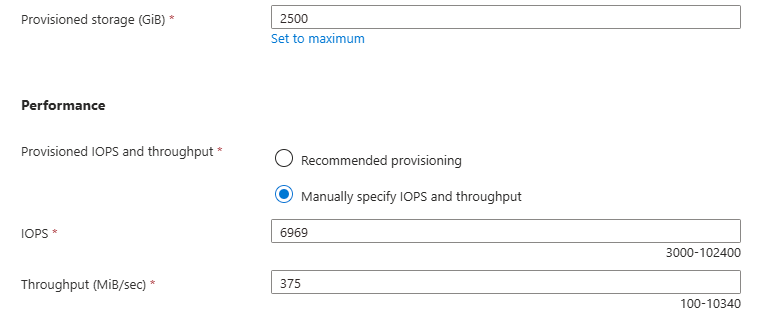
Provisioned v2
This way you can get more performance, with a little increase of credits instead of having to provision way more than you use.
Pay-as-you-go billing
Pay-as-you-go is the more linear manner of paying your storage account. Here you pay exactly what you use, and get a fixed performance but we have to pay additionally for transactions and egress of the data.
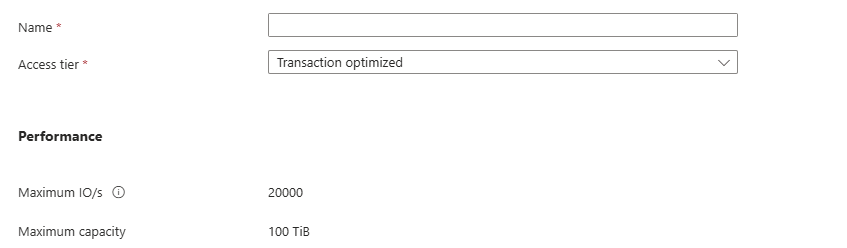
Because this billing option aligns tohow you use the storage, we can define for what purpose we use the storage account. This changes the prices of transactions, storage at rest and egress data. We have 3 categories/tiers:
- Transaction optimized
- Hot
- Cool
All three tiers use the same underlying hardware and give you the same performance.
For Azure Virtual Desktop operating in standard performance and pay-as-you-go billing, Transaction optimized or Hot tiers are recommended. Let’s find out why:
| Tier | Storage $/GB | IOPS Cost | Egress Cost | Use Cases |
|---|---|---|---|---|
| Transaction Optimized | Medium | Lowest | Normal | High metadata activity |
| Hot | Higher | Moderate | Lower | Frequent access |
| Cool | Lowest | Highest | Higher | Rare access, archival |
Per this table, we would pay the most if we place frequent accessed files on a “Cool” tier, as you pay the most for IOPS. Therefore, for FSLogix profiles it the best to use “Hot” tier as we pay the most for storage and we try to limit that as much as possible by deleting unneeded profiles and limiting the profile size with FSLogix settings.
Use the Azure Calculator for a real world calculation based on your needs.
Storage Account Performance Indicators
Now we have those terms to indicate the performance, but what do they mean exactly?
- Maximum IO/s (IOPS): Maximum read/write operations/actions per second under normal conditions
- Burst IO/s (IOPS): Maximum temporary higher read/write operations/actions per second, but only for a short time (boost)
- Throughput rate: The maximum data transfer rate in MB/s that the storage account allows
We can compare IOPS and throughput to a car, where the IOPS are the rotations per minute (RPM) of the engine and the throughput is the actual speed of the car.
Standard VS Premium performance and pricing example
Let’s say, we need a storage account. We want to know for 3 scenario’s which of the options would give us specific performance and also the costs of this configuration. We want the highest performance for the lowest price, or we want a upgrade for a little increase.
I want to go through all of the options to see the actual performance and pricing of 3 AVD profiles scenarios where we state we use 3 hypothetical sizes:
- 500GB (0,5TB) -> 20 users*
- 2500GB (2,5TB) -> 100 users*
- 5000GB (5TB) -> 200 users*
- *25GB per user profile
I first selected “Provisioned” with premium storage with default IOPS/throughput combination. For the three scenarios I get by default: (click image to enlarge)
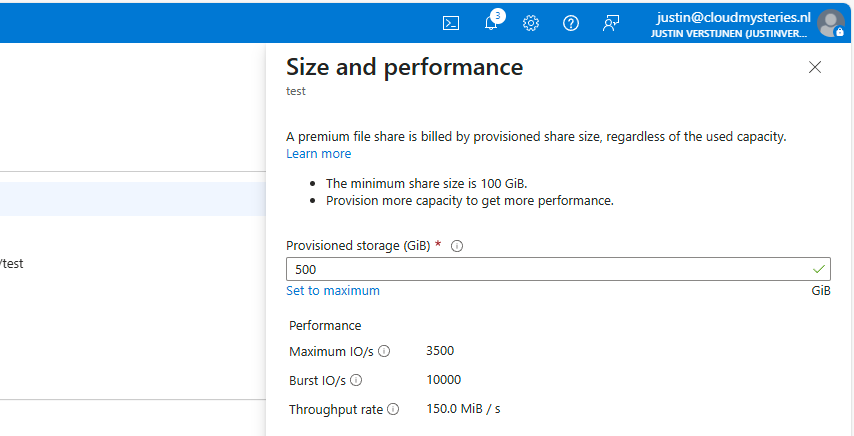
500GB
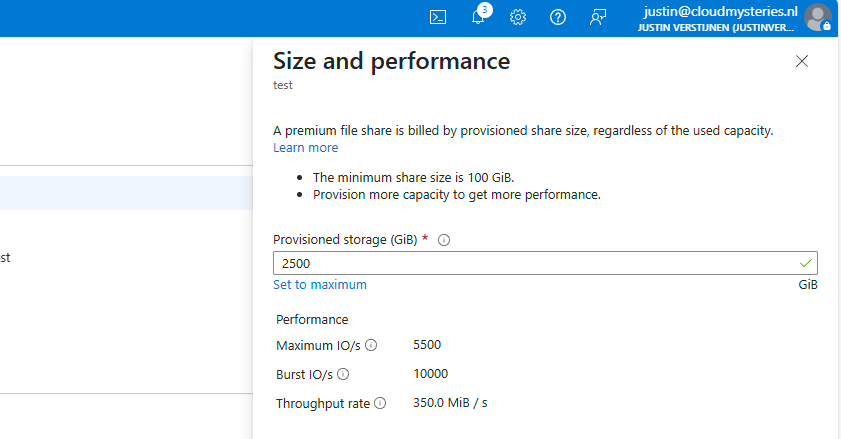
2500GB
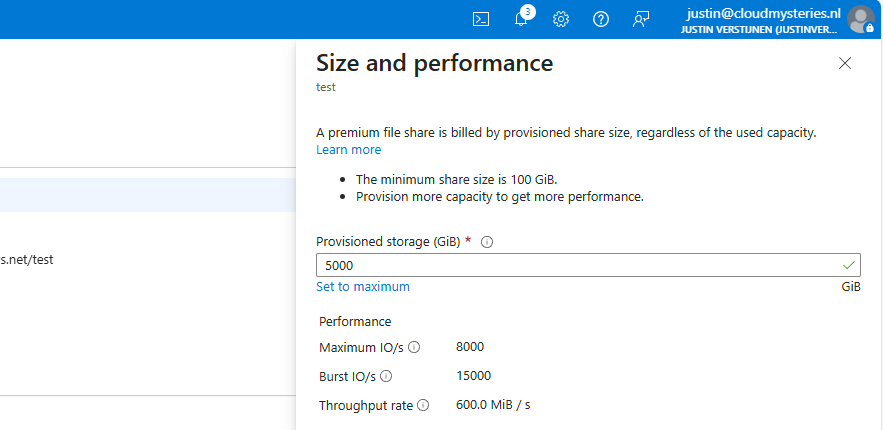
5000GB
I put those numbers in the calculator, and this will cost as stated below (without extra options):
| Storage option | IOPS | Burst IOPS | Throughput** **(MB/s) | Costs per month | Latency (in ms) |
|---|---|---|---|---|---|
| (Premium) 500GB | 3500 | 10000 | 150 | $ 96 | 1-5 |
| (Premium) 2500GB | 5500 | 10000 | 350 | $ 480 | 1-5 |
| (Premium) 5000GB | 8000 | 15000 | 600 | $ 960 | 1-5 |
You see, this is pretty much linear in terms of pricing. 96 dollars for every 500GB. Now let’s check the standard provisioned options:
| Storage option | IOPS | Burst IOPS | Throughput** **(MB/s) | Costs per month | Latency (in ms) |
|---|---|---|---|---|---|
| (Standard) 500GB | 1100 | Not available | 70 | $ 68 | 10-30 |
| (Standard) 2500GB | 1500 | Not available | 110 | $ 111 | 10-30 |
| (Standard) 5000GB | 2000 | Not available | 160 | $ 165 | 10-30 |
This shows pretty clear as the storage size increases, we could trade in performance for monthly costs. However, FSLogix profiles are heavily dependent on latency which increases by alot when using standard tier.
Because the difference of 1-5 and 10-30 ms latency, Premium would be a lot faster with loading and writing changes to the profile. And we have the possibility of bursting for temporary extra speed.
Testing performance in practice and conclusion
To further clarify what those numbers mean in terms of performance, I have a practice test;
In this test we will place a 10GB (10.240 MB) file from a workstation to the Azure Storage to count the time and the average throughput (speed in MB per second).
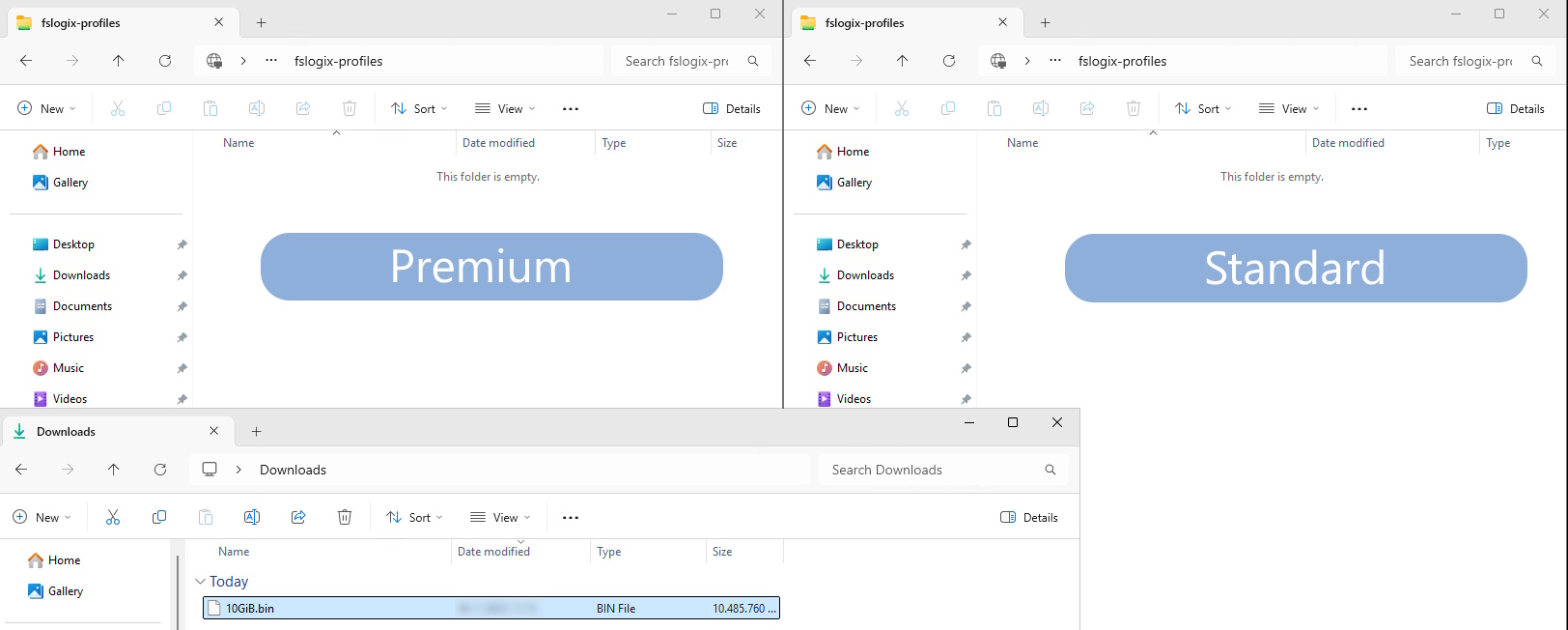
Now let’s take a look at the results:
Left: Premium Right: Standard
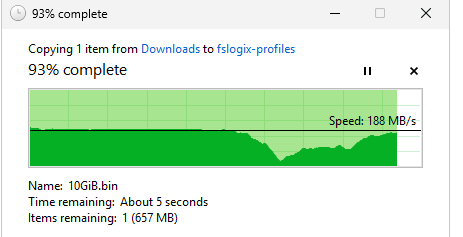
Time: 01:14:93 (75 seconds) Average speed: 136,5 MB/s Max speed: 203MB/s
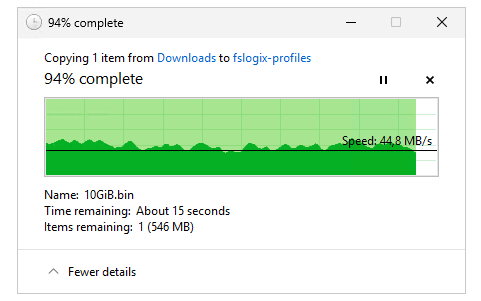
Time: 03:03:41 (183 seconds) Average speed: 55,9 MB/s Max Speed: 71,8 MB/s
The premium fileshare has finished this task 244% faster than the standard fileshare.
I also tested the profile mounting speed but they were around even. I have tested this with this script: https://justinverstijnen.nl/monitor-azure-virtual-deskop-logon-performance/
I couldn’t find a good way to test the performance when logged in and using the profile, but some tasks were clearly slower on the “standard” fileshare, like placing files on the desktop and documents folder.
Because FSLogix profiles heavily rely on low latency due to constant profile changes, we must have as low latency as possible which we also get with premium fileshares. I cannot state other than we must have Premium fileshares in production, at least for Azure Virtual Desktop and FSLogix disks.
Summary
This guide further clarifies the difference in costs and practice of Premium vs Standard Azure Storage Accounts for Azure Virtual Desktop. Due to the throughput and latency differences, for FSLogix profiles I would highly recommend using premium fileshares.
I hope this guide was very helpful and thank you for reading.
These sources helped me by writing and research for this post;
- https://azure.microsoft.com/en-us/pricing/calculator/
- https://azure.microsoft.com/en-us/pricing/details/storage/files/
- https://learn.microsoft.com/en-us/azure/storage/files/understanding-billing
- https://learn.microsoft.com/en-us/azure/storage/files/understand-performance?#glossary
- https://learn.microsoft.com/en-us/azure/storage/blobs/storage-performance-checklist
- https://justinverstijnen.nl/monitor-azure-virtual-deskop-logon-performance/
- https://testfiles.ah-apps.de/
End of the page 🎉
You have reached the end of the page. You can navigate through other blog posts as well, share this post on X, LinkedIn and Reddit or return to the blog posts collection page. Thank you for visiting this post.
Support the blog
