What is Azure Firewall?
Requirements
- Around 15 minutes of your time
- Basic knowledge of Azure
- Basic knowledge of networking and networking protocols
What is Azure Firewall?
Azure Firewall is an cloud based firewall to secure and your cloud networking environment. It acts as point of access, a sort of castledoor, and can allow or block certain traffic from the internet to your environment and from environment to the internet. The firewall can mostly work on layers 3, 4 and 7 of the OSI model.
Some basic tasks Azure Firewall can do for us:
- Port Forward multiple servers through the same IP address (DNAT)
- Superseding the native NAT Gateway to have all your environment communicating through the same static outbound IP address
- Allowing or blocking traffic from and to your virtual networks and subnets
- Block outbound traffic for sensitive servers
- Configuring a DMZ part of your network
- Blocking certain categories of websites for users on Azure Virtual Desktop
Azure Firewall overview
An overview of how this looks:
In this diagram, we have one Azure Firewall instance with an policy assigned, and we have 3 Azure virtual networks. These have each their own purpose. With Azure Firewall, all traffic of your machines and networks is going through the Firewall so we can define some policies there to restrict traffic.
To route your virtual network outbound traffic through Azure Firewall, a Route table must be created and assigned to your subnets.
Azure Firewall Pricing
To not be 100% like Microsoft who are very often like: “Buy our stuff” and then be suprised about the pricing, I want to be clear about the pricing of this service. For the West Europe region, you pay at the moment of writing:
- Basic instance: 290 dollars per month
- Standard instance: 910 dollars per month
- Premium instance: 1280 dollars per month
This is purely the firewall, and no calculated data. This isn’t that expensive, for the premium instance you pay around 20 dollars per Terabyte (1000GB).
Types of rules
Let’s deep further into the service itself. Azure Firewalls knows 3 types of rules you can create:
| Type | Goal | Example |
|---|---|---|
| DNAT Rule | Allowing traffic from the internet | Port forwarding Make your internal server available for the internet |
| Network Rule | Allowing/Disallowing traffic between whole networks/subnets | Block outbound traffic for one subnet DMZ configuration |
| Application Rule | Allowing/Disallowing traffic to certain FQDNs or web categories | Blocking a website Only allow certain websites/FQDN |
Rule processing order
Like standard firewalls, Azure Firewall has a processing order of processing those rules which you have to keep in mind when designing and configuring the different rules:
- DNAT
- Network
- Application
The golden rule of Azure Firewall is: the first rule that matches, is being used.
This means that if you create a network rule that allows your complete Azure network outbound traffic to the internet but you want to block something with application rules, that this is not possible. This because there is a broad rule that already allowed the traffic and so the other rules aren’t processed.
Rule Collections
Azure Firewall works with “Rule Collections”. This is a set of rules which can be applied to the firewall instances. Rule Collections are then categorized into Rule Collection Groups which are the default groups:
- DefaultDNATRuleCollectionGroup
- DefaultNetworkRuleCollectionGroup
- DefaultApplicationRuleCollectionGroup
How this translates into the different aspects is shown by the diagram below:
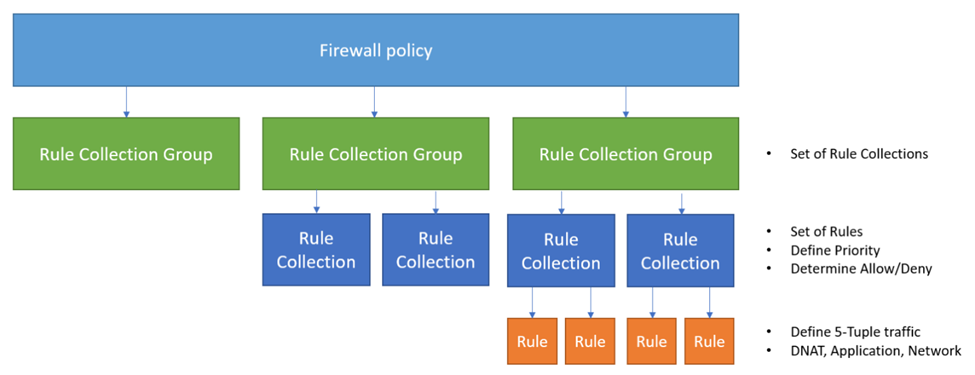
Firewall and Policies
Azure Firewall works with Firewall Policies. A policy is the set with rules that your firewall must use to filter traffic and can be re-used over multiple Azure Firewall instances. You can only assign one policy per Firewall instance. This is by design of course.
Extra security options (Premium only)
When using the more expensive Premium SKU of Azure Firewall, we have the 3 extra options below available to use.
TLS inspection
TLS inspection allows the firewall to decrypt, inspect, and then re-encrypt HTTPS (TLS) traffic passing through it. The key point of this inspection task is to inspect the traffic and block threats, even when the traffic is normally encrypted.
How it works in simplified steps:
- Client sends HTTPS request and Azure Firewall intercepts it
- Firewall presents its own certificate to the client (it acts as a man-in-the-middle proxy)
- Traffic is decrypted and inspected for threats using threat intelligence, signature-based detection, etc
- The Firewall re-encrypts the traffic and forwards it to the destination
This requires you to setup an Public Key Infrastructure and is not used very often.
IDPS
IDPS stands for Intrusion Detection and Preventing System and is mostly used to defend against security threats. It uses a signature-based database of well-known threats and can so very fast determine if specific packets must be blocked.
It very much does:
- Packet Inspection of inbound and outbound traffic
- Signature matching
- Alert generation of discovered matches
- Blocking the traffic
Threat Intelligence
Threat Intelligence is an option in the Azure Firewall Premium SKU and block and alerts traffic from or to malicious IP addresses and domains. This list of known malicious IP addresses, FQDNs and domains are sourced by Microsoft themselves.
It is basically an option you can enable or disable. You can use it for testing with the “Alert only” option.
Private IP Ranges (SNAT)
You can configure Source Network Address Translation (SNAT) in Azure Firewall. This means that your internal IP address is translated to your outbound IP address. A remote server in another country can do nothing with your internal IP addresses, so it has to be translated.
To clarify this process:
Your workstation in Azure has private IP 10.1.0.5, and when communicating to another server on the internet this address has to be translated. This is because 10.1.0.5 is in the private IP addresses range of RFC1918. Azure Firewall automatically translates this into his public IP addresses so the remote host only sees the assigned public IP address, in this case the fictional 172.172.172.172 address.
Your home router from your provider does the same thing. Translating internal IP addresses to External IP addresses.
Summary
Azure Firewall is a great cloud-native firewalling solution if your network needs one. It works without an extra, completely different interface like a 3rd party firewall.
In my honest opinion, I like the Firewall solution but for what it is capable of but is very expensive. You must have a moderate to big network in Azure to make it profitable and not be more expensive than your VMs and VPN gateway alone.
Thank you for reading this guide. Next week we will do a deep dive into the Azure Firewall deployment, configuration and setup in Azure.
End of the page 🎉
You have reached the end of the page. You can navigate through other blog posts as well, share this post on X, LinkedIn and Reddit or return to the blog posts collection page. Thank you for visiting this post.
Support the blog
