What is TLS-RPT and how to configure
What is TLS-RPT
TLS-RPT stands for SMTP TLS Reporting. It is an email security reporting mechanism that gives you reports about TLS encryption problems for incoming email to your domain. The main goal is simple: it helps you see if other mail servers can securely connect to your mail environment using TLS and where problems happen. In simple terms, TLS-RPT is a reporting layer for secure mail transport.
We can enable SMTP TLS Reporting by publishing a TXT record on our domain, stating on what email address the external sender can deliver the reports to. TLS-RPT is handy in cases where you use DANE and MTA-STS security options to be notified about possible delivery problems. Email delivery problems can of course lead to loss of money in companies.
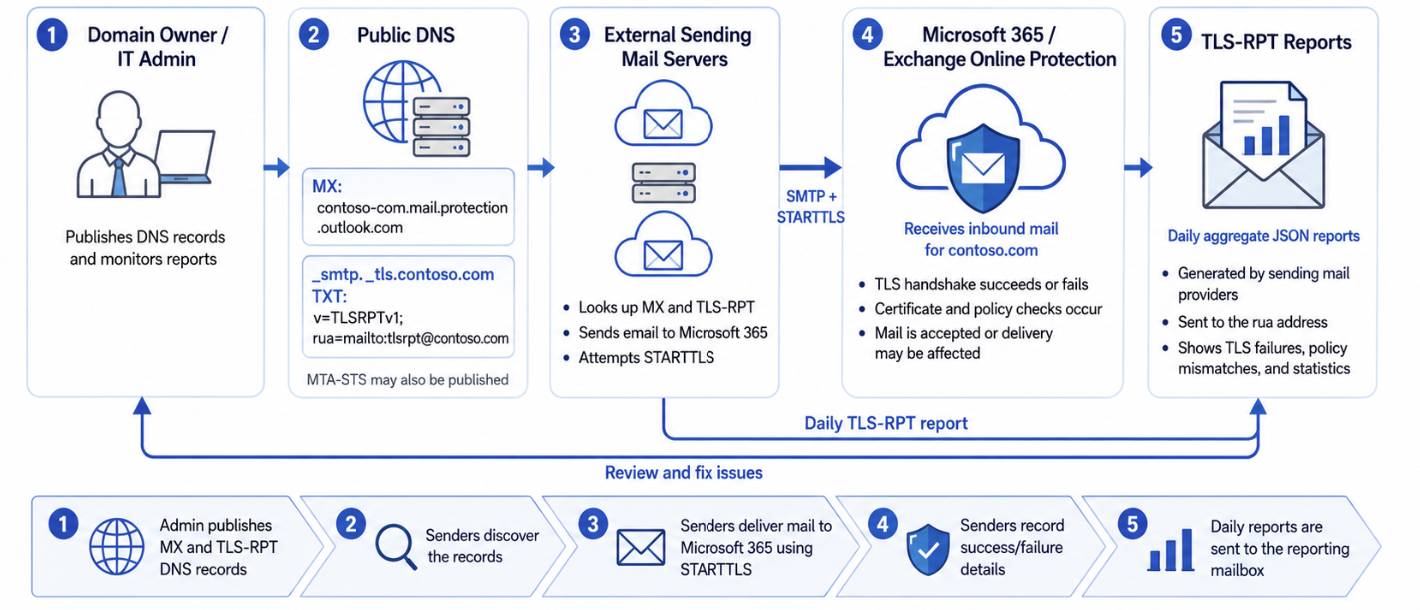
TLS-RPT as defined in RFC 8460.
TLS-RPT is commonly used together with MTA-STS. MTA-STS basically says:
- “Mail for my domain must use TLS, a valid certificate and the correct MX servers.”
TLS-RPT says:
- “Send me reports if this succeeds or fails.”
Microsoft describes MTA-STS as a method where a domain publishes TLS support, expected MX records and certificate requirements through DNS and an HTTPS policy file.
How TLS-RPT works
When another mail server tries to send email to your domain, it can detect your TLS-RPT DNS record. If that sending server supports TLS-RPT, it can send periodic reports, usually daily, to the address or HTTPS endpoint you configured. These reports contain information like:
| Information | Meaning |
|---|---|
| Successful TLS sessions | Secure connection worked |
| Failed TLS sessions | TLS failed or certificate issues happened |
| MTA-STS status | Which policy was detected and applied |
| MX host | Which mail server received the mail |
| Error type | Certificate issue, validity, DNS issue or policy mismatch |
| Counts | How many successful or failed connections happened |
Reports can also include issues related to:
- DNS resolution
- STARTTLS negotiation
- DANE validation
- MTA-STS validation
- Routing problems
To use TLS-RPT, you publish a DNS TXT record on your domains:
_smtp._tls.yourdomain.com TXT v=TLSRPTv1; rua=mailto:reports@yourdomain.com;Example:

The configured SMTP TLS record for this websites’ domain, justinverstijnen.nl
The rua value defines where the reports should be sent. TLS-RPT supports these reporting options:
- mailto:
- https:
Possible TLS-RPT problems
TLS-RPT helps you understand if email delivery to your domain is secure and working correctly. The common problems you can detect with using TLS-RPT are:
| Problem | Example |
|---|---|
| Expired certificate | External servers no longer trust your certificate |
| Wrong certificate | Certificate name does not match the MX host |
| MTA-STS issue | Policy contains different MX records than your actual mail flow |
| TLS unavailable | Receiving server does not support proper TLS |
| DNS or configuration issue | External servers cannot find your policy or mail server correctly |
How to configure TLS-RPT for your domain
TLS-RPT can be configured for any public domain, where your email service doesn’t really matter. My advice is to have an email address for specific reports, where you can use the same email address as you already use for DMARC reports. This ensures you receive the reports and can read them if needed and possible deliverability problems are assumed. My advice is to only configure TLS-RPT on domains where you expect to receive email messages. For domains at rest/stand-by domains it’s not neccesary.
To configure the record needed for TLS-RPT, open up your DNS hosting of your public domain. Then navigate to the section where you can create DNS records.
Now create a new TXT record with these parameters:
Name
_smtp._tlsTTL
1 hour or provider-default
Type
TXT
Value
v=TLSRPTv1; rua=mailto:reports@yourdomain.com;And change the email address at the end to your own reporting email address. Then save the configuration. Here my configured record for example:
You can then check this configuration by using my DNS MEGAtool, a tool created to check all security mechanisms for email security for a specific domain:
This should show green/passed for the TLS-RPT check of your domain:

TLS-RPT reports
After we configured the TXT record and waited for around a week, we will start to receive daily email reports about other email senders over the internet about the deliverability of your domain:
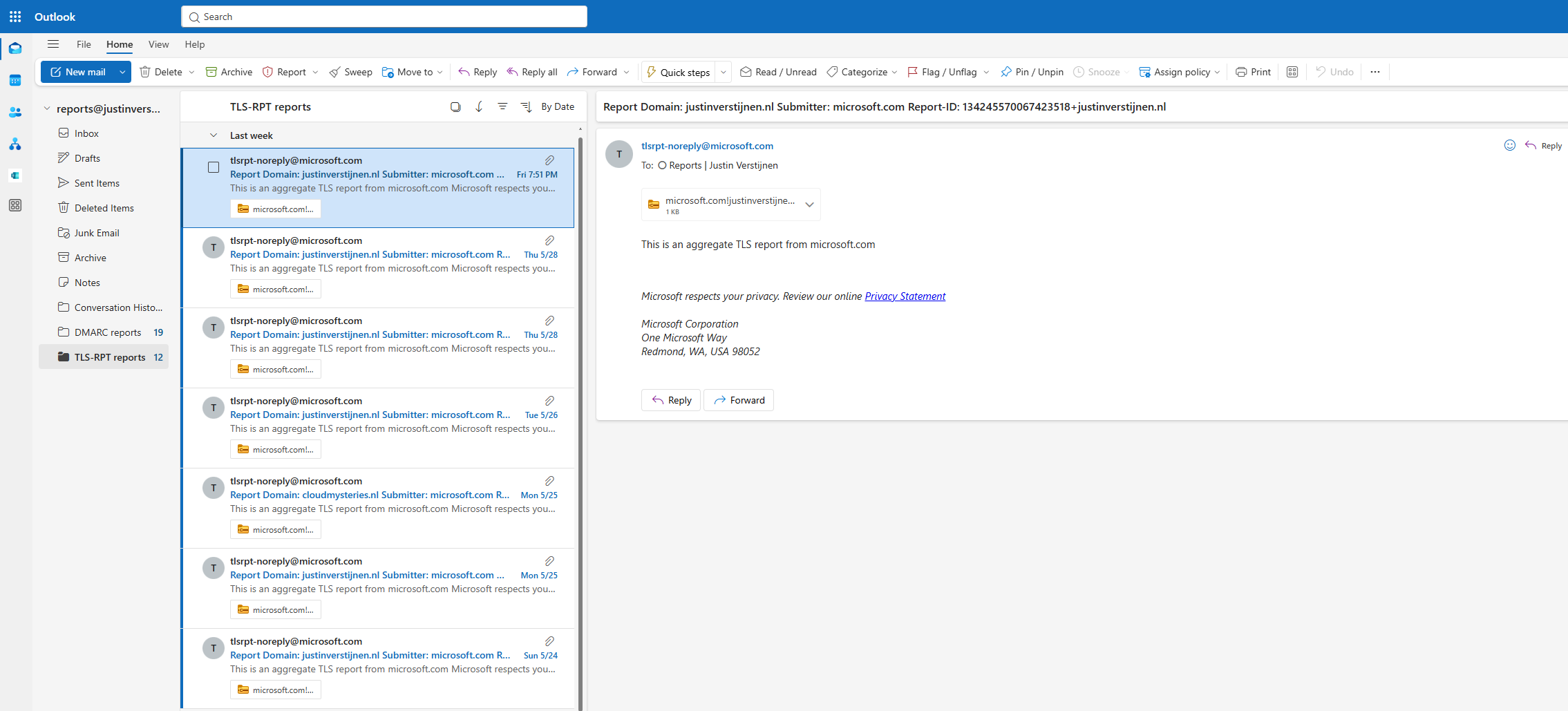
In the emails we get a report zipped into a compressed archive file. In the file we have a JSON file with the raw data, but we can format this to a table of course. This will immediately show the most important information.
Report Overview
This table shows the TLS-RPT reports from Microsoft and Google as senders and show that all sessions are succesful. Successful sessions are defined as “successful connections to your emailing server”. If assuming email deliverability problems and the information shows failed sessions, then a good point to start is your MTA-STS/TLS-RPT records/hosting configuration. If managing your own emailing server, then the validity of your servers’ SSL certificate is also a great guess.
| Date | Organization | Report ID | Contact | Policy Types | Successful Sessions | Failed Sessions |
|---|---|---|---|---|---|---|
| 2026-05-11 | Google Inc. | 2026-05-11T00:00:00Z_justinverstijnen.nl | smtp-tls-reporting@google.com | STS | 2 | 0 |
| 2026-05-12 | Microsoft Corporation | 134244139446293765+justinverstijnen.nl | tlsrpt-noreply@microsoft.com | STS, TLSA | 6 | 0 |
| 2026-05-13 | Microsoft Corporation | 134244703562497423+justinverstijnen.nl | tlsrpt-noreply@microsoft.com | TLSA, STS | 3 | 0 |
| 2026-05-14 | Microsoft Corporation | 134245570067423518+justinverstijnen.nl | tlsrpt-noreply@microsoft.com | TLSA, STS | 12 | 0 |
| Total | 23 | 0 |
Policy Summary
This table shows the results of the MTA-STS policy being enforced and the TLSA records. As I am using Microsoft 365, I don’t have to manage the TLSA records. This is managed by the emailserver (MX) service, in this case Microsoft.
| Date | Organization | Policy Domain | Policy Type | Policy Details | Successful Sessions | Failed Sessions |
|---|---|---|---|---|---|---|
| 2026-05-11 | Google Inc. | justinverstijnen.nl | STS | mode=enforce; mx=justinverstijnen-nl.r-v1.mx.microsoft; max_age=1209600 | 2 | 0 |
| 2026-05-12 | Microsoft Corporation | justinverstijnen.nl | STS | mode=enforce; mx=justinverstijnen-nl.r-v1.mx.microsoft; max_age=1209600 | 3 | 0 |
| 2026-05-13 | Microsoft Corporation | justinverstijnen.nl | TLSA | 6 TLSA records published | 3 | 0 |
| 2026-05-14 | Microsoft Corporation | justinverstijnen.nl | STS | mode=enforce; mx=justinverstijnen-nl.r-v1.mx.microsoft; max_age=1209600 | 2 | 0 |
| 2026-05-15 | Microsoft Corporation | justinverstijnen.nl | TLSA | 6 TLSA records published | 1 | 0 |
| 2026-05-16 | Microsoft Corporation | justinverstijnen.nl | STS | mode=enforce; mx=justinverstijnen-nl.r-v1.mx.microsoft; max_age=1209600 | 7 | 0 |
| 2026-05-16 | Microsoft Corporation | justinverstijnen.nl | TLSA | 6 TLSA records published | 5 | 0 |
| Total | 23 | 0 |
Overall, the reports show a healthy TLS reporting status. Both MTA-STS and TLSA/DANE-related reporting looks to be functioning correctly for the reporting sources shown. There are no failed sessions in the deliverability and all sessions are succesful, showing a healthy deliverability to your domain and email server.
Knowledge check
This quiz needs JavaScript to show the questions and feedback.
Summary
TLS-RPT is basically DMARC-style reporting for TLS and secure mail transport. It helps you understand whether other mail servers can securely deliver email to your domain using TLS. TLS-RPT itself does not stop attacks or enforce encryption, but it gives visibility into certificate problems, downgrade risks, DNS issues and MTA-STS problems. Enabling the option therefore does not make your environment more secure. Its more a reporting mechanism for more insights of possible delivery failures.
Thank you for reading this post and I hope it was helpful!
These sources helped me by writing and research for this post;
End of the page 🎉
You have reached the end of the page. You can navigate through other blog posts as well, share this post on X, LinkedIn and Reddit or return to the blog posts collection page. Thank you for visiting this post.
Support the blog
