Change Evaluation version to Standard/Datacenter version
When you install a fresh Windows Server installation from a .iso file, it will be installing the OS as a Evaluation version. When you want to activate the installation with a key you need to rebuild the OS and set the edition to Standard.
Microsoft considers Standard and Standard Evaluation as different editions of Windows, because of this we have to change the edition before you can activate the installation. When you want to use the edition Datacenter, you can change the command to Datacenter which also works.
You can download the ISO file for Windows Server 2025 Evaluation here: https://www.microsoft.com/en-us/evalcenter/evaluate-windows-server-2025
Requirements
- A valid product key for Windows Server Standard
- 15 minutes of your time
Step 1: Install and prepare
You first have to install your instance of Windows Server Evaluation. After this you can install the latest updates and configure the rest of your needs.
Step 2: Upgrade Evaluation to Datacenter/Standard
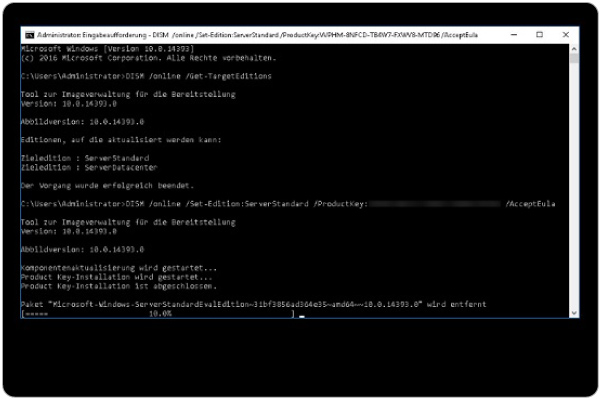
After finishing up the configuration of your server, we need to run a command to upgrade the edition of Windows Server.
Open a command prompt window, and run the following command:
DISM /online /Set-Edition:ServerStandard /ProductKey:XXXXX-XXXXX-XXXXX-XXXXX-XXXXX /AcceptEulaHere you have to use your own product key for Standard/Datacenter depending on your version. Replace this with the XXXXX-XXXXX placeholder. Also, you can choose your target edition by changing the edition:
- Windows Server Standard: ServerStandard
- Windows Server Datacenter: ServerDatacenter
Summary
When installing a Windows Server instance, your edition could be an evaluation version. This is considered as a different edition, and for some features, it must be upgraded.
I hope I helped you upgrading your edition to a non-evaluation version.
End of the page 🎉
You have reached the end of the page. You can navigate through other blog posts as well, share this post on X, LinkedIn and Reddit or return to the blog posts collection page. Thank you for visiting this post.
Support the blog
